
Танилцуулга
Thank you for choosing the SuperRC M23 Mini RC Drone. This manual provides essential information for the safe operation, setup, maintenance, and troubleshooting of your drone. Please read this manual thoroughly before operating the drone to ensure proper function and to avoid damage or injury. This drone is designed for adult beginners and features a lightweight, portable design with an HD camera and intelligent flight functions.
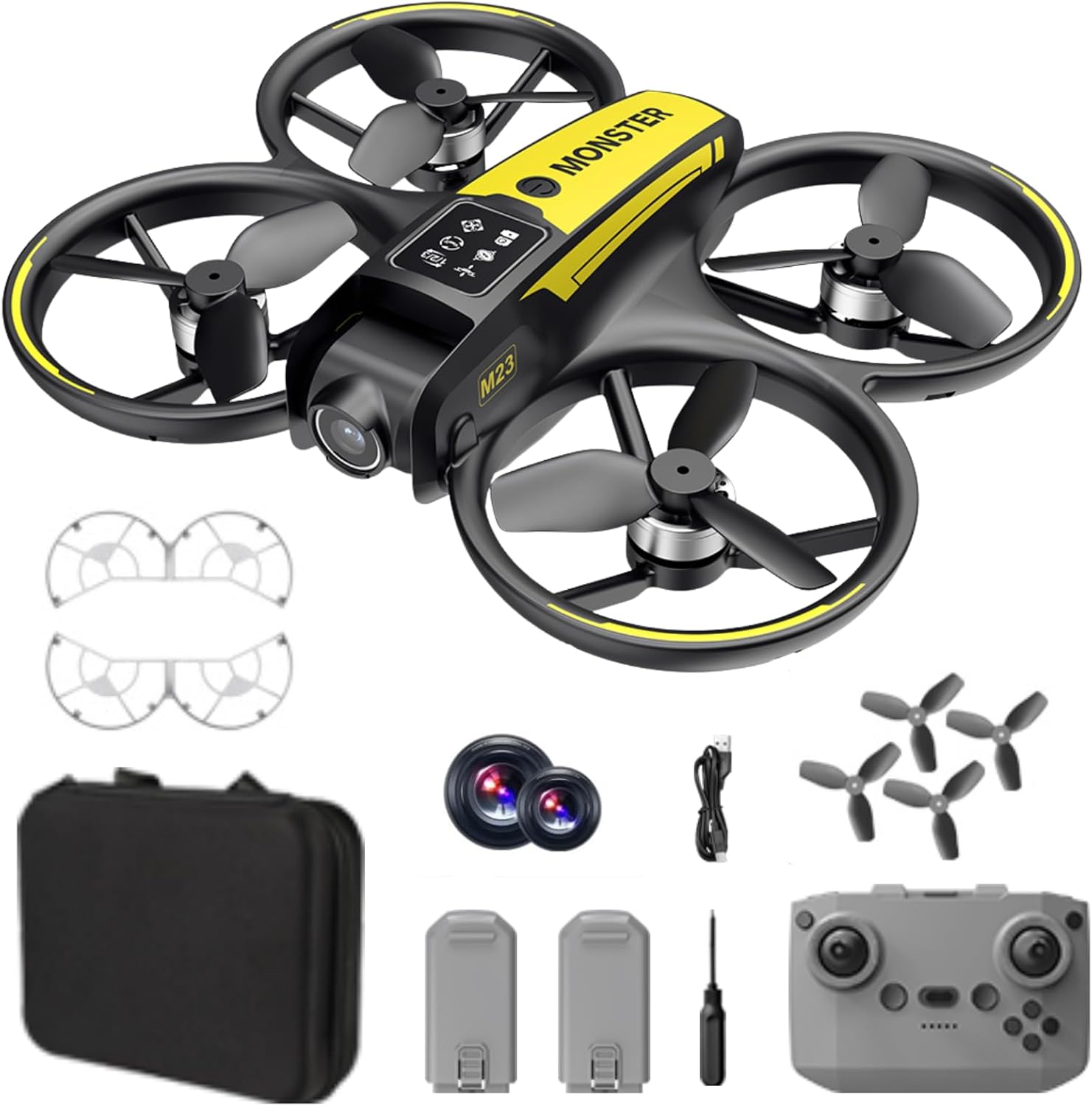
Хайрцагт юу байна
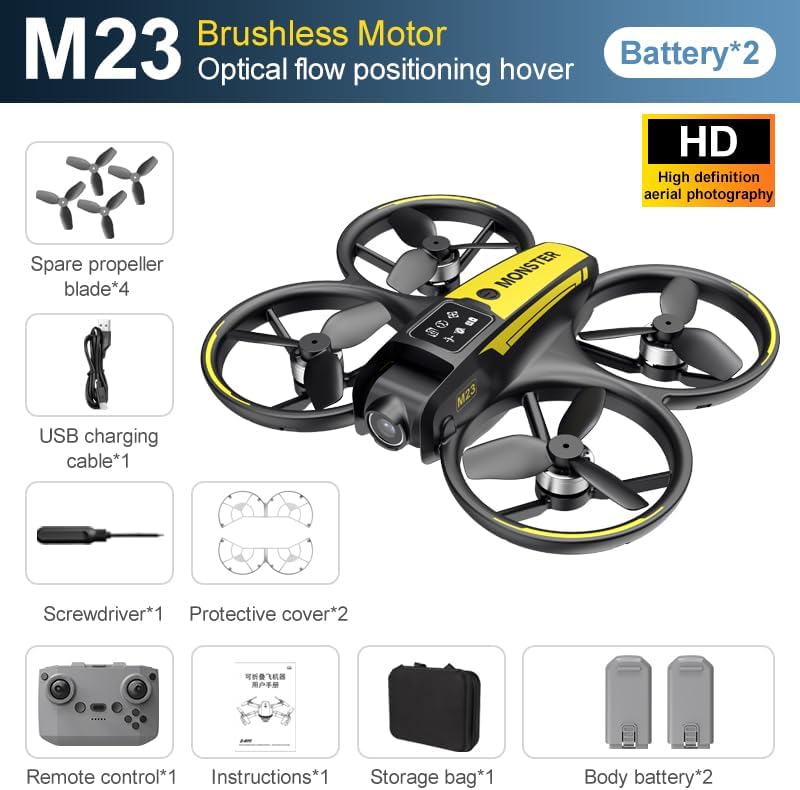
The SuperRC M23 drone package includes the following components:
- M23 нисгэгчгүй онгоц
- Алсын удирдлага
- 2 х 3.7V 1050mAh цэнэглэдэг батерей
- 4 х сэлбэг сэнс
- 2 х Сэнсний хамгаалагч
- Санах ойн карт
- Карт уншигч
- Халив
- USB цэнэглэгч кабель
- Хадгалах уут
- Хэрэглэгчийн гарын авлага (энэ баримт бичиг)

Бүтээгдэхүүн дууссанview
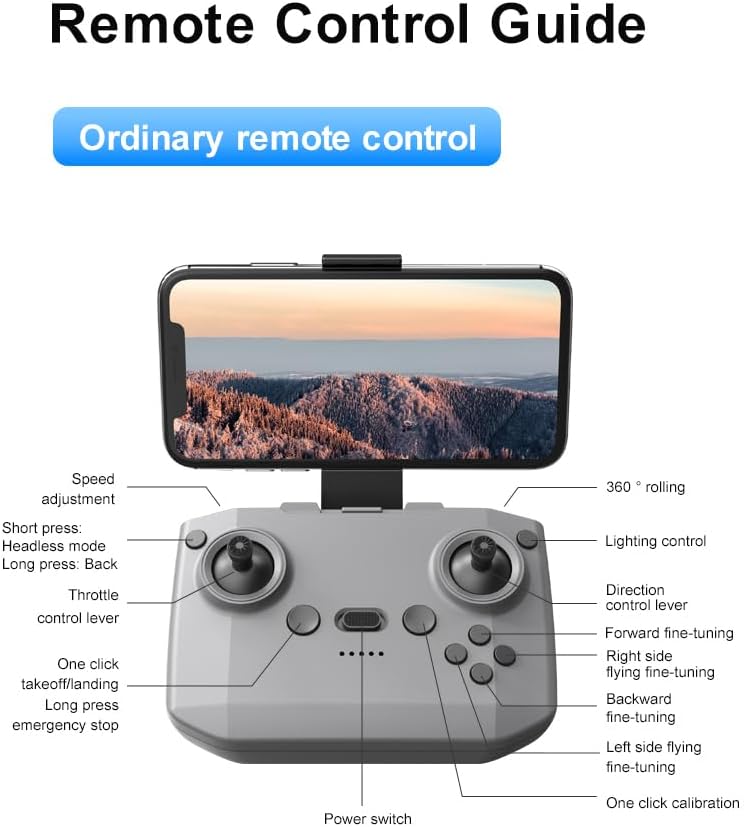
Алсын удирдлагын зохион байгуулалт
Familiarize yourself with the remote control buttons and their functions before flight.
Тохиргоо
1. Зай суурилуулах
- Дрон болон алсын удирдлага унтарсан эсэхийг шалгаарай.
- Дрон дээрх зайны тасалгааг олоорой.
- Insert a charged 3.7V 1050mAh battery into the compartment until it clicks securely into place.
- For the remote control, open the battery cover and insert the required batteries (not specified in product data, assume standard AA/AAA, user should refer to physical manual for exact type).
2. Сэнсний суурилуулалт
The drone comes with propellers pre-installed. If replacement is needed:
- Identify the 'A' and 'B' markings on the propellers and the corresponding motor arms.
- Attach 'A' propellers to 'A' motor shafts and 'B' propellers to 'B' motor shafts. Ensure they are firmly secured.
3. Propeller Guard Installation
For added safety, attach the propeller guards:
- Align each propeller guard with the designated slots on the drone's motor arms.
- Gently push until they snap into place.
4. Цэнэглэх
Charge the drone batteries using the provided USB charging cable.
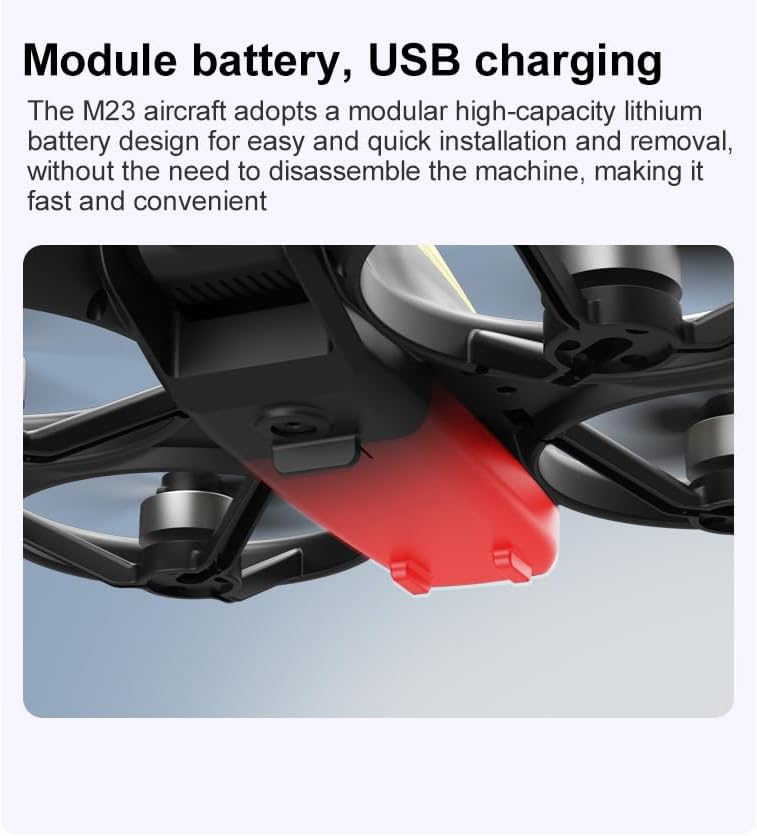
- USB цэнэглэгч кабелийг дрон батерейтай холбоно уу.
- Plug the other end into a USB power source (e.g., computer, USB wall adapter).
- The indicator light on the cable will show charging status (refer to physical manual for specific light indications).
- Charging time is approximately 60-90 minutes for a full charge.
Ашиглалтын заавар
Нислэгийн өмнөх хяналтын хуудас
- Дрон болон алсын удирдлагын батерейг бүрэн цэнэглэсэн эсэхийг шалгаарай.
- Propellers are correctly installed and secure.
- Propeller guards are attached (recommended for beginners).
- Саад тотгор, хүн, амьтангүй, ил тод талбайг сонго.
- Check local drone regulations before flying.
Нислэгийн үндсэн үйл ажиллагаа
The following video demonstrates key flight features including one-key takeoff, optical flow positioning, 360-degree roll, and speed switching.
One-Key Takeoff and Landing
- Хөөрөх: Place the drone on a flat surface. Press the One-Key Takeoff button on the remote control. The drone will automatically ascend and hover at a stable altitude.
- Буух: Press the One-Key Landing button. The drone will slowly descend and land automatically.
Flight Modes and Features
- Толгойгүй горим: Press the Headless Mode button. In this mode, the drone's orientation is relative to the pilot, making it easier to control without worrying about the drone's front direction.
- Хурдны тохируулга: Use the speed adjustment button (or switch) on the remote control to cycle through low, medium, and high speeds. This allows for adaptable flight control based on skill level and environment.
- 360° өнхрөх: Press the 360° Roll button and then move the right joystick in any direction to perform an aerial flip. Ensure sufficient altitude before attempting.
- Оптик урсгалын байрлал: The drone utilizes a bottom camera for optical flow positioning, which helps maintain stable hovering, especially indoors or in areas with good ground texture. This feature assists in precise altitude hold.
- Траекторын нислэг: Through the mobile application, you can draw a desired flight path on your screen. The drone will then follow this trajectory automatically.

Камерын ажиллагаа
The M23 drone is equipped with an HD camera with a 90-degree adjustable lens for capturing photos and videos.

- Фото/Видео бичлэг: Use the dedicated buttons on the remote control or the mobile app to start/stop video recording or take photos.
- Бодит цагийн зураг дамжуулах: Connect your smartphone to the drone's Wi-Fi network to view бодит цагийн footage from the drone's camera on your device.
Засвар үйлчилгээ
Цэвэрлэгээ
- Дронны их биеийг зөөлөн, хуурай даавуугаар тогтмол цэвэрлээрэй.
- Ensure propellers are free from dust, dirt, or debris.
- Clean the camera lens gently with a microfiber cloth to maintain image quality.
Хадгалах
- Store the drone and its components in the provided storage bag to protect them from dust and physical damage.
- Keep the drone in a cool, dry place, away from direct sunlight and extreme temperatures.
Батерейны арчилгаа
- Батерейг хэт цэнэглэж эсвэл хэт цэнэггүй болгож болохгүй.
- Хэрэв удаан хугацаагаар хадгалах бол батерейг ойролцоогоор 50-60% хүртэл цэнэглээрэй.
- Avoid exposing batteries to high temperatures or direct sunlight.
Алдааг олж засварлах
If you encounter issues with your SuperRC M23 drone, refer to the following common problems and solutions:
| Асуудал | Боломжит шалтгаан | Шийдэл |
|---|---|---|
| Дрон алсын удирдлагад хариу үйлдэл үзүүлэхгүй | Low battery on drone or remote; Not paired correctly; Interference | Charge batteries; Re-pair drone and remote (refer to physical manual for pairing steps); Move to an area with less interference |
| Нислэгийн үеэр дрон нисдэг | Not calibrated; Wind interference; Damaged propeller | Perform calibration (refer to physical manual); Fly in calm conditions; Replace damaged propellers |
| Poor camera image quality | Dirty lens; Low light conditions; Wi-Fi interference | Clean camera lens; Fly in well-lit areas; Ensure strong Wi-Fi connection |
| Нислэгийн богино хугацаа | Battery not fully charged; Old battery; Aggressive flying | Ensure battery is fully charged; Consider replacing old batteries; Practice smoother flight maneuvers |
Үзүүлэлтүүд
Key technical specifications for the SuperRC M23 Mini RC Drone:
| Онцлог | Дэлгэрэнгүй |
|---|---|
| Загварын нэр | M23-Drone |
| Брэнд | SuperRC |
| Зүйлийн жин | 0.2 Kilograms (Under 250g) |
| Хэмжээ (L x W x H) | 7"L x 6"W x 2"H (ойролцоогоор 18x15x5 см) |
| Материал | Хуванцар |
| Ур чадварын түвшин | Эхлэгч |
| Насны хүрээ (Тодорхойлолт) | Насанд хүрсэн |
| Камер | HD Camera with 90° Adjustable Lens |
| Видео бичлэгийн нягтрал | 720p |
| Видео Гаралтын тогтоол | 720 пиксел |
| Видео бичлэгийн формат | MP4 |
| Зургийн форматыг дэмждэг | JPEG |
| Оптик мэдрэгчийн технологи | CMOS |
| Холболтын технологи | Wi-Fi, RF |
| Хяналтын төрөл | Алсын удирдлага |
| Зайны багтаамж | 1050mAh (per battery) |
| Зайны эсийн найрлага | Лити ион |
| Онцлог шинж чанарууд | Adjustable, One Button Return, One Key Rotation, Rechargeable, Speed Adjustment, Headless Mode, Optical Flow Positioning |
Баталгаат болон дэмжлэг
SuperRC provides a standard warranty for the M23 Mini RC Drone against manufacturing defects. Please retain your proof of purchase for warranty claims.
Баталгаат хугацааны мэдээлэл
- The warranty period typically covers defects in materials and workmanship under normal use.
- Damage resulting from misuse, accidents, unauthorized modifications, or improper maintenance is not covered.
- For specific warranty terms and conditions, please refer to the warranty card included in your product packaging or contact SuperRC customer service.
Хэрэглэгчийн дэмжлэг
If you require further assistance, have questions, or need to report an issue, please contact SuperRC customer support through the following channels:
- Онлайн дэмжлэг: Visit the official SuperRC webТүгээмэл асуултууд, тусламжийн эх сурвалжууд болон холбоо барих маягтуудын сайт.
- Имэйл тусламж: Refer to your product packaging or the SuperRC webхэрэглэгчийн үйлчилгээний цахим шуудангийн хаягийн сайт.
- Жижиглэн худалдааны дэмжлэг: If purchased from a retailer, you may also contact their customer service for assistance.
When contacting support, please provide your product model (M23) and a detailed description of the issue.