
1. Танилцуулга
Thank you for choosing the T-Wolf T61 60% Wired Mechanical Gaming Keyboard. This manual provides detailed instructions for setting up, operating, and maintaining your keyboard to ensure optimal performance and longevity. Please read this manual carefully before using the product.
2. Бүтээгдэхүүн дууссанview
2.1 Гол онцлогууд
- Механик унтраалга: Delivers precise tactile feedback and long-lasting performance.
- Утастай USB холболт: Stable USB 2.0 plug-and-play interface; no drivers required.
- 60% авсаархан зохион байгуулалт: Functional design that saves space while maintaining key usability.
- Multi-Key Rollover: Supports simultaneous key presses without input errors, ensuring precise performance during intense typing or gaming sessions.
- RGB арын гэрэлтүүлэг: Customizable vibrant RGB backlighting for enhanced aesthetics.
- Дуу чимээ багатай ажиллагаа: Moderate sound level suitable for various environments.
- Асгарахад тэсвэртэй дизайн: Helps protect against light spills (not waterproof).
2.2 Багцын агуулга
- 1 x T-Wolf T61 60% Wired Mechanical Gaming Keyboard
- 1 х хэрэглэгчийн гарын авлага (энэ баримт бичиг)
2.3 Гарны диаграм
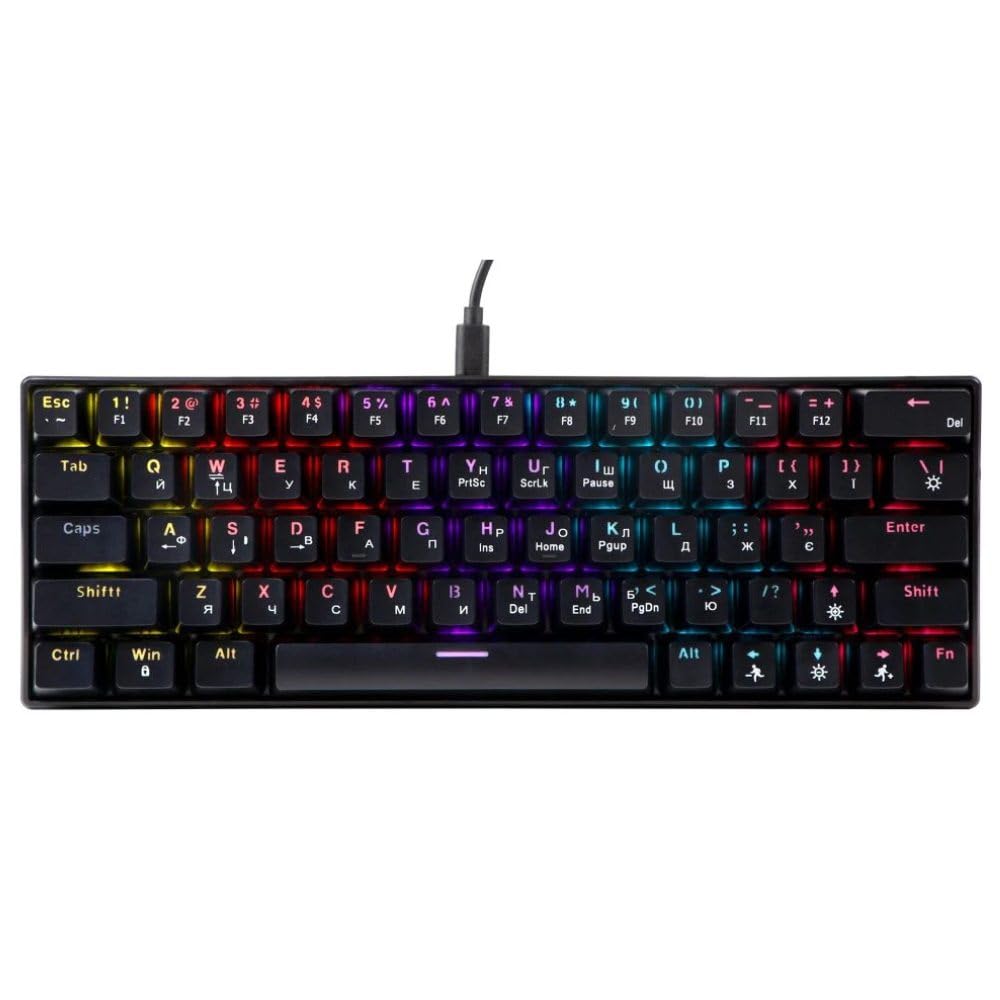
An image showing the T-Wolf T61 60% Wired Mechanical Gaming Keyboard, highlighting its compact layout and design.
3. Тохиргоо
- Гарыг задлах: Гар болон бүх дагалдах хэрэгслийг савлагаанаас болгоомжтой авч хая.
- Төхөөрөмждөө холбогдох: Locate an available USB port on your computer (PC, laptop) or gaming console. Insert the USB connector of the T-Wolf T61 keyboard into the USB port.
- Автомат драйвер суулгах: Гар нь залгаад тоглодог. Таны үйлдлийн систем шаардлагатай драйверуудыг автоматаар илрүүлж суулгана. Энэ процесс хэдэн минут үргэлжилж магадгүй.
- Ашиглахад бэлэн: Драйверуудыг суулгасны дараа гар шууд ашиглахад бэлэн болно.
4. Ашиглалтын заавар
The T-Wolf T61 keyboard functions as a standard QWERTY layout keyboard. Its 60% compact design means some functions are accessed via key combinations.
4.1 RGB арын гэрэлтүүлгийн хяналт
The keyboard features customizable RGB backlighting. Specific key combinations are used to change lighting modes and effects. Refer to the keyboard's function layer markings for exact controls, typically involving the Fn key combined with other keys (e.g., Fn + \| for mode changes, Fn + [{ or Fn + ]} for brightness/speed adjustments).
- Гэрэлтүүлгийн горимыг өөрчлөх: дарна уу Fn + \| to cycle through various RGB lighting effects.
- Гэрэлтүүлгийг тохируулах: Ашиглах Fn + [{ гэрэл гэгээг багасгах болон Fn + ]} гэрэлтүүлгийг нэмэгдүүлэх.
- Хурд тохируулах: Ашиглах Fn + ;: to decrease effect speed and Fn + '" нөлөөллийн хурдыг нэмэгдүүлэхийн тулд.
4.2 Multi-Key Rollover
The T61 keyboard supports multi-key rollover, allowing multiple keys to be pressed simultaneously without ghosting or missed inputs. This feature is particularly beneficial for fast typing and complex gaming commands.
5. Засвар үйлчилгээ
Тохиромжтой засвар үйлчилгээ нь таны гарны урт наслалт, гүйцэтгэлийг баталгаажуулдаг.
- Цэвэрлэгээ: Use a soft, dry cloth to wipe the surface of the keyboard. For deeper cleaning, use a can of compressed air to remove dust and debris from between the keycaps. For stubborn dirt, a slightly damp cloth with a mild cleaning solution can be used, ensuring no liquid enters the keyboard.
- Асгарахад тэсвэртэй дизайн: While the keyboard features a spill-resistant design to protect against light spills, it is ус нэвтэрдэггүй. In case of a spill, immediately disconnect the keyboard from your device, gently wipe away any liquid, and allow it to air dry completely before reconnecting.
- Хадгалах: Гарыг нарны шууд тусгал, хэт температураас хол, сэрүүн, хуурай газар хадгална.
6. Алдаа засах
If you encounter issues with your T-Wolf T61 keyboard, please refer to the following common solutions:
- Гар хариу өгөхгүй байна:
- Ensure the USB cable is securely connected to both the keyboard and your device.
- Гараа өөр USB порт руу холбож үзнэ үү.
- Төхөөрөмжтэй холбоотой асуудлыг арилгахын тулд гарыг өөр компьютер дээр туршиж үзээрэй.
- Компьютерээ дахин эхлүүлнэ үү.
- RGB арын гэрэлтүүлэг ажиллахгүй/буруу байна:
- Гар зөв асаалттай байгаа эсэхийг шалгаарай.
- Cycle through the RGB modes using the designated key combinations (e.g., Fn + \|).
- Adjust brightness settings (e.g., Fn + [{ / Fn + ]}).
- Бүртгүүлээгүй эсвэл давхар шивээгүй түлхүүрүүд:
- Clean the affected keycap and switch area using compressed air to remove any debris.
- Ensure no software conflicts are present (e.g., other keyboard drivers or utilities).
Хэрэв эдгээр алхмуудыг хэрэгжүүлсний дараа асуудал хэвээр байвал хэрэглэгчийн дэмжлэгтэй холбогдоно уу.
7. Техникийн үзүүлэлтүүд
| Онцлог | Тодорхойлолт |
|---|---|
| Брэнд | Т-ЧОНО |
| Загвар | T61 |
| Холболтын технологи | Утастай USB |
| Гарын тайлбар | Механик |
| Түлхүүрүүдийн тоо | 65 |
| Гарны зохион байгуулалт | QWERTY |
| Онцлог шинж чанарууд | RGB Backlit, Multi-Key Rollover, Low-Noise Operation, Spill-Resistant Design |
| Тохиромжтой төхөөрөмжүүд | PC, laptop, gaming consoles |
| Материал | Металл, хуванцар |
| Өнгө | Хар |
| Гарал үүслийн улс | Хятад |
8. Баталгаат хугацаа ба дэмжлэг
The T-Wolf T61 keyboard comes with a standard manufacturer's warranty. Please refer to the warranty card included with your purchase or contact your retailer for specific warranty terms and conditions.
For technical support, troubleshooting assistance, or warranty claims, please contact the retailer where you purchased the product or visit the official T-Wolf webтуслах нөөцийн сайт.