
1. Танилцуулга
Худалдан авалт хийсэнд баярлалааasing the VELATEMOR 16MP Digital Camera. This compact and portable camcorder is designed for capturing high-quality photos and videos with ease. Featuring a 2.4-inch rotatable screen, 16X digital zoom, and a built-in fill light, it is suitable for various recording scenarios, from family events to travel adventures.
Please read this manual thoroughly to understand the camera's functions and ensure optimal performance and longevity.
2. Бүтээгдэхүүн дууссанview
2.1 Гол онцлогууд
- Зургийн нягтрал: 16 MP хүртэл
- Видеоны нягтрал: 1080P хүртэл
- Дэлгэц: 2.4-inch rotatable display
- Томруулах: 16X дижитал томруулалт
- Гэрлийг дүүргэх: Integrated for low-light conditions
- Чиг үүрэг: Selfies, electronic anti-shake, loop recording, time watermarking, recording while charging
- Холболт: Компьютерт холбогдох USB порт
- Хадгалах: Supports up to 128GB standard memory card (not included)
2.2 Camera Components and Controls

Зураг 1: Урд view of the camera, highlighting the video lens and integrated fill light.

Зураг 2: Хажуу тал view of the camera, illustrating the SNAP button for capturing photos and the zoom lever for adjusting magnification.
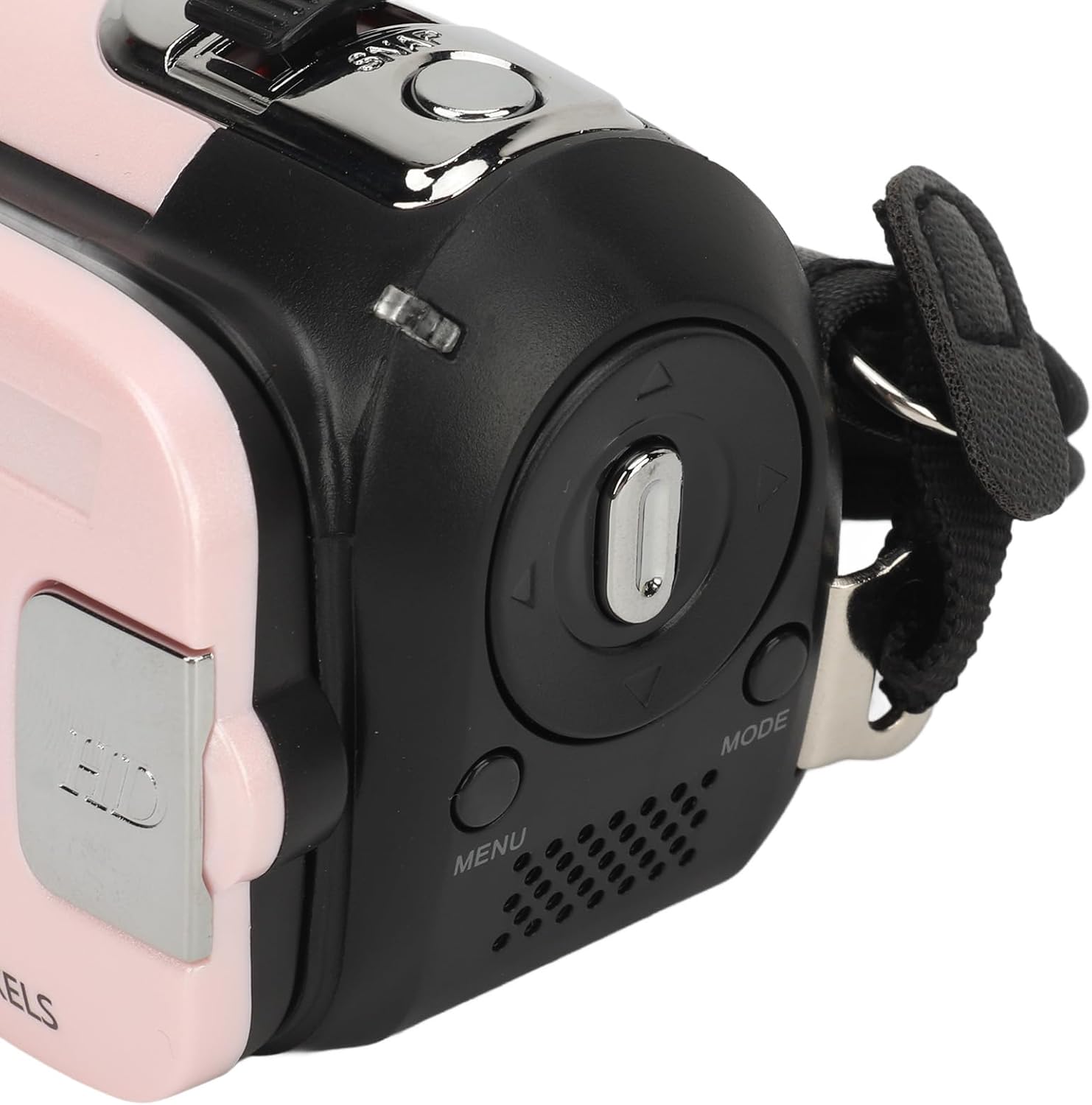
Зураг 3: Буцах view of the camera, displaying the 2.4-inch rotatable screen, MENU button, MODE button, and directional navigation controls.
Familiarize yourself with the camera's physical layout. The front features the video lens and fill light. The top includes the SNAP button for taking pictures and a lever for 16X digital zoom. The back houses the 2.4-inch rotatable screen, along with buttons for menu access, mode selection, and navigation.
3. Тохиргоо
3.1 Зайг цэнэглэх
- Locate the USB port on the camera.
- Connect the provided USB charging cable to the camera's USB port.
- USB кабелийн нөгөө үзүүрийг тохирох USB тэжээлийн адаптер (дагалдахгүй) эсвэл компьютерын USB порт руу залгана уу.
- Цэнэглэх заагч гэрэл асна. Бүрэн цэнэглэгдсэний дараа гэрэл өнгө өөрчлөгдөж эсвэл унтарч болно.
The camera supports recording while charging, allowing for extended use.
3.2 Санах ойн карт оруулах
This camera requires a standard memory card (up to 128GB, not included) for storing photos and videos.
- Камерын хажуу эсвэл доод хэсэгт санах ойн картны үүрийг олоорой.
- Санах ойн картыг оруулах эсвэл авахаасаа өмнө камерыг унтраасан эсэхээ шалгаарай.
- Insert the memory card into the slot with the metal contacts facing the correct direction (refer to the diagram near the slot if available) until it clicks into place.
- Картыг авахын тулд дэлбэрч гарах хүртэл дотогш зөөлөн дарна уу.
4. Ашиглалтын заавар
4.1 Асаах/унтраах
- Асаахын тулд: Press and hold the Power button (usually located near the screen or on top) for a few seconds until the screen illuminates.
- Унтраахын тулд: Дэлгэц унтрах хүртэл Асаах товчийг дахин дараад барина уу.
4.2 Үндсэн үйл ажиллагаа
- Горим сонгох: дээр дарна уу MODE button to switch between photo mode, video recording mode, and playback mode.
- Зураг авах: In photo mode, frame your shot using the screen. Press the SNAP button (shutter button) to capture a photo.
- Видео бичлэг хийх: In video recording mode, press the SNAP Бичлэг эхлүүлэхийн тулд товчийг дарна уу. Бичлэгийг зогсоохын тулд дахин дарна уу.
- Томруулах: Use the zoom lever (often located near the SNAP button) to digitally zoom in or out (16X digital zoom).
- Rotatable Screen: The 2.4-inch screen can be rotated to face forward for selfies or vlogging.
- Гэрлийг дүүргэх: To activate the built-in fill light for low-light conditions, locate the dedicated button or menu option (refer to the on-screen menu for specific controls).

Зураг 4: The camera's rotatable screen in selfie mode, demonstrating its flexibility for various shooting angles.
4.3 Цэсийн тохиргоо
дээр дарна уу Цэс button to access camera settings. Use the navigation buttons to scroll through options and the SNAP button (or a dedicated OK button) to confirm selections. Common settings include:
- Image Resolution (1MP, 2MP, 3MP, 5MP, 8MP, 10MP, 12MP, 16MP)
- Video Resolution (1080P maximum)
- Electronic Anti-Shake (EIS)
- Давталтын бичлэг
- Time Watermarking
- Огноо/Цагийн тохиргоо
- Language (17 languages supported)
4.4 Компьютерт холбогдох

Зураг 5: The camera and its USB cable, used for charging and data transfer.
Зураг болон видеог компьютертээ хуулахын тулд:
- Камер асаалттай байгаа эсэхийг шалгаарай.
- Өгөгдсөн USB кабелийг ашиглан камерыг компьютерт холбоно уу.
- The camera should appear as a removable disk or media device on your computer.
- Open the camera's folder to access and transfer your files.
5. Засвар үйлчилгээ
- Линз болон дэлгэцийг цэвэрлэх: Use a soft, lint-free cloth specifically designed for optical surfaces. Avoid abrasive materials or harsh chemicals.
- Батерейны арчилгаа: Store the camera in a cool, dry place. If not used for extended periods, charge the battery periodically to maintain its health.
- Хадгалах: Keep the camera away from extreme temperatures, humidity, dust, and strong magnetic fields.
- Санах ойн карт: Regularly back up your data and format the memory card periodically within the camera's settings to ensure optimal performance.
6. Алдаа засах
| Асуудал | Боломжит шийдэл |
|---|---|
| Камер асахгүй байна. | Ensure the battery is fully charged. Connect the camera to a power source using the USB cable and try again. |
| Зураг авах, видео бичлэг хийх боломжгүй. | Check if a memory card is inserted and has sufficient free space. Ensure the camera is in the correct mode (photo or video). |
| Зураг/видео бүдэг байна. | Clean the camera lens. Ensure there is adequate lighting. Hold the camera steady or use a tripod. Check if electronic anti-shake is enabled. |
| Камерыг компьютер танихгүй байна. | Ensure the USB cable is securely connected to both the camera and the computer. Try a different USB port or cable. Ensure the camera is powered on. |
| Fill light not working. | Check if the fill light function is enabled in the camera's settings or via its dedicated button. |
7. Техникийн үзүүлэлтүүд
| Онцлог | Дэлгэрэнгүй |
|---|---|
| Зургийн нягтрал | 1MP, 2MP, 3MP, 5MP, 8MP, 10MP, 12MP, 16MP |
| Зургийн формат | JPG |
| Видеоны нягтрал | 1080P (maximum) |
| Видео формат | AVI |
| Дэлгэцийн хэмжээ | 2.4 Inch (Rotatable) |
| Дижитал томруулах | 16X |
| Хөшиг | Цахим |
| Хадгалах | Supports up to 128GB standard memory card (not included) |
| Батерей | 1 x BL-5C Li Battery, 600mAh (built-in) |
| Хэлнүүд | 17 Хэл |
| Tripod бэхэлгээ | Bottom 1/4 inch thread hole (tripod not included) |
8. Баталгаат хугацаа ба дэмжлэг
8.1 Баталгаат хугацааны мэдээлэл
This VELATEMOR digital camera comes with a manufacturer warranty for 90 days from the date of purchase. Please retain your proof of purchase for warranty claims. The warranty covers manufacturing defects but typically excludes damage caused by misuse, accidents, or unauthorized repairs.
8.2 Хэрэглэгчийн дэмжлэг
For technical assistance, troubleshooting beyond this manual, or warranty inquiries, please contact VELATEMOR customer support through the retailer where the product was purchased or refer to the official VELATEMOR webхолбоо барих мэдээлэл авах сайт.