
1. Танилцуулга
This manual provides detailed instructions for the safe and effective use of the Generic M469A Smart Network Cable Tester. This device is designed to test RJ45 and RJ11 LAN cables, perform wire tracking, and assist in network repair tasks. Please read this manual thoroughly before operating the device and retain it for future reference.
2. Аюулгүй байдлын мэдээлэл
- Always handle the device with care to prevent damage.
- Төхөөрөмжийг чийг, хэт өндөр температур, нарны шууд тусгалд бүү тавь.
- Батерейг туйлшралын тэмдэглэгээний дагуу зөв оруулсан эсэхийг шалгаарай.
- Хэрэв төхөөрөмжийг удаан хугацаагаар ашиглахгүй бол батарейг нь салга.
- Төхөөрөмжийг өөрөө засах эсвэл өөрчлөх гэж бүү оролдоорой. Бүх үйлчилгээг мэргэшсэн ажилтнуудад даатга.
3. Багцын агуулга
Хүлээн авахдаа багцын агуулгыг шалгана уу. Хэрэв ямар нэг зүйл дутуу эсвэл гэмтсэн бол худалдагчтайгаа холбоо барина уу.
- M469A Smart Network Cable Tester (Main Unit)
- Алсын нэгж
- RJ45 кабель
- RJ11 кабель
- Хэрэглэгчийн гарын авлага
4. Бүтээгдэхүүн дууссанview
The M469A Smart Network Cable Tester consists of a main unit and a remote unit. It features ports for RJ45 and RJ11 cables, an LCD display for test results, and control buttons for various functions.
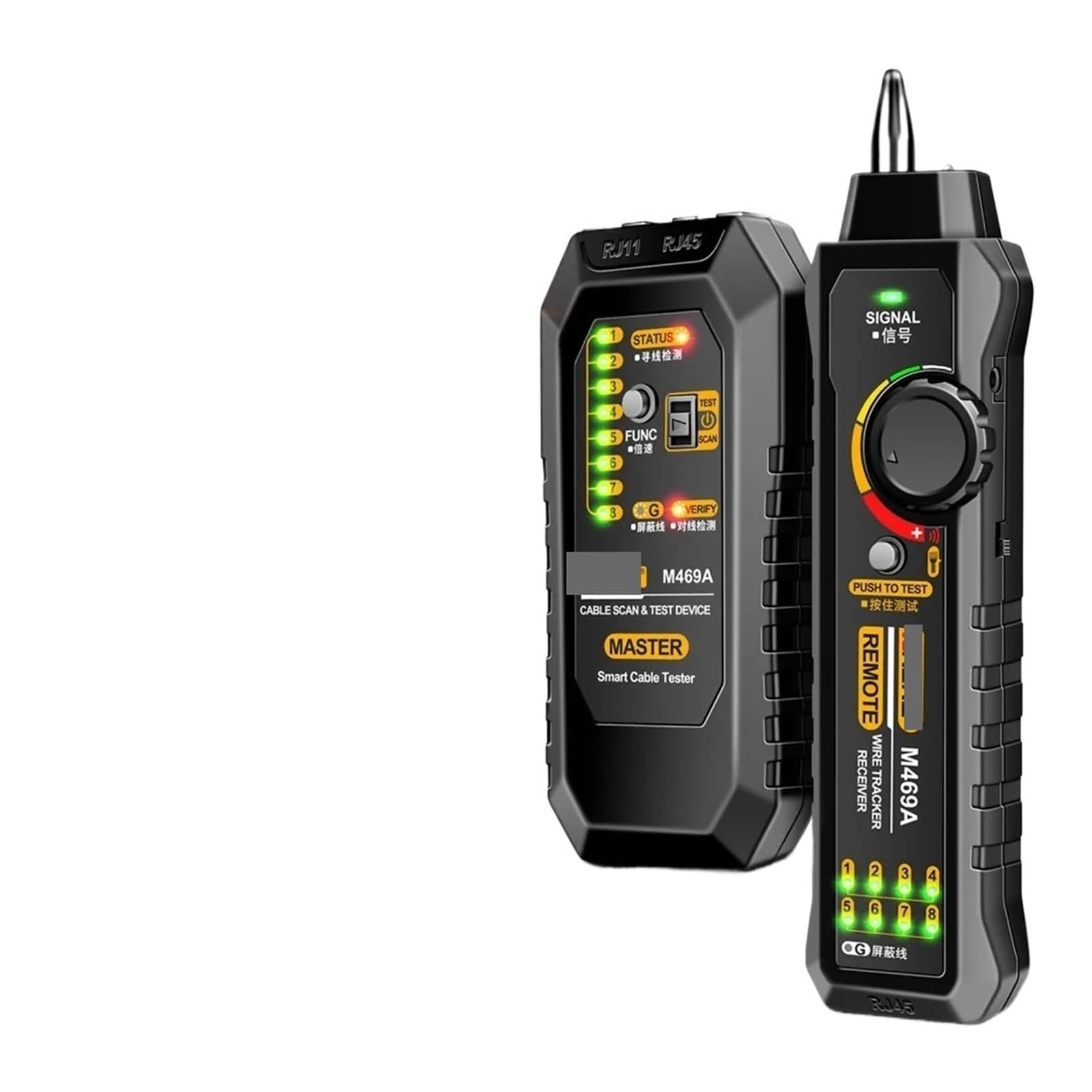
Image 1: M469A Smart Network Cable Tester. This image displays the main unit and the remote unit of the cable tester. The main unit typically features an LCD screen and control buttons, while the remote unit is a smaller, passive component used for end-to-end cable testing.
Үндсэн нэгжийн онцлогууд:
- LCD дэлгэц: Shows test results, cable status, and other information.
- RJ45 порт: For testing Ethernet cables.
- RJ11 порт: For testing telephone cables.
- Хяналтын товчлуурууд: For power, mode selection, and test initiation.
- Эрчим хүчний оролт: Battery compartment for power supply.
Remote Unit Features:
- RJ45 порт: Connects to the other end of an Ethernet cable for testing.
- RJ11 порт: Connects to the other end of a telephone cable for testing.
5. Тохиргоо
5.1 Батерей суурилуулах
- Үндсэн нэгжийн арын хэсэгт зайны тасалгааг ол.
- Зайны тасалгааны тагийг нээ.
- Insert the required batteries (e.g., 9V battery) according to the polarity markings (+/-).
- Зайны тасалгааны тагийг сайтар хаа.
5.2 Асаах/унтраах
- To power on the device, press and hold the Power button until the LCD screen illuminates.
- To power off the device, press and hold the Power button again until the LCD screen turns off.
6. Ашиглалтын заавар
6.1 Cable Testing (RJ45/RJ11)
- Төхөөрөмж асаалттай байгаа эсэхийг шалгаарай.
- Connect one end of the cable to be tested into the appropriate port (RJ45 or RJ11) on the main unit.
- Connect the other end of the cable into the corresponding port on the remote unit.
- Select the desired test mode (e.g., standard test, scan) using the mode button.
- Press the Test button to initiate the cable test.
- Observe the LCD display for results, which will indicate continuity, open circuits, short circuits, cross-overs, or split pairs.
6.2 Утас мөрдөх функц
The wire tracking function helps locate specific cables within a bundle or trace their path.
- Connect the cable to be tracked to the main unit's RJ45 or RJ11 port.
- Select the wire tracking mode on the main unit.
- Use the receiver (often integrated or a separate probe) to trace the cable. The receiver will emit an audible tone when it detects the signal from the main unit, indicating the cable's location.
7. Засвар үйлчилгээ
- Цэвэрлэгээ: Төхөөрөмжийг цэвэрлэхийн тулд зөөлөн, хуурай даавуу ашиглана уу. Зүлгүүрийн цэвэрлэгч, уусгагчийг бүү ашигла.
- Хадгалах: Төхөөрөмжийг ашиглахгүй байх үед нарны шууд тусгал, чийгээс хол, сэрүүн, хуурай газар хадгална.
- Зай солих: Батерей бага байгааг харуулсан заалт дэлгэц дээр гарч ирэхэд батерейг зөв уншихын тулд нэн даруй солино уу.
8. Алдаа засах
| Асуудал | Боломжит шалтгаан | Шийдэл |
|---|---|---|
| Төхөөрөмж асахгүй байна. | Дууссан эсвэл буруу суурилуулсан батерей. | Батерейны туйлшралыг шалгах; батерейг солих; |
| Туршилтын үр дүн буруу. | Poor cable connection; damaged cable; low battery. | Ensure cables are securely connected; inspect cable for damage; replace batteries. |
| Wire tracking signal is weak or absent. | Cable not properly connected; receiver too far from cable; interference. | Verify cable connection; move receiver closer; minimize sources of electromagnetic interference. |
9. Техникийн үзүүлэлтүүд
- Загвар: M469A (Part Number: PPZZZAIVV-BLACK)
- Брэнд: Ерөнхий
- Дэмжигдсэн кабелийн төрлүүд: RJ45 (Ethernet), RJ11 (Telephone)
- Чиг үүрэг: Cable Testing, Wire Tracking
- Эрчим хүчний эх үүсвэр: Battery Powered (e.g., 9V battery, not included)
- Өнгө: Хар
- Тодорхойлолт хангасан: UL
10. Баталгаат хугацаа ба дэмжлэг
This product comes with a standard manufacturer's warranty. For specific warranty terms, please refer to the documentation provided at the time of purchase or contact your retailer. For technical support or service inquiries, please contact the vendor or manufacturer through the contact information provided with your purchase.