
1. Танилцуулга
Thank you for choosing the MERCUSYS MC510 2K 3MP Outdoor WiFi Camera. This manual provides detailed instructions for the installation, operation, and maintenance of your security camera. Please read this manual carefully before use to ensure proper functionality and safety. The MC510 offers 2K 3MP resolution, 360-degree panoramic view, color night vision, two-way audio, smart motion detection, and IP65 weather resistance for reliable outdoor surveillance.

Image: MERCUSYS MC510 2K Pan/Tilt Wi-Fi Camera mounted on a wall, highlighting its 2K resolution and IP65 weather resistance.
2. Аюулгүй байдлын мэдээлэл
- Цахилгаан адаптер нь таны орон нутгийн цахилгаан хангамжид тохирох эсэхийг шалгаарай.
- Камерыг хэт өндөр температур, чийгшил эсвэл идэмхий орчинд бүү байлга.
- Камерыг хүчтэй цахилгаан соронзон орны ойролцоо байрлуулахаас зайлсхий.
- Камер болон түүний дагалдах хэрэгслийг хүүхдэд хүрэхгүй газар хадгална уу.
- Зөвхөн үйлдвэрлэгчээс заасан дагалдах хэрэгслийг ашиглана уу.
- Цэвэрлэх, засвар үйлчилгээ хийхээс өмнө цахилгааныг салга.
- The camera is IP65 rated for outdoor use, but avoid submerging it in water.
3. Багцын агуулга
Таны багцад бүх зүйл байгаа эсэхийг шалгана уу:
- MC510 Camera × 1
- Цахилгаан адаптер × 1
- Mounting Sticker × 1
- Суурилуулах хаалт × 1
- Mounting Screws × 4 + Bracket Screws × 2
- Холбох зангуу × 4
- Waterproof Gasket × 1
- Түргэн эхлүүлэх гарын авлага
4. Бүтээгдэхүүн дууссанview
The MERCUSYS MC510 is a versatile outdoor security camera designed to provide comprehensive surveillance with advanced features.
Гол онцлогууд:
- 2K QHD with 360° View: Provides clear 2K 3MP video and full 360° horizontal coverage to see every corner and detail.
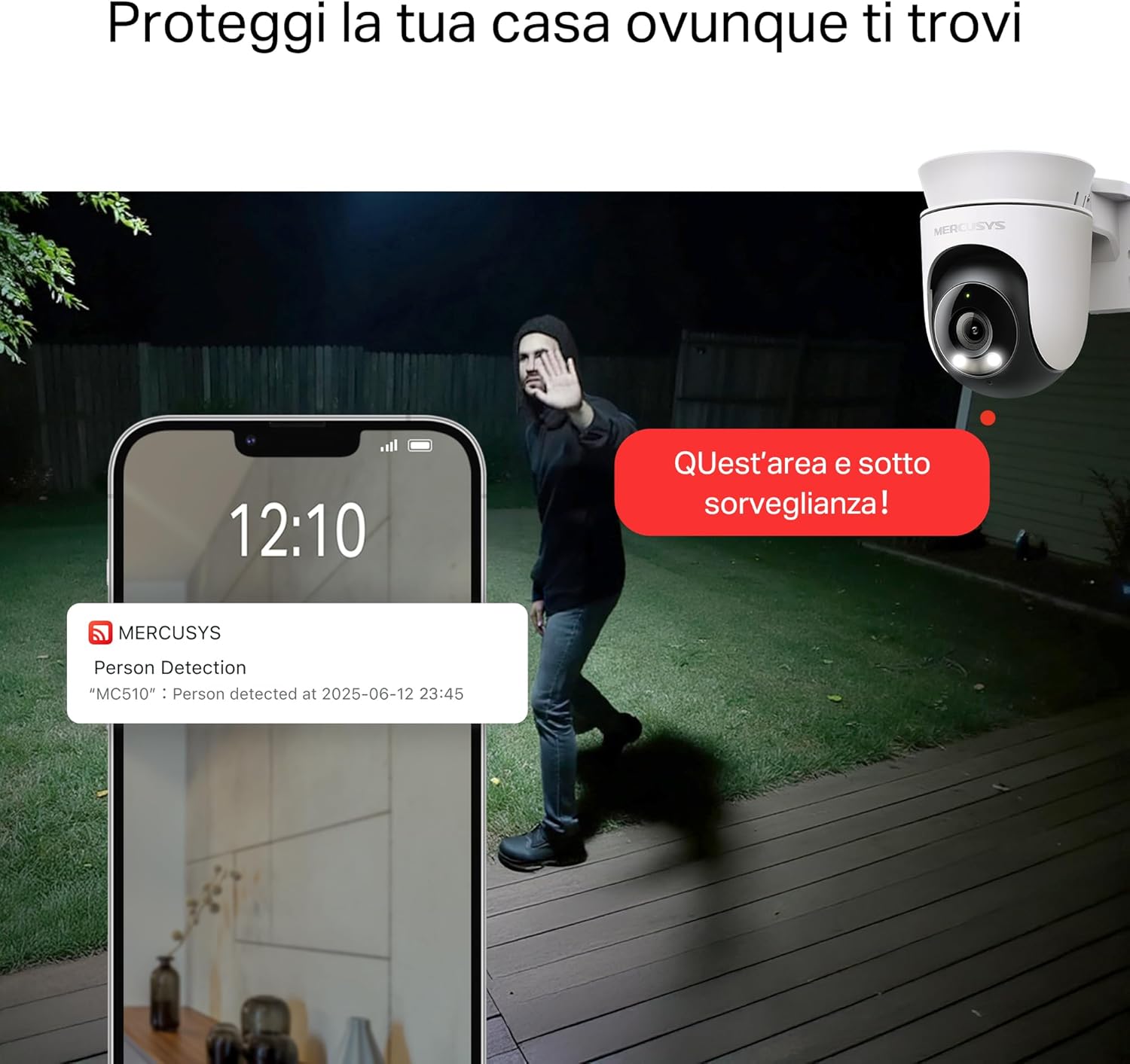
- Smart Motion Detection and Person Tracking: Automatically detects and tracks motion or people, ensuring key activities remain in focus.
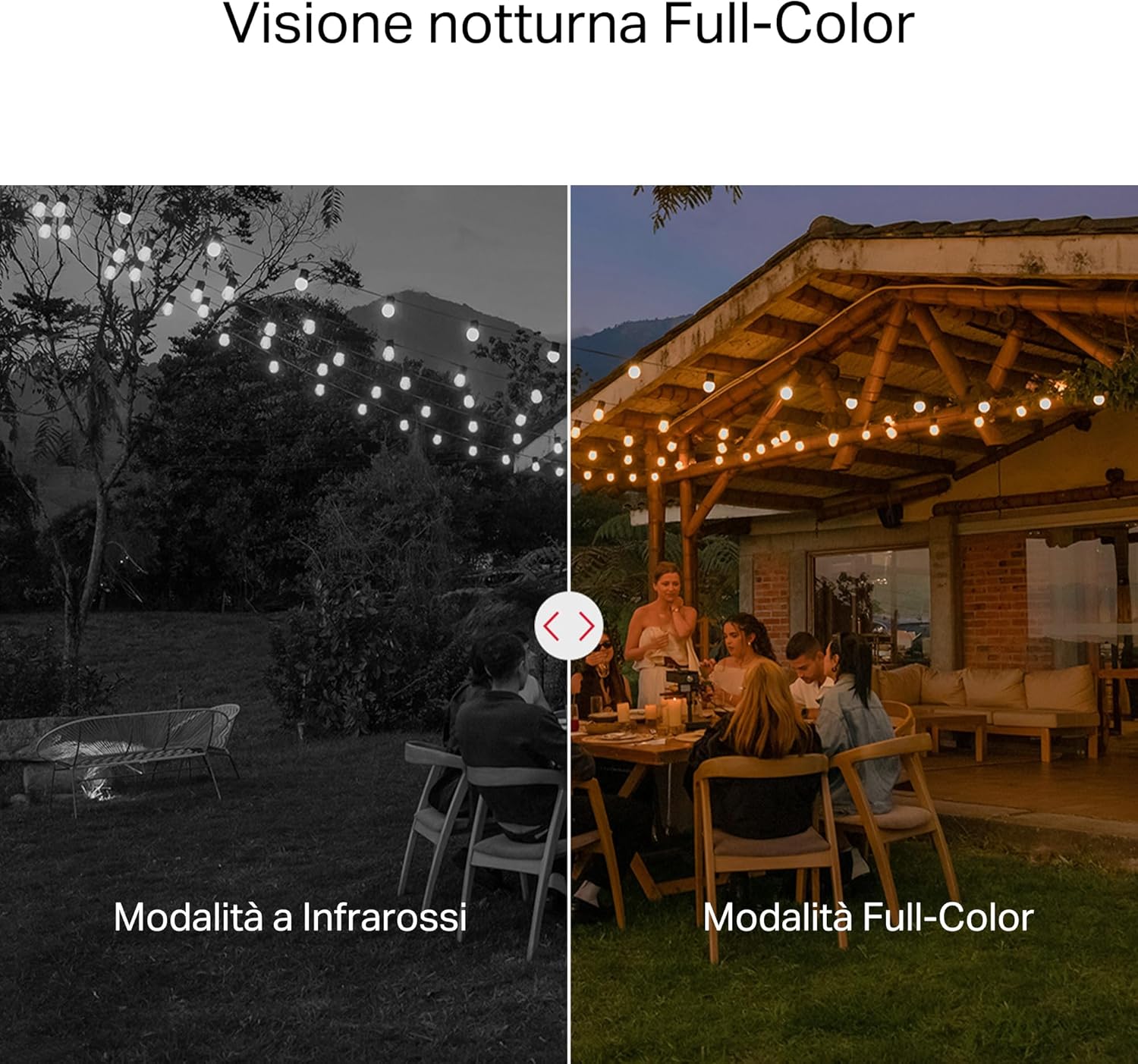
- Өнгөт шөнийн хараа: Provides vivid and detailed images even at night for 24/7 protection.
- Тохируулах боломжтой үйл ажиллагааны бүсүүд: Helps filter out irrelevant events and sends alerts only when necessary.
- Орон нутгийн болон үүлэн хадгалах сан: Supports microSD cards up to 512GB and cloud storage for secure and flexible video backup.
- Гадаа ашиглах цаг агаарын хамгаалалт: IP65 certified for reliable performance in rain, dust, or snow. Easily mounts on walls, ceilings, or poles.
- Privacy Protection with Lens Shield: Activate the physical lens cover when surveillance is not needed for greater peace of mind at home.
- Хоёр талын аудио: Communicate directly through the camera.
Харааны онцлогууд:

High-resolution 2K 3MP video capture.
360-degree panoramic rotation for full coverage.
Full-Color Night Vision for clear images in low light.

Physical lens shield for enhanced privacy.
5. Тохиргоо
5.1 Физик суурилуулалт
The MC510 camera is designed for outdoor use and can be mounted on walls, ceilings, or poles. Its IP65 rating ensures protection against dust and water jets.
- Байршил сонгоно уу: Хүссэн зүйлээ хангах тохиромжтой гадаа байршлыг сонгоорой viewөнцгөөр харах боломжтой бөгөөд тогтвортой Wi-Fi дохиотой.
- Суурилуулалт: Use the provided mounting sticker to mark drill holes. Drill holes, insert anchors, and secure the mounting bracket with screws. Attach the camera to the bracket.
- Эрчим хүчний холболт: Connect the power adapter to the camera and plug it into a power outlet. Ensure the waterproof gasket is properly installed for outdoor power connections.

Image: The camera is shown mounted outdoors, demonstrating its weather-resistant design.
5.2 Апп суулгах ба холболт
The MC510 connects exclusively via Wi-Fi. An Ethernet port is not available.
- Апп татаж авах: Download the official MERCUSYS app from your smartphone's app store (iOS or Android).
- Бүртгэл үүсгэх: Аппликешныг нээгээд шинэ бүртгэл үүсгэ эсвэл хэрэв танд бүртгэл байгаа бол нэвтэрнэ үү.
- Камер нэмэх: Follow the in-app instructions to add your MC510 camera. This typically involves scanning a QR code on the camera and connecting it to your home Wi-Fi network.
5.3 MicroSD карт суурилуулах
For local storage, install a microSD card (up to 512GB, not included).
- Унтраах: Disconnect the camera from power before inserting or removing the microSD card.
- Слотыг олох: Refer to the camera's physical design to locate the microSD card slot, often protected by a cover.
- Карт оруулах: MicroSD картыг үүрэнд нь товших хүртэл зөөлөн оруулаарай.
- Карт форматлах: After powering on the camera and connecting it to the app, navigate to the camera settings to format the microSD card.

Image: Close-up of the camera showing the microSD card slot, indicating flexible storage options.
6. Ашиглалтын заавар
6.1 Амьд View & Тоглуулах
- Амьд View: Open the MERCUSYS app and select your MC510 camera to view амьд тэжээл.
- Хөрвүүлэх/назайлтын хяналт: Use the controls in the app to remotely rotate the camera horizontally (pan) and vertically (tilt) to adjust the viewөнцөг.
- Тоглуулах: Бүртгэгдсэн foo руу нэвтрэхtage from the app's playback section. You can filter by date and event.

Image: Illustration of 360-degree rotation with motion tracking.
6.2 Motion Detection & Tracking
- Илрүүлэлтийг идэвхжүүлэх: In the app settings, enable motion detection and person tracking.
- Customize Activity Zones: Камерын доторх тодорхой хэсгийг тодорхойл view where you want motion to be detected. This helps reduce false alarms.
- Сэрэмжлүүлэг хүлээн авах: The camera will send notifications to your smartphone when motion or a person is detected in the monitored zones.

Image: A person running in a yard, with detection boxes, demonstrating motion detection and tracking.
6.3 Хоёр талын аудио
Суурилуулсан микрофон болон чанга яригч нь хоёр талын харилцаа холбоог зөвшөөрдөг.
- Activate Audio: Амьдаар view interface of the app, tap the microphone icon to speak through the camera.
- Сонсох: The speaker icon allows you to hear audio from the camera's vicinity.

Image: A person detected by the camera, with a phone notification and an on-screen alert, demonstrating customizable alarms and two-way audio.
6.4 Өнгөт шөнийн хараа
The MC510 provides full-color night vision for enhanced clarity in low-light conditions.
- Автоматаар идэвхжүүлэх: Color night vision activates automatically in low-light conditions.
- Хэт улаан туяаны горим: The camera also supports traditional infrared night vision (black and white) if preferred or in extremely dark environments.

Image: Comparison of infrared (monochrome) and full-color night vision modes.
6.5 Privacy Zone & Lens Shield
Protect your privacy by defining privacy zones or activating the physical lens shield.
- Нууцлалын бүсүүд: In the app, you can set up specific areas within the camera's view to be excluded from recording.
- Lens Shield: For complete privacy, use the app to activate the physical lens shield, which covers the camera lens.
7. Засвар үйлчилгээ
7.1 Цэвэрлэгээ
- Цэвэрлэхийн өмнө камер унтарсан эсэхийг шалгаарай.
- Камерын биеийг зөөлөн, хуурай даавуугаар арчих.
- For the lens, use a lens cleaning cloth to avoid scratches. Do not use harsh chemicals or abrasive cleaners.
7.2 Програм хангамжийн шинэчлэлтүүд
Regularly check for firmware updates through the MERCUSYS app. Updates provide new features, performance improvements, and security enhancements. Follow the in-app instructions to perform updates.
8. Алдаа засах
If you encounter issues with your MERCUSYS MC510 camera, refer to the following common problems and solutions:
| Асуудал | Боломжит шийдэл |
|---|---|
| Камер Wi-Fi-д холбогдоогүй байна | Ensure the camera is within range of your Wi-Fi router. Check Wi-Fi password. Restart the camera and router. The MC510 only supports Wi-Fi connection, no Ethernet. |
| Видео чанар муу | Check your Wi-Fi signal strength. Ensure the camera lens is clean. Adjust camera placement to avoid glare or obstructions. |
| Motion detection issues | Verify motion detection is enabled in the app. Adjust sensitivity settings. Ensure activity zones are correctly configured. |
| MicroSD card not working | Ensure the card is inserted correctly. Format the microSD card via the app. Try a different compatible microSD card. Power cycle the camera after inserting the card. |
| No two-way audio | Check microphone and speaker settings in the app. Ensure your phone's volume is up. |
9. Техникийн үзүүлэлтүүд
| Онцлог | Дэлгэрэнгүй |
|---|---|
| Брэнд | БУРХАН |
| Загварын нэр | MC510 |
| Дотор/гадаа ашиглах | Гадаа |
| Холболтын протокол | Wi-Fi |
| Суурилуулах төрөл | Тааз, шон, хана |
| Зургийн нягтрал | 3 МП |
| Олон улсын хамгаалалтын зэрэглэл | IP65 |
| Утасгүй технологи | Wi-Fi |
| Батерей шаардлагатай | Үгүй |
| Видео бичлэгийн нягтрал | 2К 3 МП |
| Видео бичлэгийн формат | MPEG-4 |
| Зүйлүүдийн тоо | 1 |
| Оруулсан бүрэлдэхүүн хэсгүүд | MC510 Camera, Power Adapter, Mounting Sticker, Mounting Bracket, Mounting Screws, Mounting Anchors, Waterproof Gasket, Quick Start Guide |
| Гарал үүслийн улс | Хятад |
| Үйлдвэрлэгч | TP-Link |
| Зүйлийн хэмжээ | 14.1 x 9.3 x 12.2 см |
10. Баталгаат хугацаа ба дэмжлэг
Баталгаат хугацаа болон техникийн дэмжлэг авахыг хүсвэл албан ёсны MERCUSYS-ээс лавлана уу website or contact their customer service. Details can typically be found in the Quick Start Guide included with your product or on the manufacturer's webсайт.
Онлайн дэмжлэг: зочилно уу www.mercusys.com for FAQs, user manuals, and support resources.