
Танилцуулга
Thank you for choosing the Digitus DA-70919 USB-C 8K 12-Port Docking Station. This device is designed to expand the connectivity of your USB-C enabled laptop or computer, providing a comprehensive solution for video output, data transfer, network access, and power delivery. Please read this manual carefully to ensure proper installation and operation.
Бүтээгдэхүүн дууссанview
The Digitus DA-70919 docking station offers 12 essential ports to enhance your workspace. It supports high-resolution video output, fast data transfer, and efficient power delivery to your host device.

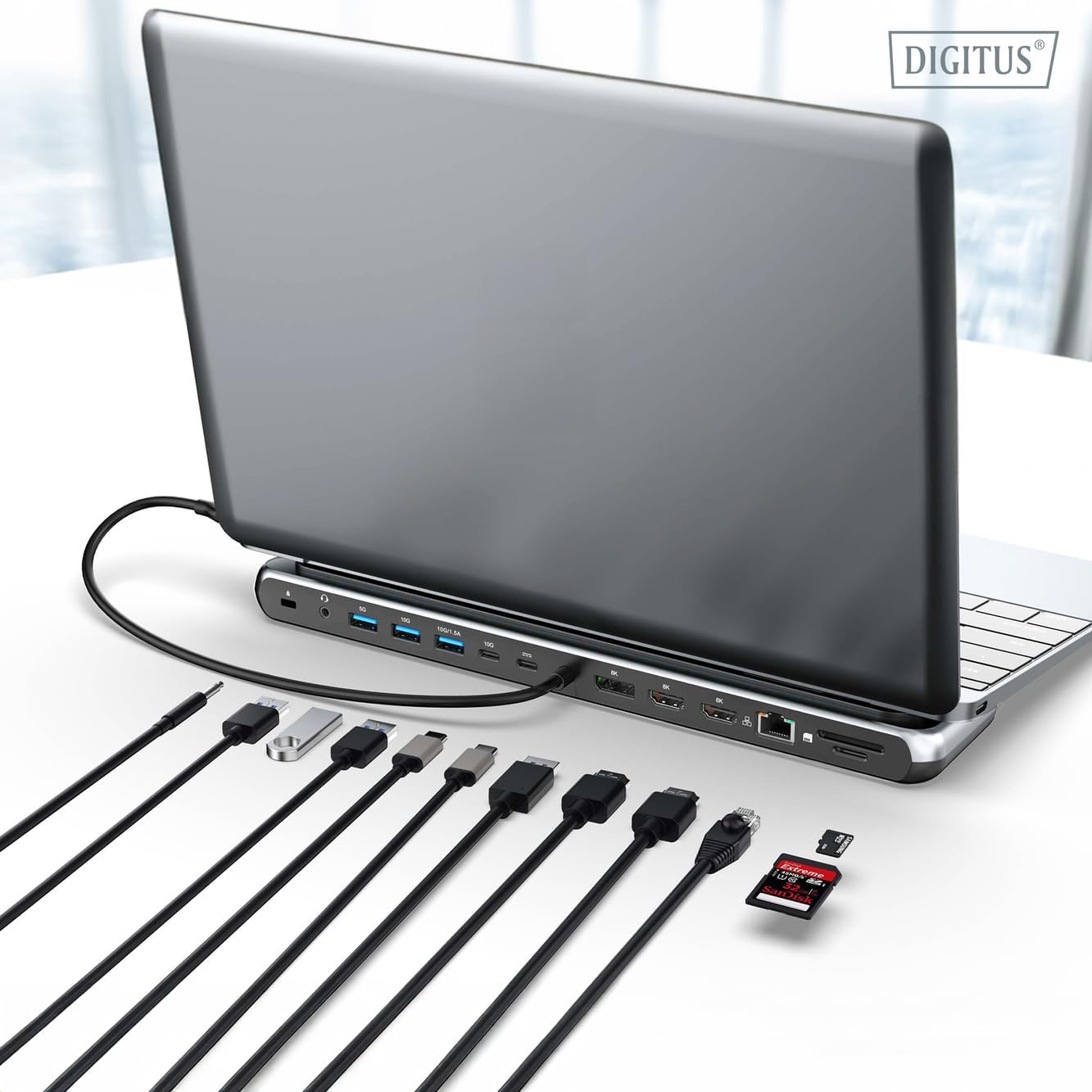
Зураг 1: Detailed diagram of the Digitus DA-70919 docking station ports and their functions. This diagram labels each of the 12 ports on the docking station, including Audio Jack, USB-A, USB-C, USB-C PD, DisplayPort, HDMI, RJ45 Gigabit Ethernet, and SD/MicroSD card slots, along with anti-theft protection.

Зураг 2: Урд view of the Digitus DA-70919 docking station showing all accessible ports. A clear view of the docking station's front panel, displaying the various input and output ports including USB-A, USB-C, HDMI, DisplayPort, Ethernet, and card readers.
Гол онцлогууд:
- Видео гаралт: 2x HDMI, 1x DisplayPort (DP) supporting up to 8K/30Hz for single display, or multi-display configurations.
- USB өгөгдлийн портууд: 2x USB-A 3.2 Gen 2 (10Gbps), 1x USB-A 3.2 Gen 1 (5Gbps), 1x USB-C 3.2 Gen 2 (10Gbps).
- Эрчим хүчний хангамж (PD): USB-C PD 3.0 port for charging your host laptop (up to 85W output).
- Сүлжээ: Gigabit Ethernet (RJ45) for stable wired internet connection.
- Карт уншигч: SD and MicroSD card slots with 104 MBps transfer speed.
- Аудио: 3.5mm audio jack for headphones or speakers.
Тохируулах заавар
Follow these steps to set up your Digitus DA-70919 docking station:
- Check Host USB-C Port Compatibility: Ensure your laptop's USB-C port supports DisplayPort Alternate Mode (DP Alt Mode) for video output and Power Delivery for charging. Without DP Alt Mode, video output will not function.

Зураг 3: Guide to USB-C port compatibility for DisplayPort Alternate Mode. This graphic explains which types of USB-C ports on your laptop support the full functionality of the docking station, specifically highlighting the requirement for DisplayPort Alternate Mode (DP Alt Mode) for video output.
- Хост төхөөрөмжид холбогдох: Connect the integrated USB-C cable from the docking station to the USB-C port on your laptop.
- Цахилгаан адаптерийг холбоно уу (заавал биш боловч санал болгож байна): If you wish to charge your laptop via the docking station or power high-demand peripherals, connect a USB-C Power Delivery adapter (not included, up to 100W recommended) to the USB-C PD input port on the docking station.
- Гадаад дэлгэцийг холбох: Тохиромжтой кабель ашиглан мониторуудаа залгах станц дээрх HDMI ба/эсвэл DisplayPort гаралттай холбоно уу.
- Дагалдах төхөөрөмжүүдийг холбох: Plug in your USB devices (keyboard, mouse, external drives), Ethernet cable, SD/MicroSD cards, and audio devices to the corresponding ports on the docking station.
- Драйвер суурилуулах: In most cases, the docking station is plug-and-play and does not require additional drivers. If prompted, allow your operating system to install any necessary drivers automatically.
Ашиглалтын заавар
Дэлгэцийн горимууд
Док станц нь янз бүрийн дэлгэцийн тохиргоог дэмждэг:
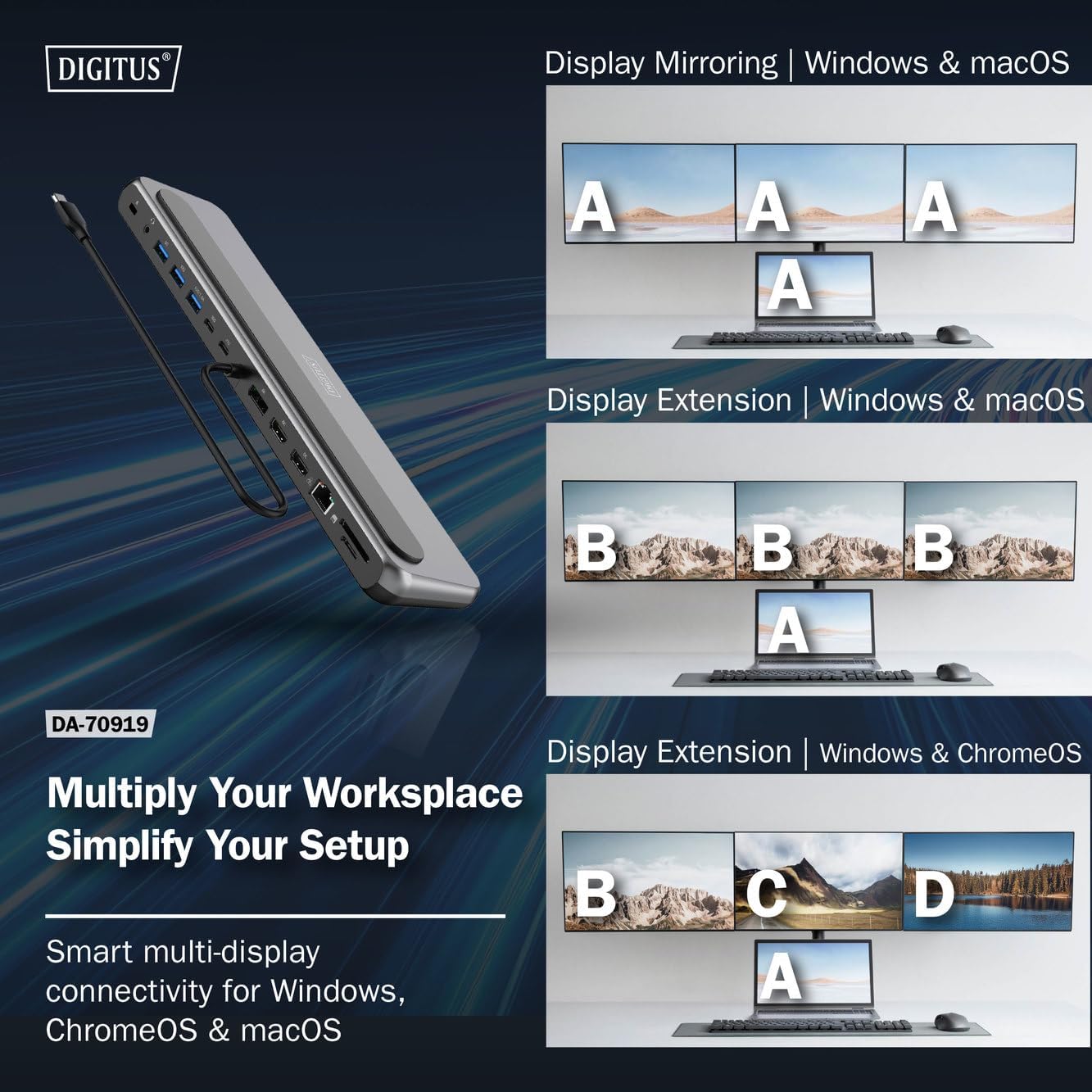
Зураг 4: Diagram showing display mirroring and extension modes for Windows, macOS, and ChromeOS. This image illustrates the various display configurations supported by the docking station, including mirroring your screen or extending it across multiple external monitors on Windows, macOS, and ChromeOS.
- Толин тусгал горим: Зөөврийн компьютерын дэлгэцийг гадаад дэлгэц дээр хуулбарлана.
- Extend Mode (Windows/ChromeOS): Extends your desktop across multiple external monitors, allowing for a multi-tasking environment. Supports dual monitors (2x 4K/60Hz) and triple monitors (1x 4K/60Hz + 2x 4K/30Hz) in MST (Multi Stream Transport) mode.
- Extend Mode (macOS): macOS typically supports extended desktop to one external monitor, with other external monitors mirroring each other.
To configure display settings, access your operating system's display settings (e.g., Windows Display Settings, macOS System Preferences > Displays).
Өгөгдөл дамжуулах
Utilize the USB-A and USB-C data ports for connecting external storage devices, keyboards, mice, and other USB peripherals. The USB 3.2 Gen 2 ports offer speeds up to 10Gbps, while the USB 3.2 Gen 1 port offers speeds up to 5Gbps.
Эрчим хүчний нийлүүлэлт
When a compatible USB-C PD power adapter is connected to the docking station's PD input port, the docking station can deliver up to 85W of power to charge your connected laptop. This allows you to power your laptop and peripherals through a single USB-C connection.
Зураг 5: Illustration of the docking station's fast charging capability via USB-C Power Delivery. This image demonstrates the Power Delivery function, showing a 100W input to the docking station and an 85W output to charge the connected laptop.
Сүлжээний холболт
Connect an Ethernet cable to the RJ45 port for a stable and high-speed wired network connection (10/100/1000 Mbps Gigabit Ethernet).
Карт уншигч
Insert SD or MicroSD cards into the dedicated slots for quick access to photos, videos, and other files. The card readers support transfer speeds up to 104 MBps.
Аудио гаралт
Connect your headphones or speakers to the 3.5mm audio jack for audio output.
Засвар үйлчилгээ
- Цэвэрлэгээ: Use a soft, dry cloth to clean the surface of the docking station. Avoid using liquid cleaners or solvents.
- Хадгалах: Холбох станцыг нарны шууд тусгал, хэт температураас хол, сэрүүн, хуурай газар хадгална.
- Харьцуулах: Avoid dropping or subjecting the device to strong impacts. Do not attempt to disassemble the docking station.
Алдааг олж засварлах
Хэрэв та док станцтайгаа холбоотой асуудалтай тулгарвал дараах нийтлэг шийдлүүдийг үзнэ үү.
- Дэлгэцийн гаралт байхгүй:
- Таны зөөврийн компьютерын USB-C порт нь DisplayPort-н өөр горимыг дэмждэг эсэхийг шалгаарай.
- Check all video cables (HDMI/DP) are securely connected to both the docking station and the monitor.
- Монитор асаагаад зөв оролтын эх үүсвэрт тохируулсан эсэхийг шалгана уу.
- Асуудлыг арилгахын тулд нэг мониторыг нэг нэгээр нь холбож үзээрэй.
- Зөөврийн компьютерийнхээ график драйверуудыг шинэчилнэ үү.
- Зөөврийн компьютерт цахилгаан дамжуулах боломжгүй:
- Ensure a compatible USB-C PD power adapter (up to 100W) is connected to the docking station's PD input port.
- Таны зөөврийн компьютерын USB-C порт нь Power Delivery-г дэмждэг эсэхийг шалгана уу.
- Цахилгаан адаптер болон кабелийг гэмтсэн эсэхийг шалгана уу.
- Танигдаагүй USB төхөөрөмжүүд:
- USB төхөөрөмжийг залгах станцын өөр порт руу дахин холбоно уу.
- Ensure the docking station is properly connected to the host laptop.
- If using a high-power USB device, ensure the docking station is connected to an external power adapter.
- Ethernet холболтын асуудал:
- Док станц болон чиглүүлэгч/модемийн аль алинд нь Ethernet кабелийн холболтыг шалгана уу.
- Зөөврийн компьютер дээрээ сүлжээний тохиргоог шалгана уу.
- Чиглүүлэгч/модем болон зөөврийн компьютерээ дахин эхлүүлнэ үү.
- Карт уншигч ажиллахгүй байна:
- Ensure the SD/MicroSD card is inserted correctly and fully.
- Test the card with another device to confirm it is not damaged.
Үзүүлэлтүүд
| Онцлог | Тодорхойлолт |
|---|---|
| Загвар | DA-70919 |
| Хост холболт | USB-C (нэгдсэн кабель) |
| Видео гаралт | 2x HDMI, 1x DisplayPort (DP) |
| Max. Single Display Resolution | 8K (7680x4320) @ 30Hz |
| Max. Dual Display Resolution (MST) | 2x 4K (3840x2160) @ 60Hz |
| Max. Triple Display Resolution (MST) | 1x 4K@60Hz + 2x 4K@30Hz |
| USB-A мэдээллийн портууд | 2x USB 3.2 Gen 2 (10Gbps), 1x USB 3.2 Gen 1 (5Gbps) |
| USB-C мэдээллийн порт | 1x USB 3.2 Gen 2 (10Gbps) |
| Power Delivery (PD) Input | USB-C PD 3.0 (up to 100W) |
| Power Delivery (PD) Output to Host | 85 Вт хүртэл |
| Ethernet | RJ45 Gigabit (10/100/1000 Mbps) |
| Карт уншигч | SD, MicroSD (104 MBps) |
| Аудио | 1x 3.5 мм аудио залгуур |
| Тохиромжтой байдал | Windows, macOS, ChromeOS |
| Ашиглалтын температур | 0°C - 45°C (32°F - 113°F) |
| Хадгалах температур | -10°C - 70°C (14°F - 158°F) |
Баталгаат болон дэмжлэг
The Digitus DA-70919 USB-C 8K 12-Port Docking Station comes with a 2 жилийн баталгаат хугацаа худалдан авсан өдрөөс эхлэн. Энэхүү баталгаа нь үйлдвэрлэлийн согогийг хамардаг бөгөөд бүтээгдэхүүний хэвийн ашиглалтын үед тайлбарласны дагуу ажиллахыг баталгаажуулдаг.
For technical support, warranty claims, or further assistance, please contact your retailer or visit the official Digitus website for contact information. Please have your product model number (DA-70919) and proof of purchase ready when seeking support.