
1. Танилцуулга
This user manual provides comprehensive instructions for the NICGIGA 10-Port 10Gbps Unmanaged Ethernet Switch, Model S25-0802T. It covers product features, installation, operation, and troubleshooting to ensure optimal performance and longevity of your device. Please read this manual thoroughly before using the switch.
2. Бүтээгдэхүүн дууссанview
The NICGIGA S25-0802T is an unmanaged Ethernet switch designed to expand your network capabilities with high-speed connectivity. It features a durable metal casing and a fanless design for quiet operation.
- Портын тохиргоо: 8 x 2.5Gb Base-T RJ45 ports and 2 x 10Gb RJ45 uplink ports.
- Speed Compatibility: Ports 1-8 support 2.5G/1G/100Mbps. Ports 9-10 support 10G/5G/2.5G/1G/100Mbps.
- Автомат MDI/MDIX: Шулуун эсвэл хөндлөн кабелийг автоматаар илрүүлж, тохируулдаг.
- Plug and Play: No software configuration required for operation.
- Өндөр шилжих хүчин чадал: 60Gbps хүртэл.
- Thermal Design: Fanless for silent operation, with double-sided cooling holes and a metal case for efficient heat dissipation.
- Суулгах сонголтууд: Supports desktop placement and wall mounting.

3. Багцын агуулга
Бүх зүйл багцад байгаа эсэхийг шалгана уу:
- NICGIGA 10-Port Unmanaged Ethernet Switch (Model: S25-0802T)
- Цахилгаан хувиргагч (DC 12V 1.5A)
- Хэрэглэгчийн гарын авлага (энэ баримт бичиг)
4. Тохируулах заавар
The NICGIGA S25-0802T switch is designed for simple plug-and-play operation. No software installation or complex configuration is required.
- Эрчим хүчний холболт: Connect the included DC 12V 1.5A power adapter to the switch's power input port and then to a power outlet. The Power LED on the switch will illuminate.
- Сүлжээний төхөөрөмжийн холболт: Connect your network devices (e.g., computers, NAS, routers, access points) to any of the RJ45 ports (1-10) on the switch using standard Ethernet cables.
- Холболтыг баталгаажуулах: Once connected, the corresponding Link/Act LEDs for each port will illuminate, indicating an active connection.

5. Ашиглалтын заавар
The switch operates automatically once powered on and devices are connected. It supports auto-negotiation for speed and duplex mode, and auto MDI/MDIX for cable type detection.
- Автомат хурд илрүүлэх: The switch ports automatically detect the speed of the connected device (100Mbps, 1Gbps, 2.5Gbps, 5Gbps, or 10Gbps) and adjust accordingly.
- Бүрэн дуплекс ажиллагаа: All ports support full-duplex mode for maximum data throughput.
- Блокгүй архитектур: The switch provides full wire-speed forwarding on all ports, ensuring efficient data transfer without bottlenecks.

6. Суурилуулалт
The NICGIGA S25-0802T switch offers flexible installation options:
- Ширээний байршил: Шилжүүлэгчийг тэгш, тогтвортой гадаргуу дээр байрлуул. Төхөөрөмжийн эргэн тойронд хангалттай агааржуулалтыг хангах.
- Ханын бэхэлгээ: The switch can be mounted on a wall using appropriate screws (not included) and the mounting slots on the underside of the device. Ensure the mounting surface is sturdy enough to support the switch's weight.


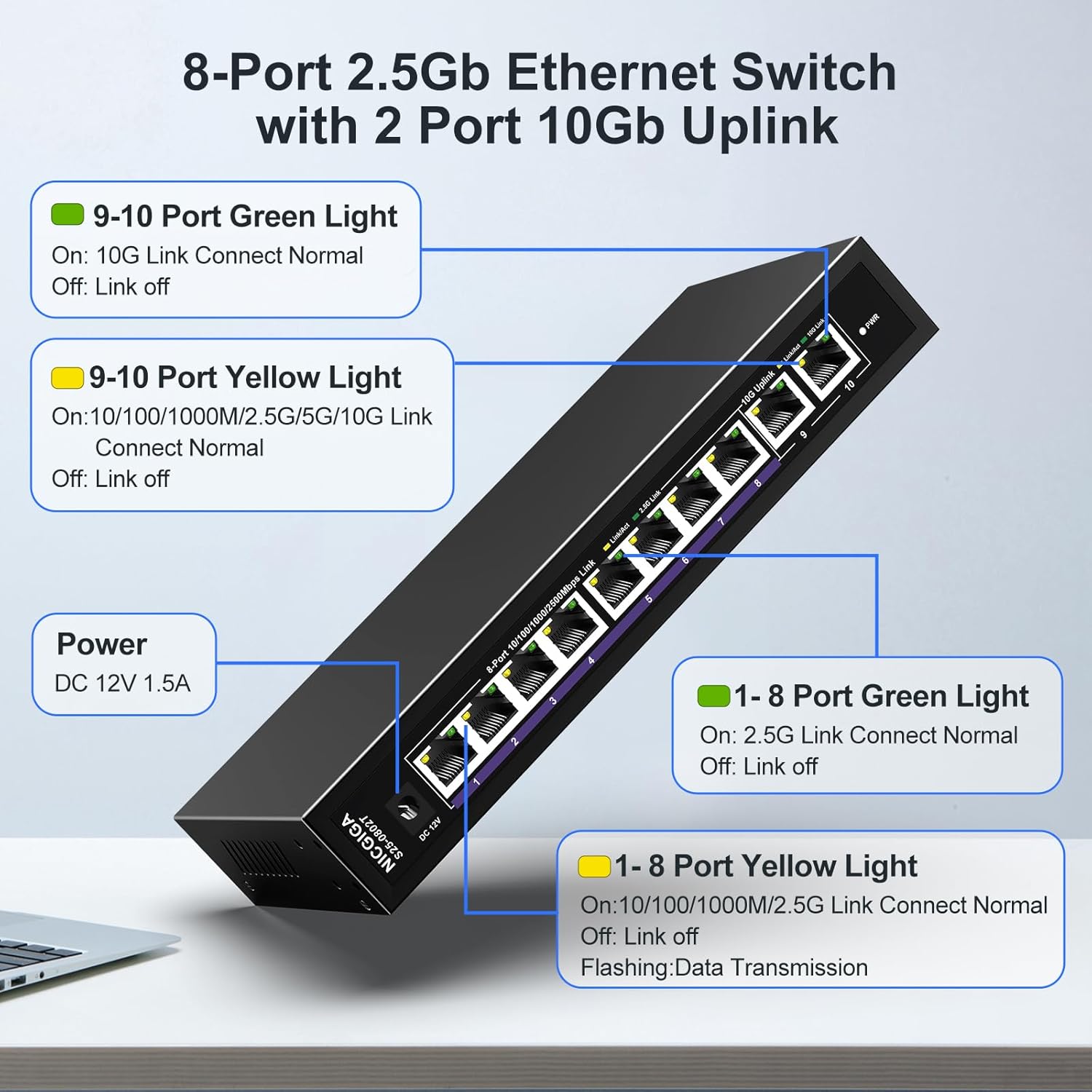
7. LED үзүүлэлтүүд
The switch features LED indicators to provide real-time status information for each port and the device itself.
| Үзүүлэлт | Статус | Тодорхойлолт |
|---|---|---|
| Хүч | On | Шилжүүлэгч асаалттай байна. |
| Ports 1-8 Green Light | On | 2.5G Link Connect Normal. |
| Унтраах | Link off. | |
| Ports 1-8 Yellow Light | On | 10/100/1000M/2.5G Link Connect Normal. |
| Анивчих | Data Transmission. | |
| Унтраах | Link off. | |
| Ports 9-10 Green Light | On | 10G Link Connect Normal. |
| Унтраах | Link off. | |
| Ports 9-10 Yellow Light | On | 10/100/1000M/2.5G/5G/10G Link Connect Normal. |
| Анивчих | Data Transmission. | |
| Унтраах | Link off. |
8. Network Cable Compatibility
Using appropriate Ethernet cables is crucial for achieving optimal network speeds.
- For 2.5Gbps Ports (1-8):
- CAT5e Cable (≤100m)
- CAT6/6a Cable (≤100m)
- CAT7 Cable (≤100m)
- For 10Gbps Ports (9-10):
- CAT6 Cable (≤55m)
- CAT6a Cable (≤100m)
- CAT7 Cable (≤100m)


9. Техникийн үзүүлэлтүүд
| Онцлог | Дэлгэрэнгүй |
|---|---|
| Загварын дугаар | S25-0802T |
| Портын тоо | 10 (8 x 2.5Gb RJ45, 2 x 10Gb RJ45) |
| Интерфейсийн төрөл | RJ45 |
| Өгөгдөл дамжуулах хурд | Секундэд 60 Гигабит (Соних хүчин чадал) |
| Дээд температурын үнэлгээ | Цельсийн 50 градус |
| Зүйлийн жин | 1.76 фунт |
| Багцын хэмжээ | 9.8 x 9.61 x 2.99 инч |
| Өнгө | Хар |
| Тохиромжтой төхөөрөмжүүд | Ширээний компьютер, Тоглоомын консол, Зөөврийн компьютер, Принтер, Чиглүүлэгч |
| Үйлдвэрлэгч | NICGIGA |
10. Алдаа засах
If you encounter issues with your NICGIGA switch, refer to the following common troubleshooting steps:
- Эрчим хүчгүй:
- Цахилгаан адаптер нь унтраалга болон ажиллаж байгаа цахилгаан залгуурт найдвартай холбогдсон эсэхийг шалгаарай.
- Цахилгааны залгуур ажиллаж байгаа эсэхийг шалгана уу.
- Холбоосын гэрэл байхгүй:
- Ethernet кабель нь шилжүүлэгч порт болон сүлжээний төхөөрөмж хоёуланд нь найдвартай холбогдсон эсэхийг шалгана уу.
- Өөр Ethernet кабель ашиглаж үзнэ үү.
- Холбогдсон төхөөрөмж асаалттай, сүлжээний адаптер идэвхжсэн эсэхийг шалгаарай.
- Verify the cable type is appropriate for the desired speed (refer to Section 8).
- Сүлжээний хурд удаан:
- Ensure your network cables are rated for the desired speed (e.g., CAT6a or CAT7 for 10Gbps).
- Check the network adapter settings on your connected devices to ensure they are configured for auto-negotiation or the correct speed.
- Confirm that the connected devices themselves support the higher speeds (2.5Gbps or 10Gbps).
- Завсарлагатай холболт:
- Ethernet кабель гэмтсэн эсэхийг шалгана уу.
- Ensure the switch is placed in a well-ventilated area to prevent overheating, although its fanless design is optimized for heat dissipation.
- Avoid placing the switch near strong electromagnetic interference sources.
11. Засвар үйлчилгээ
To ensure the longevity and optimal performance of your switch, follow these maintenance guidelines:
- Цэвэрлэгээ: Шилжүүлэгчийн гадна талыг зөөлөн, хуурай даавуугаар цэвэрлэ. Шингэн болон аэрозол цэвэрлэгч хэрэглэж болохгүй.
- Агааржуулалт: Ensure that the ventilation holes on the sides of the switch are not obstructed to allow for proper heat dissipation.
- Байгаль орчин: Operate the switch within its specified temperature range (-10~50°C) and humidity levels.
- Эрчим хүчний мөчлөг: Шилжүүлэгч хариу өгөхгүй бол тэжээлийн адаптерийг салгаад 10 секунд хүлээгээд дахин холбоно уу.

12. Баталгаат хугацаа ба дэмжлэг
NICGIGA provides the following support for this product:
- Баталгаат хугацаа: Худалдан авсан өдрөөс хойш нэг жилийн баталгаат хугацаа олгоно.
- Техникийн дэмжлэг: Lifetime technical support is available for the product.
For warranty claims or technical assistance, please contact NICGIGA customer support through the retailer where the product was purchased or visit the official NICGIGA webсайт.