
Танилцуулга
Welcome to the user manual for your Samsung QN65QN990FFXZA 65 Inch QN990F Neo QLED 8K TV. This document provides essential information for setting up, operating, maintaining, and troubleshooting your television. Please read these instructions carefully to ensure proper use and to maximize your viewтуршлага.

Зураг 1: Урд view of the Samsung QN65QN990FFXZA 65 Inch QN990F Neo QLED 8K TV.
Тохиргоо
1. Савлах ба байрлуулах
- Сав баглаа боодолоос ТВ болон бүх дагалдах хэрэгслийг болгоомжтой авч хая.
- Place the TV on a stable, flat surface or mount it on a wall using a VESA 400mm x 300mm compatible mount. Ensure adequate ventilation around the TV.
2. Connecting the Wireless One Connect Box
The Samsung QN990F utilizes a Wireless One Connect Box to manage all external connections, reducing cable clutter around the TV. Connect all your devices to this box.

Figure 2: Wireless One Connect Box for streamlined connections.
3. Гадаад төхөөрөмжийн холболтууд
Connect your external devices (e.g., Blu-ray player, game console, soundbar) to the Wireless One Connect Box using the appropriate ports.

Figure 3: Detailed diagram of the Wireless One Connect Box ports.
- Кабель/ANT: Connect for over-the-air antenna or cable TV signals.
- USB-A: Цахилгаан эсвэл медиа тоглуулах стандарт тэгш өнцөгт порт.
- EX-LINK: Гадны хяналт, оношлогооны Samsung үйлчилгээний порт.
- HDMI 1, 2, 4: Transmits high-definition video and audio from external devices. Supports 8K@120Hz / 4K@240Hz for Gaming.
- HDMI 3 (eARC): Enhanced audio return for high-quality sound and advanced formats. Supports 8K@120Hz / 4K@240Hz for Gaming.
- Ethernet: Дамжуулалт, шинэчлэлт, ухаалаг функцүүдэд зориулсан утастай интернет холболт.
- Аудио гаралт (оптик): Өндөр чанарын дижитал аудиог soundbar эсвэл хүлээн авагчид хүргэдэг.
- Эрчим хүч: Connects the power cable to the Wireless One Connect Box.
4. Эрчим хүчний холболт
- Connect the power cable to the Wireless One Connect Box, then plug it into a wall outlet.
- Ensure the TV is properly connected to the One Connect Box.
Ашиглалтын заавар
1. Анхны тохиргоо болон ухаалаг функцууд
Upon first power-on, the TV will guide you through the initial setup process, including network connection, channel scanning, and smart feature configuration. The TV runs on the One UI Tizen operating system.
- NQ8 AI Gen3 процессор: This processor optimizes content for enhanced viewing.
- 8K AI Upscaling Pro: Lower resolution content is automatically upscaled to near 8K clarity.

Figure 4: 8K AI Upscaling Pro enhances content to near 8K resolution.
2. Зургийн чанарыг сайжруулах
- Glare Free: This technology minimizes reflections on the screen, improving visibility in bright environments.
- Neo Quantum HDR 8K+: Experience enhanced contrast and color depth.
- Quantum Matrix Technology Pro: Precise light control for detailed images.
- Хэт Viewөнцөг Maintains picture quality from various viewбайрлалууд.
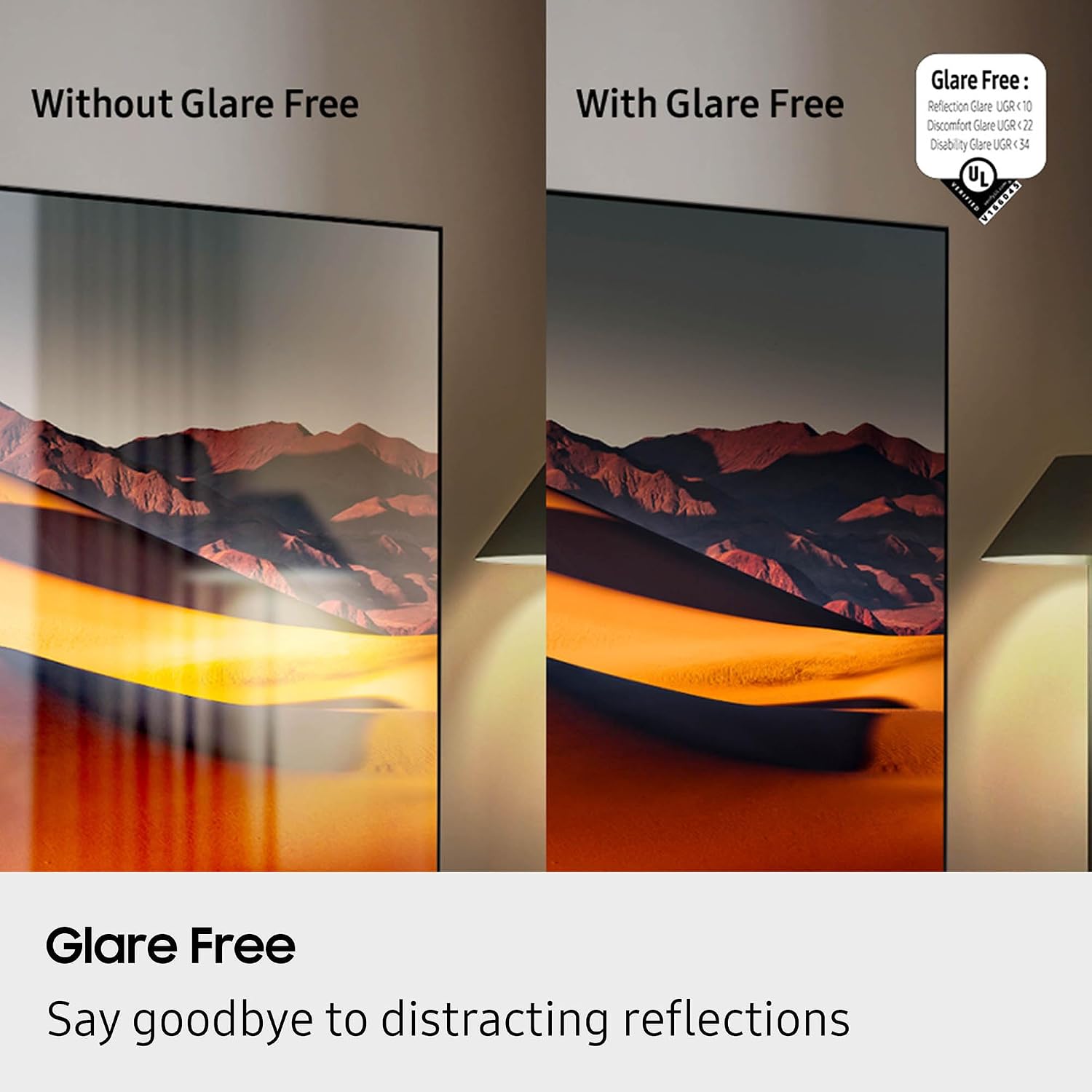
Figure 5: Glare Free technology reduces screen reflections.
3. Аудио онцлог
- Dolby Atmos: Иммерсив, олон хэмжээст дуу чимээг бий болгодог.
- Q-симфони: Synchronizes TV speakers with compatible Samsung soundbars for a richer audio experience.
- AVA Pro (Active Voice Amplifier Pro): Enhances dialogue clarity in noisy environments.
- Adaptive Sound Pro: Агуулга болон өрөөний акустик дээр үндэслэн дууг оновчтой болгодог.
- 6.2.4 сувгийн хүрээлэн буй орчны дуу чимээ: Integrated speaker system for a comprehensive audio field.
4. Тоглоомын онцлог
- Тоглоомын төв: Access cloud gaming services and console games directly from your TV.
- 120Hz Refresh Rate & VRR FreeSync Premium Pro: Ensures smooth, tear-free gaming.

Figure 6: Samsung Gaming Hub for integrated gaming experience.
5. Бүтээгдэхүүний албан ёсны видео
Видео 1: Мэдээллийн төгсгөлview of the Samsung QN990F Series TV features and capabilities.
Засвар үйлчилгээ
1. Дэлгэц цэвэрлэх
To clean your TV screen, use a soft, lint-free cloth. For stubborn marks, a non-ammonia and alcohol-free screen cleaning solution is recommended.

Figure 7: Recommended screen cleaning solution for display screens.
- Apply cleaning solution to the cloth, not directly to the screen.
- Тоос, шороо, хурууны хээг арилгахын тулд дэлгэцийг зөөлөн арч.
- Хүчтэй химийн бодис, зүлгүүрийн материалаас зайлсхий.
2. Програм хангамжийн шинэчлэлтүүд
Periodically check for and install software updates to ensure optimal performance and access to the latest features. This can usually be done through the TV's settings menu under "Support" or "Software Update."
Алдааг олж засварлах
Хэрэв та зурагттайгаа холбоотой асуудалтай тулгарвал дараах нийтлэг алдааг олж засварлах алхмуудыг үзнэ үү.
No Power / No Picture
- Ensure the power cable is securely connected to both the One Connect Box and the wall outlet.
- Verify the One Connect Box is properly connected to the TV.
- Өөр төхөөрөмж залгах замаар ханын залгуур ажиллаж байгаа эсэхийг шалгана уу.
- Алсын удирдлага эсвэл ТВ өөрөө асаах товчийг дарна уу.
Дуу байхгүй
- ТВ болон бусад холбогдсон аудио төхөөрөмж (soundbar, хүлээн авагч) дээрх дууны түвшинг шалгана уу.
- ТВ-ийн дууг хаагаагүй эсэхийг шалгаарай.
- Verify audio cables are correctly connected to the One Connect Box.
- If using external audio, check the audio output settings on the TV.
Зургийн чанар муу
- Check the source resolution. While 8K AI Upscaling Pro enhances content, native 8K content will provide the best quality.
- Зурагтын цэснээс зургийн тохиргоог (тод байдал, контраст, хурц тод байдал, өнгө) тохируулна уу.
- Ensure all video cables are securely connected and not damaged.
- If using an antenna, check antenna positioning and signal strength.
Алсын удирдлага ажиллахгүй байна
- Алсын удирдлага дахь батерейг солино уу.
- Алсын удирдлага болон ТВ хооронд ямар ч саад бэрхшээл байхгүй эсэхийг шалгаарай.
- Try re-pairing the remote control with the TV if it's a Bluetooth remote (refer to the TV's on-screen guide for pairing instructions).
Үзүүлэлтүүд
| Онцлог | Тодорхойлолт |
|---|---|
| Загварын нэр | QN65QN990FFXZA |
| Дэлгэцийн хэмжээ | 65 инч |
| Дэлгэцийн технологи | Neo QLED |
| Шийдвэр | 8K |
| Сэргээх хурд | 120 Гц |
| Процессор | NQ8 AI Gen3 процессор |
| Өргөтгөсөн технологи | 8K хиймэл оюун ухааныг дээшлүүлэх мэргэжлийн |
| Үйлдлийн систем | Нэг UI Tizen |
| Холболт | HDMI x 5, USB-A x 3, USB-C x 1, Ethernet, RF, Wireless One Connect, Bluetooth, Wi-Fi |
| Аудио гаралтын горим | Surround (6.2.4 channel) |
| Integrated Surround Sound | Dolby Atmos |
| HDR форматыг дэмждэг | HDR10+, HDR10 |
| Бүтээгдэхүүний хэмжээ (D x W x H) | 10.5"D x 56.4"W x 35.1"H |
| Зүйлийн жин | 66.6 фунт |
| VESA холбох стандарт | 400 мм x 300 мм |
| Өнгө | Графит хар |
Баталгаат болон дэмжлэг
Үйлдвэрлэгчийн баталгаа
Your Samsung QN65QN990FFXZA 65 Inch QN990F Neo QLED 8K TV comes with a full 1-year manufacturer's warranty. This warranty covers defects in materials and workmanship under normal use. Please retain your proof of purchase for warranty claims.
Хэрэглэгчийн дэмжлэг
For technical assistance, troubleshooting beyond this manual, or warranty service, please contact Samsung Customer Support. Refer to the official Samsung website or your product registration documents for the most current contact information.
- Онлайн дэмжлэг: Samsung-ийн албан ёсны дэмжлэгт зочилно уу webсайт.
- Утасны дэмжлэг: Contact the Samsung customer service hotline.


