
1. Танилцуулга
The AJAZZ AKP03 Macro Keypad Stream Controller is a versatile device designed to enhance productivity and streamline workflows for gamers, streamers, and professionals. Featuring six programmable keys with LCD displays, three physical knobs, and three toggle switches, it offers extensive customization options for various tasks.
This manual provides detailed instructions for setting up, operating, and maintaining your AKP03 device, ensuring optimal performance and user experience.
2. Бүтээгдэхүүний онцлог
- Six Programmable Macro Keys: Customizable LCD displays for single or continuous actions.
- Three Physical Knobs: For precise control over various functions.
- Three Toggle Switches: Additional control options.
- One-Click Operation: Instant execution of macro commands, text input, application launches, and media control.
- Intuitive Driver Software: Drag-and-drop functionality for easy key assignment and property configuration.
- Өргөн нийцтэй байдал: Seamless integration with platforms like Streamlabs, Twitch, YouTube, and various software applications on Windows and Mac.
- Removable 40° Stand: Provides an ergonomic viewing angle and stable placement.

Зураг 2.1: Илүүview of the AJAZZ AKP03 Macro Keypad, highlighting its programmable buttons, toggle switches, and scroll wheels.
3. Багцын агуулга
Таны багцад бүх зүйл байгаа эсэхийг шалгана уу:
- AJAZZ AKP03 Macro Keypad Stream Controller
- USB-C-аас USB-A кабель
- Removable 40° Stand
- Хэрэглэгчийн гарын авлага (энэ баримт бичиг)
4. Тохиргоо
4.1 Физик холболт
- Attach the removable 40° stand to the bottom of the AKP03 for an ergonomic angle, if desired.
- Connect the provided USB-C cable to the USB-C port on the AKP03.
- Кабелийн USB-A үзүүрийг компьютер дээрээ (PC эсвэл Mac) байгаа USB порт руу холбоно уу.
- Төхөөрөмж автоматаар асах болно.

Figure 4.1: Attaching the removable 40° stand to the AKP03.
4.2 Програм хангамж суурилуулах
To unlock the full customization capabilities of your AKP03, you must install the dedicated driver software.
- Таныг нээ web browser and navigate to the official AJAZZ webсайт: www.a-jazz.com.
- Locate the 'Driver Download' section.
- хайх 'AKP03' or browse for the corresponding driver for your model.
- Download the driver software compatible with your operating system (Windows or macOS).
- Суулгагчийг ажиллуулаад дэлгэцэн дээрх зааврыг дагаж суулгаж дуусга.
- Хэрэв асуувал компьютерээ дахин эхлүүлнэ үү.
Video 4.1: Demonstrates the software installation process and initial setup for the AJAZZ Macro Keypad.
5. Ашиглалтын заавар
5.1 Customizing Keys and Knobs
The AKP03's driver software provides a user-friendly interface for customization:
- Launch the 'Stream Dock AJAZZ' software from your desktop or applications folder.
- The software will display a visual representation of your AKP03.
- To assign an action, drag and drop a desired function (e.g., launch application, media control, macro command) from the software's library onto one of the six programmable keys.
- For knobs, select the knob in the software and assign functions such as volume control, scrolling, or zooming.
- You can configure properties for each assigned action, including specific file замууд, web URLs, or macro sequences.
- The LCD displays on the keys will update to show the assigned icon or text.
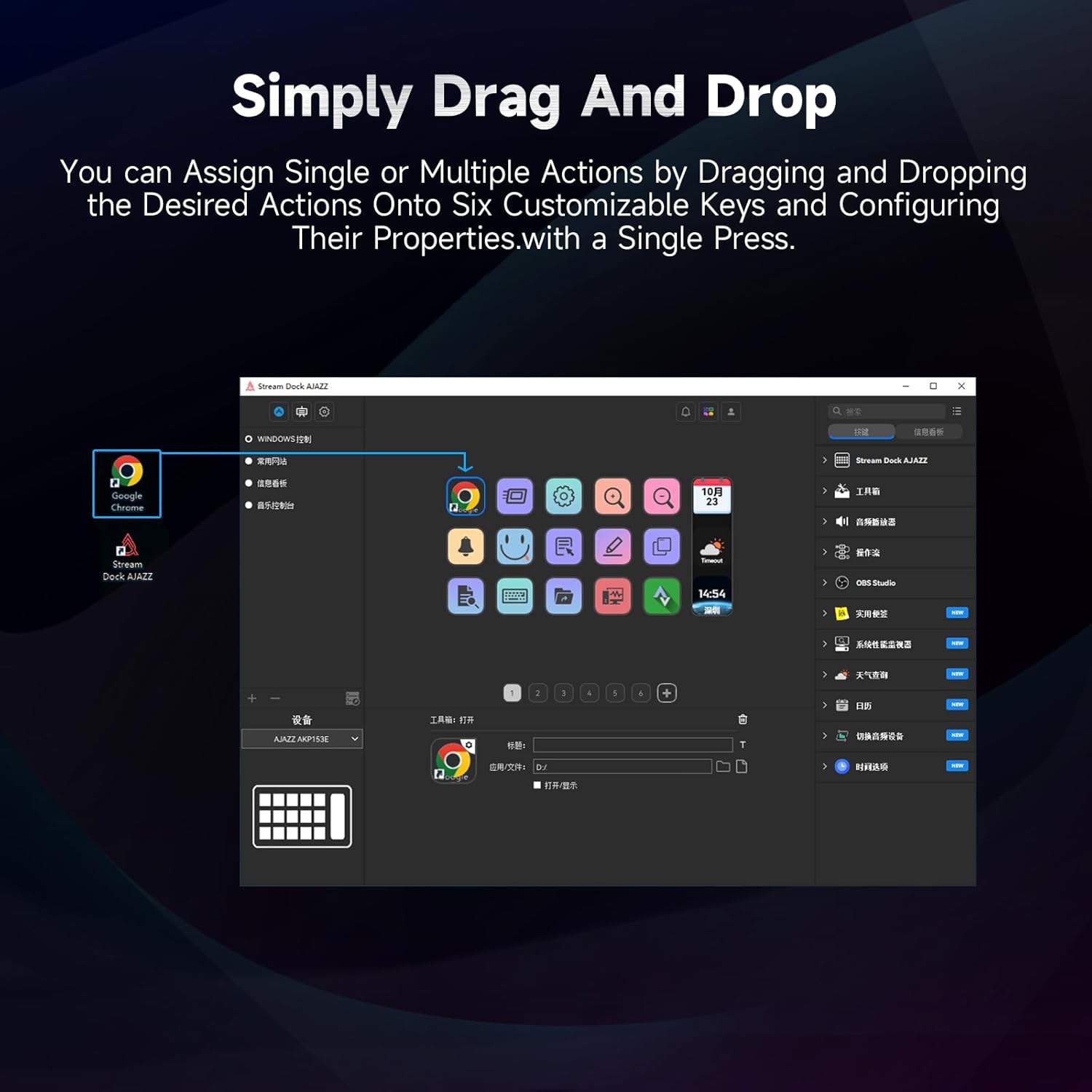
Figure 5.1: Customizing keys using the drag-and-drop interface in the AJAZZ software.
Video 5.1: Demonstration of assigning actions to keys for launching web pages and software with a single click.
5.2 Using Profiles and Pages
The software supports multiple profiles and pages, allowing you to switch between different sets of key assignments for various applications or tasks.
- Шинэ мэргэжилтэн үүсгэхfiles for specific games, editing software, or streaming setups.
- Мэргэжлийн хүн бүрийн доторfile, you can create multiple pages of key assignments, accessible by navigating through the device's buttons or software interface.
- The AKP03 automatically switches to the relevant profile when a linked application is in focus.
Video 5.2: Illustrates the multi-functional capabilities and profile switching of the AKP03 for various tasks.
6. Засвар үйлчилгээ
To ensure the longevity and optimal performance of your AJAZZ AKP03, follow these maintenance guidelines:
- Цэвэрлэгээ: Use a soft, dry cloth to wipe the surface of the device. Avoid abrasive cleaners or solvents.
- Хадгалах: Төхөөрөмжийг нарны шууд тусгал, хэт температураас хол, сэрүүн, хуурай газар хадгална.
- Кабель арчилгаа: Гэмтлээс урьдчилан сэргийлэхийн тулд USB кабелийг хэт нугалах, мушгихаас зайлсхий.
- Програм хангамжийн шинэчлэлтүүд: Regularly check the AJAZZ website for software and firmware updates to ensure compatibility and access to new features.
7. Алдаа засах
If you encounter issues with your AKP03, refer to the following common troubleshooting steps:
- Төхөөрөмжийг танихгүй байна:
- Ensure the USB cable is securely connected to both the AKP03 and your computer.
- Өөр USB порт руу холбогдож үзнэ үү.
- Компьютерээ дахин эхлүүлнэ үү.
- Verify that the driver software is correctly installed and up to date.
- Хариу өгөхгүй байгаа түлхүүрүүд:
- Check the software to ensure keys are properly assigned and the correct profile идэвхтэй байна.
- Драйверын програм хангамж ард ажиллаж байгаа эсэхийг шалгаарай.
- Програм хангамжийн асуудлууд:
- Reinstall the driver software.
- Check for software updates on the AJAZZ webсайт.
8. Техникийн үзүүлэлтүүд
| Онцлог | Дэлгэрэнгүй |
|---|---|
| Брэнд | АЖАЗ |
| Загварын нэр | AKP03 |
| Тохиромжтой төхөөрөмжүүд | Компьютер, зөөврийн компьютер |
| Хянагчийн төрөл | Гар |
| Холболтын технологи | USB-C |
| Товчлуурын тоо | 6 Programmable Keys (with LCD displays), 3 Physical Knobs, 3 Toggle Switches |
| Зүйлийн жин | 0.32 кг |
| Хэмжээ (L x W x H) | 5 x 3 x 2 инч |
| Эрчим хүчний эх үүсвэр | Утастай цахилгаан |
9. Баталгаат хугацаа ба дэмжлэг
9.1 Баталгаат хугацааны мэдээлэл
The AJAZZ AKP03 Macro Keypad Stream Controller comes with a 1 жилийн хязгаарлагдмал баталгаат хугацаа худалдан авсан өдрөөс. Энэхүү баталгаа нь ердийн ашиглалтын үеийн үйлдвэрлэлийн согог, доголдлыг хамарна. Энэ нь буруу ашиглалт, осол аваар, зөвшөөрөлгүй өөрчлөлт, буруу суурилуулалтын улмаас учирсан хохирлыг хамрахгүй.
Баталгаат заргад зориулж худалдан авалтаа нотлох баримтаа үлдээнэ үү.
9.2 Хэрэглэгчийн дэмжлэг
For technical assistance, troubleshooting, or warranty inquiries, please contact AJAZZ customer support:
- Webсайт: www.a-jazz.com (Refer to the 'Support' or 'Contact Us' section)
- Имэйл: [Insert Customer Support Email, if available]
- Утас: [Insert Customer Support Phone Number, if available]
Our support team is available to assist you with any questions or concerns regarding your product.