
Танилцуулга
This manual provides essential information for setting up, operating, and maintaining your Roku 32-Inch Select Series 1080p Full HD Smart TV. Designed for a delightful streaming experience, this TV offers excellent picture quality, clear sound, and automatic updates. Please read this manual thoroughly before using your television.
Хайрцагт юу байна
Савлагаанд бүх бүрэлдэхүүн хэсгүүд байгаа эсэхийг шалгана уу:
- Roku 32-Inch Select Series 1080p Full HD Smart TV
- Алсын удирдлага
- Тавиур (2 ширхэг)
- Stand Screws (4 pieces)
- Цахилгаан кабель
- Хэрэглэгчийн гарын авлага (энэ баримт бичиг)

Image: Contents of the Roku TV box, showing the television, remote control, two stand pieces, and four screws.
Тохируулах заавар
1. Телевизийн тавиурыг холбох
- Carefully place your TV face-down on a soft, clean surface to prevent damage to the screen.
- Тавиурын хэсгүүдийг ТВ-ийн ёроолд байгаа шураг нүхнүүдтэй зэрэгцүүлнэ.
- Secure each stand piece with two screws using a Phillips head screwdriver. Do not overtighten.
2. Цахилгаан болон төхөөрөмжүүдийг холбох
- Цахилгааны кабелийг ТВ-ийн тэжээлийн оролтод, дараа нь ханын залгуурт холбоно.
- Connect your external devices (e.g., cable box, gaming console, Blu-ray player) to the available HDMI ports on the back of the TV. This model features 3 HDMI ports.
- For older devices, use the AV input ports (yellow, white, red).
- An optical audio output is available for connecting to soundbars or home theater systems.
- A USB port is provided for media playback.

Зураг: Ар талд view of the Roku TV displaying HDMI, AV, Antenna, USB, Optical, and Headphone ports.
3. Анхдагч асаалт ба сүлжээний холболт
- Алсын удирдлага эсвэл ТВ дээрх цахилгаан товчийг дарна уу.
- Follow the on-screen instructions to select your language and connect to your Wi-Fi network.
- Activate your Roku account or create a new one. This is required to access streaming channels and features.
Ашиглалтын заавар
1. Roku OS Interface
The Roku OS provides a simple and intuitive home screen for accessing all your entertainment. Easily navigate between streaming apps, live TV, and connected devices.

Image: The Roku TV home screen with a menu on the left and app icons on the right, including Netflix, Disney+, Apple TV, and Roku Channel.
2. Voice Remote
Your Roku TV comes with a voice remote for convenient control. Use your voice to search for content, launch apps, and control playback.
- Дуут хайлт: Press the voice button and speak your command (e.g., "Find comedies," "Open Netflix").
- Програмын товчлол: Тусгай товчлуурууд нь алдартай стрийминг үйлчилгээнд хурдан хандах боломжийг олгодог.
- Дууны хяналт: Хажуугийн товчлууруудыг ашиглан дууны хэмжээг тохируулна уу.
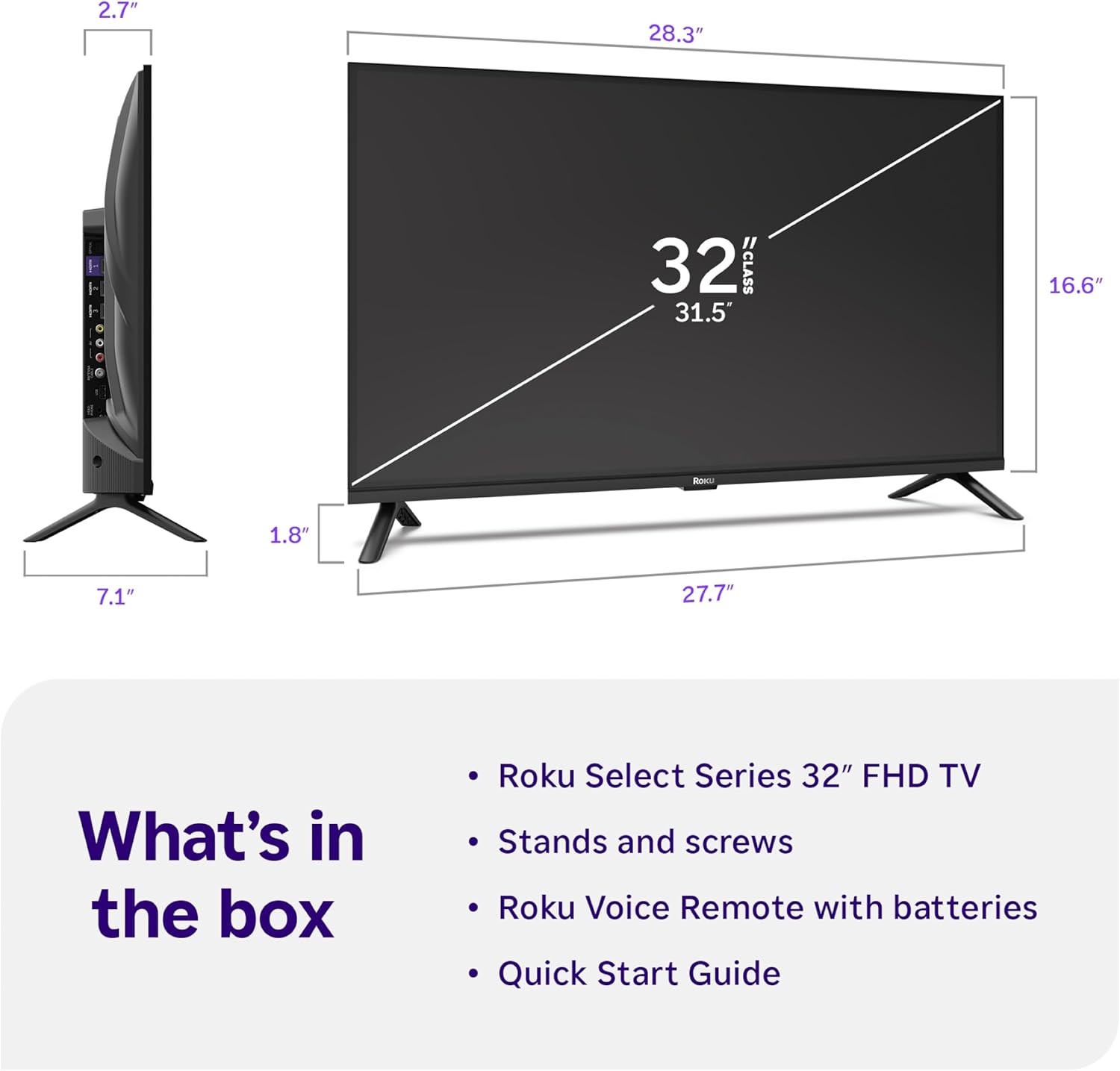
Image: Close-up of the Roku Voice Remote, highlighting buttons for TV power, volume, mute, voice search, instant replay, options, and dedicated app shortcuts.
3. Streaming Apps and Live TV
Access thousands of streaming channels, including Netflix, Disney+, Hulu, Prime Video, and Apple TV+. The Roku Channel also offers free live TV and on-demand content.

Image: A vibrant Roku TV home screen displaying a selection of popular streaming applications and recommended shows.
4. Зургийн тохиргоо
Өөрийгөө оновчтой болго viewянз бүрийн зургийн тохиргоог ашиглах туршлага:
- Roku Smart Picture: Automatically adjusts picture mode for optimal viewing.
- Зургийн горимууд: Choose from presets like Movie, Sports, Vivid, Standard, or Low Power.
- Тохируулга: Adjust brightness, contrast, sharpness, color, and tint for a personalized picture.
5. Дууны тохиргоо
Аудио туршлагыг сайжруулна уу:
- Dolby Аудио: Enjoy clear speech and louder sound.
- Дууны горимууд: Select from Standard, Dialogue, Movie, Music, or Night mode.
- Bluetooth чихэвчний горим: Connect your wireless headphones to listen without disturbing others.

Image: A child wearing wireless headphones while watching the Roku TV, demonstrating the Bluetooth Headphone Mode.
6. Ухаалаг гэрийн интеграци
Your Roku TV is compatible with various smart home ecosystems:
- Дуут удирдлага: Use Roku Voice, Siri, Alexa, or Google Assistant for hands-free control.
- Apple AirPlay: Effortlessly share videos, photos, and music from your Apple devices.
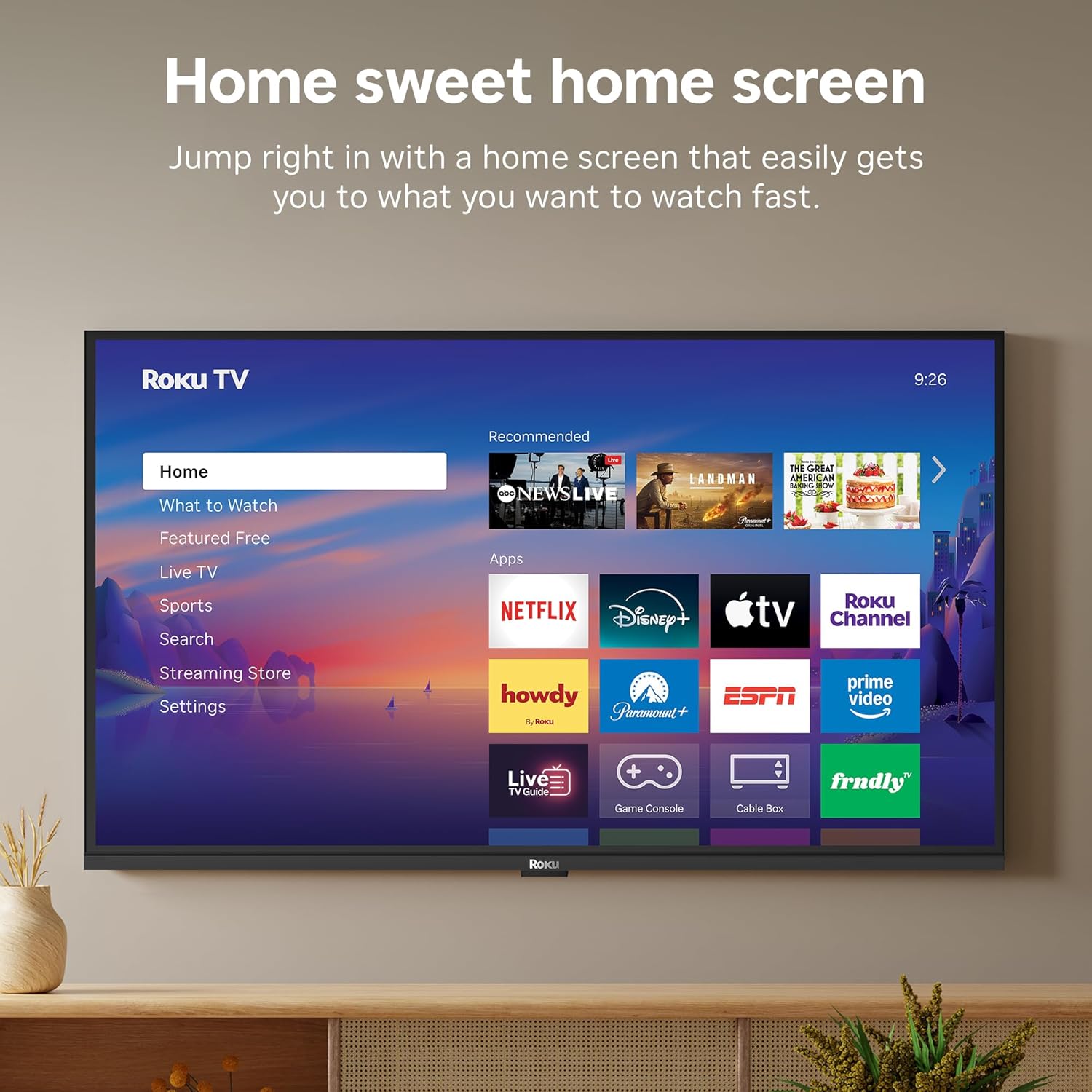
Image: The Roku TV screen displaying smart home compatibility logos for Roku Smart Home, Apple AirPlay, Apple Home, Alexa, and Google Home, with a smart speaker nearby.
7. Эцэг эхийн хяналт
Manage content access with built-in parental controls, including V-Chip technology, to ensure a safe viewхүүхдэд зориулсан орчин.
Бүтээгдэхүүний албан ёсны видео
Видео: Дууслааview of the Roku TV OS, demonstrating its user-friendly interface, app selection, and smart features. This video is provided by Roku, Inc.
Үзүүлэлтүүд
- Дэлгэцийн хэмжээ:
- 32 инч
- Шийдвэр:
- 1080p бүрэн HD
- Дэлгэцийн технологи:
- LED
- Сэргээх хурд:
- 60 Гц
- Онцлог шинж чанарууд:
- Bluetooth Headphone Mode, Dolby Audio, Voice Remote, Roku Smart Picture
- Холболтын технологи:
- Bluetooth, WiFi
- Техник хангамжийн интерфейс:
- 3 HDMI Ports, 1 USB Port, S/PDIF (Optical Audio Out)
- Үйлдлийн систем:
- Roku үйлдлийн систем
- Бүтээгдэхүүний хэмжээс (D x W x H):
- 7.1"D x 28.3"W x 18.4"H
- Барааны жин:
- 7.7 фунт (суурьтай)
- VESA холбох стандарт:
- 200 х 200 мм
- Загварын дугаар:
- 32R3E5
- UPC:
- 829610009469
Алдааг олж засварлах
If you encounter issues with your Roku TV, please refer to the following common solutions:
- Эрчим хүчгүй: Цахилгааны кабель нь зурагт болон ажиллаж байгаа цахилгааны залгуурт найдвартай холбогдсон эсэхийг шалгаарай. Өөр залгуураар оролдоно уу.
- Зураг/дуу чимээ байхгүй: Verify that the correct input source is selected on your TV. Check all cable connections (HDMI, AV, etc.) for looseness.
- Алсын удирдлага хариу өгөхгүй байна: Replace the batteries in your remote control. Ensure there are no obstructions between the remote and the TV.
- Сүлжээний холболтын асуудлууд: Restart your Wi-Fi router and modem. Go to the TV's Settings > Network > Check connection to diagnose and reconnect.
- Апп ачаалахгүй байна: Restart the app. If the issue persists, try removing and reinstalling the app from the Roku Channel Store.
For more detailed troubleshooting, visit the official Roku support webсайт.
Засвар үйлчилгээ
To ensure the longevity and optimal performance of your Roku TV, follow these maintenance guidelines:
- Дэлгэц цэвэрлэх: Дэлгэцийг зөөлөн, хуурай microfiber даавуугаар зөөлөн арчина. Зөрүүд толбоны хувьд бага зэрэг dampдаавуунд ус эсвэл электроникийн зориулалттай тусгайлан зориулсан дэлгэц цэвэрлэх уусмал. Дэлгэц рүү шууд шингэн цацаж болохгүй.
- ТВ-ийн их биеийг цэвэрлэх: Use a soft, dry cloth to wipe the exterior of the TV. Avoid abrasive cleaners or solvents.
- Агааржуулалт: Хэт халалтаас сэргийлэхийн тулд ТВ-ийн агааржуулалтын нүхийг хаагаагүй эсэхийг шалгаарай. ТВ-ийн эргэн тойронд агаарын солилцоог хангах хангалттай зайг хадгалах.
- Програм хангамжийн шинэчлэлтүүд: Your Roku TV automatically receives software updates. Ensure your TV is connected to the internet to receive the latest features and performance improvements.
- Эрчим хүчний менежмент: Аянга шуургатай үед эсвэл удаан хугацаагаар хараа хяналтгүй байх үед ТВ-ээ цахилгааны залгуураас салга.
Баталгаат болон дэмжлэг
Баталгаат хугацааны мэдээлэл
Roku warrants the hardware of this device against defects in materials and workmanship under normal use for a period of one (1) year from the date of purchase ("Warranty Period"). If Roku determines that the device’s hardware is defective during the Warranty Period, Roku’s sole obligation, and your exclusive remedy, will be to either repair or replace the unit with either a new or rebuilt device, at its option. This warranty applies if the device is used in accordance with the provided documentation.
Important information about warranty returns and replacements is available on the Roku support site. You may also return a device for any reason, subject to the terms of the applicable return policy: 1) Within thirty (30) days from the date of purchase from Roku; or 2) within the applicable return period if purchased from an authorized reseller or distributor. Additional details regarding product returns can be found on the Roku support site.
Хэрэглэгчийн дэмжлэг
For further assistance, technical support, or to access the full range of support resources, please visit the official Roku support webсайт. Та эндээс түгээмэл асуултууд, алдааг олж засварлах заавар, харилцагчийн үйлчилгээний холбоо барих мэдээллийг олж авах боломжтой.