
1. Танилцуулга
Thank you for choosing the Acer Gadget Golf Rangefinder. This device is designed to provide precise distance measurements for golf, hunting, and other outdoor activities. Featuring advanced laser technology, 6x magnification, slope compensation, and anti-shake capabilities, it offers reliable performance. Please read this manual thoroughly to understand the proper operation and care of your rangefinder.

The Acer Gadget Golf Rangefinder, a compact and ergonomic device designed for precise distance measurement.
2. Тохиргоо
2.1 Хайрцагнаас задлах, анхны үзлэг
Багцыг нээхэд бүх бүрэлдэхүүн хэсгүүд байгаа эсэхийг шалгаарай:
- Acer Range Finder unit
- USB-C цэнэглэгч кабель
- Зөөврийн цүнх
- Линз цэвэрлэх даавуу
- Хэрэглэгчийн гарын авлага
Video demonstrating the unboxing process of the Acer Gadget Golf Rangefinder, showing the included accessories.
2.2 Зайг цэнэглэх
The rangefinder is equipped with a built-in USB-C rechargeable battery. Before first use, fully charge the device.
- Хүрээ хэмжигчийн хажуу талд USB-C цэнэглэгч портыг олоорой.
- Өгөгдсөн USB-C кабелийг зай хэмжигч болон тохирох USB тэжээлийн эх үүсвэрт (жишээ нь, компьютер, ханын адаптер) холбоно уу.
- A charging indicator light will illuminate. It will change color or turn off when fully charged.
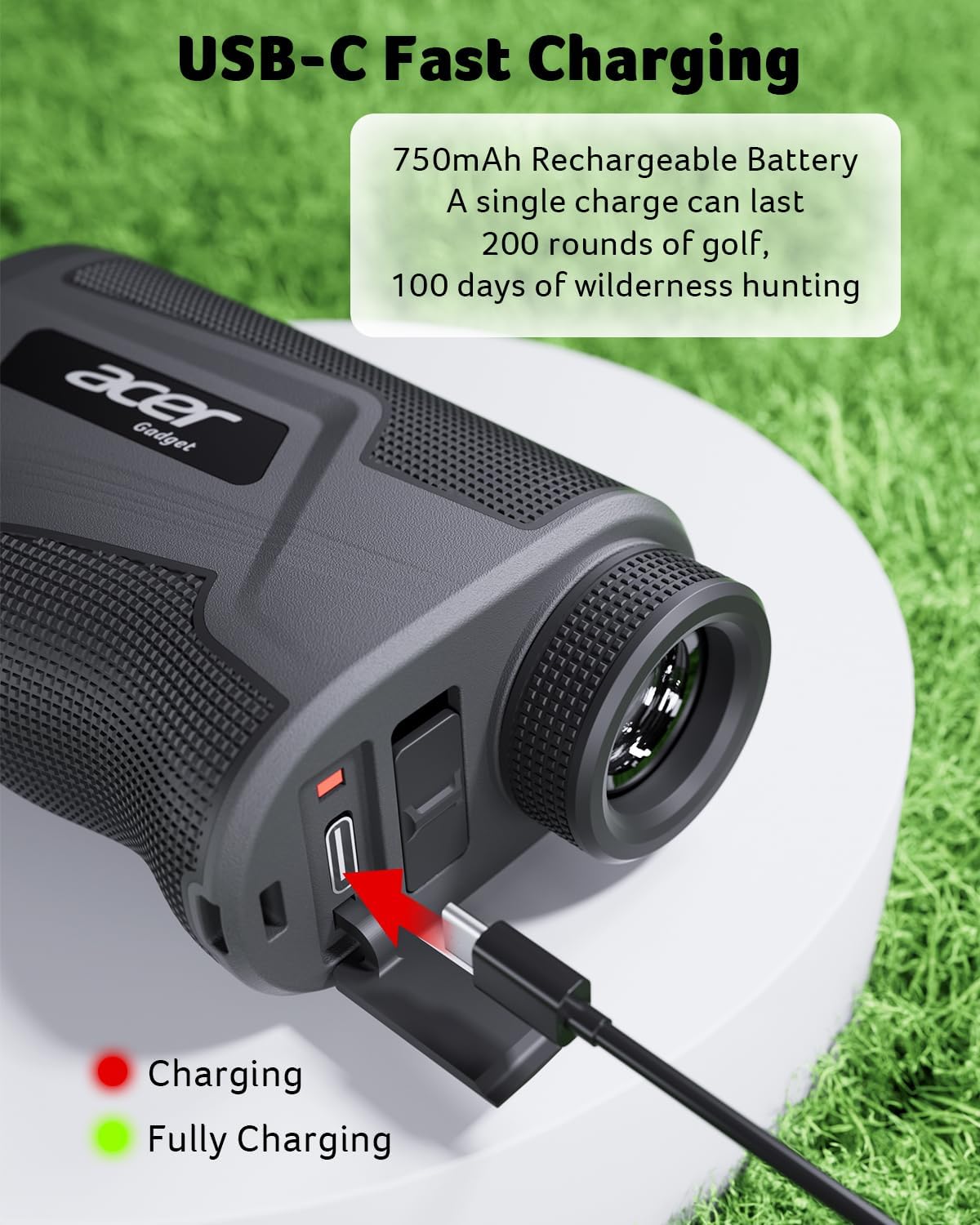
Image showing the USB-C charging port on the rangefinder, with a cable connected and indicating charging status.
2.3 Power On/Off and Focus Adjustment
To power on the device, press the Power/Measure button. To adjust the focus for a clear view, rotate the eyepiece until the display is sharp.
3. Ашиглалтын заавар
The Acer Gadget Golf Rangefinder offers multiple modes for various measurement needs. Use the 'M' (Mode) button to cycle through the available modes.
3.1 Хэмжилтийн горимууд
- Slope Compensation Mode (Golf): Provides adjusted distances based on elevation changes. This mode can be toggled on or off using the dedicated slope switch for tournament legality. When active, it calculates the 'play as' distance.
- Vertical & Horizontal Distance Mode: Measures the straight-line distance, vertical height, and horizontal distance to a target.
- Өнцгийн горим: Displays the angle of inclination or declination to the target.
- Хурдны горим: Measures the speed of a moving object.
- Скан хийх горим: Allows continuous measurement by holding down the Power/Measure button, useful for scanning multiple targets or moving objects.
- Flaglock with Vibration: When targeting a flagpole, the device will vibrate to confirm it has locked onto the flag, filtering out background objects.

Illustration of the Slope Assist feature, showing how it calculates adjusted distances for uphill and downhill shots. The image also shows the physical slope switch on the device.

Demonstration of the anti-shake technology, comparing a shaky reading without it to a stabilized reading with it, ensuring easier target lock.

Visual representation of the rangefinder's 800-yard capability and 6x magnification, highlighting its accuracy.

Дууслааview of specialized modes for hunting, such as Speed Mode, Scan Mode, and Angle Mode, with continuous scanning capability.
Видео шоуcasing the multi-functionality of the rangefinder, demonstrating various measurement modes.
3.2 Switching Units (Yards/Meters)
To switch between yards and meters, long-press the 'M' (Mode) button until the unit changes in the display.
3.3 Magnetic Stripe
The rangefinder features a built-in magnetic stripe, allowing it to be securely attached to metal surfaces, such as a golf cart frame, for convenient access.

Image illustrating the magnetic stripe feature, showing the rangefinder attached to a golf cart and also in a belt clip case.
Informational video discussing key features of the Acer Golf Rangefinder, including its magnetic stripe and various modes.
Video demonstrating the Acer Gadget Golf Rangefinder in use during a golf game, highlighting its ease of use and accuracy.
4. Засвар үйлчилгээ
4.1 Цэвэрлэгээ
To maintain optimal performance and clarity:
- Use the provided lens cleaning cloth to gently wipe the lenses. Avoid using abrasive materials or excessive force.
- Clean the body of the rangefinder with a soft, damp даавуу. Химийн хатуу бодис, уусгагчийг бүү ашигла.
4.2 Хадгалалт
When not in use, store the rangefinder in its protective carrying case in a cool, dry place, away from direct sunlight and extreme temperatures.
4.3 Усны эсэргүүцэл
The device features IPX5 water resistance, meaning it is protected against low-pressure water jets from any direction. It is not designed for submersion.

Image showing the rangefinder with water droplets, demonstrating its water-resistant design.
5. Алдаа засах
If you encounter issues with your Acer Gadget Golf Rangefinder, refer to the following common problems and solutions:
| Асуудал | Боломжит шалтгаан | Шийдэл |
|---|---|---|
| Буруу эсвэл зөрүүтэй уншилтууд | Unstable aiming, dirty lens, environmental factors (haze, fog) | Ensure steady aim, clean lenses with provided cloth. Note that extreme haze or fog can affect laser performance. |
| Төхөөрөмж асахгүй байна | Батерей бага, төхөөрөмжийн эвдрэл | Charge the battery fully using the USB-C cable. If the issue persists, contact customer support. |
| Cannot lock onto flag/target | Obstruction, incorrect mode, target too small/far | Ensure a clear line of sight. Try using scanning mode or ensure Flaglock with Vibration is active. Ensure target is within range. |
| Дэлгэц бүдэг байна | Нүдний шил фокусгүй байна | Дэлгэц тодорхой болтол фокусыг тохируулахын тулд нүдний шилийг эргүүлнэ үү. |
6. Техникийн үзүүлэлтүүд
| Онцлог | Дэлгэрэнгүй |
|---|---|
| Загварын дугаар | SW-RF700 |
| Хэмжих хүрээ | 800 ярд |
| Томруулах | 6x |
| Нарийвчлал | ±0.5 ярд |
| Зайны төрөл | Лити-ион, цэнэглэдэг (USB-C) |
| Материал | Поликарбонат (PC) |
| Хэмжээ (L x W x H) | 4.2" x 2.5" x 1.5" |
| Зүйлийн жин | 0.7 фунт |
| Усны эсэргүүцэл | IPX5 |

Image displaying the physical dimensions of the Acer Gadget Golf Rangefinder.
7. Баталгаат хугацаа ба дэмжлэг
7.1 Баталгаат хугацааны мэдээлэл
This Acer Gadget Golf Rangefinder comes with a 1-year warranty. Please retain your proof of purchase for warranty claims. The warranty covers manufacturing defects under normal use.
7.2 Хэрэглэгчийн дэмжлэг
For technical assistance, troubleshooting, or warranty inquiries, please contact Acer Gadget Inc. customer support. Refer to the product packaging or the official Acer webхамгийн сүүлийн үеийн холбоо барих мэдээллийг авах сайт.