
H24-2201-B
Generic H24-2201-B 39.4" Drawer Computer Desk with USB Charger User Manual
Model: H24-2201-B
Танилцуулга
This manual provides essential information for the assembly, operation, and maintenance of your Generic H24-2201-B 39.4" Drawer Computer Desk with USB Charger. Please read these instructions carefully before assembly and use to ensure safe and efficient operation.
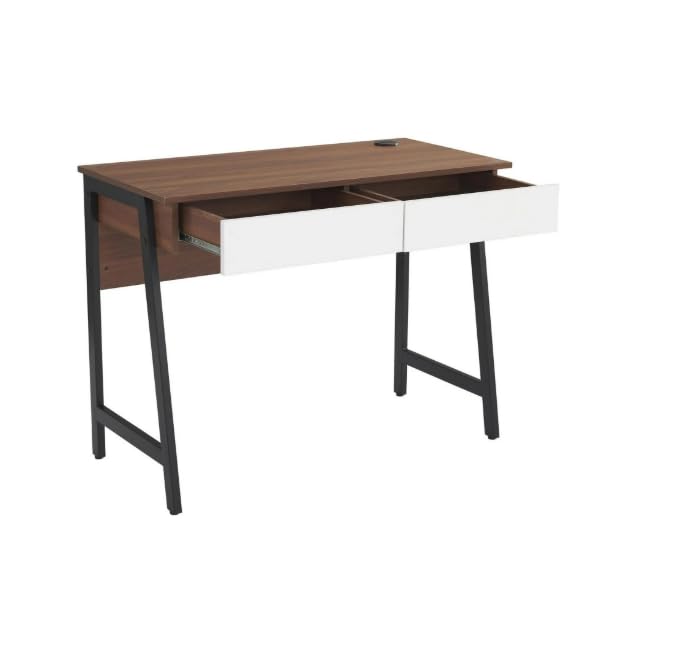
Image: The Generic H24-2201-B computer desk in walnut finish, featuring two white drawers and sturdy black metal legs. This image provides an overall view of the desk's design and dimensions.
Аюулгүй байдлын мэдээлэл
It is crucial to follow all safety guidelines to prevent injury or damage to the product. Please observe the following:
- Ширээг үргэлж өгөгдсөн зааврын дагуу угсарна уу.
- -ийн жингийн хязгаараас хэтрүүлж болохгүй 88 фунт (40 кг). Overloading can compromise the desk's stability and structural integrity.
- Ensure the desk is placed on a stable, level surface to prevent tipping.
- Ширээг шууд дулааны эх үүсвэр, ил гал, хэт их чийгнээс хол байлга.
- Avoid placing heavy objects on the edges of the desk to prevent damage or instability.
- Бүх бэхэлгээг нягт байлгахын тулд үе үе шалгаж байгаарай.
Багцын агуулга
Угсарч эхлэхийн өмнө доор жагсаасан бүх эд ангиуд байгаа бөгөөд гэмтэлгүй эсэхийг шалгаарай. Хэрэв ямар нэг эд анги дутуу эсвэл гэмтсэн бол хэрэглэгчийн дэмжлэгтэй холбоо барина уу.
- 1 x Desk Top (with integrated USB charger)
- 2 x Drawer Units
- 2 x Metal Leg Frames
- 1 x арын самбар
- Угсралтын тоног төхөөрөмж (эрэг, боолт, Аллен эрэг чангалах түлхүүр гэх мэт)
- Зааварчилгааны гарын авлага
Note: All necessary assembly tools are included.
Тохиргоо ба угсралт
Assembly is required for this desk. It is recommended that хоёр хүн assemble the desk to ensure stability and ease of construction. Please follow the steps below carefully.
- Бүрэлдэхүүн хэсгүүдийг задлах: Carefully remove all parts from the packaging and lay them out on a clean, soft surface (e.g., a blanket or carpet) to prevent scratches.
- Хөлийн хүрээг бэхлэх: Secure the metal leg frames to the underside of the desk top using the provided screws and Allen wrench. Ensure all connections are tight.
- Шүүгээ суурилуулах: Assemble the two drawer units according to their individual instructions. Once assembled, slide them into the designated slots under the desk top. Ensure the smooth sliding rails are properly aligned.
- Арын самбарыг хавсаргах: Secure the back panel to the rear of the desk structure. This adds stability and finishes the desk's appearance.
- Эцсийн шалгалт: Once assembled, gently lift and move the desk to its desired location. Verify that all screws are tightened and the desk is stable.
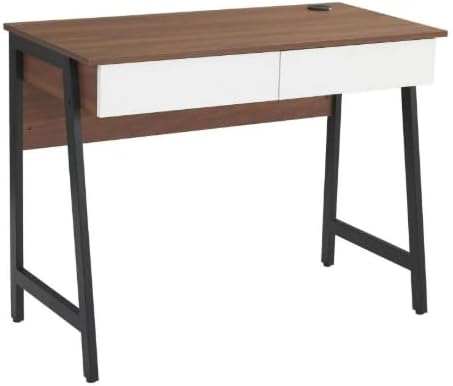
Зураг: Угсарсан view of the computer desk, highlighting the integration of the desk top, drawers, and metal leg structure. This image can serve as a visual reference during assembly.
Ашиглалтын заавар
USB цэнэглэгч портыг ашиглах
Your desk is equipped with a built-in USB charging port for convenient device charging.
- Эрчим хүчийг холбох: Ensure the desk's power cord (if applicable, usually from the USB hub) is securely plugged into a functional wall outlet.
- Plug in Devices: Connect your USB-compatible devices (e.g., smartphones, tablets, smartwatches) to the USB ports located on the desk surface.
- Цэнэглэх заалт: Your device should indicate that it is charging. If not, check the power connection and the USB cable.

Зураг: Нарийвчилсан view of the circular USB charging hub embedded in the desk's surface. It features three USB ports, allowing multiple devices to be charged simultaneously.
Using the Storage Drawers
The two integrated drawers provide convenient storage for your office supplies and personal items.
- Нээх/Хаах: Gently pull the drawer handle to open and push to close. The smooth sliding rails ensure easy operation.
- Жингийн хязгаар: Шургуулгын гулсуурыг гэмтээхээс сэргийлж, жигд ажиллагааг хангахын тулд шургуулгыг хэт ачаалахаас зайлсхий.
Засвар үйлчилгээ
Зөв арчилгаа нь таны ширээний ашиглалтын хугацааг уртасгаж, гадаад төрхийг нь хадгалах болно.
- Цэвэрлэгээ: Зар сурталчилгаагаар цэвэрлэamp даавуу. Зөрүүд толботой бол зөөлөн савангийн уусмал хэрэглэж, цэвэрхэн даавуугаар нэн даруй хатаана.
- Химийн хорт бодисоос зайлсхий: Do not use abrasive cleaners, strong detergents, or solvents, as these can damage the wood grain laminate finish.
- Асгаралт: Promptly wipe up any spills to prevent water damage or staining. The scratch-resistant and waterproof finish offers protection, but immediate cleaning is recommended.
- Бэхэлгээ: Periodically check and tighten all screws and bolts to ensure the desk remains stable.
Алдааг олж засварлах
Хэрэв таны ширээнд ямар нэгэн асуудал тулгарвал дараах нийтлэг асуудал, шийдлүүдийг үзнэ үү.
- Ширээ догдолж байна:
- Бүх угсралтын эрэг ба боолтыг сайтар чангална уу.
- Verify the desk is placed on a level surface. Adjust floor glides if present, or use shims if necessary.
- Шүүгээнүүд жигд гулсдаггүй:
- Шургуулгын слайдуудад саад байгаа эсэхийг шалгана уу.
- Шүүгээнүүд хэт ачаалалтай биш байгаа эсэхийг шалгаарай.
- Угсрах явцад шургуулгын слайдыг зөв суурилуулсан эсэхийг шалгана уу.
- USB портууд цэнэглэгдэхгүй байна:
- Confirm the desk's power cord (for the USB hub) is firmly plugged into a working electrical outlet.
- Try a different USB cable or device to rule out cable/device issues.
- Ensure the USB hub connection within the desk is secure (if accessible).
Үзүүлэлтүүд
| Загварын дугаар | H24-2201-B |
| Брэнд | Ерөнхий |
| Хэмжээ (D x W x H) | 48D x 100W x 76H Сантиметр (18.9"D x 39.4"W x 29.9"H) |
| Жин | 37.4 фунт (17 кг) |
| Материал | MDF, PB, Metal |
| Төгсгөлийн төрөл | Wood Grain Laminate |
| Өнгө | Walnut (with white drawers) |
| Хамгийн их жингийн багтаамж | 88 фунт (40 кг) |
| Зурагчийн тоо | 2 |
| Онцлог шинж чанарууд | Built-in USB Charging Port, Scratch-Resistant & Waterproof Surface, Smooth Drawer Operation, Space-Saving Design |
| Угсрах шаардлагатай | Тийм (2 хүн санал болгож байна) |
| Оруулсан угсралтын хэрэгслүүд | Тиймээ |
Баталгаат болон дэмжлэг
Баталгаат мэдээлэл: Warranty is not included with this product. Please contact the seller directly for any warranty-related inquiries or support.
Хэрэглэгчийн дэмжлэг: For any questions, missing parts, or assistance with assembly or operation, please contact the seller directly via Amazon messaging. Provide your order number and a detailed description of the issue for prompt assistance.
Manufacturer Contact Information: Not applicable. Please contact the seller directly via Amazon messaging.
Ask a question about this manual
Ask about setup, troubleshooting, compatibility, parts, safety, or missing instructions. Manuals+ will review the question and use this page’s manual context to help answer it.