
Танилцуулга
This manual provides essential instructions for the safe and efficient operation of your Generic Portable Bluetooth Speaker with Solar Charging, Model B0FVMB2F8H. Please read this manual thoroughly before using the product and retain it for future reference.
Аюулгүй байдлын мэдээлэл
- Do not expose the speaker to extreme temperatures or direct sunlight for prolonged periods when not in use, especially the solar panel.
- Чанга яригчийг унагах эсвэл хүчтэй нөлөөнд оруулахаас зайлсхий.
- Чанга яригчийг өөрөө задалж, засаж эсвэл өөрчилж болохгүй. Засварын талаар мэргэшсэн үйлчилгээний ажилтантай холбогдоно уу.
- Keep the speaker away from water and liquids, despite its waterproof design, to prevent damage to internal components.
- Зөвхөн заасан цэнэглэгч кабель болон цахилгаан адаптеруудыг ашиглана уу.
- Хүүхдийн гар хүрэхгүй газар хадгална.
Багцын агуулга
Дараах зүйлсийн багцад байгаа эсэхийг шалгана уу.
- Portable Bluetooth Speaker (Model B0FVMB2F8H)
- USB цэнэглэгч кабель
- Түргэн эхлүүлэх гарын авлага
Бүтээгдэхүүн дууссанview
Чанга яригчийнхаа бүрэлдэхүүн хэсгүүдтэй танилцаарай:
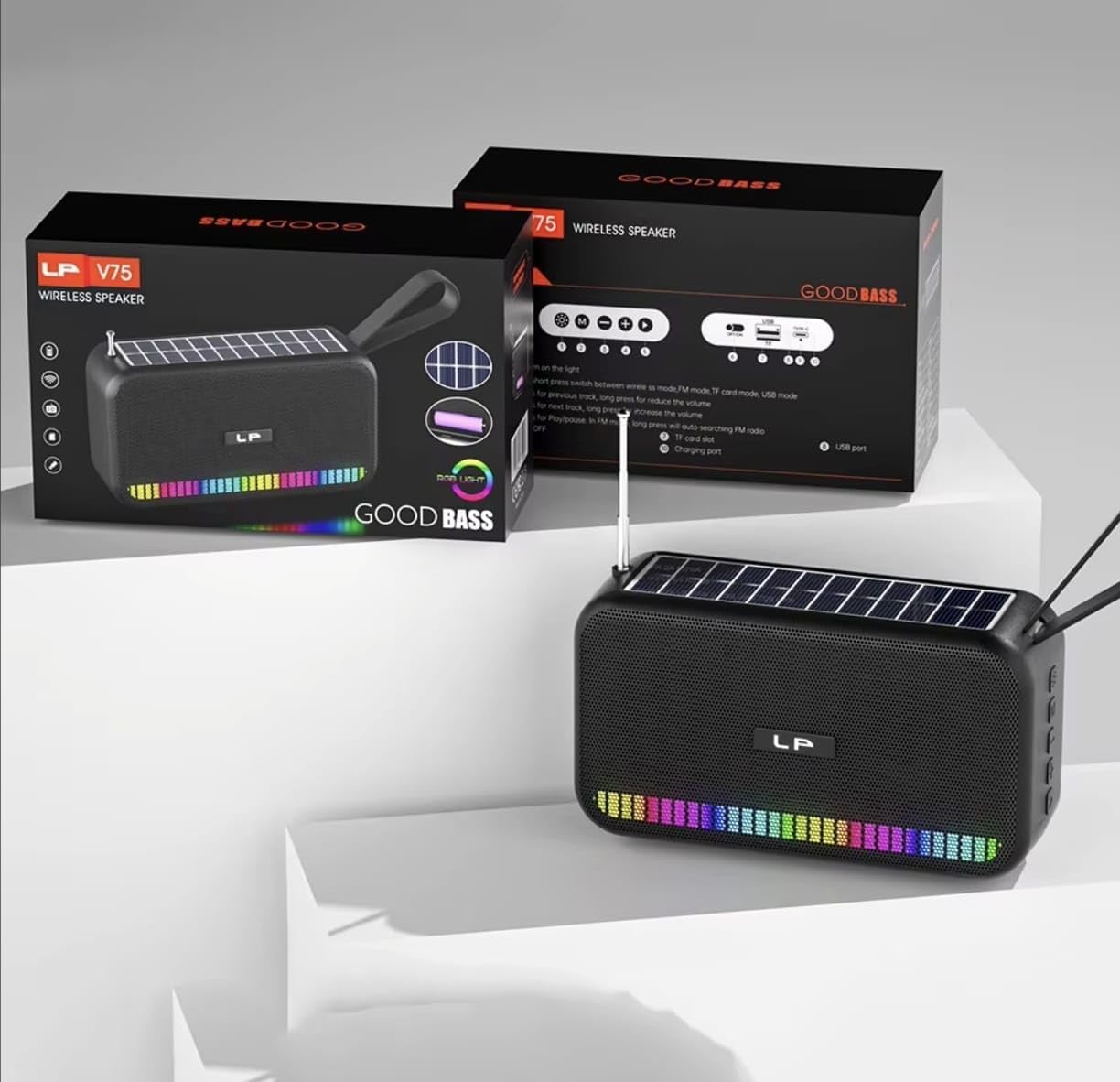
Зураг: Урд view of the portable Bluetooth speaker, highlighting its solar panel, LED light display, and overall dimensions (approximately 170.5mm length, 95mm height, 60mm width).
- Нарны хавтан: Located on the top surface for solar charging.
- LED гэрлийн дэлгэц: Front-facing lights that synchronize with music.
- Хяналтын товчлуурууд: (Details not provided, assuming standard buttons for power, volume, mode, play/pause).
- USB порт: For charging and USB drive playback.
- TF картын оролт: TF карт тоглуулах зориулалттай.
- Цэнэглэх порт: For USB cable charging.
- Антен: Extendable for FM radio reception.
- Зөөх оосор: Зөөврийн хувьд.

Зураг: Арын view of the portable Bluetooth speaker, showing the battery compartment open with a rechargeable battery inserted. Also visible are the USB and charging ports.
Тохиргоо
1. Илтгэгчийг цэнэглэх
Your speaker offers two charging methods:
- Нарны цэнэглэгч: Place the speaker with the solar panel facing direct sunlight. The charging indicator light will illuminate. Solar charging is ideal for maintaining battery life outdoors but may be slower than USB charging.
- USB цэнэглэх: Connect the provided USB charging cable to the speaker's charging port and the other end to a USB power adapter (not included) or a computer's USB port. The charging indicator light will show charging status. A full charge typically takes several hours.
Ensure the speaker is fully charged before first use for optimal battery performance.
2. Асаах/унтраах
- Асаахын тулд: Асаах товчийг дараад барина уу (ихэвчлэн тэмдэглэгдсэн) ⏻ or ON/OFF) for approximately 3 seconds until you hear an audible prompt or see the LED lights activate.
- Унтраахын тулд: Press and hold the Power button again for approximately 3 seconds until the speaker powers down.
Ашиглалтын заавар
1. Bluetooth горим
- Bluetooth горимыг оруулна уу: Upon powering on, the speaker typically defaults to Bluetooth mode. If not, press the "M" (Mode) button until you hear the "Bluetooth Mode" prompt. The LED indicator will flash, indicating it's ready for pairing.
- Хослуулах:
- Өөрийн төхөөрөмж (ухаалаг утас, таблет гэх мэт) дээр Bluetooth-г идэвхжүүлнэ үү.
- хайх available Bluetooth devices. The speaker will appear as "B0FVMB2F8H" or a similar name.
- Select the speaker from the list to connect. Once paired, you will hear a confirmation sound, and the LED indicator will stop flashing.
- Тоглуулах хяналт:
- Тоглуулах/түр зогсоох: Тоглуулах / түр зогсоох товчийг дарна уу (⏸).
- Дараагийн дуу: Press the "Next" button (⏭).
- Өмнөх бичлэг: Press the "Previous" button (⏮).
- Дууг нэмэгдүүлэх: Long press the "Next" button or use a dedicated Volume Up button.
- Дууг багасгах: Long press the "Previous" button or use a dedicated Volume Down button.
2. FM радио горим
- FM горимд орно уу: Press the "M" (Mode) button repeatedly until you hear the "FM Radio" prompt.
- Антеныг сунгах: Илүү сайн хүлээн авахын тулд телескоп антенныг бүрэн сунгана.
- Автомат скан хийх: Тоглуулах/Түр зогсоох товчийг удаан дар (⏸) to automatically scan and save available FM stations. The speaker will cycle through frequencies and store them.
- Switch Stations: Use the "Next" (⏭) and "Previous" (⏮) buttons to navigate through the saved stations.
3. USB / TF карт тоглуулах
- Медиа оруулах: Insert a USB flash drive into the USB port or a TF (MicroSD) card into the TF card slot. The speaker will automatically detect the media and switch to the corresponding playback mode.
- Тоглуулах хяналт: Use the Play/Pause, Next, and Previous buttons for controlling playback, similar to Bluetooth mode.
4. LED Light Display
The speaker features dynamic RGB LED lights that can synchronize with your music. Specific controls for the LED lights (e.g., changing patterns, turning off) are not detailed in the product information, but they typically activate automatically with audio playback. If there is a dedicated light button, press it to cycle through modes or turn off the lights.
5. Гар чөлөөтэй дуудлага хийх
Ухаалаг гар утсанд Bluetooth-ээр холбогдсон үед чанга яригчийг гар ашиглахгүйгээр дуудлага хийхэд ашиглаж болно.
- Дуудлагад хариулах: Тоглуулах / түр зогсоох товчийг дарна уу (⏸) once to answer an incoming call.
- Дуудлага дуусгах: Тоглуулах / түр зогсоох товчийг дарна уу (⏸) once to end an ongoing call.
- Дуудлагаас татгалзах: Тоглуулах/Түр зогсоох товчийг удаан дар (⏸) ирж буй дуудлагыг татгалзахын тулд.
Засвар үйлчилгээ
- Цэвэрлэгээ: Use a soft, dry cloth to clean the speaker's surface. Do not use abrasive cleaners, alcohol, or chemical solvents.
- Нарны хавтан: Keep the solar panel clean and free of dust or debris to ensure efficient charging.
- Хадгалах: When not in use for extended periods, store the speaker in a cool, dry place. It is recommended to fully charge the battery every 3 months to prolong its lifespan.
Алдааг олж засварлах
| Асуудал | Боломжит шалтгаан | Шийдэл |
|---|---|---|
| Чанга яригч асахгүй байна. | Батерей бага. | Charge the speaker using the USB cable or place it in direct sunlight. |
| Bluetooth-ээр холбох боломжгүй. | Төхөөрөмж дээр Bluetooth идэвхжээгүй байна; чанга яригч нь хослуулах горимд байхгүй байна; төхөөрөмжөөс хэт хол байна. | Ensure Bluetooth is on and the speaker is in pairing mode. Move device closer to speaker (within 10 meters). Forget previous pairings on your device and try again. |
| Дуу байхгүй эсвэл дуу багатай. | Чанга яригч эсвэл холбогдсон төхөөрөмжийн дууны түвшин хэт бага байна; буруу горим сонгогдсон байна. | Increase volume on both the speaker and your connected device. Ensure the correct mode (Bluetooth, FM, USB, TF) is selected. |
| FM радио хүлээн авах чадвар муу байна. | Антенн сунгаагүй; дохио сул байна. | Fully extend the telescopic antenna. Try repositioning the speaker for better signal reception. |
| USB/TF карт тоглохгүй байна. | Буруу file format; card/drive not inserted correctly; corrupted media. | Аудио шалгах files are in a compatible format (e.g., MP3). Reinsert the USB drive or TF card. Try a different USB drive or TF card. |
Үзүүлэлтүүд
| Загварын дугаар: | B0FVMB2F8H |
| Холболтын технологи: | Bluetooth |
| Эрчим хүчний эх үүсвэр: | Solar, USB |
| Дэмжигдсэн радио хамтлагууд: | FM (87.5-108 МГц) |
| Онцлог шинж чанарууд: | Solar charging, LED light display, Multi-playback options (Bluetooth, FM Radio, USB, TF card) |
| Тохиромжтой төхөөрөмжүүд: | Bluetooth devices, USB devices, TF cards, FM radio signals |
| Дэлгэцийн төрөл: | LED |
| Өнгө: | Хар |
| Үйлдвэрлэгч: | Хятад |
Баталгаат болон дэмжлэг
Энэ бүтээгдэхүүн нь хамт ирдэг 15 хоногийн баталгаат хугацаа from the date of purchase. This warranty covers manufacturing defects. It does not cover damage caused by misuse, accidents, unauthorized modifications, or normal wear and tear.
For warranty claims or technical support, please refer to the contact information provided by your retailer or the seller "CLASSYSA" on Amazon. Please retain your proof of purchase for warranty validation.