
1. Танилцуулга
Thank you for choosing the Angrox Backlit Universal Remote Control for LG Smart TVs. This remote is designed to provide a seamless and enhanced television viewing experience, especially in low-light conditions. It serves as a direct replacement for your original LG TV remote, offering broad compatibility and ease of use without requiring complex setup procedures. This manual provides detailed instructions for setting up, operating, maintaining, and troubleshooting your new remote control.
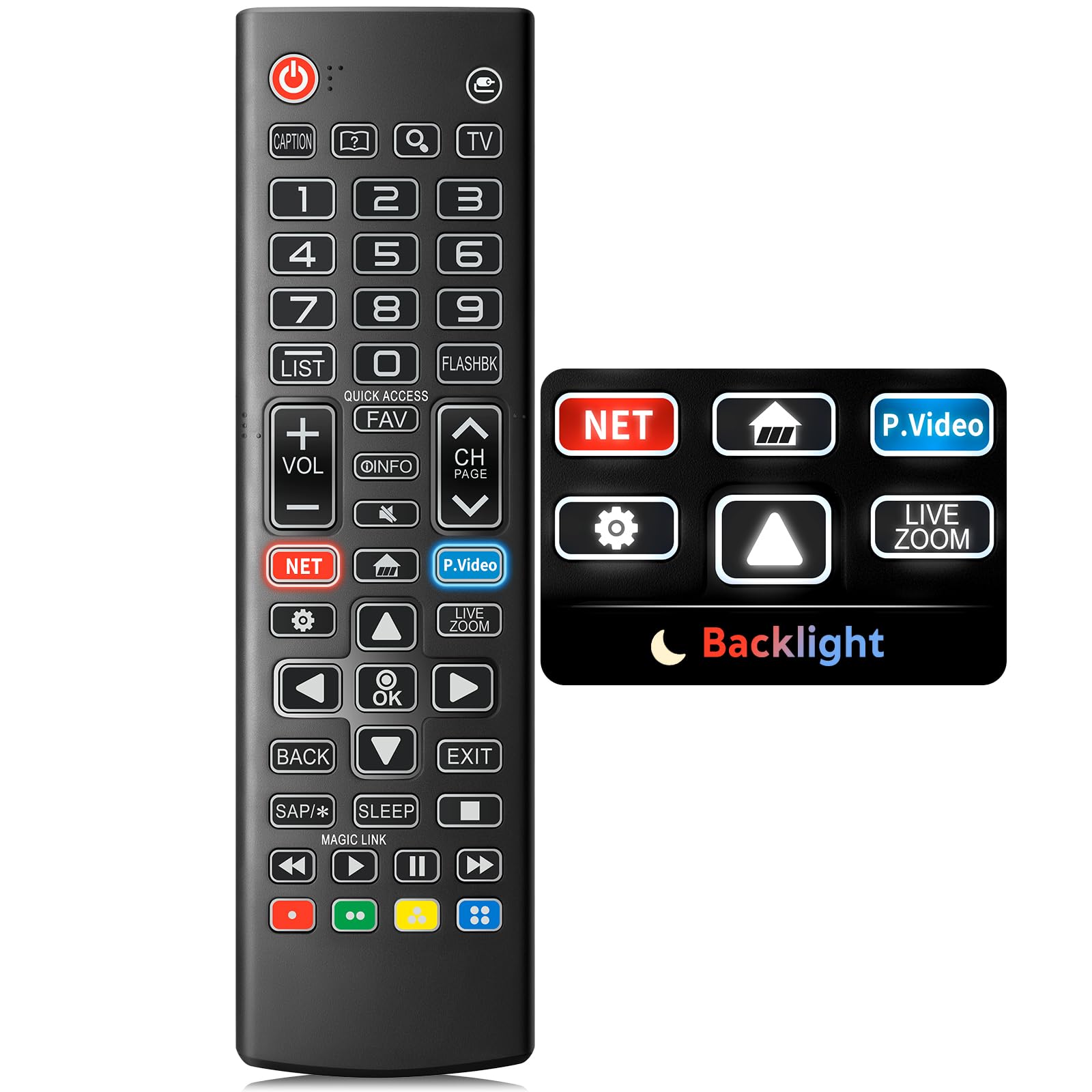
Image: The Angrox Backlit Universal Remote Control, a sleek black remote with clearly labeled buttons.
2. Үндсэн шинж чанарууд
- Easy Nighttime Operation: Features soft glow buttons that illuminate, allowing for clear visibility and use in dark environments without causing glare. The backlight activates with any button press and automatically turns off after 10 seconds of inactivity.
- Нийтэд нийцтэй байдал: Designed as a direct replacement for LG TV remotes, compatible with all LG TV models. No programming or complex pairing is required; it works immediately out of the box.
- High-Quality Performance: Equipped with sensitive buttons and stable signal transmission for smooth and responsive operation.
- Эргономик дизайн: Shaped to fit comfortably in the hand, reducing fatigue during extended use. The button layout is intuitive for users of all ages.
- Бат бөх, найдвартай: Constructed from high-quality, sturdy materials to withstand daily use and accidental drops, ensuring a long lifespan.

Image: A comparison showing the remote control with its backlight off and then with its buttons illuminated, highlighting the easy nighttime operation feature.

Image: The remote control displayed alongside various LG TV models (OLED, UHD, QNED, NanoCell), illustrating its broad compatibility.
3. Тохируулах заавар
3.1 Батерей суурилуулах
- Алсын удирдлагын ар талд байгаа зайны тасалгааны тагийг ол.
- Тагийг доош гулсуулж эсвэл түгжээг дарж тасалгааг нээнэ үү.
- Эерэг (+) болон сөрөг (-) терминалууд нь тасалгааны доторх үзүүлэлтүүдтэй зөв тохирч байгаа эсэхийг шалгаад хоёр (2) AAA батерейг хийнэ үү.
- Батерейны тасалгааны тагийг найдвартай товших хүртэл шургуулж орлуулаарай.
Жич: Batteries are not included with the remote control. Please use new AAA alkaline batteries for optimal performance.

Image: A visual guide demonstrating the correct insertion of two AAA batteries into the remote control's battery compartment.
3.2 Initial Use (No Pairing Required)
The Angrox Backlit Universal Remote Control is designed for immediate use with LG Smart TVs. No pairing or programming steps are necessary. Once batteries are installed, the remote is ready to control your LG television.
4. Ашиглалтын заавар
This section details the functions of the buttons on your Angrox remote control.

Image: A comprehensive layout of the remote control, with labels pointing to each button and describing its primary function.
4.1 Үндсэн функцууд
- Хүч (
 ): ТВ-г асаах эсвэл унтраана.
 - Оруулах (): Changes the input source (e.g., HDMI 1, HDMI 2).
- Дууны хэмжээг нэмэгдүүлэх/доошруулах (VOL +/-): Дууны түвшнийг тохируулна.
- Суваг дээш/доошоо (CH Page): Телевизийн сувгийг өөрчилдөг.
- Дууг хаах (): ТВ-ийн дууг хаадаг эсвэл нээдэг.
- Тоон товчлуурууд (0-9): Сувгийн дугаар эсвэл бусад тоон оролтыг шууд оруулна.
- Навигацийн товчлуурууд (дээш/доошоо/зүүн/баруун): Цэс болон сонголтуудаар гүйлгэхэд ашигладаг.
- OK товчлуур: Selects menu items or confirms your input.
4.2 Special Function Buttons
- Netflix товчлуур: Netflix програмыг шууд ажиллуулдаг.
- Amazon Prime Video Button: Amazon Prime Video програмыг шууд ажиллуулдаг.
- Шуурхай хандалт: A feature that allows you to enter a specified app or Live TV directly by pressing and holding the number buttons.
- Жагсаалт: Хадгалагдсан програмуудын жагсаалтад хандана.
- Эргэн дурсамж: Өмнөх рүү буцна viewed channel or input.
- Мэдээлэл: Displays information on the current program.
- Дуртай: Өөрийн дуртай сувгийн жагсаалтад хандах.
- Тохиргоо (): Accesses the Quick Settings menu.
- Буцах: Дэлгэц дээрх дэлгэцийг цэвэрлэж, ТВ рүү буцна viewing.
- Гарах: Одоогийн цэсээс гарна.
- Унтах: Accesses the sleep timer.
- Media Control Buttons (Play, Pause, Stop, Fast Forward, Rewind): Controls media content playback.
4.3 Арын гэрэлтүүлгийн функц
The remote control features a soft backlight for easy use in the dark. Simply press any button, and the backlight will turn on. It will automatically turn off after 10 seconds of inactivity to conserve battery life.
Video: A demonstration of the Angrox Backlit Remote for LG Smart TV, showcasing its easy nighttime use and responsive buttons. This video highlights the convenience of the backlit feature in dark environments.
5. Техникийн үзүүлэлтүүд
| Брэнд | Ангрокс |
| Загварын нэр | AKB75095307 |
| Загварын дугаар | AKB75095307 |
| Онцлог шинж чанарууд | Backlit, Ergonomic, Lightweight, No Programming Required, Universal |
| Тохиромжтой төхөөрөмжүүд | Television (All LG TV models) |
| Дэмжигдсэн төхөөрөмжүүдийн хамгийн их тоо | 1 |
| Холболтын технологи | Хэт улаан туяа |
| Товчлуурын тоо | 30 |
| Хянагчийн төрөл | Товчлуурын удирдлага |
| Хамгийн их хүрээ | 10 метр (ойролцоогоор 33 фут) |
| Шаардлагатай батерейны тоо | 2 AAA батерей |
| Зайны төрөл | Шүлтлэг |
| Хэмжээ (L x W x H) | 9.25"L x 1.89"W x 0.73"H |
6. Алдаа засах
Хэрэв та алсын удирдлагатай холбоотой асуудалтай тулгарвал дараах нийтлэг шийдлүүдийг үзнэ үү.
- Алсын удирдлага хариу өгөхгүй байна:
- Батерейг зөв туйлшралтай (+/-) зөв оруулсан эсэхийг шалгаарай.
- Хуучин батерейг шинэ AAA шүлтлэг батерейгаар солино уу.
- Алсын удирдлага болон телевизийн хэт улаан туяаны хүлээн авагчийн хооронд ямар нэгэн саад байгаа эсэхийг шалгана уу.
- Ensure you are within the maximum operating range (10 meters) of the TV.
- Арын гэрэлтүүлэг ажиллахгүй байна:
- Verify battery power. Low batteries may affect backlight functionality.
- The backlight is designed to turn off after 10 seconds of inactivity. Press any button to reactivate it.
- Specific buttons not working (e.g., Netflix, Amazon Prime):
- Ensure your LG Smart TV is connected to the internet and the respective applications are installed and updated.
- Some smart TV features or app shortcuts may vary slightly depending on your TV's model and region.
- Remote feels sluggish or unresponsive:
- Батерейг шинэ зайгаар солих.
- Clean the remote's infrared emitter (at the top) and the TV's IR receiver with a soft, dry cloth to ensure a clear signal path.
7. Засвар үйлчилгээ
To ensure the longevity and optimal performance of your Angrox remote control, follow these maintenance guidelines:
- Цэвэрлэгээ: Use a soft, dry cloth to clean the remote's surface. Avoid using liquid cleaners, aerosols, or harsh chemicals, as they may damage the remote.
- Зай солих: Replace batteries promptly when the remote's performance declines or if the backlight becomes dim. Remove batteries if the remote will not be used for an extended period to prevent leakage.
- Хадгалах: Алсын удирдлагыг нарны шууд тусгал, хэт температур, өндөр чийгшилээс хол, сэрүүн, хуурай газар хадгална.
- Дусалаас зайлсхийх: Удаан эдэлгээтэй боловч олон удаа дусал дуслаар дотоод эд ангиудыг гэмтээж болно. Алсын удирдлагатай болгоомжтой харьц.
8. Баталгаат хугацаа ба дэмжлэг
8.1 Баталгаат хугацааны мэдээлэл
The Angrox Backlit Universal Remote Control (Model AKB75095307) is covered by a 90 хоногийн баталгаат хугацаа from the date of purchase. This warranty covers manufacturing defects and ensures the product functions as described under normal use. It does not cover damage caused by misuse, accidents, unauthorized modifications, or normal wear and tear.
8.2 Хэрэглэгчийн дэмжлэг
For any questions, technical assistance, or warranty claims, please contact Angrox customer support through the retailer where you purchased the product or visit the official Angrox store online. Please have your purchase receipt and product model number available when contacting support.