
1. Танилцуулга
This manual provides essential information for the proper installation, operation, and maintenance of the Generic TP.SK508.PB801 LED TV Motherboard. This board is designed for use in LED and LCD Smart TVs as a replacement or upgrade power board. Please read this manual thoroughly before attempting any installation or operation to ensure safety and optimal performance.
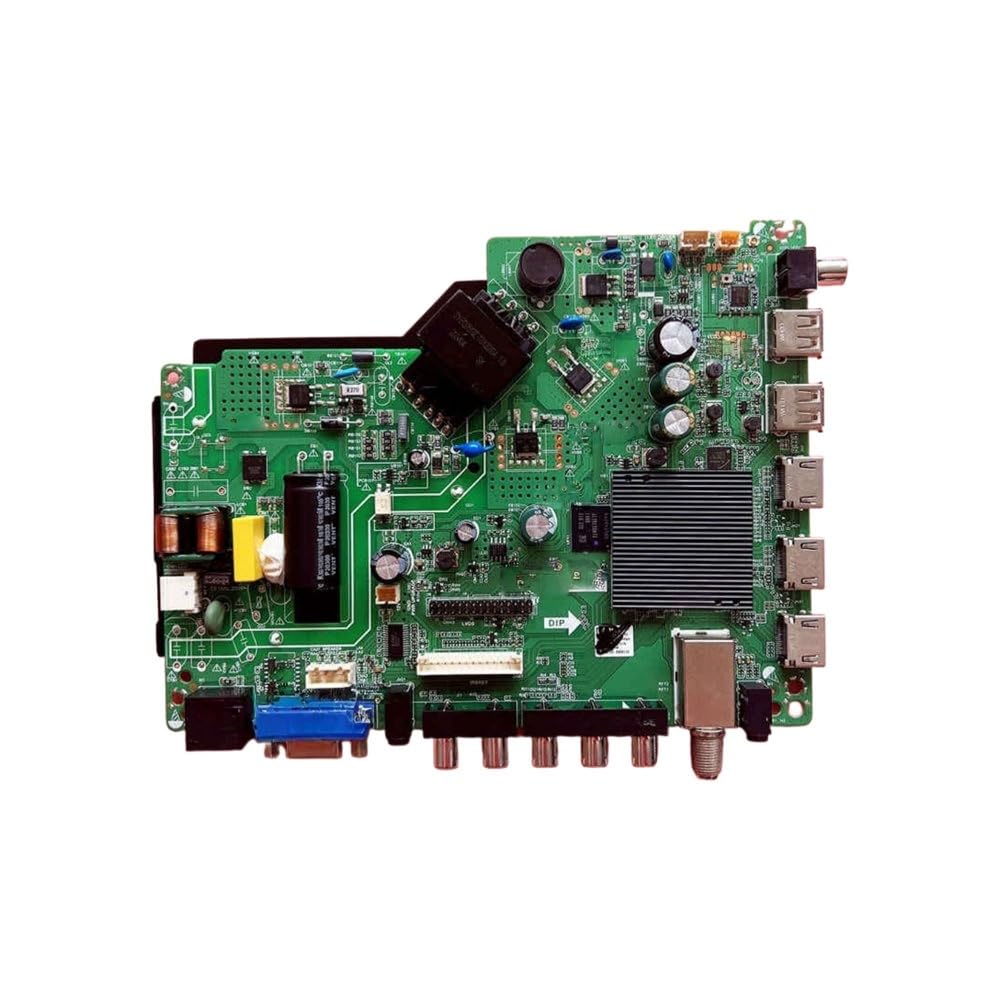
Зураг 1: Илүүview of the Generic TP.SK508.PB801 LED TV Motherboard. This image shows the general layout and components of the motherboard.
2. Аюулгүй байдлын мэдээлэл
WARNING: Risk of Electric Shock. Do not open the TV casinХэрэв та мэргэшсэн техникч биш бол g.
- Always disconnect the TV from the main power supply before attempting any installation, repair, or maintenance.
- This product should only be installed by a qualified and experienced technician. Improper installation can lead to electric shock, fire, or damage to the TV and motherboard.
- Avoid touching components on the motherboard with bare hands to prevent electrostatic discharge (ESD) damage. Use an anti-static wrist strap if available.
- Ensure all connections are secure and correctly oriented before reapplying power.
- Эх хавтанг чийг, хэт өндөр температурт бүү байлга.
3. Багцын агуулга
Please verify that all items are present and undamaged upon opening the package:
- 1 x Generic TP.SK508.PB801 LED TV Motherboard
- (Optional) Screws or mounting hardware (may vary by supplier)
- (Optional) User Manual (this document)
Хэрэв ямар нэг зүйл дутуу эсвэл эвдэрсэн бол нийлүүлэгчтэйгээ яаралтай холбоо барина уу.
4. Тохиргоо ба суурилуулалт
The installation of a TV motherboard requires technical expertise. If you are not comfortable performing this procedure, please seek professional assistance.
4.1 Бэлтгэл ажил
- Цахилгааныг салгах: ТВ-г хананы залгуураас салгасан эсэхээ шалгаарай.
- Статик цэнэг алдалт: Статик цахилгааныг гадагшлуулахын тулд антистатик бугуйн оосор зүүх эсвэл газардуулсан металл зүйлд ойр ойрхон хүрч байх.
- ТВ дотор талд нэвтрэх: Carefully remove the back cover of the TV, following the TV manufacturer's instructions.
- Баримт бичгийн холболтууд: Before disconnecting anything, take clear photos of all existing cable connections to the old motherboard. This will serve as a reference for reassembly.
4.2 Motherboard Replacement
- Кабелийг салгах: Carefully disconnect all cables from the old motherboard, including power, LVDS (display), backlight, speakers, and input/output ports.
- Хуучин эх хавтанг устгах: Хуучин эх хавтанг телевизийн их биенээс салгаад салга.
- Шинэ эх хавтанг суулгах: Place the new TP.SK508.PB801 motherboard into position, aligning it with the mounting holes. Secure it with the appropriate screws. Do not overtighten.
- Кабельуудыг дахин холбох: Refer to your photos and carefully reconnect all cables to the new motherboard. Ensure each connector is fully seated and correctly oriented. Pay special attention to the LVDS cable, ensuring it is inserted straight and locked.
- Давхар шалгах: Visually inspect all connections to confirm they are correct and secure.
4.3 Анхдагч асаалт
- Temporary Power: Before replacing the TV back cover, plug the TV into a power outlet.
- Туршилтын функц: Power on the TV. Check for display, sound, and basic input functionality.
- Унтраах: If the TV functions correctly, unplug it from the power outlet.
- ТВ-ийг дахин угсрах: Carefully replace the TV back cover and secure it with screws.
5. Ашиглалтын заавар
Once the TP.SK508.PB801 motherboard is successfully installed, the TV's operation will largely depend on the specific TV model and its firmware. This motherboard functions as the core processing unit for your TV.
5.1 Үндсэн үйл ажиллагаа
- Асаах/унтраах: Use the TV's remote control or physical power button to turn the TV on or off.
- Оролтын сонголт: Use the "Input" or "Source" button on your remote to select between HDMI, AV, USB, or other connected devices.
- Цэсийн навигаци: Access the TV's on-screen display (OSD) menu to adjust picture settings, sound settings, network settings (for Smart TV features), and other system configurations.
5.2 Firmware Updates (If Applicable)
Some motherboards may support firmware updates to improve performance, add features, or fix bugs. Refer to your TV's original manufacturer's website or the motherboard supplier for specific instructions on how to perform firmware updates for the TP.SK508.PB801 board. Typically, this involves:
- Downloading the correct firmware file USB диск рүү.
- Inserting the USB drive into the TV's USB port.
- Accessing the TV's system menu to initiate the update process.
CAUTION: Ensure the correct firmware is used for your specific panel and motherboard model. Using incorrect firmware can render the TV inoperable.
6. Засвар үйлчилгээ
The TP.SK508.PB801 motherboard is designed for long-term reliability with minimal maintenance. However, following these guidelines can help extend its lifespan:
- Цэвэр байлгах: Periodically clean the interior of the TV (with power disconnected) to remove dust buildup, which can hinder cooling and lead to overheating. Use compressed air or a soft brush.
- Агааржуулалтыг хангах: Make sure the TV's ventilation openings are not blocked. Proper airflow is crucial for dissipating heat from the motherboard and other components.
- Шингэнээс зайлсхийх: Never expose the TV or its internal components to liquids.
- Тогтвортой хүч: Use a surge protector to protect the TV and motherboard from power fluctuations and surges.
7. Алдаа засах
If you encounter issues after installing the TP.SK508.PB801 motherboard, refer to the following common troubleshooting steps. Always disconnect power before checking internal connections.
7.1 Цахилгаангүй / ТВ асахгүй байна
- Цахилгааны кабелийг шалгах: Ensure the TV's power cable is securely plugged into both the wall outlet and the TV.
- Туршилтын гарц: Plug another device into the same outlet to confirm it is working.
- Internal Power Connection: With the TV unplugged, open the back cover and verify that the power cable from the power supply unit (PSU) is securely connected to the motherboard.
- Гал хамгаалагч шалгах: If comfortable, check for a blown fuse on the power supply board (not the motherboard itself). This usually requires a multimeter and technical knowledge.
7.2 No Picture / Blank Screen
- Оролтын эх сурвалж: Ensure the correct input source (HDMI, AV, etc.) is selected on the TV.
- Гадаад төхөөрөмж: Verify that the external device (cable box, DVD player) is powered on and functioning correctly.
- LVDS Cable: With the TV unplugged, check the LVDS cable connection between the motherboard and the LCD panel. Ensure it is fully seated and not damaged.
- Арын гэрэлтүүлэг: Shine a flashlight at the screen. If you can faintly see an image, the backlight might be faulty, not the motherboard.
7.3 Дуугүй
- Дууны түвшин: Check the TV's volume and ensure it is not muted.
- Чанга яригчийн холболтууд: With the TV unplugged, verify that the speaker cables are securely connected to the motherboard.
- Гадаад аудио: If using external audio systems, ensure they are correctly connected and configured.
If these steps do not resolve the issue, professional diagnosis and repair may be necessary.
8. Техникийн үзүүлэлтүүд
Key specifications for the Generic TP.SK508.PB801 LED TV Motherboard:
| Онцлог | Дэлгэрэнгүй |
|---|---|
| Загварын дугаар | TP.SK508.PB801 (6524285438241) |
| Төрөл | LED TV Motherboard / LCD Smart TV Power Board |
| Брэнд | Ерөнхий |
| Гарал үүслийн улс | Хятад |
| Тохиромжтой байдал | Designed for various LED/LCD Smart TV models (verify compatibility with your specific TV panel) |
| Оролтын хэмжээtage | Standard TV power input (specific voltage depends on TV model) |
| Холболт | HDMI, USB, AV, VGA, Ethernet (may vary based on specific board revision) |
9. Баталгаат хугацаа ба дэмжлэг
This Generic TP.SK508.PB801 LED TV Motherboard is typically covered by a limited warranty provided by the seller or manufacturer. Please refer to your purchase documentation for specific warranty terms and conditions.
For technical support, troubleshooting assistance beyond this manual, or warranty claims, please contact the retailer or supplier from whom you purchased the product. Provide your model number (TP.SK508.PB801 or 6524285438241) and a detailed description of the issue.