
1. Танилцуулга
Thank you for choosing the Keenso Front Rear Dash Cam. This device is designed to provide reliable video recording of your journeys, offering enhanced safety and security for your vehicle. This manual will guide you through the installation, operation, and maintenance of your dash cam to ensure optimal performance.
2. Аюулгүй байдлын мэдээлэл
- Жолоо барьж байхдаа хяналтын камерыг бүү ажиллуул. Зөвхөн тээврийн хэрэгслийг аюулгүй зогсоолд байрлуулсны дараа тохиргоог нь тохируулна уу.
- Хяналтын камерыг найдвартай суурилуулсан бөгөөд таны хөдөлгөөнд саад болохгүй эсэхийг шалгаарай view замын хөдөлгөөнийг зогсоох эсвэл тээврийн хэрэгслийн удирдлагад саад учруулах.
- Төхөөрөмжийг хэт өндөр температур, нарны шууд тусгал, хэт их чийгэнд удаан хугацаагаар байлгахаас зайлсхий.
- Use only the provided car charger and data cable to prevent damage to the device.
- Хяналтын камерыг өөрөө задлах эсвэл засах гэж бүү оролдоорой. Тусламж авахын тулд хэрэглэгчийн дэмжлэгтэй холбогдоно уу.
- Чухал видеог тогтмол нөөцлөх files to prevent loss.
3. Багцын агуулга
Таны багцад бүх зүйл байгаа эсэхийг шалгана уу:
- 1 x Keenso Car DVR Unit
- 1 х машины цэнэглэгч
- 1 х хэрэглэгчийн гарын авлага (энэ баримт бичиг)
- 1 x Дата кабель (USB)
- 2 x Mounts (for installation)
- 1 х хоёр талт соронзон хальс
- 1 x Magic Base
Зураг 3.1: All components included in the Keenso Dash Cam package.
4. Бүтээгдэхүүний онцлог
The Keenso Front Rear Dash Cam offers a range of features for reliable vehicle monitoring:
- Өндөр чанартай материал: Constructed from durable ABS material for long-lasting performance.
- Баригдсан лити батерей: Features a 180mAh lithium-ion battery for continuous recording even when external power is interrupted.
- Хэрэглэгчдэд ээлтэй дэлгэц: Equipped with a 2.0-inch screen (960x240 resolution) for easy viewing and management of recordings.
- Enhanced Parking Safety: Motion detection feature automatically records movement around your parked vehicle.
- Давталтын бичлэг: Automatically overwrites older, non-protected files when the memory card is full, ensuring continuous recording without manual deletion.
- Хэт улаан туяаны шөнийн хараа: Professional configuration of 4 infrared night lights combined with WDR technology enhances night recording clarity.
- Supercapacitors: Designed to operate reliably in temperatures ranging from -10℃ to 70℃.
- Өндөр нарийвчлалтай камер: 10MP image sensor with a 170-degree wide-angle lens, covering multiple lanes.

Зураг 4.1: Урд тал view of the dash cam, highlighting the display screen and control buttons.
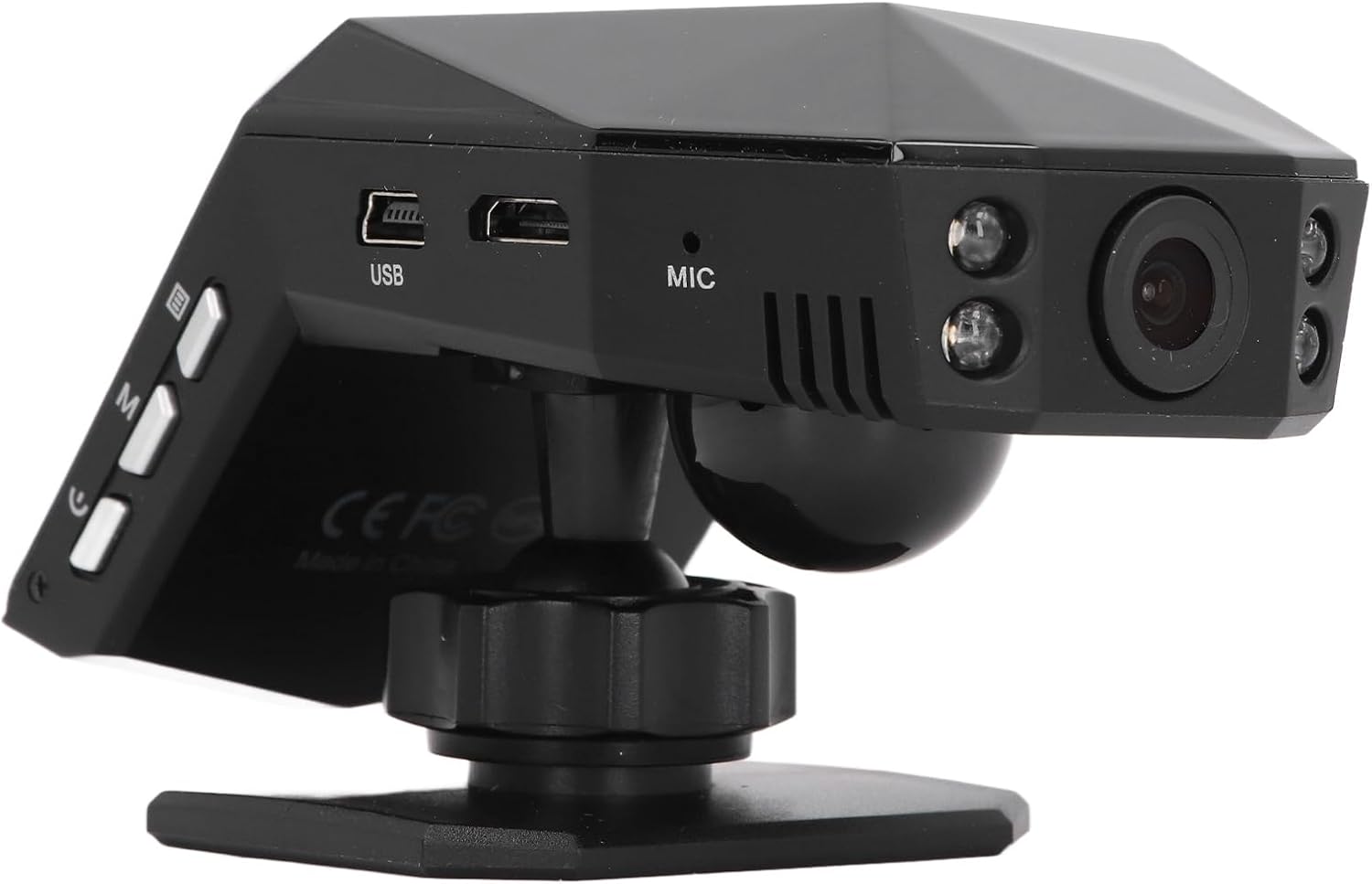
Зураг 4.2: Арын view of the dash cam, showing the camera lens and four infrared night vision lights.
5. Тохиргоо
5.1 Inserting the Micro Memory Card
- Хяналтын камер унтарсан эсэхийг шалгаарай.
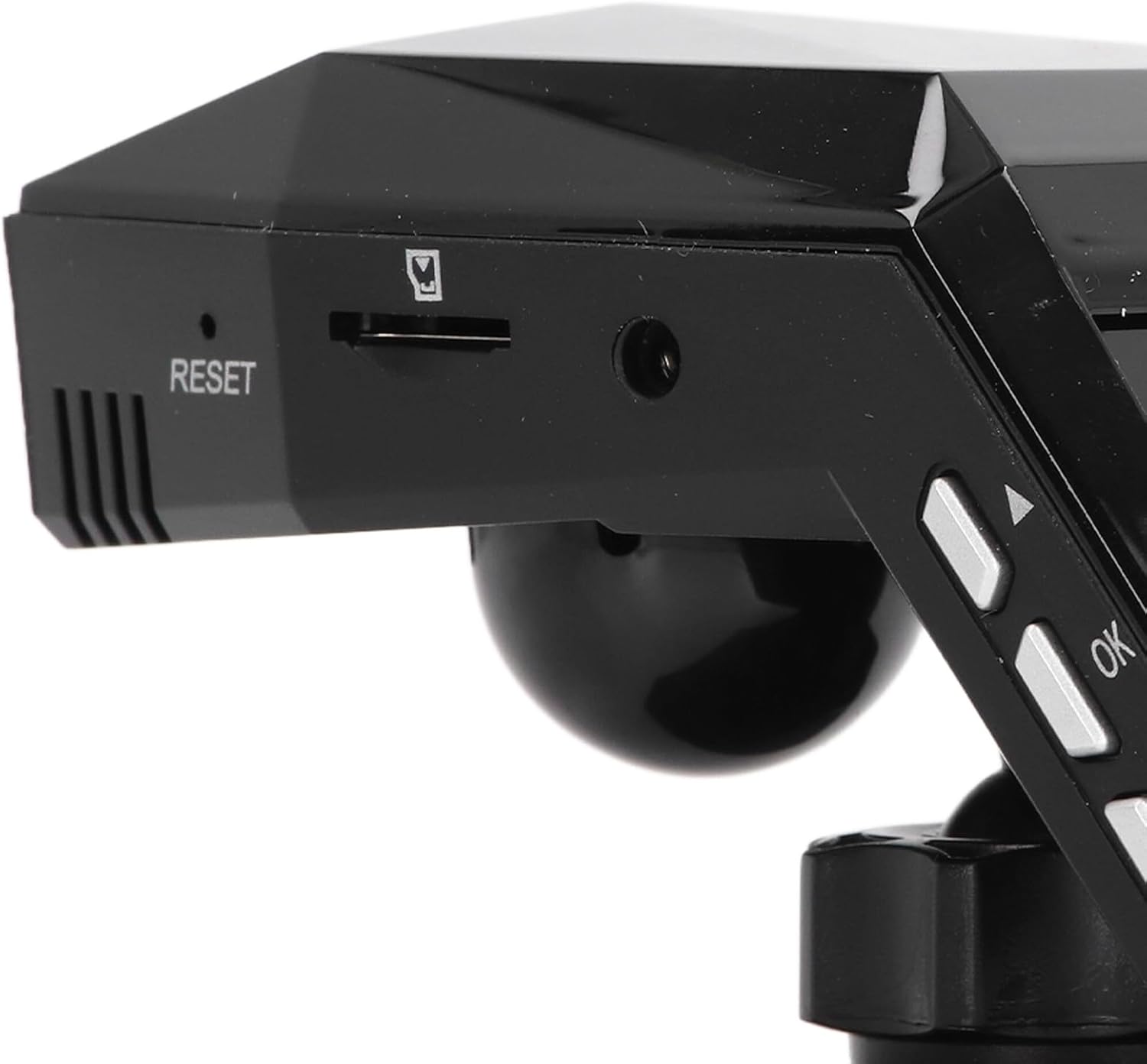
- Locate the Micro Memory Card slot on the side of the device.
- Gently insert a Micro Memory Card (up to 32GB, not included) into the slot until it clicks into place.
- Авахын тулд картыг товших хүртэл зөөлөн түлхэж, дараа нь гаргахын тулд суллана.

Зураг 5.1: Хажуу тал view showing the Micro Memory Card slot and Reset button.
5.2 Зураасны камерыг суурилуулах
- Салхины шилэн дээрээ машинд саад болохгүй газрыг сонгоорой view, ихэвчлэн арын ардview толь.
- Салхины шилний гадаргууг сайтар цэвэрлэ.
- Attach the magic base to the chosen location using the double-sided tape. Ensure it is firmly secured.
- Connect the dash cam to one of the provided mounts.
- Attach the mount with the dash cam to the magic base. Adjust the camera angle for optimal road coverage.
5.3 Цахилгааныг холбох
- Машины цэнэглэгчийг тээврийн хэрэгслийнхээ тамхины асаагуурын залгуурт оруулна уу.
- Connect the other end of the car charger cable to the USB port on the dash cam.
- Route the cable neatly along the windshield trim to avoid interference with driving.
- Хяналтын камер нь ихэвчлэн тээврийн хэрэгсэл асахад автоматаар асдаг бөгөөд хөдөлгүүр унтарсан үед унтардаг.
6. Ашиглалтын заавар
6.1 Үндсэн үйл ажиллагаа
- Асаах/унтраах: The device powers on automatically when connected to vehicle power and off when power is cut. You can also manually power on/off using the power button.
- Бичлэг: Once powered on, the dash cam will automatically begin continuous loop recording. A recording indicator will be visible on the screen.
- Цэсийн навигаци: Use the 'M' button to access the menu and the up/down arrow buttons to navigate. The 'OK' button confirms selections.
6.2 Давталтын бичлэг
The dash cam features intelligent loop recording. When the Micro Memory Card reaches its capacity, the system will automatically delete the oldest unprotected video fileШинэ бичлэг хийх зай гаргахын тулд s. Энэ нь гараар оролцоогүйгээр тасралтгүй бичлэг хийхийг баталгаажуулдаг.
6.3 24 цагийн зогсоолын хяналт
To activate 24-hour parking monitoring, ensure the feature is enabled in the settings. When the car encounters a collision while parked, the dash cam will automatically start recording for approximately one minute. For continuous monitoring when the car is off, a voltage reducing cable (purchased separately) is required.
6.4 Хөдөлгөөн илрүүлэх
If enabled in the settings, the motion detection feature will automatically activate and begin recording if a significant object enters the camera's monitoring range while the vehicle is parked. It is recommended to turn off motion detection when driving to avoid unnecessary recordings.
6.5 ViewБичлэг хийх
Та чадна view recorded videos directly on the 2.0-inch display screen. Navigate to the playback mode in the menu to browse and play files. Alternatively, remove the Micro Memory Card and insert it into a computer to view files.
7. Засвар үйлчилгээ
- Цэвэрлэгээ: Хяналтын камерын линз болон дэлгэцийг цэвэрлэхдээ зөөлөн, хуурай даавуу ашиглаарай. Зүлгүүрийн цэвэрлэгч эсвэл уусгагч хэрэглэж болохгүй.
- Санах ойн карт: Format the Micro Memory Card regularly (e.g., once a month) within the dash cam's settings to maintain optimal performance and prevent data corruption.
- Програм хангамжийн шинэчлэлтүүд: Үйлдвэрлэгчийг шалгана уу webБоломжтой програм хангамжийн шинэчлэлтүүдийн талаар сайтаас үе үе мэдээлэл аваарай. Шинэчлэлттэй хамт өгсөн зааврыг анхааралтай дагаж мөрдөөрэй.
- Хадгалах: Удаан хугацаагаар ашиглаагүй үед хяналтын камерыг сэрүүн, хуурай газар, нарны шууд тусгалаас хол хадгална уу.
8. Алдаа засах
| Асуудал | Боломжит шалтгаан | Шийдэл |
|---|---|---|
| Зураасан камер асахгүй байна. | No power supply; faulty car charger; depleted internal battery. | Check car charger connection and vehicle's power outlet. Ensure the car charger is functional. Charge the internal battery. |
| Бичлэг гэнэт зогссон. | Memory card full; memory card error; power interruption. | Format the memory card. Replace the memory card if errors persist. Check power connection. |
| Видео чанар муу байна. | Dirty lens; protective film on lens; incorrect resolution settings. | Clean the lens. Remove any protective film. Adjust video resolution settings to 1080P. |
| Зураасны камер хөлддөг эсвэл гацдаг. | Software error; memory card issue. | Press the RESET button (refer to Figure 5.1). Format or replace the memory card. |
| Зогсоолын хяналт ажиллахгүй байна. | Feature not enabled; no voltage reducing cable for continuous power. | Enable parking monitoring in settings. Consider installing a voltage reducing cable for 24/7 monitoring. |
9. Техникийн үзүүлэлтүүд
| Онцлог | Тодорхойлолт |
|---|---|
| Бүтээгдэхүүний материал | ABS |
| Видеоны нягтрал | 1920x1080P/30 кадр/сек |
| Зургийн нягтрал | 10 МП |
| Зайны төрөл | Лити ион батерей |
| Зайны багтаамж | 180 мАч |
| Дэлгэцийн хэмжээ | 2.0 инч |
| Дэлгэцийн нягтрал | 960х240 |
| Supported Micro Memory Card | 32 ГБ хүртэл (оруулаагүй) |
| Ашиглалтын температур | -10 хэмээс 70 хэм хүртэл |
| Бүтээгдэхүүний хэмжээ (D x W x H) | 5.91" x 4.72" x 3.54" |
10. Баталгаат хугацаа ба дэмжлэг
This Keenso product is covered by a manufacturer warranty for 90 days from the date of purchase. This warranty covers defects in materials and workmanship under normal use.
For technical support, warranty claims, or any questions regarding your Keenso Front Rear Dash Cam, please contact your retailer or visit the official Keenso webхэрэглэгчийн үйлчилгээний мэдээлэл авах сайт.