
Танилцуулга
Энэхүү гарын авлагад таны төхөөрөмжийг аюулгүй, үр дүнтэй ашиглах талаар дэлгэрэнгүй зааварчилгаа өгсөн болно. AMPBANK M256 Thermal Camera. The M256 is a compact thermal imager designed for use with Android smartphones, tablets, and PCs, offering a 256x192 IR resolution and a temperature range of -4°F to 842°F (-20°C to 450°C). Please read this manual thoroughly before operating the device.
Аюулгүй байдлын мэдээлэл
Төхөөрөмжийг гэмтээх, гэмтээхээс сэргийлэхийн тулд дараах аюулгүй байдлын урьдчилан сэргийлэх арга хэмжээг үргэлж дагаж мөрдөөрэй.
- Do not point the camera directly at intense heat sources, such as the sun or lasers, as this may damage the sensor.
- Төхөөрөмжийг хэт өндөр температур, чийгшил, идэмхий орчинд бүү тавь.
- Төхөөрөмжийг унагах эсвэл хүчтэй нөлөөнд оруулахаас зайлсхий.
- Use only the provided accessories or those approved by AMPBANK.
- Төхөөрөмжийг хүүхдэд хүрэхгүй газар хадгална уу.
- Refer to local regulations for proper disposal of electronic devices.
Багцын агуулга
Таны багцад бүх зүйл байгаа эсэхийг шалгана уу:
- 1 х AMPBANK M256 дулааны дүрсний камер
- 1 x Multifunctional Adapter Cable (19.7-inch / 50cm USB extension cable)
- 1 х цэвэрлэгээний даавуу
- 1 x хурдан хэрэглэгчийн гарын авлага
- 1 x үүрэх цүнх
- 1 х савлах хайрцаг

Image: Contents of the AMPBANK M256 Thermal Camera package, including the camera, adapter cable, cleaning cloth, quick user guide, carrying bag, and packing box.
Бүтээгдэхүүн дууссанview
The AMPBANK M256 is a compact, plug-and-play thermal imaging camera designed to extend the capabilities of your Android smartphone or PC. It features a USB-C connector for direct attachment to compatible devices.

Зураг: Урд view -ийн AMPBANK M256 Thermal Camera, showing its compact green and black design with a USB-C connector.
Гол онцлогууд:
- Өндөр нягтрал: 256x192 IR resolution for clear thermal images.
- Өргөн температурын хүрээ: Measures from -4°F to 842°F (-20°C to 450°C).
- Бага эрчим хүчний хэрэглээ: Operates efficiently at 0.35W.
- Авсаархан, зөөврийн: Weighs only 30g, easily fits in a pocket.
- Олон талт холболт: Compatible with Android smartphones/tablets and PCs via USB-C.
Тохиргоо
1. App Installation (Android)
- Locate the "ThermCam" application on the Google Play Store.
- Download and install the application on your Android smartphone or tablet.
- Ensure your device supports OTG (On-The-Go) functionality for external device connection.

Image: Screenshot showing the ThermCam app available on Google Play, indicating where to download the required software for the thermal camera.
2. Төхөөрөмжийг холбох
- For direct connection: Plug the USB-C connector of the M256 thermal camera directly into the USB-C port of your Android smartphone or tablet.
- For extended connection: Use the provided 19.7-inch (50cm) USB extension cable. Connect one end to your smartphone/tablet and the other end to the M256 camera. This offers greater flexibility during use.
- Once connected, open the "ThermCam" app. The app should automatically detect the camera and display the thermal image.

Image: A hand holding a smartphone with the AMPBANK M256 Thermal Camera connected to its USB-C port, displaying a thermal image on the phone screen.

Зураг: The AMPBANK M256 Thermal Camera connected to a laptop and a tablet using the 19.7-inch USB extension cable, demonstrating its versatility.
3. Компьютерийн програм хангамж суурилуулах
- For PC usage, download the "TCView 2.0" software from the official AMPБАНК webсайт.
- Програм хангамжийг Windows компьютер дээрээ суулгана уу.
- Connect the M256 camera to your PC using the USB-C extension cable.
- Launch the TCView 2.0 software to begin thermal imaging on your PC.
Үйл ажиллагаа
1. Basic Temperature Measurement
- Once the app is open and the camera is connected, the thermal image will appear on your screen.
- The app displays real-time temperature readings.
- Adjust the camera's position to focus on the area of interest.

Image: A person using the AMPBANK M256 Thermal Camera with a smartphone to inspect a wall, showing the thermal image and temperature readings on the phone screen.
2. Measurement Modes and Color Palettes
- The ThermCam app offers various measurement modes, including Цэг, Шугам, ба Онгоц, for precise temperature monitoring.
- Select from 10 different color palettes to visualize temperature changes. Different palettes can highlight specific temperature variations more clearly.

Image: A smartphone screen displaying various color palettes and measurement settings within the ThermCam app, demonstrating customization options for thermal imaging.
3. 3D Thermal Analysis
- Utilize the advanced 3D editing features within the app or PC software for detailed temperature analysis from multiple perspectives.
- This feature assists in identifying subtle temperature anomalies and patterns.
4. Ухаалаг сэрэмжлүүлэг
- Configure smart alerts for high and low temperatures. The app will notify you when temperatures exceed or fall below predefined thresholds.
- This is useful for monitoring critical equipment or areas.
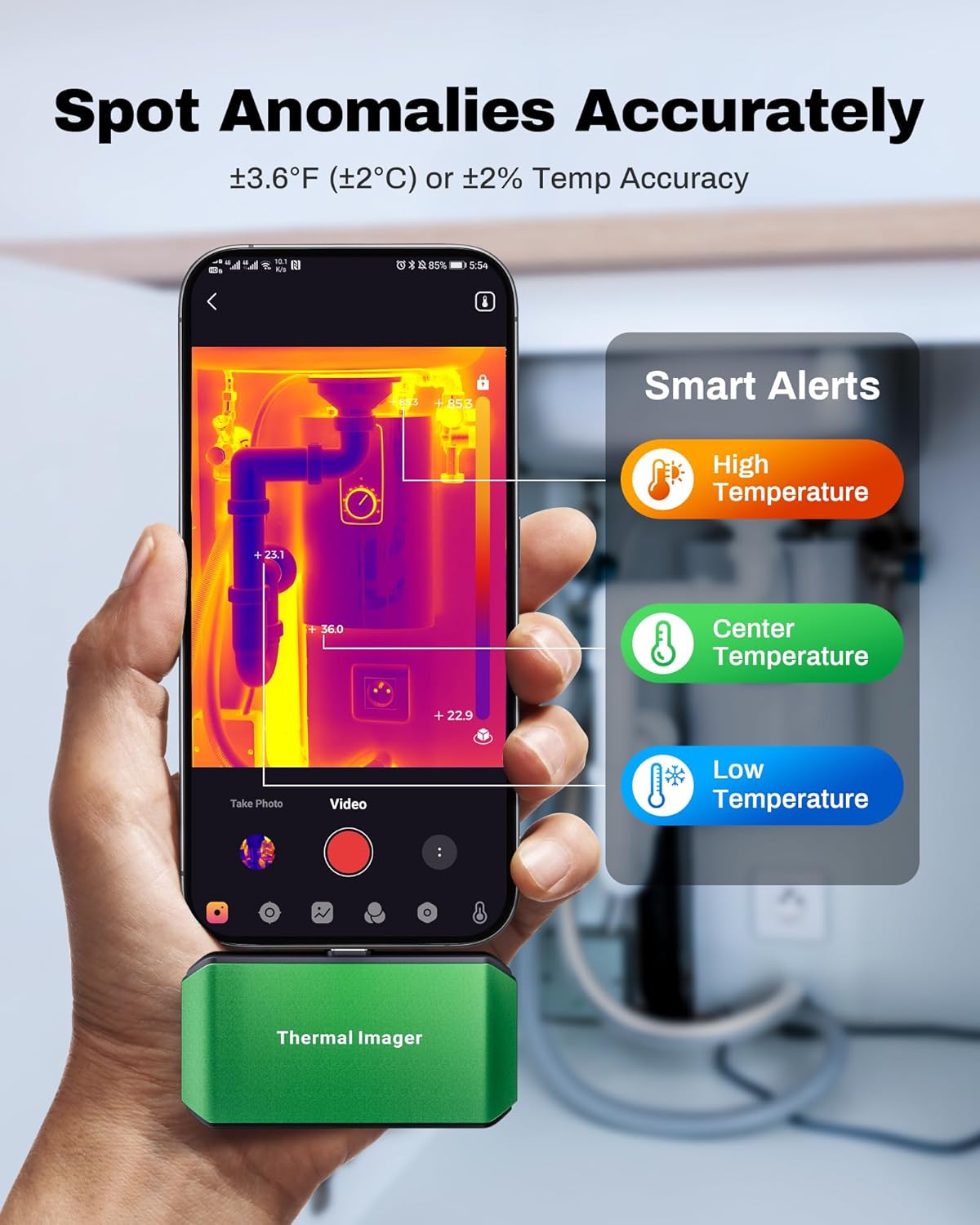
Image: A smartphone screen showing the ThermCam app with "Smart Alerts" for high, center, and low temperatures, indicating the camera's ability to detect anomalies.
5. Фото болон видео бичлэг хийх
- Capture still thermal images or record thermal videos directly through the app.
- These captures can be used for documentation, analysis, or sharing.

Image: Screenshots from the ThermCam app demonstrating options for video recording and photo capturing of thermal images.
6. Generating Professional Reports
- The ThermCam app and TCView 2.0 software allow you to generate professional field reports.
- Customize data, add watermarks, and adjust settings for seamless sharing of your thermal analysis.

Image: A smartphone screen displaying the ThermCam app's interface for generating professional reports, including options to customize data and share.
Засвар үйлчилгээ
- Цэвэрлэгээ: Камерын линз болон биеийг зөөлөн арчихын тулд өгөгдсөн цэвэрлэгээний даавууг ашиглана уу. Зүлгүүрийн цэвэрлэгч, уусгагчийг бүү ашигла.
- Хадгалах: When not in use, store the thermal camera in its protective carrying bag to prevent dust and damage. Store in a cool, dry place away from direct sunlight.
- Програм хангамжийн шинэчлэлтүүд: Regularly check the Google Play Store or AMPБАНК website for updates to the ThermCam app or TCView 2.0 software to ensure optimal performance and access to new features.
Алдааг олж засварлах
| Асуудал | Боломжит шалтгаан | Шийдэл |
|---|---|---|
| Camera not detected by smartphone/PC. |
|
|
| Температурын буруу заалт. |
|
|
| Аппликейшн гацах эсвэл хөлдөх. |
|
|
Үзүүлэлтүүд
| Онцлог | Дэлгэрэнгүй |
|---|---|
| Загвар | M256 |
| IR тогтоол | 256x192 пиксел |
| Температурын хүрээ | -4°F - 842°F (-20°C - 450°C) |
| Температурын нарийвчлал | ±3.6°F (±2°C) or ±2% |
| Дулааны мэдрэмж (NETD) | <40 мК |
| Сэргээх хурд | 25 Гц |
| Эрчим хүчний хэрэглээ | 0.35 Вт |
| Холболт | USB-C |
| Тохиромжтой байдал | Android Smartphones/Tablets, Windows PC |
| Хэмжээ | 2.8 x 1.65 x 0.55 инч (70 x 44 x 14 мм) |
| Жин | 30 гр (0.07 фунт) |
| Үйлдвэрлэгч | AMPБАНК |

Image: A visual summary of the AMPBANK M256 Thermal Camera's key features and specifications, including resolution, temperature range, and power consumption.
Баталгаат болон дэмжлэг
AMPBANK products are designed for reliability and performance. For warranty information, technical support, or service inquiries, please refer to the official AMPБАНК webсайт эсвэл харилцагчийн үйлчилгээний хэлтэстэй холбогдоно уу.
Баталгаат заргад зориулж худалдан авалтаа нотлох баримтаа үлдээнэ үү.
Онлайн нөөцүүд: -д зочилно уу AMPBANK Store on Amazon нэмэлт бүтээгдэхүүний мэдээлэл, дэмжлэг авах.