
1. Танилцуулга
This manual provides instructions for the Generic HTR-U33G Replacement Voice Remote Control. This remote is designed to be compatible with Haier LCD TVs, offering both infrared (IR) and Bluetooth connectivity for comprehensive control, including voice commands. Please ensure your original remote control model matches HTR-U33G for full compatibility.
2. Бүтээгдэхүүн дууссанview
The HTR-U33G remote control features a user-friendly layout with dedicated buttons for various functions, including navigation, media playback, and direct access to popular streaming services. It supports both traditional button control and voice commands.
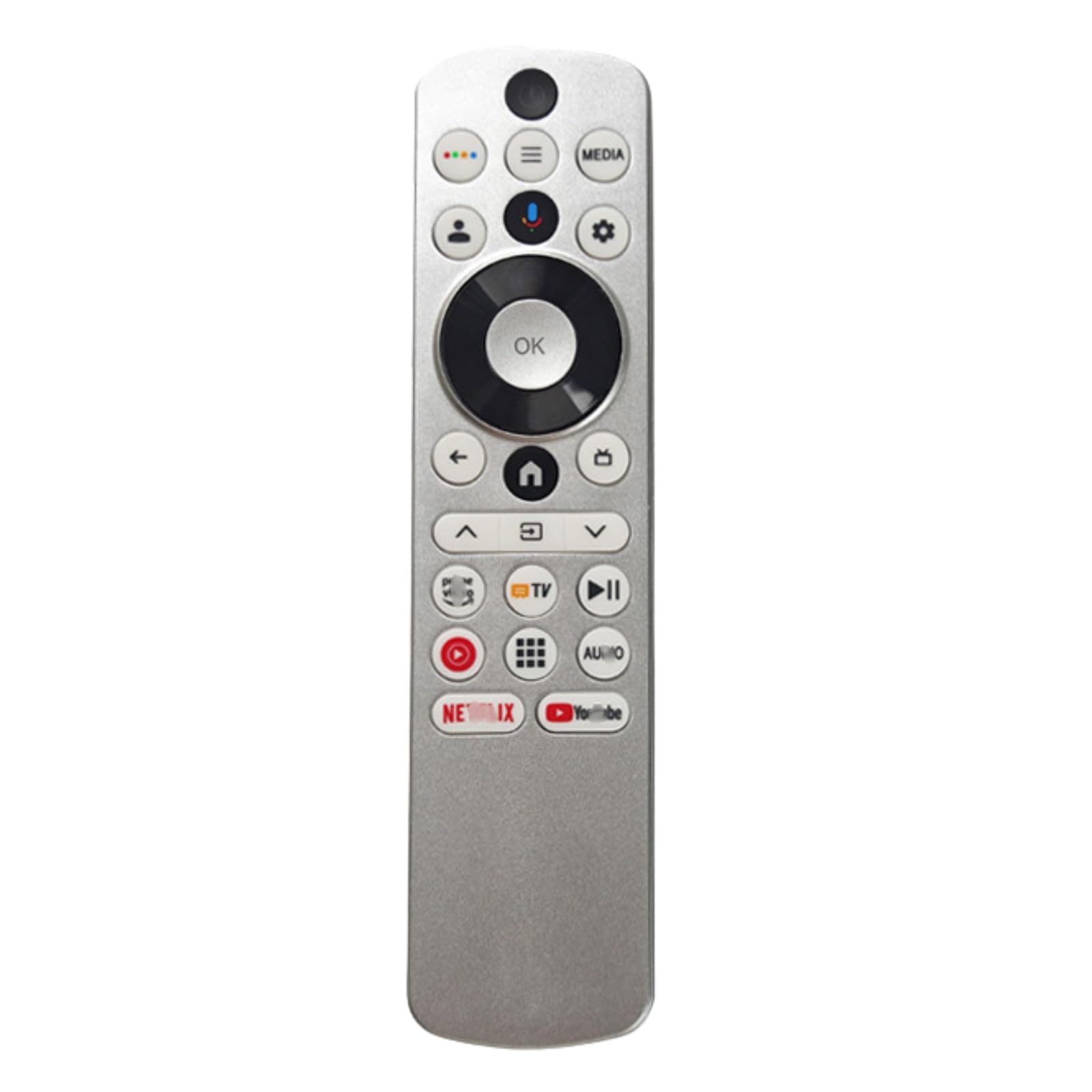
Зураг 1: Урд ба хойд view of the HTR-U33G Replacement Voice Remote Control. The front displays various control buttons, including a directional pad, app shortcuts, and a microphone button. The back provides Bluetooth pairing instructions.
Гол онцлогууд:
- Direct replacement for Haier HTR-U33G remote.
- No programming required for basic infrared (IR) functions.
- Voice control capability via Bluetooth pairing.
- Dedicated buttons for popular streaming services like Netflix and YouTube.
- Maximum operating range of 8 meters.
3. Тохиргоо
3.1 Батерей суурилуулах
- Алсын удирдлагын ар талд байгаа зайны тасалгааг ол.
- Зайны тасалгааны тагийг гулсуулж нээнэ үү.
- Хоёр (2) AAA батерейг оруулаад эерэг (+) ба сөрөг (-) терминалууд нь тасалгааны доторх тэмдэглэгээтэй зөв таарч байгаа эсэхийг шалгаарай.
- Зайны тасалгааны тагийг сайтар хаа.
Тэмдэглэл: Алсын удирдлагатай хамт батерейнууд дагалдахгүй.
3.2 Initial Operation (Infrared)
For basic functions such as power, volume, and channel control, the remote typically operates via infrared (IR) and requires no additional setup or pairing. Simply point the remote towards your Haier LCD TV after installing batteries.
3.3 Bluetooth Pairing (for Voice Control)
To enable voice control and other advanced features, you must pair the remote control with your Haier LCD TV via Bluetooth. Follow these steps:
- Ensure your TV is powered on and in a state where it can accept new Bluetooth devices. Refer to your TV's user manual for specific instructions on entering Bluetooth pairing mode.
- On the HTR-U33G remote control, simultaneously press and hold the Буцах (←) товчлуур болон Home (🏠) товчийг хэдэн секундын турш дарна уу.
- The remote's indicator light (if present) may flash to indicate it is in pairing mode.
- On your TV screen, select the HTR-U33G remote control from the list of available Bluetooth devices to complete the pairing process.
- Once paired, the remote's voice control function will be active.
4. Ашиглалтын заавар
Familiarize yourself with the buttons on your HTR-U33G remote control:
- Асаах товчлуур (Зүүн дээд): ТВ-г асаах эсвэл унтраана.
- Four-Dot Button (Top Row): May access a quick menu or input selection.
- Menu Button (Top Row): ТВ-ийн үндсэн цэсийг нээнэ.
- MEDIA Button (Top Row): Direct access to media sources or a media player.
- Хэрэглэгч Profile Button (Middle Row): Likely for switching user profiles or accessing account settings.
- Microphone Button (Middle Row): Activates voice control. Press and speak your command after pairing via Bluetooth.
- Settings/Gear Button (Middle Row): Opens TV settings or quick settings menu.
- Directional Pad (Center Circle): Use Up, Down, Left, Right arrows to navigate menus and content.
- OK Button (Center of D-Pad): Сонголтыг баталгаажуулна.
- Буцах товчлуур (←): Өмнөх дэлгэц эсвэл цэс рүү буцна.
- Нүүр хуудасны товчлуур (🏠): ТВ-ийн үндсэн дэлгэц эсвэл ухаалаг төв рүү буцна.
- TV Input Button (TV icon): Боломжтой оролтын эх үүсвэрүүдээр (HDMI, AV, гэх мэт) эргэлддэг.
- Volume Up/Down (∧/∨): ТВ-ийн дууны түвшинг тохируулна.
- Mute Button (Speaker with slash): ТВ-ийн дууг хаадаг эсвэл нээдэг.
- Play/Pause Button (►II): Медиа тоглуулалтыг хянадаг.
- Red Circle Button: May be a record button or a specific function depending on the TV model.
- Grid Button (Apps): Opens the TV's app launcher or smart features.
- AU/IO Button: Function may vary; potentially for audio settings or input/output selection.
- Netflix товчлуур: Netflix програм руу шууд нэвтрэх.
- YouTube товчлуур: YouTube програм руу шууд нэвтрэх.
5. Засвар үйлчилгээ
5.1 Батерейг солих
When the remote control's performance degrades or it stops responding, replace the AAA batteries. Always replace both batteries at the same time with new ones. Do not mix old and new batteries or different types of batteries.
5.2 Цэвэрлэгээ
To clean the remote control, use a soft, dry cloth. Do not use liquid cleaners, sprays, or abrasive materials, as these can damage the remote's surface or internal components.
6. Алдаа засах
- Алсын удирдлага хариу өгөхгүй байна:
- Батерейг зөв оруулсан, дуусаагүй эсэхийг шалгана уу. Шаардлагатай бол солино.
- Алсын удирдлага болон телевизийн IR хүлээн авагчийн хооронд ямар нэгэн саад бэрхшээл байхгүй эсэхийг шалгаарай.
- Make sure you are within the operating range (up to 8 meters).
- Дуут удирдлага ажиллахгүй байна:
- Verify that the remote control is successfully paired with your TV via Bluetooth (refer to Section 3.3).
- Ensure your TV supports voice control and that the feature is enabled in its settings.
- Алсын удирдлага дээрх микрофон руу тодорхой бөгөөд шууд ярь.
- Тодорхой товчлуурууд ажиллахгүй байна:
- Some advanced functions or app shortcuts may require specific TV software or settings.
- Ensure the remote is fully compatible with your specific Haier TV model.
7. Техникийн үзүүлэлтүүд
| Онцлог | Дэлгэрэнгүй |
|---|---|
| Брэнд | Ерөнхий |
| Загвар | HTR-U33G |
| Холболтын технологи | Infrared (IR), Bluetooth |
| Тохиромжтой төхөөрөмжүүд | Haier LCD Television (HTR-U33G models) |
| Онцлог шинж чанар | Voice Control, No Programming Required (for basic IR) |
| Хянагчийн төрөл | Товчлуурын удирдлага |
| Хамгийн их хүрээ | 8 метр |
| Батерей шаардлагатай | 2 x AAA (оруулаагүй) |
8. Дэмжлэг
If you encounter any issues or have questions regarding your HTR-U33G Replacement Voice Remote Control that are not covered in this manual, please contact the seller or manufacturer for assistance. Provide your product model number (HTR-U33G) and a detailed description of the issue when seeking support.