
Танилцуулга
Welcome to the Thunderobot Zero 16 Pro user manual. This document provides essential information for setting up, operating, maintaining, and troubleshooting your new gaming laptop. The Thunderobot Zero 16 Pro is engineered for high-performance gaming and demanding applications, featuring an Intel Core Ultra 9 275HX processor, NVIDIA GeForce RTX 5080 graphics, a 16-inch QHD+ 360Hz display, 32GB DDR5 RAM, and a 1TB PCIe M.2 SSD.
For optimal performance and longevity, please read this manual thoroughly before using your device.
Багцын агуулга
Таны багцад бүх зүйл байгаа эсэхийг шалгана уу:
- Thunderobot Zero 16 Pro Gaming Laptop
- Цахилгаан адаптер ба кабель
- Хэрэглэгчийн гарын авлага (энэ баримт бичиг)
- Баталгаат карт
Тохиргоо
1. Анхдагч асаалт
- Эрчим хүчийг холбох: Цахилгаан адаптерийг зөөврийн компьютерын цахилгаан порт руу, дараа нь ханын залгуурт залгаарай.
- Зөөврийн компьютер нээх: Зөөврийн компьютерын тагийг болгоомжтой нээнэ үү.
- Асаах: Ихэвчлэн гарны дээд талд эсвэл хажуу талд байрлах цахилгаан товчийг дар.
- Анхны тохиргоо: Хэл, бүс нутаг, сүлжээний холболт, хэрэглэгчийн бүртгэл үүсгэх зэрэг Windows 11 Home тохиргоог дуусгахын тулд дэлгэц дээрх зааврыг дагана уу.
2. Захын төхөөрөмжүүдийг холбох
The Thunderobot Zero 16 Pro offers various ports for connecting external devices:
- USB-A портууд: Connect mice, keyboards, external hard drives, and other USB accessories.
- USB-C Port (Thunderbolt 5): Өндөр хурдны өгөгдөл дамжуулах, гадаад дэлгэц болон цахилгаан дамжуулах зориулалттай.
- HDMI 2.1 порт: Өргөтгөсөн дэлгэцийн хувьд гадаад дэлгэц эсвэл телевизортой холбогдоно уу.
- RJ-45 Ethernet порт: Тогтвортой утастай сүлжээний холболтын хувьд.
- 3.5 мм аудио залгуур: Чихэвч эсвэл гадаад чанга яригчийг холбоно уу.
Зураг: хажуу тал view of the Thunderobot Zero 16 Pro, highlighting the RJ-45, USB3.2 Gen2 Type-A, HDMI 2.1, Thunderbolt 5 Type-C, Power, USB3.2 Gen1 Type-A, and 3.5mm audio jack ports.

Image: Detailed diagram illustrating the location and type of ports available on the Thunderobot Zero 16 Pro, including USB, HDMI, Ethernet, and audio connections.
Ашиглалтын заавар
1. Keyboard and Lighting
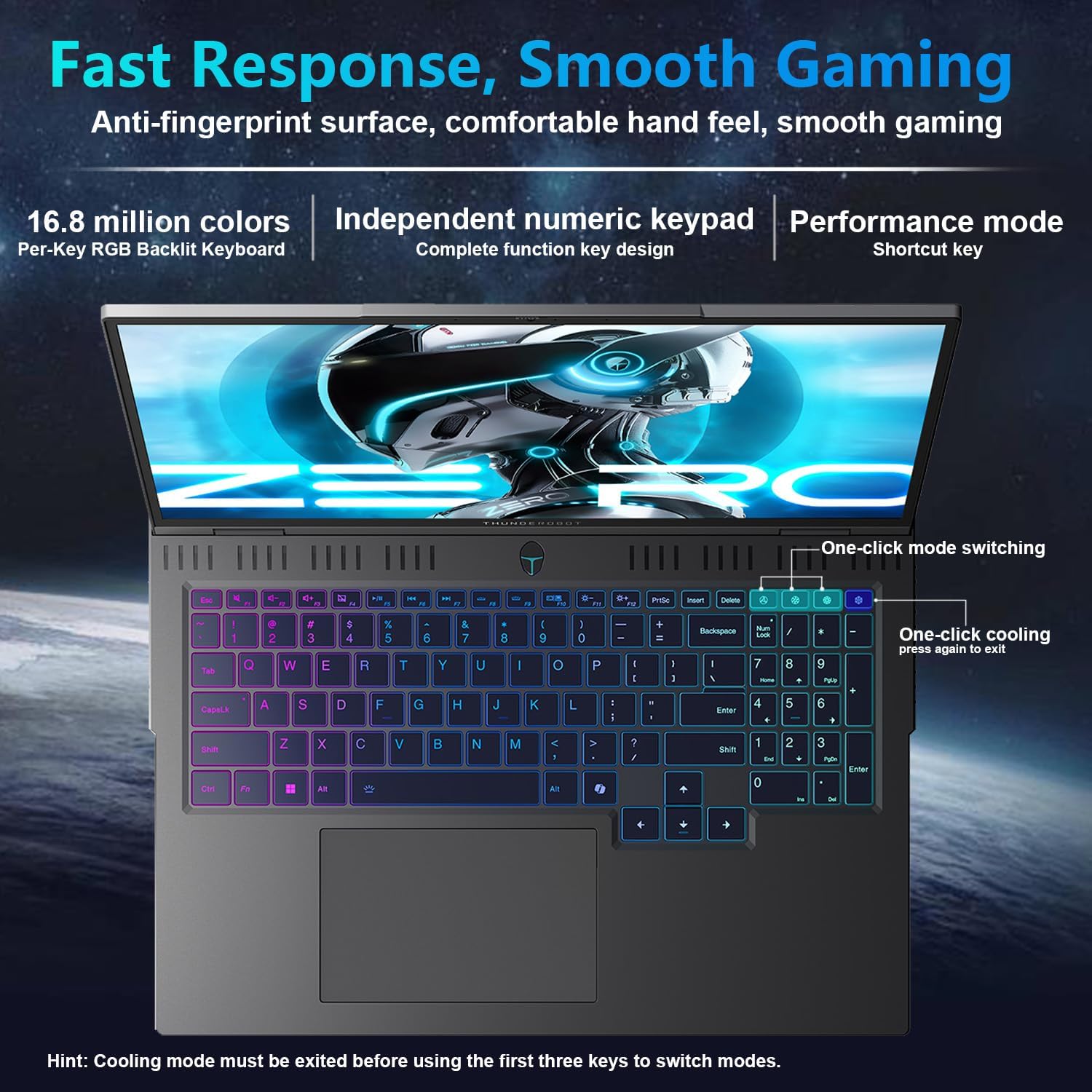
The laptop features a full-size, per-key RGB backlit keyboard with a numeric keypad. You can customize the RGB lighting effects through the Thunderobot Control Center software.
- Performance Mode Switching: Use dedicated shortcut keys to switch between performance profiles (e.g., Quiet, Balance, Turbo).
- One-Click Cooling: A dedicated key allows for instant activation of maximum cooling.
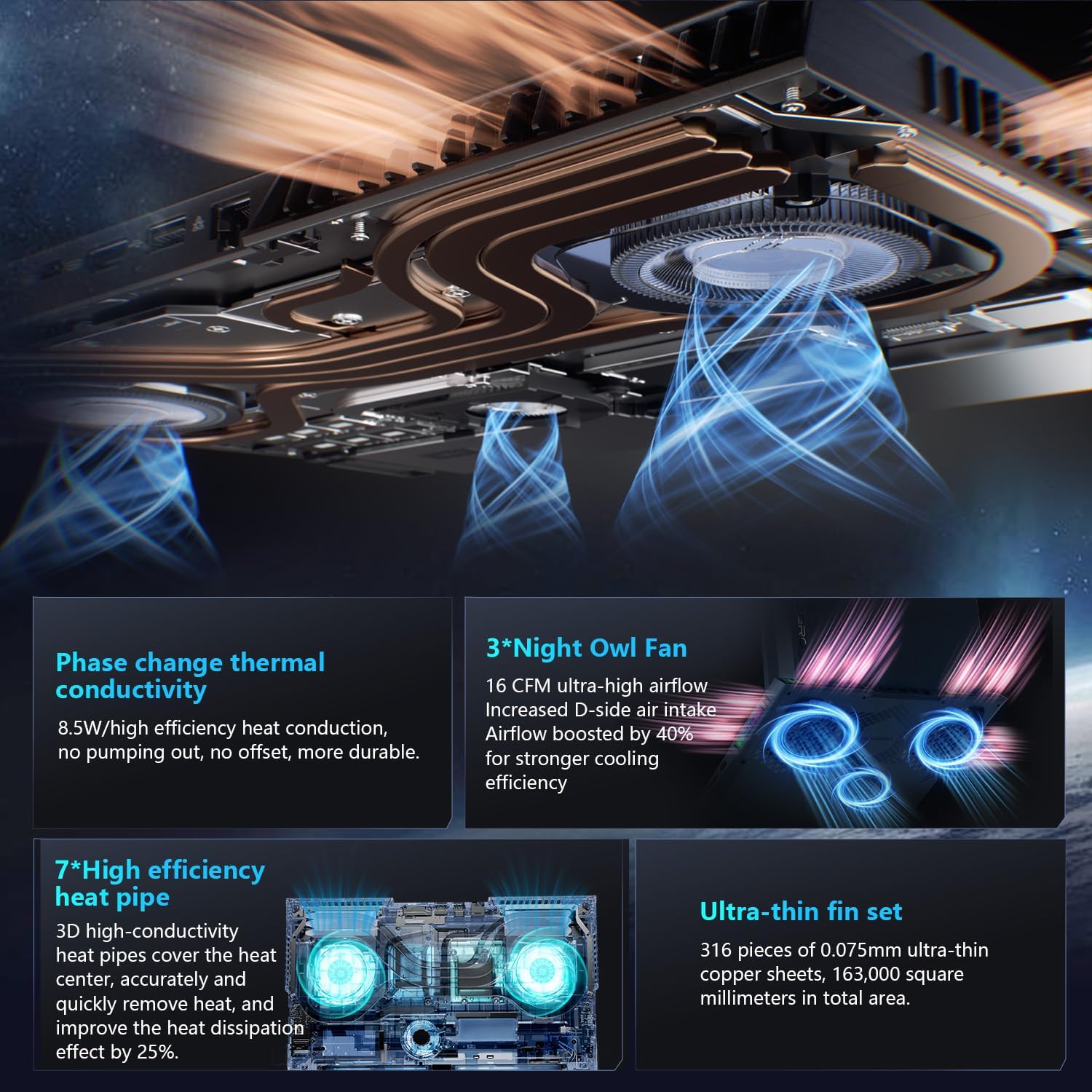
Image: The RGB backlit keyboard of the Thunderobot Zero 16 Pro, showing the full layout and numeric keypad.

Image: Visual guide to the keyboard's one-click mode switching and cooling activation keys.
Video: This video demonstrates the RGB lighting system and keyboard features of the Thunderobot Zero 16 Pro, including performance mode switching and one-click cooling.
2. Дэлгэцийн онцлог
The 16-inch QHD+ (2560x1600) display offers a 360Hz refresh rate and eye-care technology. To utilize the highest refresh rate, ensure the dedicated graphics direct connection mode is enabled in the Control Center.
- Anti-Glare & Anti-Reflection: Reduces distractions from ambient light.
- Цэнхэр гэрлийн эсрэг: Helps reduce eye strain during prolonged use.
- DC бүдэгрүүлэх: Provides flicker-free eye protection.
- Мэргэжлийн өнгө тохируулга: Ensures accurate color reproduction.

Image: The 16-inch QHD+ display of the Thunderobot Zero 16 Pro, showcasing its high refresh rate and eye-care features.

Image: Infographic detailing the display's features such as 2.5K resolution, 360Hz refresh rate, 500 nits brightness, and various eye protection technologies.
3. Thunderobot Control Center
The AI Intelligent Control Center software allows for comprehensive management of your laptop's performance, lighting, and system settings. It is recommended to connect the device to a power source for full functionality of system mode switching.
- Гүйцэтгэлийн тохируулга: Adjust CPU and GPU settings for optimal performance or power saving.
- Intelligent Light Adjustment: Customize keyboard, strip, and logo RGB lighting.
- Comprehensive Adjustment: Monitor system status, fan speeds, and manage other personalized settings.
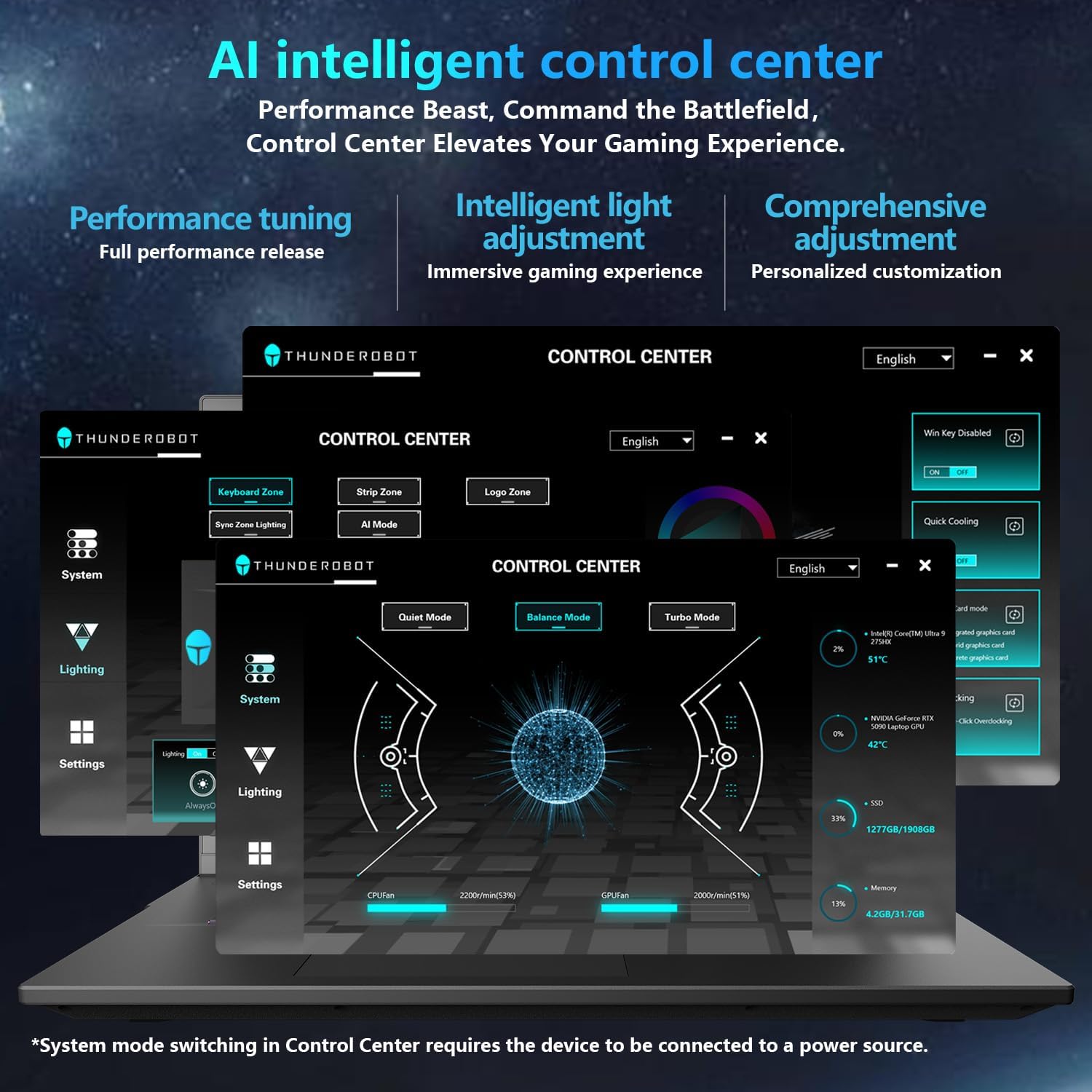
Image: A visual representation of the Thunderobot Control Center interface, showing options for system monitoring, lighting control, and performance settings.
Image: Infographic explaining the capabilities of the AI Intelligent Control Center, including performance tuning, intelligent light adjustment, and comprehensive system management.
4. Аудио систем
The laptop is equipped with a Soundstage Full audio system, featuring 4 speakers and Nahimic high-quality sound effects for an immersive audio experience.

Image: A graphic illustrating the Soundstage Full audio system with sound waves, emphasizing the immersive experience.
Video: This video showcases the display quality and overall design of the Thunderobot Zero series, including the Zero 16 Pro.
Засвар үйлчилгээ
1. Хөргөлтийн систем
The Thunderobot Zero 16 Pro features a robust cooling system designed to maintain performance under heavy loads. This includes dual Night Owl fans, 7 enlarged heat pipes, and 316 ultra-thin copper fins.
- Агааржуулалтын нүхийг цэвэр байлгах: Ensure that the air intake and exhaust vents are not obstructed to allow for proper airflow.
- Тогтмол цэвэрлэгээ: Шахмал агаар ашиглан агааржуулалтын нүхнээс гарсан тоосыг үе үе цэвэрлэж байгаарай.

Зураг: дэлбэрсэн view of the laptop's internal cooling components, showing the dual fans, heat pipes, and fin set.

Image: Infographic explaining the Night Hawk fans, high-efficiency heat pipes, phase-change thermal conduction, and ultra-thin fin array.
2. Ерөнхий тусламж үйлчилгээ
- Цэвэрлэгээ: Дэлгэц болон явах эд ангиудыг цэвэрлэхийн тулд зөөлөн, хөвөнгүй даавуу ашиглана уу. Химийн хүчтэй бодисоос зайлсхий.
- Байгаль орчны нөхцөл: Operate the laptop within recommended temperature ranges (-20°C to 60°C) and humidity (up to 90%).
- Батерейны ашиглалтын хугацаа: To prolong battery life, avoid frequently discharging the battery completely and store the laptop with a partial charge if not used for extended periods.
Video: This video highlights the robust build quality and testing of Thunderobot gaming products, demonstrating their durability.
Алдааг олж засварлах
Нийтлэг асуудал ба шийдэл
| Асуудал | Боломжит шалтгаан | Шийдэл |
|---|---|---|
| Display not reaching 360Hz refresh rate. | Dedicated graphics direct connection mode is not enabled. | Enable the dedicated graphics direct connection mode in the Thunderobot Control Center. |
| Laptop performance is lower than expected. | Laptop is not connected to power, or is in a power-saving mode. | Connect the laptop to its power adapter. Adjust performance settings to "Turbo Mode" or "Performance Mode" in the Thunderobot Control Center. Ensure cooling vents are clear. |
| Keyboard RGB lighting is not working or customizable. | Lighting settings are disabled or not configured in the Control Center. | Open the Thunderobot Control Center and navigate to the "Lighting" section to enable and customize RGB effects. |
| No sound from speakers or headphones. | Audio drivers are outdated, volume is muted, or incorrect output device selected. | Check volume levels and audio output settings in Windows. Update audio drivers if necessary. Ensure headphones are fully plugged into the 3.5mm jack. |
Үзүүлэлтүүд
| Онцлог | Дэлгэрэнгүй |
|---|---|
| Брэнд | Thunderobot |
| Загварын нэр | ZERO 16 Pro |
| Дэлгэцийн хэмжээ | 16 инч |
| Шийдвэр | 2560x1600 pixels (QHD+) |
| Сэргээх хурд | 360 Гц |
| CPU загвар | Intel Core Ultra 9 275HX (24 Cores, up to 5.4 GHz) |
| График процессор | NVIDIA GeForce RTX 5080 (12 ГБ GDDR7) |
| Суулгасан RAM санах ойн хэмжээ | 32 ГБ DDR5 (4800 МГц) |
| Хатуу дискний хэмжээ | 1 TB SSD (PCIe x4) |
| Үйлдлийн систем | Windows 11 Нүүр хуудас |
| Холболтын технологи | Wi-Fi 6E, Bluetooth, USB-A, USB-C (Thunderbolt 5), HDMI, Ethernet, Audio Jack |
| Нийт USB портууд | 4 |
| HDMI портууд | 1 |
| Гар | Backlit, Full-size with Numeric Keypad |
| Webкамерын чадвар | Тиймээ |
| Хэмжээ (L x W x Зузаан) | 14.09"L x 10.52"W x 1.03"Th |
| Бүтээгдэхүүний тусгай хэрэглээ | Тоглоом |
Баталгаат болон дэмжлэг
Баталгаат хугацааны мэдээлэл
Every Thunderobot laptop includes a 12 сарын баталгаат хугацаа, offering expert support, thorough diagnostics, and genuine parts if a repair is needed. Additionally, a 90 хоногийн баталгаат хугацаа is provided on all warranty replacement parts, ensuring hassle-free repairs. Your complete satisfaction is our commitment.
Хэрэглэгчийн дэмжлэг
For technical assistance, warranty claims, or product inquiries, please visit the official Thunderobot website or contact their customer support. Refer to the warranty card included in your package for specific contact details and terms.
Та мөн зочилж болно Thunderobot Store on Amazon нэмэлт бүтээгдэхүүний мэдээлэл болон туслах эх сурвалжийг авах.