
1. Танилцуулга
Худалдан авалт хийсэнд баярлалааasing the Sharp PS-916 Bluetooth Party Speaker System. This system includes two identical portable Bluetooth speakers designed to deliver powerful audio with versatile connectivity options. Please read this manual carefully before using the product to ensure proper operation and to maximize your listening experience.
Багцын агуулга:
- 2 x Sharp PS-916 Party Speakers
- 1 х цэнэглэх кабель
- 1 x Алсын удирдлага
- 1 х хэрэглэгчийн гарын авлага

Image: The Sharp PS-916 system includes two speakers for a complete stereo experience.
2. Тохиргоо
2.1 Charging the Speakers
The PS-916 speakers are equipped with rechargeable batteries, providing up to 12 hours of playback. Before initial use, fully charge both speakers.
- Connect the charging cable to the DC IN port on the rear of each speaker.
- Plug the other end of the charging cable into a suitable power adapter (not included) or USB power source.
- The charging indicator light will illuminate. It will change color or turn off once charging is complete.
2.2 Асаах/унтраах
To power on or off each speaker, press and hold the ON/STAND BY INPUT хяналтын самбар дээр байрлах товчлуур.
2.3 Bluetooth холболт (дан чанга яригч)
- Ensure the speaker is powered on and in Bluetooth mode. The Bluetooth indicator will flash, indicating it is ready for pairing.
- Мобайл төхөөрөмж дээрээ Bluetooth-г идэвхжүүлж, боломжтой төхөөрөмжүүдийг хай.
- Select "Sharp PS-916" from the list of devices.
- Once connected, the Bluetooth indicator will stop flashing and remain solid.
2.4 Жинхэнэ утасгүй стерео (TWS) хослол (хоёр чанга яригч)
TWS allows you to connect two PS-916 speakers wirelessly for a stereo sound experience.
- Power on both PS-916 speakers.
- Ensure neither speaker is currently connected to a Bluetooth device.
- Чанга яригчийн аль нэг дээр (энэ нь үндсэн чанга яригч байх болно) дээр дарна уу TWS button. The speaker will enter TWS pairing mode.
- The primary speaker will automatically search for the secondary speaker. Once connected, you will hear an audible confirmation, and the TWS indicator lights on both speakers will illuminate.
- Now, connect your mobile device to the primary speaker via Bluetooth as described in section 2.3. Audio will play through both speakers in stereo.
3. Ажиллаж байгаа
3.1 Хяналтын самбар дээрview

Image: Main control panel for the Sharp PS-916 speaker.
- ON/STAND BY INPUT: Power on/off, switch input modes (Bluetooth, USB, TF, AUX, FM).
- PLAY/PAUSE (►/∕∕): Аудио тоглуулахыг тоглуулах эсвэл түр зогсоох.
- ӨМНӨХ (◀◀): Өмнөх дуу руу алгасах.
- NEXT (▶▶): Дараагийн дуу руу алгасах.
- ДУГААРЫН ЗӨВЛӨГӨӨ: Үндсэн дууны хэмжээг тохируулахын тулд эргүүлнэ үү.
- TWS: Initiate or disconnect True Wireless Stereo pairing.
- ТЭНЦҮҮЛЭГЧ: Cycle through preset equalizer modes.
- БАС: Activate or deactivate bass boost.
- ГЭРЭЛ: Change or turn off the LED light effects.
- MIC CONTROL: Adjust microphone volume or echo (if applicable).
3.2 Оролтын портууд
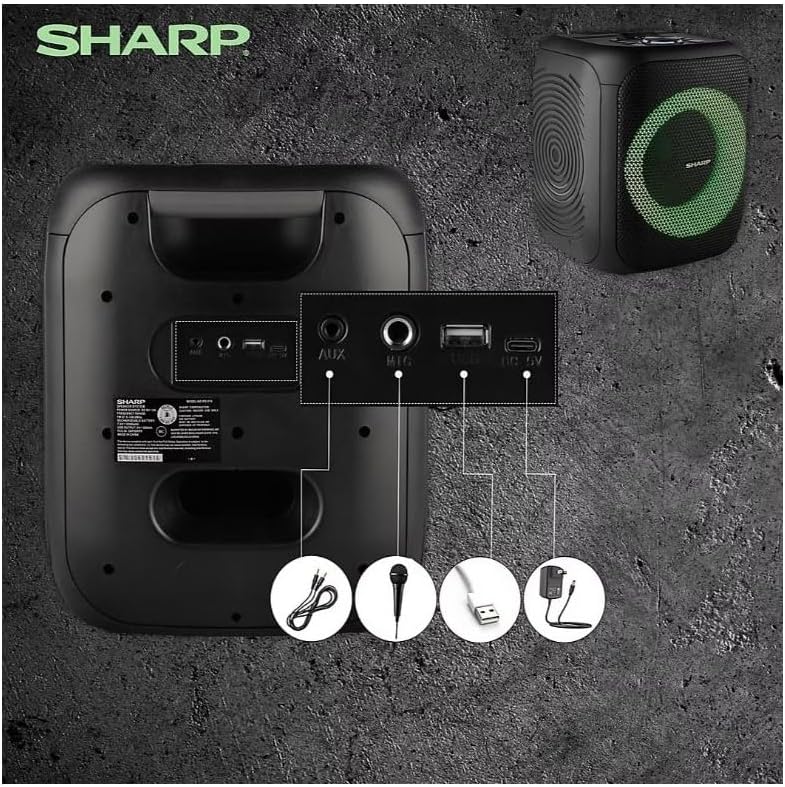
Image: Rear panel with various input and charging ports.
- AUX IN: 3.5 мм аудио кабель ашиглан гадаад аудио төхөөрөмжийг холбоно уу.
- MIC IN: Connect a microphone (sold separately) for karaoke or announcements.
- USB: Аудио тоглуулахын тулд USB флаш диск оруулна уу.
- TF карт: Аудио тоглуулахын тулд TF (microSD) карт оруулна уу.
- DC IN: Connect the charging cable to power and charge the speaker.
3.3 Playing Audio from USB/TF Card
- Insert a USB flash drive or TF card into the corresponding port.
- дээр дарна уу ON/STAND BY INPUT button repeatedly until the display shows the USB or TF mode.
- Тоглуулах нь автоматаар эхэлнэ. Ашиглах ТОГЛОХ/ЗОГСООХ, ӨМНӨХ, ба ДАРААГИЙН Тоглуулахыг удирдах товчлуурууд.
3.4 Using AUX Input
- Connect one end of a 3.5mm audio cable to the AUX IN port on the speaker.
- Нөгөө үзүүрийг гадаад төхөөрөмжийн чихэвчний залгуур эсвэл аудио гаралт руу холбоно уу.
- дээр дарна уу ON/STAND BY INPUT button repeatedly until the display shows AUX mode.
- Гадаад төхөөрөмжөөсөө тоглуулах болон дууны хэмжээг хянах.
3.5 FM радиогийн ажиллагаа

Image: The PS-916 features an integrated FM Tuner.
- дээр дарна уу ON/STAND BY INPUT button repeatedly until the display shows FM mode.
- -г удаан дар ТОГЛОХ/ЗОГСООХ боломжтой FM станцуудыг автоматаар сканнердаж, хадгалах товчийг дарна уу.
- -г ашиглана уу ӨМНӨХ болон ДАРААГИЙН хадгалсан станцуудаар дамжих товчлуурууд.
3.6 LED гэрлийн эффектүүд
дээр дарна уу ГЭРЭЛ button to cycle through different LED light modes or to turn the lights off.
4. Засвар үйлчилгээ
4.1 Цэвэрлэгээ
- Цэвэрлэхийн өмнө чанга яригчийг үргэлж унтрааж, тэжээлийн эх үүсвэрээс салга.
- Гаднах гадаргууг зөөлөн, хуурай даавуугаар арчина.
- Шингэн цэвэрлэгч, аэрозоль, уусгагчийг бүү ашигла, учир нь эдгээр нь өнгөлгөө болон дотоод эд ангиудыг гэмтээж болзошгүй.
4.2 Хадгалалт
- Чанга яригчийг сэрүүн, хуурай газар, нарны шууд тусгал болон хэт өндөр температураас хол хадгална уу.
- Хэрэв удаан хугацаагаар хадгалах бол батерейны эрүүл мэндийг хадгалахын тулд хэдэн сар тутамд ойролцоогоор 50% хүртэл цэнэглээрэй.
5. Алдаа засах
If you encounter issues with your Sharp PS-916 speakers, please refer to the following common problems and solutions:
| Асуудал | Боломжит шийдэл |
|---|---|
| Чанга яригч асахгүй байна. | Батерей цэнэглэгдсэн эсэхийг шалгана уу. Цэнэглэгчийн кабелийг холбоод дахин оролдоно уу. |
| Чанга яригчаас ямар ч чимээ алга. | Чанга яригч болон холбогдсон төхөөрөмжийнхөө дууны түвшинг шалгана уу. Зөв оролтын горимыг сонгосон эсэхийг шалгаарай. |
| Bluetooth төхөөрөмжийг холбох боломжгүй. | Ensure the speaker is in Bluetooth pairing mode (indicator flashing). Move your device closer to the speaker. Disconnect from other Bluetooth devices. |
| TWS холболт амжилтгүй боллоо. | Ensure both speakers are powered on and not connected to any other Bluetooth devices. Try initiating TWS pairing again. |
| Гажуудсан дуу чимээ. | Reduce the volume on both the speaker and your connected device. Ensure the audio source is not distorted. |
6. Техникийн үзүүлэлтүүд
| Онцлог | Дэлгэрэнгүй |
|---|---|
| Брэнд | Хурц |
| Загварын нэр | PS-916 |
| Чанга яригчийн тохиргоо | 8" Woofer, 1" Tweeter (per speaker) |
| Оргил гаралтын чадал | 400 Watts (per speaker) |
| RMS гаралтын хүч | 40 Watts (per speaker) |
| Холболтын технологи | Bluetooth |
| Нэмэлт оролт | USB, TF Card, 3.5mm AUX, Microphone Input |
| Зайны ашиглалт | 12 цаг хүртэл |
| Онцлог шинж чанарууд | True Wireless Stereo (TWS) Pairing, Bass Boost, LED Light Effects, FM Tuner |
| Өнгө | Хар |
| Зүйлийн жин | 6.5 фунт (чанга яригч тутамд) |
| UPC | 728434122111 |
| GTIN | 728434122111 |
7. Баталгаат хугацаа ба дэмжлэг
7.1 Баталгаат хугацааны мэдээлэл
This Sharp PS-916 product comes with a 90-day limited warranty. This warranty covers manufacturing defects under normal use. It does not cover damage caused by misuse, accidents, unauthorized modifications, or normal wear and tear.
7.2 Хэрэглэгчийн дэмжлэг
For technical assistance, warranty claims, or further inquiries, please refer to the contact information provided with your purchase documentation or visit the official Sharp support webсайт.