
1. Танилцуулга
Худалдан авалт хийсэнд баярлалааasing the OXS Thunder Duo Speaker System. This manual provides essential information for the safe and efficient use of your new speaker system. Please read this manual thoroughly before operating the device and retain it for future reference.
The OXS Thunder Duo is a 3.1.2 channel bookshelf speaker system designed for an immersive audio experience, compatible with various devices including TVs, PCs, gaming consoles, and mobile devices.
2. Аюулгүй байдлын мэдээлэл
- Эрчим хүчний эх үүсвэр: Зөвхөн өгсөн тэжээлийн адаптерийг ашиглана уу. Боть байгаа эсэхийг баталгаажуулна ууtage нь таны орон нутгийн цахилгаан хангамжтай таарч байна.
- Байршил: Place the speakers on a stable, flat surface. Avoid placing near heat sources, direct sunlight, or in areas with high humidity or dust.
- Агааржуулалт: Агааржуулалтын нүхийг бүү бөглөөрэй. Агаарын урсгалыг хэвийн байлгахын тулд чанга яригчийн эргэн тойронд хангалттай зай байгаа эсэхийг шалгаарай.
- Ус ба чийг: Do not expose the device to water, rain, or moisture. This product is not waterproof.
- Цэвэрлэгээ: Disconnect from power before cleaning. Use a soft, dry cloth. Do not use liquid cleaners or aerosols.
- Үйлчилгээ: Do not attempt to repair or disassemble the unit yourself. Refer all servicing to qualified personnel.
- Батерей: The remote control uses AAA batteries. Ensure correct polarity when inserting. Do not mix old and new batteries.
3. Багцын агуулга
Доор жагсаасан бүх зүйл таны багцад байгаа эсэхийг шалгаарай.
- OXS Thunder Duo Speakers (2 units)
- Алсын удирдлага (2 AAA батерейтай)
- HDMI кабель
- Оптик кабель
- Эрчим хүчний адаптер
- Хэрэглэгчийн гарын авлага (энэ баримт бичиг)
4. Бүтээгдэхүүн дууссанview
The OXS Thunder Duo speaker system consists of two bookshelf speakers designed for tabletop placement. Below is a general representation of the product and its typical components.
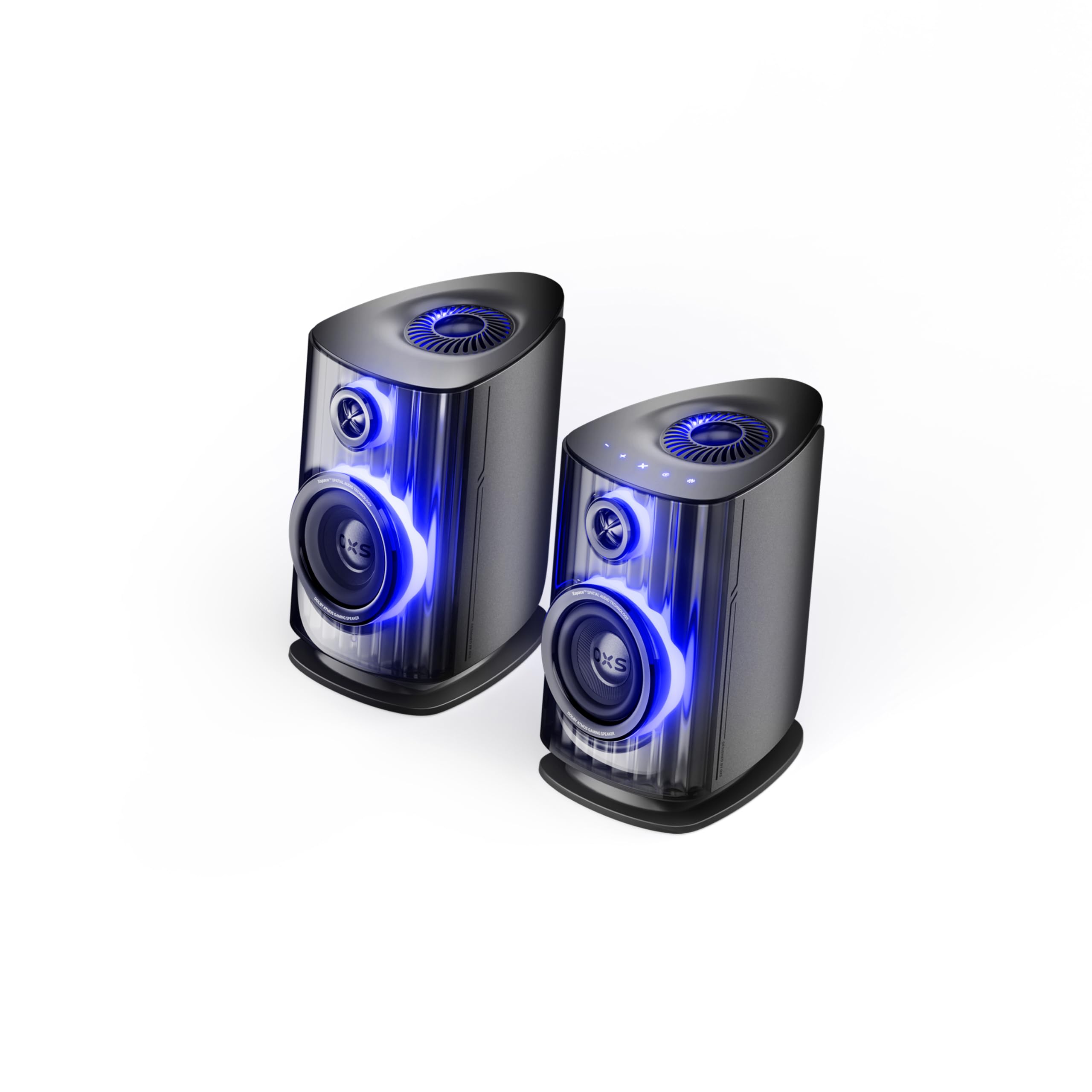
Image: OXS Thunder Duo Speaker System. This image shows the two main speaker units, typically placed on a tabletop. The design features a sleek, modern aesthetic with speaker grilles visible on the front.
4.1. Чанга яригчийн бүрэлдэхүүн хэсгүүд
- Үндсэн чанга яригч: Houses the primary audio drivers and control circuitry.
- Satellite Speaker Unit: Connects to the main unit to provide a wider soundstage.
- Эрчим хүчний оролт: Цахилгаан адаптерийг холбоход зориулагдсан.
- Аудио оролт: HDMI IN, USB-C, eARC, Optical for various source connections.
4.2. Алсын удирдлага
The included remote control allows for convenient operation of the speaker system from a distance. It typically includes buttons for:
- Асаах/унтраах
- Дууны хэмжээг нэмэгдүүлэх/доошруулах
- Input Source Selection (HDMI, USB-C, eARC, Optical)
- Дууг хаах
- Audio Mode Selection (e.g., Surround)
5. Тохиргоо
5.1. Илтгэгчийн байршил
Place the OXS Thunder Duo speakers on a stable, flat tabletop surface. For optimal sound, position them equidistant from your listening position and at ear level. Ensure there are no obstructions between the speakers and your listening area.
5.2. Эрчим хүчний холболт
- Connect the power adapter to the power input port on the main speaker unit.
- Цахилгаан адаптерийг ханын залгуурт холбоно уу.
- The power indicator on the speaker will illuminate, indicating it is in standby mode.
5.3. Аудио эх сурвалжуудыг холбох
The OXS Thunder Duo offers multiple connectivity options:
- HDMI (eARC): For connecting to TVs with an HDMI eARC/ARC port. Use the provided HDMI cable. This connection supports high-quality audio and allows TV remote control of speaker volume.
- HDMI IN: For connecting other HDMI-enabled devices like gaming consoles or Blu-ray players.
- Оптик: For connecting to TVs or other devices with an optical audio output. Use the provided optical cable.
- USB-C: For connecting to PCs, laptops, or compatible mobile devices.
Connect your desired audio source to the corresponding input port on the main speaker unit.
6. Ашиглалтын заавар
6.1. Асаах/унтраах
Press the Power button on the remote control or the main speaker unit to turn the system on or off. The power indicator will change status accordingly.
6.2. Оролтын эх үүсвэрийг сонгох
Press the 'Input' or dedicated source buttons (e.g., HDMI, Optical, USB-C) on the remote control to switch between connected audio sources. The current input source will typically be indicated by an LED or display on the main speaker unit.
6.3. Дууны түвшний хяналт
Use the 'Volume Up' (+) and 'Volume Down' (-) buttons on the remote control to adjust the audio level. Press the 'Mute' button to temporarily silence the audio.
6.4. Audio Modes
The OXS Thunder Duo supports surround sound audio output. Use the 'Mode' button on the remote control to cycle through available audio modes, if applicable, to optimize your listening experience for different content types.
7. Холболт
The OXS Thunder Duo offers versatile connectivity for a wide range of devices:
- HDMI IN: Connects to various HDMI-enabled devices.
- USB-C: Ideal for direct digital audio connection to computers (PC), laptops, and mobile devices running Windows, Android, or iOS.
- eARC (Сайжруулсан дууг буцаах суваг): Connects to compatible TVs for high-fidelity audio transmission and simplified control.
- Оптик: Provides a digital audio connection for TVs, game consoles (PlayStation, XBOX, Switch), and other devices with an optical output.
8. Засвар үйлчилгээ
Proper maintenance ensures the longevity and performance of your OXS Thunder Duo speaker system.
- Цэвэрлэгээ: Regularly wipe the speaker surfaces with a soft, dry, lint-free cloth. Do not use abrasive cleaners, waxes, or solvents.
- Тоос: Keep the speaker grilles free from dust accumulation. Use a soft brush or a vacuum cleaner with a brush attachment on a low setting.
- Хадгалах: Хэрэв чанга яригчийг удаан хугацаагаар хадгалах бол цахилгаан тэжээлээс салгаад сэрүүн, хуурай газар, болж өгвөл үйлдвэрийн савлагаанд нь хадгална уу.
9. Алдаа засах
If you encounter issues with your OXS Thunder Duo, refer to the following common problems and solutions:
| Асуудал | Боломжит шалтгаан | Шийдэл |
|---|---|---|
| Хүч чадалгүй | Power cable not connected; Power outlet not active; Speaker is off. | Ensure power cable is securely connected. Test the outlet with another device. Press the Power button on the remote or speaker. |
| Дуу алга | Incorrect input source selected; Volume too low or muted; Audio cable not connected properly; Source device not outputting audio. | Select the correct input source. Increase volume and check if muted. Reconnect audio cables. Check audio settings on your source device. |
| Алсын удирдлага ажиллахгүй байна | Batteries are dead or incorrectly inserted; Obstruction between remote and speaker. | Replace batteries, ensuring correct polarity. Remove any obstructions. Ensure remote is pointed at the main speaker unit. |
| Гажуудсан дуу чимээ | Volume too high; Poor audio source quality; Loose cable connection. | Lower the volume. Check the audio quality from the source. Ensure all cables are securely connected. |
If the problem persists after trying these solutions, please contact OXS customer support.
10. Техникийн үзүүлэлтүүд
| Онцлог | Тодорхойлолт |
|---|---|
| Брэнд | ҮХС |
| Загварын дугаар | Thunder DUO |
| Speaker Max Output | 220 ватт |
| Давтамжийн хариу үйлдэл | 20 кГц |
| Холболтын технологи | HDMI IN, USB-C, eARC, Optical |
| Аудио гаралтын горим | Хүрээлэн |
| Суурилуулах төрөл | Ширээний тавиур |
| Product Exterior Material | ABS & PVC |
| Чанга яригчийн төрөл | Номын тавиур |
| Зөвлөмж болгож буй хэрэглээ | Computer, TV, Gaming Consoles |
| Өнгө | Титан |
| Усны хамгаалалттай | Худлаа |
| Баталгаат төрөл | Хязгаарлагдмал баталгаат хугацаа |
| Чанга яригчийн хэмжээ | 1.5 инч |
| Speaker Channel Configuration | 3.1.2 |
| S/N харьцаа | 96 дБ |
| Батерей | 2 AAA батерей (алсын удирдлагад багтсан) |
| Хэмжээ (D x W x H) | 17.8 x 21.5 x 27.6 см |
| Зүйлийн жин | 11.02 фунт |
| Тохиромжтой төхөөрөмжүүд | TV, PC, PlayStation, XBOX, Mobile devices (Windows, Android, iOS), Switch |
| UPC | 199284067936 |
| ASIN | B0GDFVBVB3 |
11. Баталгаат хугацаа ба дэмжлэг
The OXS Thunder Duo Speaker System comes with a Limited Warranty. Please refer to the warranty card included in your package for specific terms and conditions, including the duration and coverage details.
For technical support, troubleshooting assistance, or warranty claims, please contact OXS customer service through the contact information provided on the official OXS website or your purchase documentation. Please have your model number (Thunder DUO) and proof of purchase ready when contacting support.