
Танилцуулга
This manual provides detailed instructions for the safe and efficient use of your Samvix iBusiness Mehadrin 128 Kosher MP3 Player. Please read this manual thoroughly before operating the device and retain it for future reference.
Гол онцлогууд
- Massive 128GB Storage: Store thousands of songs, lectures, and audio files without needing an SD card.
- Full MP3 Playback: Features repeat, shuffle, bookmark, Add to Playlist, and adjustable playback speed for a customized listening experience.
- High-Quality Voice Recording: Built-in recorder with noise reduction and voice activity detection (VAD) for clear recordings.
- Secure and Family-Friendly: Three parental password options, plus USB and Bluetooth password protection for safe use.
- Multilingual and Convenient: Supports English, Hebrew, and Yiddish, with auto power-saving shutdown, date/time display, and Type C USB charging.
- No SD Card Slot: Төхөөрөмжийн онцлог ample internal storage and does not include an SD card slot.
- No Radio Functionality: This device is designed for dedicated audio playback and does not include a radio tuner.
Хайрцагт юу байна
- Samvix iBusiness Mehadrin 128GB Kosher MP3 Player
- USB Type-C цэнэглэгч кабель (not explicitly listed but implied for Type C USB charging)
- Хэрэглэгчийн гарын авлага (энэ баримт бичиг)
Төхөөрөмж дууссанview
Familiarize yourself with the physical components of your Samvix iBusiness Mehadrin MP3 Player.
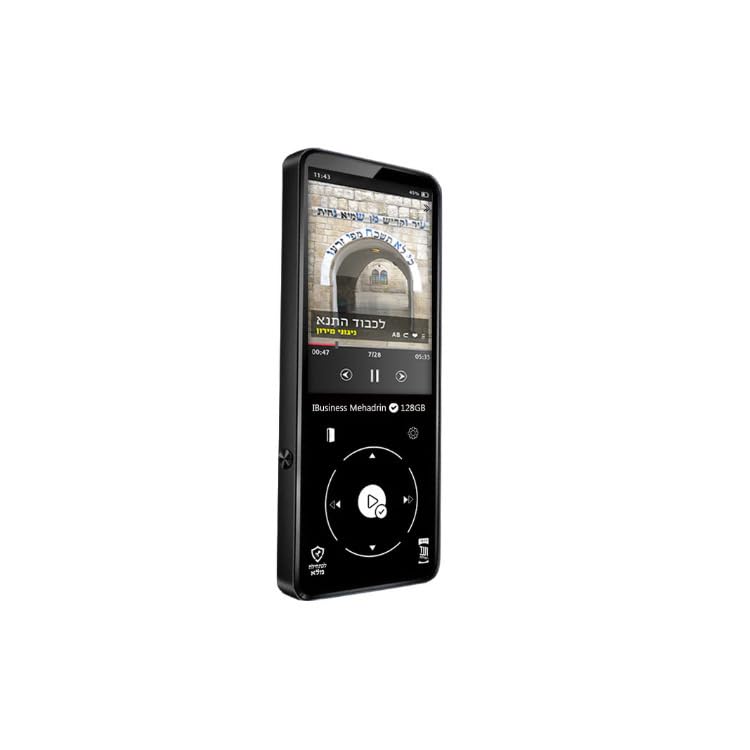
Figure 1: Samvix iBusiness Mehadrin 128 Kosher MP3 Player in its retail packaging.
Урд самбар
- 2.4 инчийн LCD дэлгэц: Цэс, хөгжмийн мэдээлэл болон тохиргоог харуулна.
- Гүйлгэх дугуй: Цэс болон жагсаалтаар дамжуулан навигаци хийхэд ашигладаг.
- Тоглуулах/түр зогсоох товчлуур: Initiates or pauses music playback.
- Цэсийн товчлуур: Үндсэн цэс рүү нэвтрэх эсвэл өмнөх дэлгэц рүү буцах.
- Өмнөх/Урагшаа эргүүлэх товчлуур: Skips to the previous track or rewinds the current track.
- Next/Fast-forward Button: Skips to the next track or fast-forwards the current track.
- Буцах товчлуур: Өмнөх цэс эсвэл дэлгэц рүү буцна.
Хажуугийн самбар
- Дууг дээшлүүлэх / доош товчлуурууд: Аудио гаралтын дууны түвшинг тохируулна.
- Бичил SD картны үүр: Note: This model does not include an SD card slot.
Дээд/доод самбар
- Цахилгаан товч: Төхөөрөмжийг асаана/унтраана эсвэл дэлгэцийг түгжинэ/тайлна.
- Чихэвчний порт: Connects to wired headphones.
- USB Type-C порт: Used for charging the device and transferring fileкомпьютер руу/компьютерээс.
- Гарах порт: Provides an audio output for connecting to external ampчангалагч эсвэл чанга яригч.
- Суулгасан чанга яригч: Чихэвчгүйгээр шууд аудио тоглуулах зориулалттай.
Тохиргоо
1. Төхөөрөмжийг цэнэглэж байна
- Connect the USB Type-C charging cable to the device's USB Type-C port.
- Кабелийн нөгөө үзүүрийг USB тэжээлийн адаптер (дагаагүй) эсвэл компьютерийн USB порт руу холбоно уу.
- The device will indicate charging status on the screen. Allow sufficient time for a full charge before first use.
2. Хөгжим дамжуулах Files
To transfer music from your computer to the Samvix iBusiness Mehadrin MP3 Player:
- MP3 тоглуулагчаа дагалдах USB Type-C кабелиар компьютертээ холбоно уу.
- On the MP3 player, navigate to Системийн тохиргоо > USB горим болон сонгох USB (do not select DAC).
- Your computer should recognize the MP3 player as a removable disk or portable device.
- Open the device's drive on your computer. You can create new folders (e.g., "Music 1", "Music 2") to organize your files.
- Хүссэн аудиогоо чирж тавь files (MP3, FLAC, etc.) from your computer into the folders on the MP3 player.
- Нэг удаа fileфайлуудыг шилжүүлсэн тохиолдолд USB кабелийг салгахаасаа өмнө төхөөрөмжийг компьютерээсээ аюулгүй салга.
- The device will automatically update its music library after disconnection.
Ашиглалтын заавар
1. Асаах/унтраах
- Асаахын тулд: Дэлгэц асах хүртэл асаах товчийг удаан дарна уу.
- Унтраахын тулд: Press and hold the Power button until the power-off prompt appears, then confirm.
- Дэлгэцийн түгжээ/түгжээг тайлах: Ашиглаж байх үед дэлгэцийг түгжих эсвэл тайлахын тулд Асаах товчийг товч дарна уу.
2. Цэс рүү шилжих
- -г ашиглана уу Гүйлгэх дугуй to move through menu options.
- дээр дарна уу Тоглуулах/түр зогсоох товчлуур (center of the scroll wheel) to select an option.
- дээр дарна уу Буцах товчлуур өмнөх цэс рүү буцах.
- дээр дарна уу Цэсний товчлуур үндсэн цэс рүү очих.
3. Хөгжим тоглуулах
- From the main menu, select "Music" or "Category" to browse your audio files.
- Use the Scroll Wheel to highlight a song, then press the Play/Pause button to start playback.
- Дахин тоглуулах явцад ашиглана уу Өмнөх/буцах болон Дараах/Урагшлах buttons to change tracks. Press and hold these buttons to fast-forward or rewind within a track.
- дээр дарна уу Тоглуулах/түр зогсоох товчлуур тоглуулахыг түр зогсоох эсвэл үргэлжлүүлэх.
- -Г ашиглан дууны хэмжээг тохируулна уу Дууг чангалах / багасгах товч талд.
4. Bluetooth хослол
To connect your Samvix iBusiness Mehadrin MP3 Player to Bluetooth headphones or speakers:
- Таны Bluetooth төхөөрөмж хослох горимд байгаа эсэхийг шалгаарай.
- On the MP3 player, navigate to Системийн тохиргоо > Bluetooth тохиргоо.
- Bluetooth-г асаана уу On.
- Сонго Bluetooth скан to search for available devices.
- Once your device appears in the list, select it to initiate pairing.
- Confirm any pairing requests on both devices. Once connected, the Bluetooth icon will appear on the MP3 player's screen.
5. Дуу бичлэг
The device features a built-in voice recorder:
- From the main menu, select the "Voice Recorder" option.
- Follow the on-screen prompts to start, pause, save, or delete recordings.
- Recordings benefit from noise reduction and Voice Activity Detection (VAD) for clear audio.
Эцэг эхийн хяналт
The Samvix iBusiness Mehadrin MP3 Player offers robust parental control features to ensure a safe listening environment:
- Three Parental Password Options: Configure different password levels to restrict access to certain features or content.
- USB Password Protection: Secure the device with a password to prevent unauthorized file USB-ээр дамжуулдаг.
- Bluetooth Password Protection: Implement a password for Bluetooth connections to control which devices can pair with the MP3 player.
Refer to the device's settings menu for detailed configuration of these parental control features.
Засвар үйлчилгээ
Цэвэрлэгээ
- Use a soft, dry, lint-free cloth to clean the device.
- Шингэн цэвэрлэгч, аэрозоль эсвэл хүчтэй химийн бодис бүү хэрэглэ.
Батерейны арчилгаа
- Төхөөрөмжийг хэт өндөр температурт байлгахаас зайлсхий.
- Батерейны эрүүл мэндийг хадгалахын тулд төхөөрөмжийг ашиглаагүй байсан ч тогтмол цэнэглээрэй.
Хадгалах
- Төхөөрөмжийг нарны шууд тусгалаас хол, сэрүүн, хуурай газар хадгална.
- Keep the device away from magnetic fields.
Алдааг олж засварлах
- Төхөөрөмж асахгүй байна: Батерейг цэнэглэсэн эсэхийг шалгаарай. Эрчим хүчний эх үүсвэрт холбогдоод дахин оролдоно уу.
- Шилжүүлэх боломжгүй files: Check the USB cable connection. Ensure the device's USB Mode is set to "USB" in System Settings. Try a different USB port or computer.
- Bluetooth холбогдоогүй байна: Ensure Bluetooth is enabled on both the MP3 player and the target device. Make sure both devices are in pairing mode and within range.
- Дууны чанар муу: Check headphone connections. Ensure the audio files are of good quality. Adjust equalizer settings if available.
- Төхөөрөмж хариу өгөхгүй байна: Press and hold the Power button for about 10-15 seconds to perform a forced restart.
Үзүүлэлтүүд
| Брэнд | SAMVIX |
| Загварын нэр | MP3 |
| Загварын дугаар | iBusinessMehadrin128 |
| Онцлог шинж чанар | Дуу бичигч |
| Холболтын технологи | Bluetooth |
| Санах ойн хадгалах багтаамж | 128 ГБ |
| Дэлгэцийн хэмжээ | 2.4 инч |
| Тохиромжтой төхөөрөмжүүд | Чихэвч |
| Дэлгэцийн технологи | LCD |
| Зүйлийн жин | 9.1 фунт |
| Хэмжээ D x W x H | 0.39"D x 9.1"W x 9.1"H |
| UPC | 766162175757 |
Баталгаат болон дэмжлэг
For warranty information, technical support, or service inquiries, please refer to the official SAMVIX webсайт эсвэл харилцагчийн үйлчилгээтэй шууд холбогдоно уу. Худалдан авалтын баримтаа баталгаат нэхэмжлэлд зориулж худалдан авалтын баталгаа болгон хадгална уу.