
Танилцуулга
This manual provides essential instructions for the setup, operation, and troubleshooting of your new Generic remote control, specifically designed for use with OKIN Control Unit Cu358-2-l JLDP 15.005.102 adjustable bed bases. Please read this manual carefully before attempting to use or pair the remote control.
Чухал тэмдэглэл: This remote control is a replacement unit and does not include batteries or a printed instruction manual. It is crucial to ensure that your existing control box and old remote control match the specifications listed in this document for proper functionality. This remote is not a universal remote and will only work with the specified OKIN control unit.
Тохиромжтой байдлын баталгаажуулалт
Before attempting to pair or use this remote, it is critical to verify its compatibility with your adjustable bed base's control unit. This remote is designed exclusively for the OKIN Control Unit Cu358-2-l JLDP 15.005.102.

Зургийн тайлбар: This image displays a crucial compatibility message: "Important Note: Before placing your order please provide us with clear pictures of your control box and old remote (front & back) in order to match the correct remote to your bed." It also shows examples of a remote control (front and back) and close-ups of control box labels with model numbers like "JLDP 15.005.102" and "MODEL: JLDP 03", indicating where to find identification information.
Please ensure your control box has the model number Cu358-2-l JLDP 15.005.102. You can usually find this information on a label attached to the control box or within the battery compartment of your old remote control. If you are uncertain, consult your bed base's original manual or contact the manufacturer with your control box details.
Тохиргоо
1. Зай суурилуулах
The remote control requires 2 AAA batteries (not included). To install the batteries:
- Алсын удирдлагын араас зайны тагийг ав.
- Зөв туйлшралыг (+/-) баталгаажуулж, 2 AAA батерейг оруулаарай.
- Зайны тагийг найдвартай солино.


Зургийн тайлбар: Two images displaying the rear of the remote control with the battery cover detached, illustrating the battery compartments where two AAA batteries are to be inserted. The internal circuitry and battery terminals are visible.
2. Хослуулах заавар
The remote control must be paired with your adjustable bed base's control unit to function. Follow these steps carefully:
Method 1: Standard Pairing Procedure
- Алхам 1: Unplug the power cord of your adjustable bed base from the electrical outlet.
- Алхам 2: Wait approximately 5 seconds, then plug the power cord back into the outlet.
- Алхам 3: Within 10 seconds of plugging in the power cord, locate the PAIR button on the back of the remote control (often inside the battery compartment). Press and hold this PAIR button.
- Алхам 4: The PAIR button on the remote will illuminate blue and begin flashing. Continue holding the button.
- Алхам 5: When the PAIR button stops flashing, the LED light on the control box will go out. Release the PAIR button.
- Алхам 6: The remote is now paired to the adjustable base. Test all remote functions to confirm successful pairing.

Зургийн тайлбар: This image provides a visual guide for pairing. It shows the back of a remote control with the battery cover removed, highlighting a "Pairing Button." Text steps instruct the user to "start the massage bed, then find the control box," "point the remote control at the control box (open the remote control battery cover and press the Pair/Paired button)," and "Press and hold the Pair/Paired button for 30 seconds to complete the pairing."
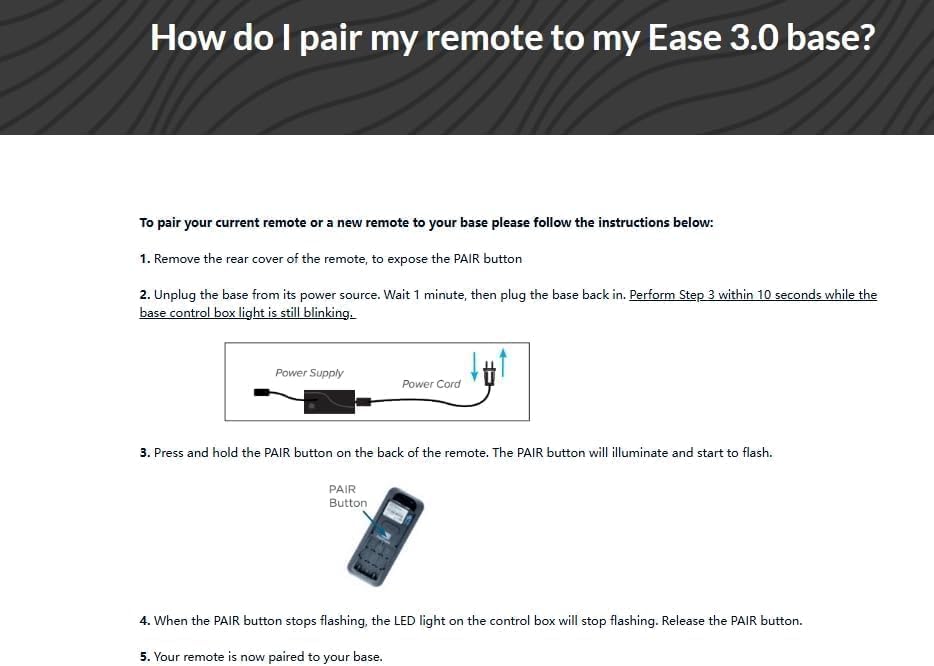
Зургийн тайлбар: This image presents detailed pairing instructions titled "How do I pair my remote to my Ease 3.0 base?". It outlines five steps: removing the rear cover to expose the PAIR button, unplugging the base and plugging it back in within 10 seconds, pressing and holding the PAIR button until it illuminates and flashes, and releasing the button when it stops flashing and the control box LED goes out. A diagram of a power supply and an illustration of a remote with a PAIR button are included.
Method 2: Pairing with Reset Button (If applicable)
Some control boxes may require a reset. The distance between the remote and control box for pairing should be less than 2 meters.
- Алхам 1: Remove the battery cover on the flipside of the remote.
- Алхам 2: Insert/check existing 3x AAA batteries (Note: This remote uses 2 AAA batteries, please verify your specific model's requirement).
- Алхам 3: Push the reset button on the control box twice with a small, pointed object. The green pairing LED adjoining will light up. You now have 10 seconds to pair the remote and receiver.
- Алхам 4: On the flipside of the remote, locate the silicone push button positioned above the batteries. A blue LED starts blinking as the button is pressed. Keep it pressed until the blue LED is lit continuously, then pairing is completed, and the blue LED light fades away.

Зургийн тайлбар: This image provides "Pairing instruction (in case of trouble)." It details steps including removing the battery cover, inserting batteries, pushing a reset button on the control box twice (which lights a green LED), and then pressing a silicone push button on the remote until a blue LED blinks and then stays lit, indicating successful pairing. Illustrations of the remote's battery compartment and a control box with an arrow pointing to the reset LED are included.
Ашиглалтын заавар
Once successfully paired, your remote control is ready for use. The remote typically features buttons for adjusting the head and foot sections of your adjustable bed base, as well as flat position and potentially massage functions. Refer to your bed base's original manual for specific button layouts and advanced features.
- Толгойгоо дээш/доош чиглүүлэх: Орны толгойн хэсгийг тохируулна.
- Хөлийг дээш/доошлуулах: Орны хөлийн хэсгийг тохируулна.
- Хавтгай: Орыг тэгш байрлалд буцааж оруулна.
- Massage (if applicable): Activates or adjusts massage functions.
Point the remote control towards the bed base when operating to ensure the signal is received.
Алдааг олж засварлах
- Алсын удирдлага хариу өгөхгүй байна:
- Check if the batteries are correctly installed and not depleted. Replace if necessary.
- Ensure the remote is pointed directly at the bed base's control unit.
- Verify that the bed base is plugged into a working electrical outlet.
- Re-attempt the pairing procedure as described in the "Setup" section.
- Хослолтын алдаа:
- Confirm that your control box model number is exactly Cu358-2-l JLDP 15.005.102. This remote is not universal.
- Ensure you are performing the pairing steps within the specified timeframes (e.g., 10 seconds after plugging in the power cord).
- Try both pairing methods if available for your specific control unit.
- Ensure the remote is within 2 meters of the control box during pairing.
- Завсарлагатай ажиллагаа:
- Check for any obstructions between the remote and the bed base.
- Ensure there are no strong interference sources nearby (e.g., other wireless devices).
- Replace batteries even if they seem partially functional.
If issues persist after following these steps, please consult the original manual for your adjustable bed base or contact the manufacturer for further assistance.
Үзүүлэлтүүд
| Брэнд | Ерөнхий |
| Загварын дугаар | for Cu358-2-l JLDP 15.005.102 |
| Compatible Control Unit | OKIN Control Unit Cu358-2-l JLDP 15.005.102 |
| Онцлог шинж чанар | Not a universal remote |
| Өнгө | Хар |
| Дэмжигдсэн төхөөрөмжүүдийн хамгийн их тоо | 1 |
| Тохиромжтой төхөөрөмжүүд | Тохируулж болох орны суурь |
| Холболтын технологи | Хэт улаан туяа |
| Хянагчийн төрөл | Товчлуурын удирдлага |
| Хамгийн их хүрээ | 8 метр |
| Батерейны тоо | 2 AAA батерей шаардлагатай (оруулаагүй) |
| Үйлдвэрлэгч | SZHKHXD |
Засвар үйлчилгээ
- Цэвэрлэгээ: Алсын удирдлагыг зөөлөн, хуурай даавуугаар арчина. Шингэн цэвэрлэгч болон зүлгүүрийн материалыг бүү ашигла.
- Зай солих: Replace batteries promptly when the remote's performance degrades. Remove batteries if the remote will not be used for an extended period to prevent leakage.
- Хадгалах: Удирдлагыг хуурай газар, хэт температур, нарны шууд тусгалаас хол байлга.
Баталгаат хугацааны мэдээлэл
Энэ бүтээгдэхүүн нь хамт ирдэг 90 хоногийн баталгаат хугацаа from the date of purchase. This warranty covers manufacturing defects under normal use. It does not cover damage caused by misuse, accidents, unauthorized modifications, or improper battery installation. Please retain your proof of purchase for warranty claims.
Дэмжлэг
For further assistance or if you encounter issues not covered in this manual, please refer to the original instruction manual provided with your adjustable bed base. For product-specific inquiries regarding this remote control, please contact the seller or manufacturer (SZHKHXD) through your purchase platform.