
1. Бүтээгдэхүүн дууссанview
The Hunter ZenTech 52 Inch Smart Ceiling Fan (Model 53638) is designed for both indoor and covered outdoor spaces, offering quiet, efficient performance with advanced smart home integration. This 5-blade fan features a slim DC motor, adjustable LED lighting with TrueLight technology, and Wi-Fi connectivity for control via the HunterSMART app, Amazon Alexa, Google Assistant, and Apple HomeKit. It is ENERGY STAR certified and damp-rated for versatile use.
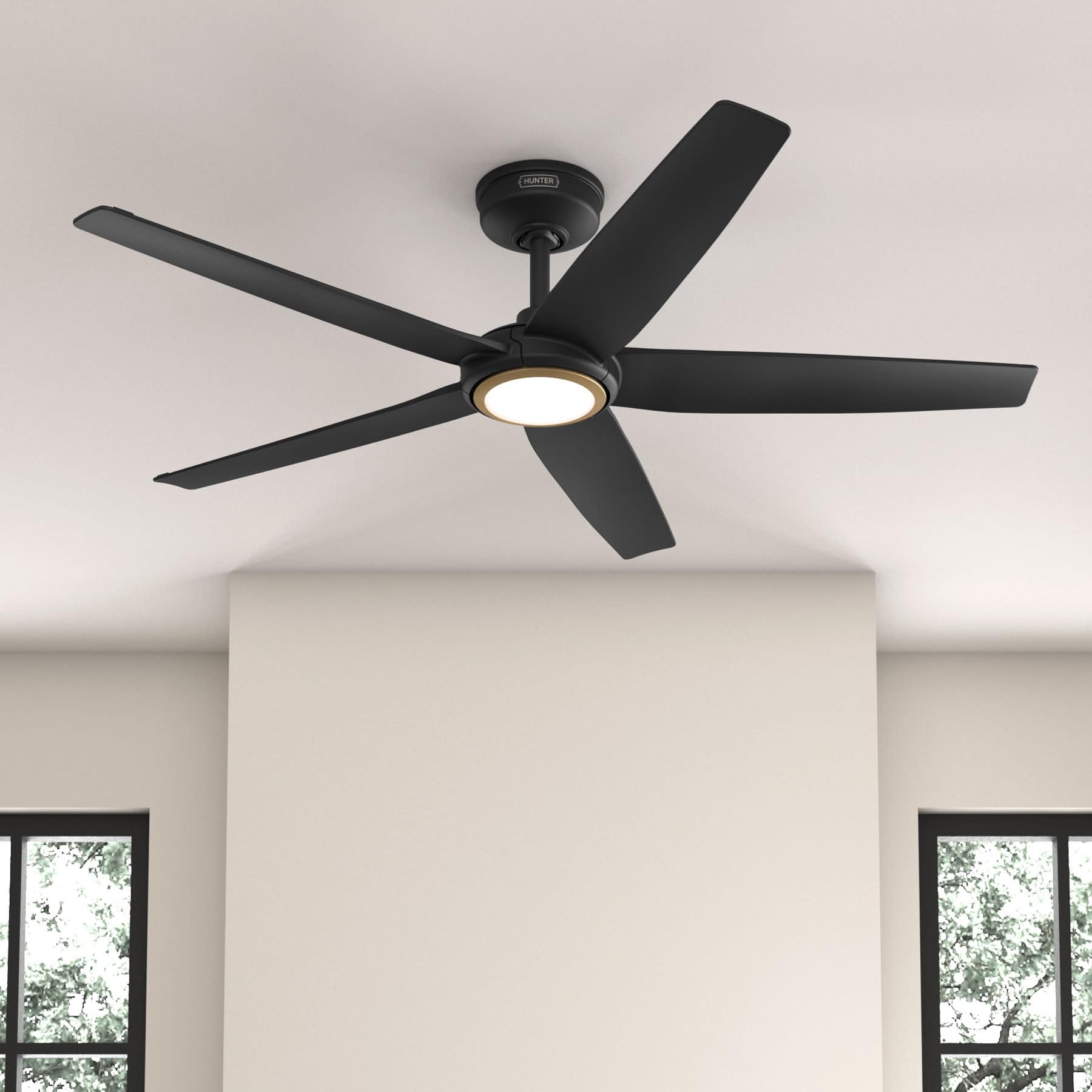
Figure 1: Hunter ZenTech 52 Inch Smart Ceiling Fan (Matte Black)
Гол онцлогууд:
- Нарийвчилсан дизайн: Ultra-slim DC motor for powerful, quiet airflow and a modern aesthetic.
- Ухаалаг гэрийн интеграци: HunterSMART technology for app and voice control via Amazon Alexa, Google Assistant, and Apple HomeKit.
- Тохируулах боломжтой LED гэрэлтүүлэг: TrueLight LED offers 10 brightness levels and 10 color temperatures, protected by a durable Duralight lens.
- SureSpeed Guarantee: Delivers strong, consistent airflow with quiet, wobble-free performance.
- Эрчим хүчний хэмнэлттэй: ENERGY STAR certified reversible 6-speed DC motor.
- Damp Үнэлгээ: Suitable for indoor and covered outdoor areas.
2. Аюулгүй ажиллагааны чухал заавар
Суулгахаасаа өмнө бүх зааврыг анхааралтай уншина уу. Эдгээр зааврыг дагаж мөрдөхгүй байх нь цахилгаан цочрол, гал түймэр гарах эсвэл хүний биед гэмтэл учруулж болзошгүй.
- Суурилуулалт, засвар үйлчилгээ хийхээс өмнө үндсэн таслуураас тэжээлийг үргэлж салга.
- Ensure all electrical connections comply with local codes and ordinances. If you are unfamiliar with electrical wiring, consult a qualified electrician.
- The mounting structure must be capable of supporting the fan's weight (approximately 14.11 lbs).
- Do not bend blade brackets during installation or cleaning.
- Сэнс ажиллаж байх үед сэнсний ирнээс гараа хол байлга.
- Энэ фен нь damp-rated for use in covered outdoor areas but should not be exposed directly to water.
3. Багцын агуулга
Суулгаж эхлэхээс өмнө доор жагсаасан бүх бүрэлдэхүүн хэсгүүд таны багцад байгаа эсэхийг шалгаарай.
- Таазны сэнсний моторын орон сууц
- 5 сэнсний ир
- Light Kit with Duralight Lens
- 6 инчийн доошоо татдаг
- Бүрхүүл ба бэхэлгээний хаалт
- Гарын алсын удирдлага
- Тоног төхөөрөмжийн багц (эрэг, угаагч, утас самар)

Figure 2: ZenTech 52 Inch Fan Components
4. Суулгах заавар
Professional installation is recommended. Ensure the power is OFF at the circuit breaker before starting.
4.1 Сэнс суурилуулах
- Secure the mounting bracket to the ceiling junction box. The junction box must be listed for fan support.
- Assemble the downrod (6-inch included, compatible with up to 24-inch downrods) to the fan motor housing.
- Hang the fan assembly from the mounting bracket.
- Complete electrical wiring connections as per the wiring diagram provided in the full manual.
- Сэнсний ирийг моторын орон сууцанд холбоно.
- Install the light kit and Duralight lens.

Figure 3: ZenTech Fan installed in a covered outdoor space
5. Ашиглалтын заавар
The ZenTech fan can be operated using the included handheld remote control or through the HunterSMART app.
5.1 Алсын удирдлагатай ажиллагаа
- Сэнс асаах/унтраах: Сэнсийг асаах, унтраахын тулд сэнсний товчлуурыг дарна уу.
- Сэнсний хурд: Use the speed buttons to cycle through 6 fan speeds.
- Гэрэл асаах/унтраах: Гэрлийг асаах эсвэл унтраахын тулд гэрлийн товчлуурыг дарна уу.
- Хөнгөн бүдэгрүүлэх: Hold the light button to dim or brighten the light.
- Өнгөний температур: Press the color temperature button to cycle through different color temperatures (warm to cool).
- Урвуу функц: Press the reverse button to change the fan's direction for seasonal use.
5.2 LED Light Control (TrueLight Technology)
The TrueLight LED system allows for precise control over your lighting environment. You can select from 10 brightness levels and 10 color temperatures to match your preference.

Figure 4: TrueLight LED Technology for adjustable lighting
6. Ухаалаг гэрийн интеграци
The ZenTech fan features HunterSMART technology, enabling seamless integration with popular smart home ecosystems.
6.1 Connecting to HunterSMART App
- Download the HunterSMART app from your device's app store.
- Follow the in-app instructions to create an account and add your ZenTech fan.
- Ensure your fan is powered on and your mobile device is connected to a 2.4 GHz Wi-Fi network during setup.
6.2 Voice Control Compatibility
Once connected to the HunterSMART app, you can link your fan to:
- Amazon Alexa
- Google Туслах
- Apple HomeKit
Refer to the respective smart home platform's instructions for linking smart devices.

Figure 5: HunterSMART Control Options
7. Арчилгаа, засвар үйлчилгээ
Тогтмол засвар үйлчилгээ нь таазны сэнсний оновчтой гүйцэтгэл, удаан эдэлгээтэй байдлыг баталгаажуулдаг.
- Цэвэрлэгээ: Dust the fan blades and motor housing periodically with a soft, lint-free cloth. For damp-rated areas, wipe down with a slightly damp cloth, then dry thoroughly. Do not use abrasive cleaners or solvents.
- Битүүмжлэл шалгах: Annually, check all screws and connections for tightness. Vibrations can cause them to loosen over time.
- Гэрэл иж бүрдэл: The LED light source is designed for long life and is not user-serviceable.
8. Алдааг олж засварлах гарын авлага
If you encounter issues with your ZenTech ceiling fan, refer to the table below for common problems and solutions.
| Асуудал | Боломжит шалтгаан | Шийдэл |
|---|---|---|
| Сэнс эхлэхгүй байна | Сэнсний цахилгаан байхгүй; Сул утас холболт; Алсын удирдлагын зай бага. | Хэлхээ таслагчийг шалгах; Бүх утасны холболтууд найдвартай эсэхийг шалгах; Алсын удирдлагын батерейг солих. |
| Гэрэл ажиллахгүй байна | No power to the light kit; Loose wire connection; Light kit malfunction. | Check circuit breaker; Verify light kit wiring; Contact customer support if LED is faulty. |
| Сэнс ганхаж байна | Loose blades or blade holders; Improperly balanced blades; Loose mounting bracket. | Ensure all blade screws are tight; Use a blade balancing kit (not included); Tighten mounting bracket screws. |
| Ухаалаг функцууд холбогдохгүй байна | Incorrect Wi-Fi network (not 2.4 GHz); Incorrect app setup; Router issues. | Ensure connection to 2.4 GHz Wi-Fi; Re-attempt app setup; Restart router and fan. |
9. Техникийн үзүүлэлтүүд
| Тодорхойлолт | Дэлгэрэнгүй |
|---|---|
| Брэнд | Анчин |
| Загварын нэр | ZenTech |
| Загварын дугаар | 53638 |
| Хэмжээ | 52 инч |
| Өнгө | Матт хар |
| Бүтээгдэхүүний хэмжээс | 52"D x 52"W x 11.78"H |
| Зүйлийн жин | 14.11 фунт |
| Хутганы тоо | 5 |
| Моторын төрөл | DC |
| Хурдны тоо | 6 |
| Агаарын урсгалын хүчин чадал | Минутанд 5443.94 куб фут |
| Ватtage | 17 ватт |
| Ботьtage | 120 вольт |
| Дотор/гадаа ашиглах | Дотор, Бүрхүүлтэй Гадаа (D)amp Үнэлгээ) |
| Онцлог шинж чанарууд | LED Light, Quiet Operation, Water Resistant, Wi-Fi Enabled |
| Хянагчийн төрөл | Програмын удирдлага, Алсын удирдлага |
| Гэрчилгээ | ETL, Energy Star, FCC |
| Доод талын урт | 6 инч (багтсан) |
10. Баталгаат хугацааны мэдээлэл
The Hunter ZenTech 52 Inch Smart Ceiling Fan is backed by Hunter's commitment to quality. It includes a limited lifetime motor warranty, ensuring long-term confidence in your product. For full warranty details and terms, please refer to the documentation included with your fan or visit the official Hunter Fan Company webсайт.
11. Хэрэглэгчийн дэмжлэг
If you require further assistance, have questions about installation, operation, or troubleshooting that are not covered in this manual, please contact Hunter Fan Company customer support. You can typically find contact information on the official Hunter Fan Company webсайт эсвэл бүтээгдэхүүний сав баглаа боодол дотор.