
1. Бүтээгдэхүүн дууссанview
The Generic G96 Max Android Smart TV Box transforms your television into a smart entertainment hub. This device supports 4K Ultra HD resolution with HDR10, offering enhanced visual clarity and vibrant colors. It features 4GB RAM and 32GB internal storage for smooth performance and ample space for applications. Connectivity includes 2.4G WiFi for reliable internet access and Bluetooth for peripherals. The package includes a voice-enabled remote control and an HDMI cable for straightforward setup.
Гол онцлогууд
- 4K Ultra HD дамжуулалт: Delivers 4K Ultra HD resolution with HDR10 support for vibrant colors and clear picture quality.
- Хүчтэй гүйцэтгэл: Equipped with 4GB RAM and 32GB internal storage for smooth multitasking and media content.
- Android TV Platform: Access popular streaming applications like Netflix, YouTube, Prime Video, Sling, Vudu, and Hulu.
- Утасгүй холболт: Built-in 2.4G WiFi enables seamless internet connection for streaming.
- Бүрэн багц: Includes a voice-enabled remote control and an HDMI cable for quick setup.
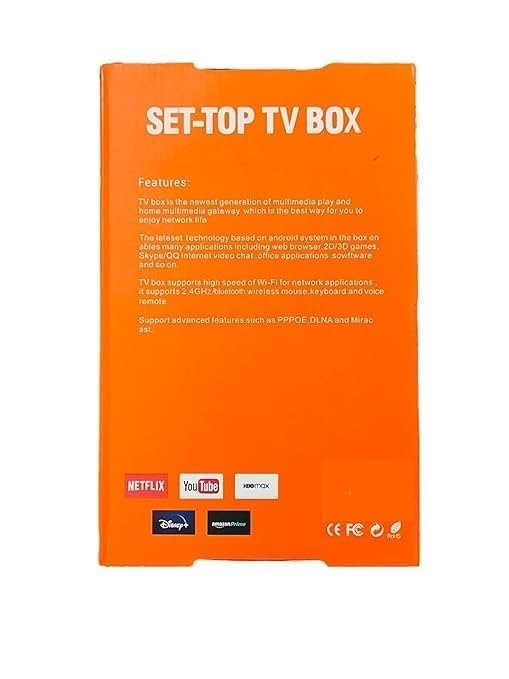
This image displays the rear of the product packaging, highlighting the device's main features and supported streaming services such as Netflix, YouTube, and HBO Max.
2. Багцын агуулга
Доор жагсаасан бүх зүйл таны багцад байгаа эсэхийг шалгана уу.
- G96 Max Android Smart TV Box
- Bluetooth дуут алсын удирдлага
- Эрчим хүчний адаптер
- HDMI кабель
- Хэрэглэгчийн гарын авлага (энэ баримт бичиг)
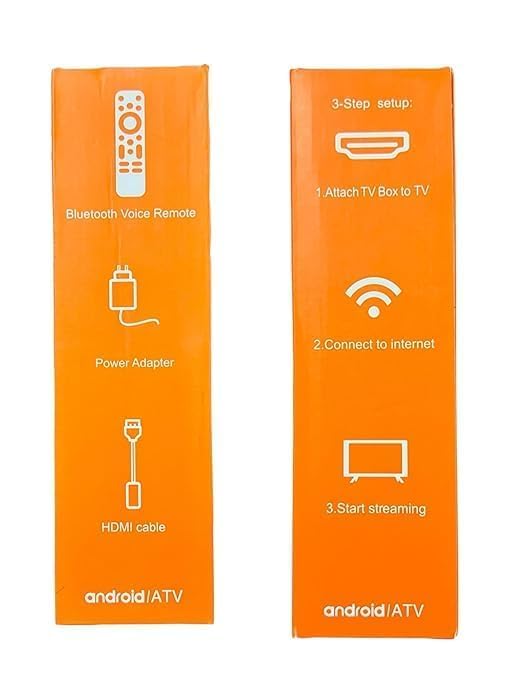
This image shows the side of the product box, detailing the included accessories: a Bluetooth Voice Remote, a Power Adapter, and an HDMI cable.
3. Тохируулах гарын авлага
Connecting Your TV Box
Follow these steps to connect your G96 Max Android Smart TV Box:
- Connect TV Box to TV: Plug one end of the included HDMI cable into the HDMI port on the G96 Max TV Box and the other end into an available HDMI input on your television.
- Цахилгаанд холбогдох: Plug the power adapter into the DC IN port on the TV Box, then plug the adapter into a wall outlet.
- Интернетэд холбогдох: Once powered on, navigate to the network settings to connect to your 2.4G WiFi network.
- Дамжуулж эхлэх: After successful connection, you can begin setting up your Android TV interface and installing streaming applications.
This image provides a visual guide to the quick 3-step setup: connecting the TV Box to your television, establishing an internet connection, and then starting to stream content.
4. Ашиглалтын заавар
Асаах/унтраах
To power on the device, ensure it is connected to power and press the power button on the remote control. To power off, press the power button again.
Интерфэйсийг чиглүүлэх
Use the directional pad (up, down, left, right) on the remote control to navigate through menus and select items. The "OK" button confirms selections.
Using the Voice Remote
The included remote control features voice command capabilities. Press the dedicated voice button (often a microphone icon) and speak clearly into the remote to search for content, open applications, or control playback.
Installing and Using Applications
The G96 Max runs on the Android TV platform, allowing access to a wide range of applications.
- From the home screen, navigate to the "Apps" section or the Google Play Store icon.
- Browse or search for desired applications (e.g., Netflix, YouTube, Prime Video).
- Select an app and choose "Install" to download and set it up.
- Once installed, the app will appear in your app list for quick access.
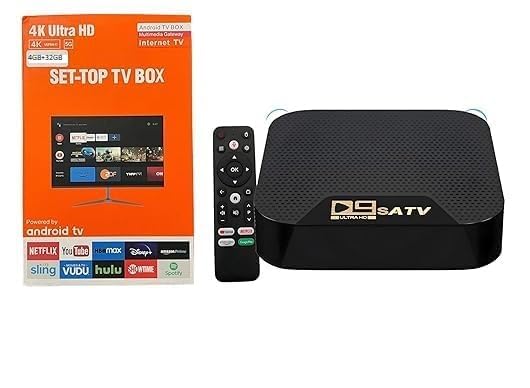
This image shows the G96 Max Android Smart TV Box, a black rectangular device with a textured top surface, alongside its black voice-enabled remote control.
5. Засвар үйлчилгээ
Арчилгаа, цэвэрлэгээ
- Keep the device in a dry, well-ventilated area, away from direct sunlight and heat sources.
- Төхөөрөмжийг ус эсвэл хэт их чийгэнд бүү тавь.
- Clean the device and remote control with a soft, dry cloth. Avoid using liquid cleaners or abrasive materials.
- Хэт халалтаас урьдчилан сэргийлэхийн тулд агааржуулалтын нүхийг хаагаагүй эсэхийг шалгаарай.
Хадгалах
Хэрэв төхөөрөмжийг удаан хугацаагаар хадгалах бол цахилгаан тэжээлээс салгаад сэрүүн, хуурай газар хадгална уу.
6. Алдаа засах
Нийтлэг асуудал ба шийдэл
- Эрчим хүчгүй:
- Цахилгаан адаптер нь ТВ хайрцаг болон ажиллаж байгаа цахилгааны залгуурт найдвартай холбогдсон эсэхийг шалгаарай.
- Цахилгаан залгуур ажиллаж байгаа эсэхийг шалгана уу.
- Зураг/дуу чимээ байхгүй:
- HDMI кабелийг ТВ хайрцаг болон ТВ хоёуланд нь найдвартай холбосон эсэхийг шалгана уу.
- Таны ТВ оролт зөв HDMI порт руу тохируулагдсан эсэхийг шалгаарай.
- Check TV volume settings.
- Алсын удирдлага хариу өгөхгүй байна:
- Алсын удирдлага дахь батерейг солино уу.
- Алсын удирдлага болон ТВ хайрцагны хооронд ямар ч саад бэрхшээл байхгүй эсэхийг шалгаарай.
- For Bluetooth remotes, ensure it is properly paired (refer to initial setup if needed).
- WiFi холболтын асуудал:
- Ensure your WiFi router is on and functioning correctly.
- Check if the WiFi password entered is correct.
- ТВ хайрцгийг чиглүүлэгч рүү ойртуул эсвэл бусад төхөөрөмжүүдийн хөндлөнгийн оролцоог бууруул.
- Аппликешн хөлдөх/гацах:
- Програмыг дахин эхлүүлнэ үү.
- Төхөөрөмжийн тохиргооноос програмын кэш болон өгөгдлийг устгана уу.
- ТВ хайрцгийг дахин эхлүүлнэ үү.
- Төхөөрөмжийн програм хангамж шинэчлэгдсэн эсэхийг шалгаарай.
Асуудал арилахгүй байвал хэрэглэгчийн дэмжлэгтэй холбогдоно уу.
7. Техникийн үзүүлэлтүүд
G96 Max Android Smart TV Box
| Онцлог | Дэлгэрэнгүй |
|---|---|
| Загварын нэр | G96 Макс |
| Брэнд | Ерөнхий |
| Шийдвэр | 4K (3840 Pixels) |
| RAM санах ой | 4 ГБ |
| Хадгалах багтаамж | 32 ГБ |
| Холболтын технологи | Bluetooth, HDMI, WiFi 2.4G |
| Дэмжигдсэн интернет үйлчилгээ | Amazon Prime, Hulu, Netflix, Sling, Vudu, YouTube |
| Хянагчийн төрөл | IR Remote, Voice Remote |
| Video Codec Support | H.264, H.265, VP9 |
| Онцлог шинж чанарууд | HDR10 Support, Voice Remote Control |
| Тохиромжтой төхөөрөмжүүд | HDTV, LCD TV, LED TV, Smart TV, Television |
| Хэмжээ (L x W x H) | 15L x 12W x 2H Сантиметр |
| Жин | 150 грамм |
| Үйлдвэрлэгч | MVC ENTERPRISE |
| Өнгө | Хар |
| Form Factor | Топ хайрцаг тавь |
8. Баталгаат хугацааны мэдээлэл
Энэхүү бүтээгдэхүүн нь хамт ирдэг БАТАЛГААТ ҮГҮЙ as per manufacturer specifications. Please retain your proof of purchase for any potential support inquiries.
9. Хэрэглэгчийн дэмжлэг
For further assistance or inquiries not covered in this manual, please refer to the retailer's support channels or the manufacturer's webболомжтой бол сайт.