
Танилцуулга
This manual provides essential instructions for setting up, operating, and maintaining your XINDADA H12 2025 4G Smartwatch. Please read this manual thoroughly before using the device to ensure proper function and to maximize your user experience.
Багцын агуулга
Таны бүтээгдэхүүний багцад бүх зүйл байгаа эсэхийг шалгана уу:
- 1 x XINDADA H12 2025 Smartwatch
- 1 x Watch Strap
- 1 х цэнэглэх кабель
- 1 x Бүтээгдэхүүний гарын авлага
Бүтээгдэхүүн дууссанview
The XINDADA H12 2025 is a 4G Android 9.0 OS smartwatch featuring a 1.51-inch AMOLED display, a 500W HD camera, GPS, Wi-Fi, and comprehensive health monitoring capabilities. It supports app downloads from the Google Play Store.
Гол онцлогууд:
- Full 4G Netcom: Supports 4G connectivity (EU/UK countries only).
- High-Performance CPU: SL8541E quad-core processor for smooth operation.
- Android 9.0 үйлдлийн систем: Enhanced performance and security.
- Large AMOLED Display: 1.51-inch screen with 466x466 resolution, wide color gamut, and 178° viewөнцөг.
- 500W HD Camera: Rotatable front/rear camera.
- 800 мАч батерей: Батерейны ашиглалтын хугацааг уртасгасан.
- Эрүүл мэндийн хяналт: Heart rate, blood oxygen, sleep detection, sedentary reminders, step counting.
- Спортын горимууд: Running, walking, hiking, mountaineering, rope skipping.
- Аппын дэмжлэг: Download apps like WhatsApp, YouTube, Facebook, Instagram, TikTok from Google Play Store.
- Intelligent Crown: Rotating crown for menu navigation.

Image: The smartwatch features a 1.51-inch AMOLED display with 466x466 resolution, offering a wide color gamut (98% Adobe RGB) and a 178-degree ultra-wide viewтодорхой дүрслэлд зориулсан өнцөг.
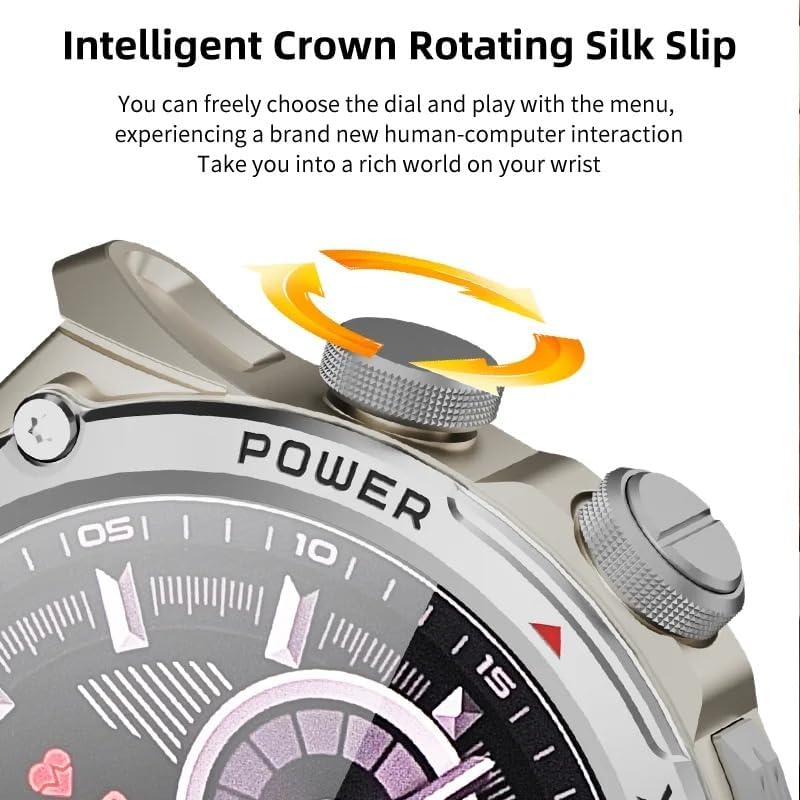
Image: Close-up of the smartwatch's intelligent rotating crown, which allows for intuitive navigation through menus and watch faces.

Image: The smartwatch is equipped with a 500W HD camera that can rotate 180 degrees, functioning as both a front and rear camera.
Тохиргоо
1. Төхөөрөмжийг цэнэглэж байна
Before first use, fully charge your smartwatch. Connect the provided charging cable to the charging port on the watch and to a standard USB power adapter (not included). The watch display will indicate charging status.
2. SIM Card Installation (for 4G connectivity)
The smartwatch supports 4G Netcom. Ensure your SIM card is compatible with the supported network bands (2G: B3+B5+B8; 3G: B1+B5+B8; 4G_FDD: B1+B3+B5+B7+B8+B20; 4G_TDD: B34+B38+B39+B40+B41). This feature is primarily for EU/UK countries. Refer to the watch's manual for specific SIM card tray access and insertion instructions.
3. Анхдагч асаалттай
Press and hold the Power button (usually located on the side of the watch) until the XINDADA logo appears. Follow the on-screen prompts to select your language and initial settings.
4. Connecting to the HiSportPro App
To synchronize data and receive notifications from your mobile phone, download and connect to the HiSportPro application.
- Алхам 1: Enable Bluetooth on both your smartwatch and your mobile phone.
- Алхам 2: On your smartwatch, access the app market and download the "Bluetooth Assistant" application.
- Алхам 3: On your mobile phone, download the "HiSportPro" app from your phone's app store (Google Play Store for Android, Apple App Store for iOS).
- Алхам 4: Open the Bluetooth Assistant on your smartwatch and enable Bluetooth service.
- Алхам 5: In the HiSportPro app on your phone, use the scan function to scan the QR code displayed on your smartwatch to establish the connection.
- Алхам 6: Once connected, you can configure notification push settings within the HiSportPro app to receive mobile phone information on your watch.

Image: The smartwatch on a wrist, displaying a message, illustrating its capability for 4G calls and real-time message viewing.
Ашиглалтын заавар
Үндсэн навигаци
- Мэдрэгчтэй дэлгэц: Tap to select, swipe to navigate through menus and screens.
- Эргэдэг титэм: Rotate the crown to scroll through lists or adjust settings. Press the crown to return to the home screen or confirm selections.
- Цахилгаан товч: Press to wake/sleep the screen. Long press to power on/off or restart.
- Сэрэхийн тулд өсгөх: The screen can be activated by raising your wrist.
Харилцааны онцлог
- Утасны дуудлага: With a SIM card installed, you can make and receive calls directly from the watch. Access the "Phone" application.
- Мессеж: View and reply to messages (SMS, WhatsApp, etc.) directly on the watch.
- Харилцагчид: Access your synchronized contacts.
Камерын хэрэглээ
The smartwatch features a 500W HD camera. Open the "Camera" application. The camera can rotate 180 degrees to function as both a front-facing and rear-facing camera. Tap the screen to take photos or start video recording.
Эрүүл мэнд ба биеийн тамирын хяналт
- Зүрхний цохилтын хяналт: Access the "Heart Rate" app to measure your heart rate.
- Цусан дахь хүчилтөрөгчийн хяналт: Use the "Blood Oxygen" app to check your SpO2 levels.
- Унтах илрүүлэх: The watch automatically monitors your sleep patterns when worn during sleep. View data in the "Sleep Detection" app or HiSportPro.
- Суурин сануулга: Enable this feature in settings to receive alerts when you have been inactive for too long.
- Алхам тоолох: The watch automatically tracks your daily steps.
Спортын горимууд
The smartwatch supports various sports modes to track your exercise data.
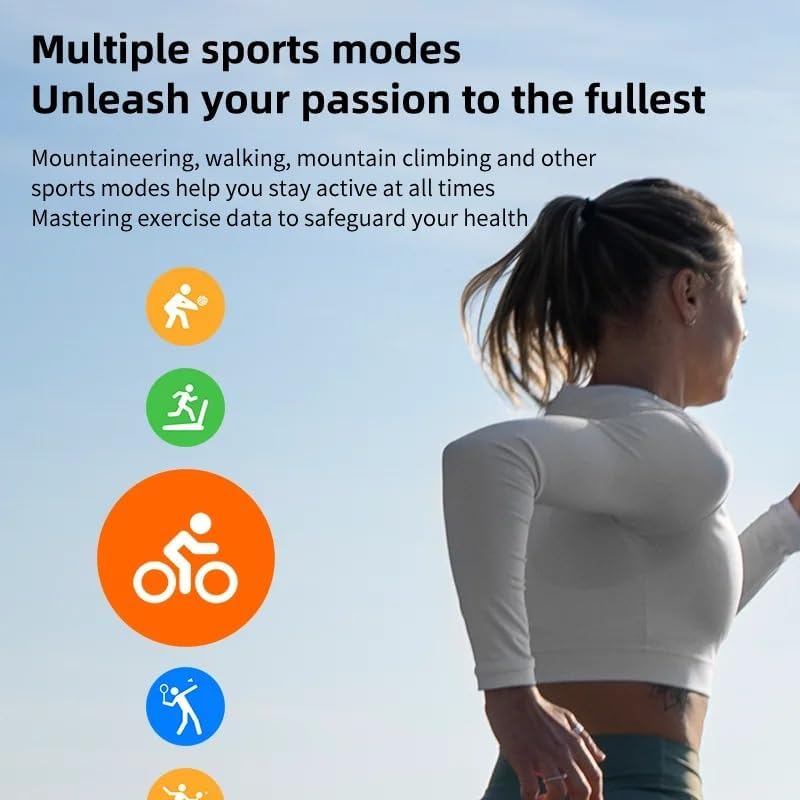
Image: Icons representing various sports modes available on the smartwatch, including running, walking, cycling, mountaineering, and rope skipping.
Дасгал эхлүүлэхийн тулд:
- Navigate to the "Sports" application.
- Select your desired activity (e.g., Running, Walking, Mountaineering, Rope Skipping).
- Tap to start the activity. The watch will begin tracking relevant metrics like duration, distance, and calories burned.
- Tap to pause or end the activity. Your exercise data will be saved and can be viewed on the watch or in the HiSportPro app.
Other Applications and Features
- Google Play Store: Download and install additional applications such as WhatsApp, YouTube, Facebook, Instagram, and TikTok directly from the Play Store on your watch.
- Цаг агаар: View одоогийн цаг агаарын нөхцөл байдал.
- Хөгжим тоглуулагч: Play music stored on the watch or control music on your phone.
- Хөтөч: Суурилуулсан хөтөч ашиглан интернетэд нэвтрэх.
- Calendar, Calculator, Alarm: Стандарт хэрэглээний програмууд.
- OTA Online Update: The watch supports Over-The-Air software updates. Check for updates periodically in the settings menu to ensure optimal performance and access to new features.
Засвар үйлчилгээ
- Цэвэрлэгээ: Regularly clean your smartwatch and strap with a soft, dry cloth. Avoid using harsh chemicals or abrasive materials.
- Усны эсэргүүцэл: While the watch may have some water resistance, avoid prolonged exposure to water, swimming, or showering with the watch unless explicitly stated otherwise in the product specifications.
- Батерейны арчилгаа: To prolong battery life, avoid fully discharging the battery frequently. Charge the watch when the battery level is low. Store the watch in a cool, dry place when not in use for extended periods.
- Програм хангамжийн шинэчлэлтүүд: Keep your watch's software updated to ensure optimal performance and security.
Алдааг олж засварлах
| Асуудал | Боломжит шийдэл |
|---|---|
| Цаг асахгүй байна. | Ensure the watch is fully charged. Connect it to the charger for at least 30 minutes. If it still doesn't turn on, try a long press (10-15 seconds) of the power button. |
| Cannot connect to HiSportPro app. |
|
| 4G network not working. |
|
| Дэлгэц хариу өгөхгүй байна. | Restart the watch by long-pressing the power button. If the issue persists, ensure the screen is clean and dry. |
| Эрүүл мэндийн буруу мэдээлэл. | Цагийг бугуйндаа хэт бариу эсвэл хэт сул биш, нягт зүүсэн эсэхийг шалгаарай. Цагны ар талын мэдрэгчийг цэвэрлэ. Хэмжилт хийх явцад хэт их хөдөлгөөн хийхээс зайлсхий. |
Үзүүлэлтүүд
| Онцлог | Дэлгэрэнгүй |
|---|---|
| Брэнд | ХИНДАДА |
| Загвар | H12 2025 |
| Үйлдлийн систем | Android 9.0 |
| CPU | SL8541E Quad-core |
| Дэлгэц | 1.51 инчийн AMOLED дэлгэц, 466x466 нягтралтай |
| Камер | 500W HD, 180° rotation |
| Зайны багтаамж | 800 мАч |
| Холболт | 4G (EU/UK bands), Wi-Fi, Bluetooth |
| Сүлжээний хамтлагууд | 2G: B3+B5+B8; 3G: B1+B5+B8; 4G_FDD: B1+B3+B5+B7+B8+B20; 4G_TDD: B34+B38+B39+B40+B41 |
| Апп нийцтэй байдал | HiSportPro (for phone sync), Google Play Store apps |
| Бүтээгдэхүүний жин | 100 гр |
| Багцын хэмжээ | 5 x 5 x 5 см |
Баталгаат болон дэмжлэг
Баталгаат хугацааны мэдээлэл болон хэрэглэгчийн дэмжлэг авахыг хүсвэл худалдан авалттайгаа хамт ирсэн баримт бичгийг үзэх эсвэл жижиглэнгийн худалдаачин/үйлдвэрлэгчтэй шууд холбогдоно уу. Баталгаат хугацааны нэхэмжлэл гаргахын тулд худалдан авалтын баримтаа хадгална уу.
Manufacturer: XINDADA