
1. Бүтээгдэхүүн дууссанview
The Keenso F4 V3S PLUS Brushless ESC Stack is a high-performance 4-in-1 controller designed for FPV drones and RC airplanes. This integrated unit combines a flight controller and a 45A Electronic Speed Controller (ESC) into a compact design, simplifying installation and wiring.
Гол онцлогууд нь:
- High Performance 45A ESC: Integrates four 45A ESCs for efficient power management and simplified setup.
- Anti-Jamming & Fast Response: Supports various throttle modes including Oneshot, Multishot, and Dshot for rapid signal processing and interference resistance.
- Powerful BLHeli_S Firmware: Facilitates easy ESC parameter configuration, firmware updates, and compatibility with Cleanflight and Betaflight firmware.
- Дээд зэрэглэлийн гар урлал: Constructed with industrial-grade LDO and high-resistance MOS for enhanced durability, strong load capacity, and high-temperature resilience.
- Сайжруулсан функциональ байдал: Equipped with a gyroscope and barometer for superior control and flight stability.
2. Багцын агуулга
Доор жагсаасан бүх зүйл таны багцад байгаа эсэхийг шалгаарай.
- 1 x 4-in-1 ESC (Electronic Speed Controller)
- 1 x Нислэгийн хянагч
- 1 x Capacitance (Capacitor)
- 3 x Connecting Wires (various types)
- 2 x Accessories (unspecified, typically connectors or small parts)
- 8 х Damping Pads
- 4 х самар

Зураг 2.1: Дууслааview орсон бүх бүрэлдэхүүн хэсгүүдээс.

Зураг 2.2: Нарийвчилсан view of the ESC and Flight Controller boards with accompanying parts.

Image 2.3: Components laid out for inspection.
3. Техникийн үзүүлэлтүүд
3.1. 4-in-1 ESC Parameters
| Параметр | Үнэ цэнэ |
|---|---|
| ESC Size | Approx. 42x41mm / 1.7x1.6in |
| Нүхний зай | Approx. 30.5x30.5mm / 1.2x1.2in |
| Тасралтгүй гүйдэл | 45 А |
| Тэсэлгээний гүйдэл | 50А (10S) |
| Процессор | EFM8BB21F16G |
| Програм хангамж | BLS J H 30 7 |
| Drive Signal Support | DShot300/600, Multshot, Oneshot, PMW |
| Оролтын хэмжээtage | 7.4 to 22.2V (2 to 6S LiPo) |
| ESC Weight | Ойролцоогоор 12гр / 0.4 унц |
3.2. Flight Controller Parameters
| Параметр | Үнэ цэнэ |
|---|---|
| Хянагчийн хэмжээ | Approx. 36x36mm / 1.4x1.4in |
| Холбох нүхний зай | Approx. 30.5x30.5mm / 1.2x1.2in |
| MCU | F405 |
| Дэмжигдсэн функцууд | Drag and drop OSD via Betaflight configuration, SBUS, PPM, Spketrum ports, Micro storage card black box |
| Гироскоп | Оруулсан |
| Барометр | BMP280 |
| BEC гаралт | 5V/3A, 9V/3A |
| Хянагчийн жин | Ойролцоогоор 7гр / 0.2 унц |
3.3. Бүтээгдэхүүний ерөнхий мэдээлэл
- Брэнд: Кеенсо
- Загварын нэр: Keensox6h89r54l1
- Материал: Цахим бүрэлдэхүүн хэсэг
- Хэрэглээ: FPV UAV, RC Airplanes
4. Тохиргоо ба суурилуулалт
Proper installation is crucial for the performance and safety of your FPV drone or RC airplane. Always refer to the specific wiring diagrams for your frame and components.
4.1. Суулгахын өмнөх шалгалт
- Ensure your workspace is clean and static-free.
- Бүх бүрэлдэхүүн хэсгүүд байгаа бөгөөд гэмтэлгүй эсэхийг шалгана уу.
- Gather necessary tools: soldering iron, solder, flux, wire cutters, heat shrink tubing, multimeter.
4.2. Mounting the ESC Stack
- d-г хавсарганаamping pads to the mounting holes on your frame.
- Carefully place the 4-in-1 ESC board onto the damping pads, aligning the mounting holes.
- Place the flight controller board on top of the ESC, ensuring proper orientation and alignment.
- Secure the stack using the provided nuts or standoffs, ensuring not to overtighten.
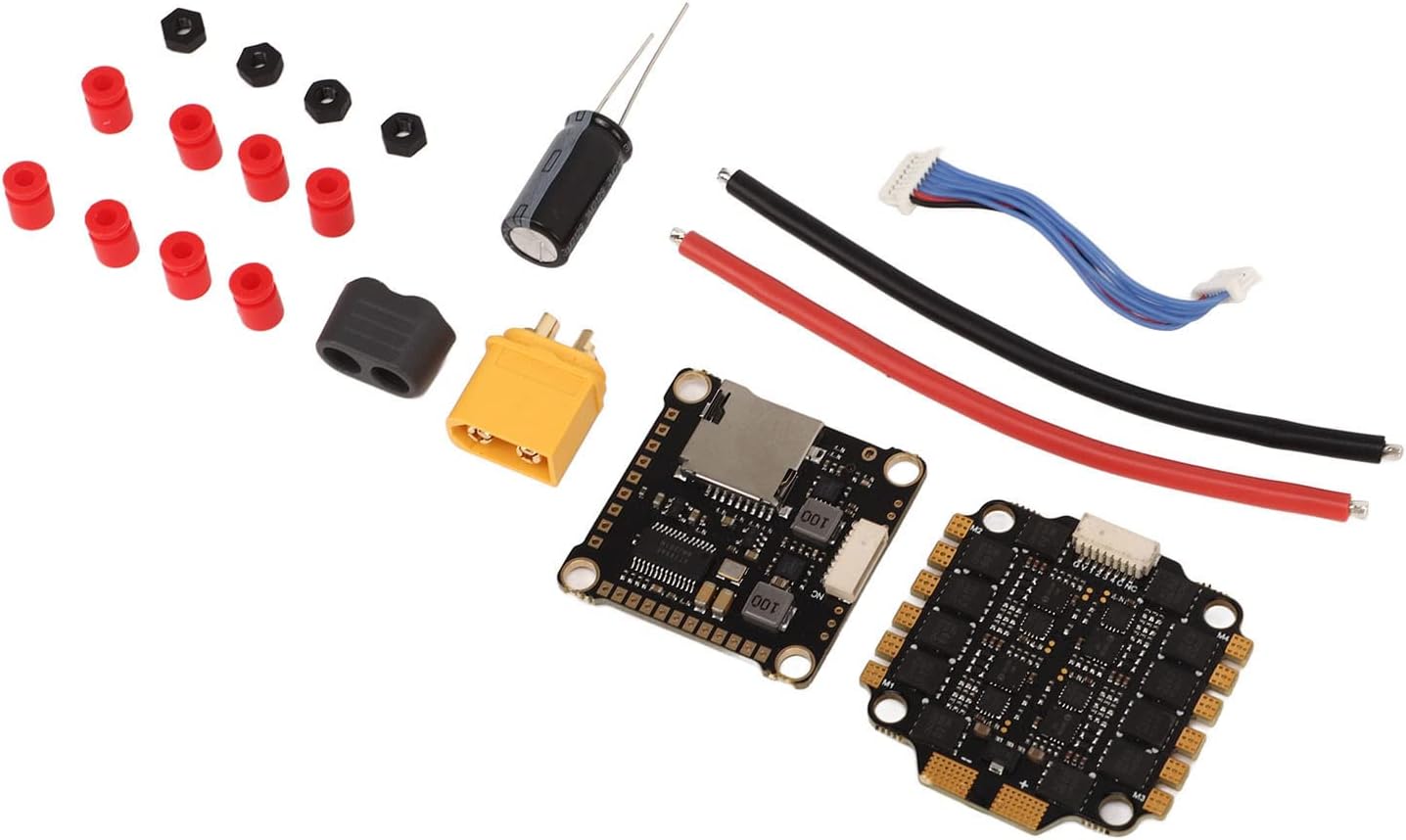
Зураг 4.1: Нарийвчилсан view of the ESC and Flight Controller boards, highlighting mounting points.
4.3. Утасны холболт
Connect the ESC stack to your drone's power distribution board (PDB) or direct battery connection, motors, receiver, and other peripherals. Always double-check polarity before powering on.
- Эрчим хүчний оролт: Solder the main battery leads (red for positive, black for negative) to the designated pads on the 4-in-1 ESC. Ensure the capacitor is soldered across the main battery pads for voltage spike suppression.
- Мотор холболтууд: Solder the three motor wires from each motor to the corresponding motor pads on the ESC. The order of wires may need adjustment in software for correct motor direction.
- Flight Controller to ESC: Use the provided connecting wire harness to link the flight controller to the 4-in-1 ESC. This typically carries telemetry, current sensing, and motor control signals.
- Хүлээн авагчийн холболт: Connect your receiver (SBUS, PPM, or Spektrum) to the appropriate UART port on the flight controller. Refer to the flight controller's pinout diagram.
- Бусад захын төхөөрөмж: Connect FPV camera, video transmitter (VTX), GPS, or other accessories to the designated pads/ports on the flight controller, paying attention to voltage requirements (5V/9V BEC outputs are available).
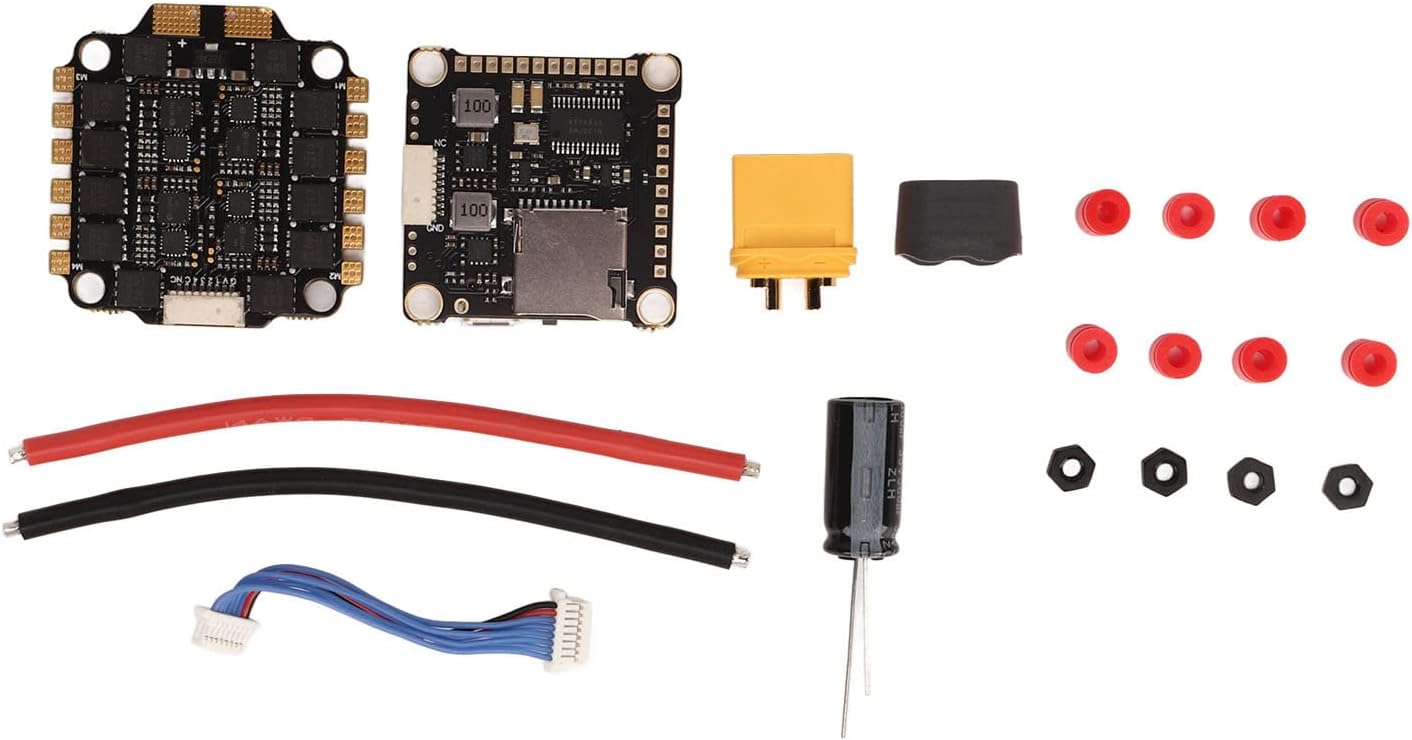
Image 4.2: Connection points on the ESC and Flight Controller.

Image 4.3: Included connecting wires.

Image 4.4: Included capacitor for power filtering.
4.4. Програм хангамжийн тохиргоо
The flight controller supports Betaflight and Cleanflight firmware. The ESCs utilize BLHeli_S firmware.
- Нислэгийн хянагч: Connect the flight controller to your computer via USB. Use the Betaflight Configurator or Cleanflight Configurator software to flash the latest firmware and configure settings such as PID tuning, motor output, receiver protocols, and OSD.
- ESC: Use the BLHeliSuite software (accessible through Betaflight/Cleanflight passthrough) to configure ESC settings, calibrate motors, reverse motor direction if needed, and update BLHeli_S firmware.
5. Ашиглалтын заавар
Once installed and configured, the Keenso F4 V3S PLUS ESC Stack is ready for operation.
5.1. Нислэгийн өмнөх үзлэг
- Бүх холболтууд найдвартай, шортгүй эсэхийг шалгаарай.
- Сэнсний чиглэл болон чангалалтыг шалгана уу.
- Зайны хэмжээг шалгана ууtage ба цэнэгийн түвшин.
- Радио удирдлагын холбоос болон хамгаалалтын унтраалгын ажиллагааг баталгаажуулна уу.
5.2. Powering On and Arming
- Connect the flight battery to the ESC stack. You should hear a series of beeps indicating successful initialization.
- Дроныг тэгш гадаргуу дээр байрлуул.
- Arm the motors using your configured arming switch on your radio transmitter. The motors will typically spin slowly or make a distinct sound to indicate they are armed.
5.3. Throttle Modes
The ESC supports various throttle protocols for precise motor control:
- DShot300/600: Digital protocol offering high resolution and noise immunity. Recommended for optimal performance.
- Multishot: Analog protocol, faster than Oneshot.
- Oneshot125: Analog protocol, faster than standard PWM.
- ХБХ: Standard analog protocol, generally not recommended for FPV drones due to latency.
Select the desired throttle mode in your flight controller software (e.g., Betaflight Configurator).
6. Засвар үйлчилгээ
Regular maintenance helps ensure the longevity and reliability of your ESC stack.
- Харааны үзлэг: Periodically check for any signs of physical damage, loose connections, or burnt components.
- Цэвэрлэгээ: Keep the boards free from dust, dirt, and debris. Use compressed air or a soft brush. Avoid using liquids directly on the electronics.
- Програм хангамжийн шинэчлэлтүүд: Regularly check for and apply the latest firmware updates for both the flight controller (Betaflight/Cleanflight) and ESCs (BLHeli_S) to benefit from performance improvements and bug fixes.
- Дулааны менежмент: Ensure adequate airflow around the ESC stack, especially during intense flight, to prevent overheating.
7. Алдаа засах
Энэ хэсэгт танд тулгарч болох нийтлэг асуудлуудыг авч үзэх болно.
7.1. No Power / No Initialization Beeps
- Батерейг шалгах: Батерейг цэнэглэж, зөв холбосон эсэхийг шалгаарай.
- Туйлшралыг шалгах: Verify that the battery leads are connected with correct polarity to the ESC. Reverse polarity can cause severe damage.
- Гагнуурын ажиллагааг шалгах: Look for cold solder joints or bridges on the main power pads.
7.2. Motors Not Spinning / Incorrect Direction
- Зэвсэглэх: Ensure the flight controller is armed.
- Мотор холболтууд: Verify all motor wires are securely soldered to the ESC.
- BLHeli_S Configuration: Use BLHeliSuite to check motor direction and calibrate ESCs. Motor direction can be reversed in the software.
- Throttle Protocol: Confirm the correct DShot/Multishot/Oneshot protocol is selected in Betaflight/Cleanflight.
7.3. Unstable Flight / Jittery Motors
- PID Tuning: Adjust PID settings in Betaflight/Cleanflight.
- Damping дэвсгэрүүд: Ensure the ESC stack is properly mounted on damping pads to reduce vibrations.
- Сэнс: Check for damaged or unbalanced propellers.
- Конденсатор: Verify the capacitor is correctly installed across the main power leads to filter electrical noise.
7.4. USB Connection Issues
- USB кабель: Try a different USB cable, ensuring it is a data-capable cable.
- Жолооч нар: Install necessary drivers (e.g., STM32 Virtual COM Port Driver, Zadig for DFU mode) for your flight controller.
- Тохируулагч: Ensure you are using the correct version of Betaflight/Cleanflight Configurator.
8. Баталгаат хугацаа ба дэмжлэг
For warranty information and technical support, please refer to the official Keenso webсайт эсвэл худалдагчтайгаа холбогдоно уу. Аливаа баталгаат нэхэмжлэлийн хувьд худалдан авалтаа нотлох баримтаа хадгалаарай.
This product has no known safety hazards to users when installed and operated correctly.