
1. Бүтээгдэхүүн дууссанview
The G-Shock Casio GD010 digital watch is engineered for durability and functionality, designed to withstand demanding conditions while providing essential timekeeping features. This timepiece incorporates bio-based resin components and a CORDURA re/cor band, reflecting a commitment to environmental considerations.
This manual provides detailed instructions for setting up, operating, maintaining, and troubleshooting your GD010 watch.
Гол онцлогууд
- Цочролд тэсвэртэй бүтэц: Designed to endure impacts and vibrations.
- Нүүрстөрөгчийн цөм хамгаалалтын бүтэц: Enhances durability and protection for the internal module.
- 200 метрийн усны эсэргүүцэл: Suitable for swimming, snorkeling, and diving (non-SCUBA).
- Батерейны урт наслалт: CR2025 батерейгаар ойролцоогоор 10 жил ажиллана.
- Bio-based Resin Components: Case and bezel made with environmentally conscious materials.
- CORDURA re/cor Band: Durable strap made from recycled PET plastic fiber.
- Дижитал дэлгэц: Clear and easy-to-read time and function information.
- Олон функцууд: Includes alarm, chronograph (stopwatch), and timer.

Image 1.1: The G-Shock GD010 watch, showcasing its core features including shock resistance, Carbon Core Guard structure, and a 10-year battery life.
2. Эхлэх: Тохиргоо
Товчлуурын функцууд
Your GD010 watch features several buttons for navigation and function control. Familiarize yourself with their locations and primary roles.

Зураг 2.1: Хажуу тал view of the G-Shock GD010, illustrating the location of the control buttons.
- ТОХИРУУЛАХ (Зүүн дээд): Тохиргооны горимд орох, гарах, мөн тохиргоог баталгаажуулахад ашиглана.
- ГОРИМ (Зүүн доод буланд): Cycles through the watch's various modes (Timekeeping, Stopwatch, Timer, Alarm).
- REVERSE (Top Right): Used to decrease values or move backward through options during setting.
- FORWARD / START (Bottom Right): Used to increase values or move forward through options during setting. Also used to start/stop stopwatch or timer.
- LIGHT (Center Bottom): Гэрэлтүүлгийн хувьд арын гэрлийг идэвхжүүлдэг.
Анхны цаг болон огнооны тохиргоо
- Цаг хэмжилтийн горимд, товчийг дараад барина уу ТОХИРУУЛАХ button until the city code starts to flash, indicating the setting mode.
- -г ашиглана уу УРВАХ болон Урагшаа buttons to select your desired Home City Code. This will automatically set the correct time zone.
- дээр дарна уу MODE button to cycle through the settings: DST (Daylight Saving Time) → 12/24-hour format → Seconds → Hour → Minute → Year → Month → Day.
- For each setting, use the УРВАХ болон Урагшаа утгыг өөрчлөх товчлуурууд.
- Бүх тохиргоог тохируулсны дараа товчийг дарна уу ТОХИРУУЛАХ тохиргооны горимоос гарахын тулд товчлуурыг дарна уу.
3. Цагаа ажиллуулах
The GD010 offers various modes for different functions. Press the MODE Тэдгээрээр ээлжлэн өнгөрөх товчийг дарна уу.
Цаг барих горим
This is the default mode, displaying the current time, day of the week, and date.
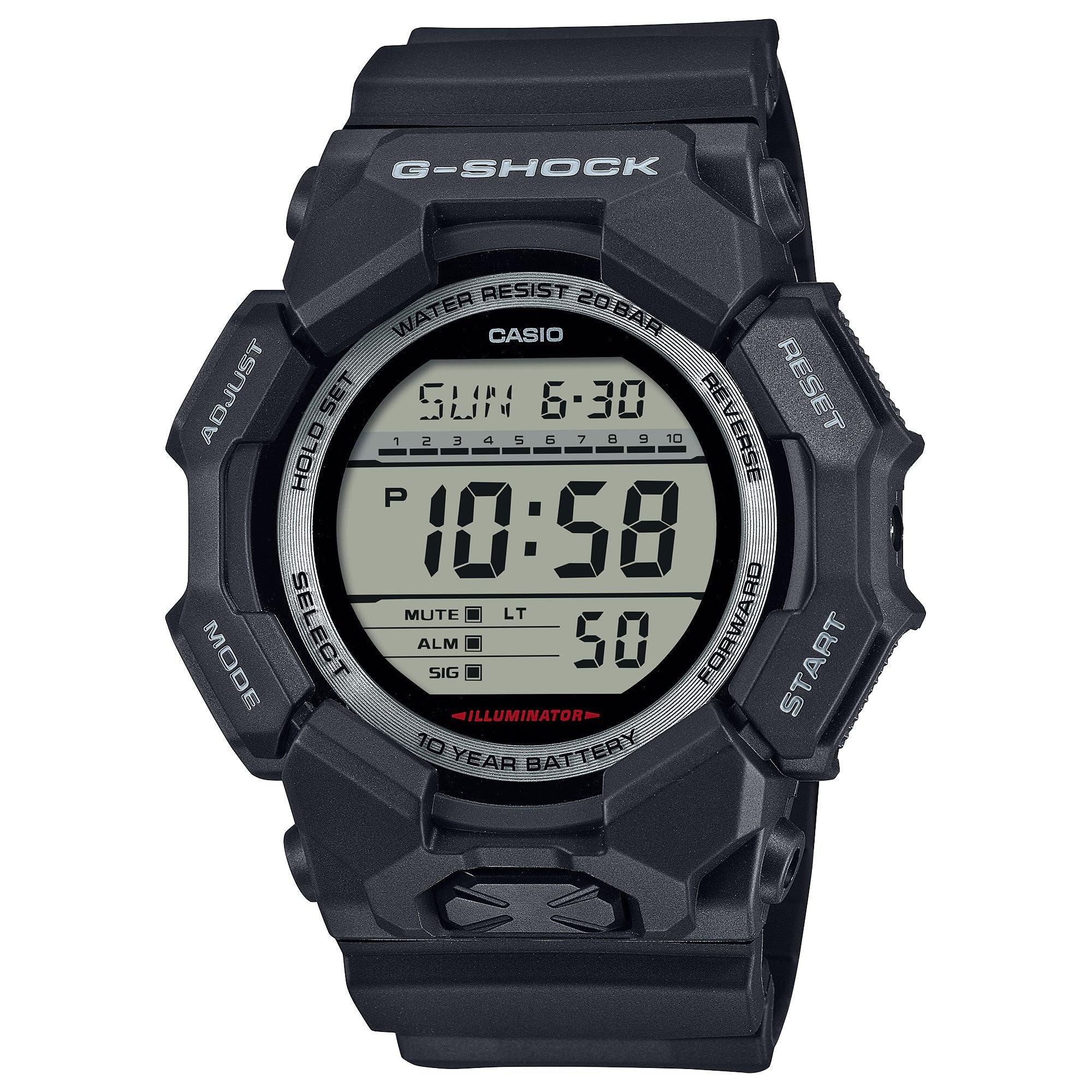
Image 3.1: The G-Shock GD010 watch face in Timekeeping Mode.
Using the Stopwatch (Chronograph)
- Цаг хэмжилтийн горимоос, товчийг дарна уу MODE button until "STW" or "STOPWATCH" appears on the display.
- дээр дарна уу FORWARD / START Секундомерыг эхлүүлэх товчлуур.
- дээр дарна уу FORWARD / START Секундомерыг зогсоохын тулд товчийг дахин дарна уу.
- Секундомерыг тэг болгохын тулд товчийг дарна уу УРВАХ button while the stopwatch is stopped.
Countdown timer тохируулах
- Цаг хэмжилтийн горимоос, товчийг дарна уу MODE button until "TMR" or "TIMER" appears.
- -г удаан дар ТОХИРУУЛАХ button until the current timer setting starts to flash.
- -г ашиглана уу MODE Цаг эсвэл минутын тохиргоог сонгохын тулд товчийг дарна уу.
- -г ашиглана уу УРВАХ болон Урагшаа товчлууруудаар хүссэн тоолох хугацааг тохируулна.
- дээр дарна уу ТОХИРУУЛАХ тохиргооны горимоос гарахын тулд товчлуурыг дарна уу.
- дээр дарна уу FORWARD / START button to start the countdown. An alarm will sound when the timer reaches zero.
Сэрүүлгийн функцууд
- Цаг хэмжилтийн горимоос, товчийг дарна уу MODE button until "ALM" or "ALARM" appears.
- -г удаан дар ТОХИРУУЛАХ сэрүүлгийн цаг анивчиж эхлэх хүртэл товчийг дарна уу.
- -г ашиглана уу MODE Цаг эсвэл минутын тохиргоог сонгохын тулд товчийг дарна уу.
- -г ашиглана уу УРВАХ болон Урагшаа хүссэн сэрүүлгийн цагийг тохируулах товчлуурууд.
- дээр дарна уу ТОХИРУУЛАХ тохиргооны горимоос гарахын тулд товчлуурыг дарна уу.
- Сэрүүлгийг асаах/унтраахын тулд товчийг дарна уу FORWARD / START button while in Alarm Mode (without holding ADJUST).
Усны эсэргүүцлийн удирдамж
Your GD010 watch is rated for 200-meter water resistance. This means it is suitable for recreational diving (excluding saturation diving), swimming, snorkeling, and water sports.
- Do not operate buttons while the watch is submerged in water or wet.
- Avoid exposing the watch to hot water, steam, or extreme temperature changes, as this can compromise water resistance.
- After exposure to saltwater, rinse the watch thoroughly with fresh water and wipe it dry.
4. Арчилгаа, засвар үйлчилгээ
Ерөнхий арчилгаа
- Шороо болон чийгийг арилгахын тулд цагийг зөөлөн, хуурай даавуугаар тогтмол арчина.
- Avoid exposing the watch to strong chemicals, solvents, or detergents, as these can damage the resin materials.
- Цагийг ашиглаагүй үед нарны шууд тусгал болон хэт өндөр температураас хол, сэрүүн, хуурай газар хадгална уу.
- The watch's resin components and band are designed for durability, but prolonged exposure to UV light may cause discoloration over time.
Зай солих
The GD010 watch is equipped with a CR2025 battery, providing an approximate battery life of 10 years. When the display becomes dim or functions become erratic, it may be time for a battery replacement.
Battery replacement should ideally be performed by a qualified watch technician to ensure proper sealing and maintain water resistance. Attempting to replace the battery yourself may void the warranty and compromise the watch's water resistance.
Цэвэрлэгээ
To clean your watch, use a soft cloth dampened with mild soap and water. Gently wipe the case and band. For stubborn dirt, a soft brush can be used. Rinse thoroughly with fresh water and dry completely with a soft cloth.
5. Алдааг олж засварлах гарын авлага
If you encounter issues with your GD010 watch, refer to the following common problems and their solutions.
| Асуудал | Боломжит шалтгаан | Шийдэл |
|---|---|---|
| Дэлгэц хоосон эсвэл бүдэг байна. | Батерей бага. | Replace the battery (CR2025). Consult a professional watch technician. |
| Цаг буруу байна. | Incorrect time zone or manual setting error. | Re-adjust the time and date settings as described in Section 2. |
| Товчнууд хариу өгөхгүй байна. | Watch is wet, or internal module error. | Ensure the watch is dry. If the problem persists, a reset may be required (consult support), or professional service. |
| Сэрүүлэг дуугарахгүй байна. | Alarm is turned off or volume is too low (if adjustable). | Verify the alarm is set to ON in Alarm Mode. Check watch settings for alarm volume if applicable. |
If the problem persists after attempting these solutions, please contact G-Shock customer support for further assistance.
6. Бүтээгдэхүүний техникийн үзүүлэлтүүд
| Загварын нэр | GD010 |
| Загварын дугаар | GD010-1 |
| Case Size (L× W× H) | 54.9 × 51.9 × 16.1 мм |
| Жин | 73 гр (ойролцоогоор 2.57 унц) |
| Кейс болон хүрээний материал | Bio-based Carbon / Bio-based Resin |
| Хамтлаг материалын төрөл | Resin (CORDURA re/cor) |
| Барилга | Shock Resistant, Carbon Core Guard structure |
| Усны эсэргүүцэл | 200 метрийн усны эсэргүүцэл |
| Эрчим хүчний хангамж | CR2025 (1 Lithium Metal battery, included) |
| Ойролцоогоор Батерейны ашиглалт | 10 жил |
| Кристал | Ашигт малтмалын шил |
| Дэлгэцийн төрөл | Дижитал |
| Хөдөлгөөний төрөл | Японы кварц |
| Нэмэлт онцлогууд | Alarm, Chronograph, Timer |
| Тэврэлтийн төрөл | Тэврэлт |
| Хамтлаг өнгө | Хар |
| Өнгө залгах | Хар |
7. Баталгаат хугацаа ба хэрэглэгчийн дэмжлэг
Баталгаат хугацааны мэдээлэл
Your G-Shock GD010 watch comes with a Хязгаарлагдмал баталгаат хугацаа. The terms and conditions of this warranty cover manufacturing defects under normal use. Please refer to the warranty card included with your purchase for specific details regarding coverage duration, exclusions, and how to make a claim. Keep your proof of purchase for warranty validation.
Хэрэглэгчийн дэмжлэгтэй холбоо барьж байна
For technical assistance, warranty service, or any other inquiries regarding your G-Shock GD010 watch, please contact G-Shock customer support.
- Visit the official G-Shock website for support contact information, FAQs, and service center locations.
- Have your watch model number (GD010-1) and proof of purchase ready when contacting support.