Танилцуулга
This manual provides comprehensive instructions for the setup, operation, and maintenance of your VTech t2451 2.4 GHz Analog Cordless Phone with Answering System and Caller ID. Please read this manual thoroughly before using your new phone system to ensure proper functionality and to take full advantagтүүний онцлог шинж чанарууд.
Key features of your VTech t2451 include:
- 2.4 GHz analog reception for clear communication.
- Digital answering system with 3 mailboxes and 15 minutes of recording time.
- 50 name/number phonebook directory for easy contact management.
- 99 name/number Caller ID history to review аваагүй дуудлага.
- Headset compatibility (2.5 mm jack) for hands-free operation.
- Hold function, page/handset locator, and selectable ring tones.
- Wall-mountable design for flexible placement.
Тохиргоо
Follow these steps to set up your VTech t2451 cordless phone system.
- Савлах: Carefully remove all components from the packaging. Ensure you have the cordless handset, base unit, AC power adapter, telephone line cord, and battery pack.
- Батерей суурилуулах: Open the battery compartment on the back of the cordless handset. Connect the battery pack connector to the jack inside the compartment, ensuring correct polarity. Place the battery pack into the compartment and close the cover.
- Үндсэн нэгжийг холбох:
- Connect one end of the telephone line cord to the TEL LINE jack on the base unit and the other end to a telephone wall jack.
- Connect the small end of the AC power adapter to the DC IN 9V jack on the base unit. Plug the large end of the AC power adapter into a standard electrical outlet.
- Гар утсыг цэнэглэж байна: Place the cordless handset in the base unit's charging cradle. The charge indicator on the handset should illuminate, indicating that the battery is charging. Allow the handset to charge for at least 12 hours before initial use.
- Хананд суурилуулах (заавал биш): The base unit is designed to be wall-mountable. Refer to the included wall-mount bracket and instructions for secure installation.
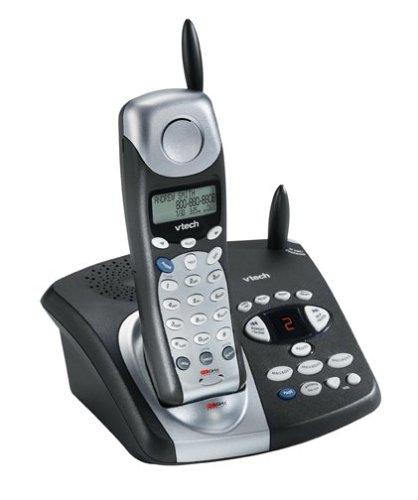
Image: The VTech t2451 cordless phone system, showing the black base unit with the silver and black handset docked in its charging cradle. The base unit features an integrated digital answering system with controls and a display.
Ашиглалтын заавар
Дуудлага хийх, хүлээн авах
- Дуудлага хийхийн тулд: дээр дарна уу ЯРИА button, wait for a dial tone, then dial the phone number.
- Дуудлага хүлээн авахын тулд: Утас дуугарах үед товчийг дарна уу ЯРИА button or any key on the keypad (Any Key Answer).
- Дуудлага дуусгахын тулд: дээр дарна уу Төгсгөл button or place the handset back in the base unit.
- барих функц: Дуудлагын үеэр БАРЬ button to place the call on hold. Press ЯРИА дуудлагыг үргэлжлүүлэхийн тулд дахин дарна уу.
Дижитал хариултын систем
Your phone system includes a digital answering system with 3 mailboxes and 15 minutes of recording time.
- Мессежүүдийг тоглуулах: дээр дарна уу ТОГЛОХ Шинэ мессежийг сонсохын тулд үндсэн төхөөрөмж дээрх товчийг дарна уу.
- Гарах мессежийг бичих (OGM): Follow the voice prompts to record a personalized outgoing message.
- Mailbox Management: The system supports up to 3 distinct mailboxes. Refer to the detailed instructions in the full user guide for setting up and accessing individual mailboxes.
Дуудлага хийгчийн дугаар болон утасны дэвтэр
- Дуудлагын ID: When subscribed to Caller ID service, the handset display will show the caller's name and number. Press the CID дахин товчлуурview the 99-name/number Caller ID history.
- Утасны лавлах: Store up to 50 names and numbers in the phonebook. Use the navigation buttons to scroll through entries and the ЦЭС/СОНГОХ button to add or edit entries.
Бусад функцууд
- Page/Handset Locator: дээр дарна уу ХУУДАС button on the base unit to locate a misplaced handset.
- Ringer Tones: Customize your phone's ringer by selecting from various available tones. Refer to the handset settings menu.
- Чихэвчний хэрэглээ: Connect a 2.5 mm compatible headset to the headset jack on the side of the handset for hands-free communication.
Засвар үйлчилгээ
Proper care ensures the longevity of your VTech t2451 phone system.
- Цэвэрлэгээ: Утас болон суурь хэсгийг зөөлөн, d аргаар цэвэрлэнэ үүamp даавуу. Хүчтэй химийн бодис, зүлгүүрийн цэвэрлэгч хэрэглэж болохгүй.
- Батерейны арчилгаа:
- Always return the handset to the base unit when not in use to ensure it remains charged.
- If the phone will not be used for an extended period, remove the battery from the handset.
- Replace the battery when its performance significantly degrades. Use only the specified replacement battery pack.
- Байгаль орчны нөхцөл: Утсаа хэт өндөр температур, нарны шууд тусгал эсвэл чийгэнд өртүүлэхээс зайлсхий.
Алдааг олж засварлах
If you experience issues with your VTech t2451, try these common troubleshooting steps.
| Асуудал | Шийдэл |
|---|---|
| Залгах аялгуу алга. |
|
| Хүлээн авалт муу эсвэл статик. |
|
| Гар утас цэнэглэхгүй байна. |
|
| Хариулах систем нь мессеж бичихгүй байна. |
|
Үзүүлэлтүүд
| Онцлог | Дэлгэрэнгүй |
|---|---|
| Брэнд | VTech |
| Загварын дугаар | T2451 |
| Утасны төрөл | Утасгүй |
| Давтамж | 2.4 GHz Analog |
| Хариулах системийн төрөл | Дижитал |
| Бичлэг хийх чадвар | 15 минут |
| Mailboxes | 3 |
| Утасны дэвтрийн лавлах | 50 нэр/тоо |
| Дуудлага хийгчийн ID санах ой | 99 нэр/тоо |
| Чихэвчний нийцтэй байдал | 2.5 мм үүр |
| Эрчим хүчний эх үүсвэр | Утастай цахилгаан |
| Бүтээгдэхүүний хэмжээс | 7.1 x 8.5 x 5.1 инч |
| Зүйлийн жин | 2.19 фунт |
| Үйлдвэрлэгч | Vtech |
Баталгаат болон дэмжлэг
For warranty information, please refer to the warranty card included with your product packaging or visit the official VTech website. VTech provides customer support for product inquiries, technical assistance, and service. Contact information can typically be found on the VTech webсайт эсвэл бүтээгдэхүүний анхны баримт бичигт.
Үйлдвэрлэгч: VTech


