1. Танилцуулга
Худалдан авалт хийсэнд баярлалааasing the SANYO DC-M1 Stereo System. This manual provides essential information for the safe and efficient operation of your new audio system. Please read it thoroughly before use and retain it for future reference.
The SANYO DC-M1 is a full logic micro component stereo system featuring a high-quality 2-way speaker design, delivering 15W total output. It supports CD-R/RW playback and MP3 files, and includes full remote control functionality.
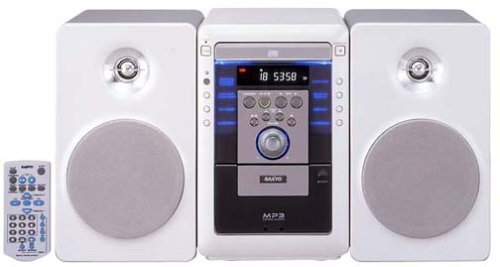
Image of the SANYO DC-M1 stereo system, showcasing its compact design and two-way speakers.
2. Тохиргоо
2.1 Савлах
Сав баглаа боодолоос бүх бүрэлдэхүүн хэсгүүдийг болгоомжтой арилгана. Доор жагсаасан бүх зүйл байгаа эсэхийг шалгаарай:
- Main Unit (DC-M1)
- Хоёр чанга яригчтай төхөөрөмж
- Алсын удирдлага
- Цахилгааны утас
- Чанга яригч кабель
- Хэрэглэгчийн гарын авлага (энэ баримт бичиг)
2.2 Чанга яригчийн холболт
- Connect the speaker cables to the speaker terminals on the rear of the main unit. Ensure correct polarity (red to red, black to black) for each speaker.
- Position the speakers on a stable, flat surface, ensuring they are equidistant from the listening position for optimal sound.
2.3 Эрчим хүчний холболт
- Insert the power cord into the AC IN socket on the rear of the main unit.
- Plug the other end of the power cord into a standard AC wall outlet.
2.4 Анхдагч асаалттай
дээр дарна уу ХҮЧ button on the front panel or the remote control to turn on the system. The display will illuminate.
3. Ашиглалтын заавар
3.1 Үндсэн удирдлага
- Асаах товч: Системийг асаах эсвэл унтраана.
- VOLUME Knob/Buttons: Adjusts the sound output level. Turn clockwise to increase, counter-clockwise to decrease.
- FUNCTION/SOURCE Button: Selects the input source (CD, AUX).
3.2 CD тоглуулах
- дээр дарна уу НЭЭХ/ХААХ товчлуурыг дарж CD тавиурыг нээнэ үү.
- Place a CD (audio CD, CD-R/RW with audio or MP3 files) with the label side up into the tray.
- дарна уу НЭЭХ/ХААХ тавиурыг хаахын тулд дахин.
- дээр дарна уу ТОГЛОХ/ЗОГСООХ тоглуулж эхлэх товчлуур.
- -г ашиглана уу АЛГАСАХ товчлуурууд (|< / >> |) to navigate between tracks.
- дарна уу ЗОГС тоглуулахыг дуусгах.
3.3 Туслах оролт (AUX)
To connect an external audio device (e.g., smartphone, MP3 player):
- Connect an audio cable (not supplied) from the headphone jack or line-out of your external device to the AUX ДАХЬ jack on the SANYO DC-M1.
- дээр дарна уу FUNCTION/SOURCE Дэлгэц дээр "AUX" гарч иртэл товчийг дарна уу.
- Start playback on your external device. Adjust the volume on both the external device and the DC-M1 for optimal sound.
3.4 Алсын удирдлагын ашиглалт
The included remote control provides full functionality for the stereo system. Ensure batteries are correctly inserted. Point the remote control towards the main unit's front panel sensor.
4. Засвар үйлчилгээ
4.1 Цэвэрлэгээ
- Цэвэрлэхийн өмнө цахилгааны утсыг салга.
- Төхөөрөмжийн гадна талыг зөөлөн, хуурай даавуугаар арчина. Зөрүүд шороонд даавууг хөнгөн хэрэглээрэй dampусаар зайлж, дараа нь хатаана.
- Do not use abrasive cleaners, benzene, alcohol, or other chemical solvents, as these may damage the finish.
4.2 CD арчилгаа
- Тоглоомын гадаргуу дээр хурууны хээ үлдэхээс сэргийлж CD-үүдийг ирмэгээс нь барь.
- Store CDs in their cases to protect them from dust and scratches.
- If a CD is dirty, wipe it gently from the center outwards with a soft, lint-free cloth.
4.3 Хадгалалт
Хэрэв төхөөрөмжийг удаан хугацаагаар ашиглахгүй бол цахилгааны утсыг хананы залгуураас салгаж, сэрүүн, хуурай газар, нарны шууд тусгал болон хэт өндөр температураас хол хадгална уу.
5. Алдаа засах
Before seeking service, please check the following points:
- Эрчим хүчгүй:
- Ensure the power cord is securely plugged into both the unit and the wall outlet.
- Check if the wall outlet is functioning by plugging in another device. - Дуугүй:
- Check that the volume is not set to minimum or muted.
- Ensure speaker cables are correctly connected to both the main unit and speakers, with correct polarity.
- If using AUX input, verify the external device's volume and connection. - CD Not Playing / Disc Error:
- Ensure the CD is inserted correctly with the label side up.
- Clean the CD if it appears dirty or scratched.
- Try a different CD to rule out a disc-specific issue.
- Ensure the disc type is compatible (audio CD, CD-R/RW with audio or MP3). - Алсын удирдлага ажиллахгүй байна:
- Check and replace the batteries if necessary.
- Ensure there are no obstructions between the remote control and the unit's sensor.
- Make sure you are pointing the remote directly at the unit.
6. Техникийн үзүүлэлтүүд
- Загварын дугаар: DC-M1
- Бүтээгдэхүүний хэмжээс (L x W x H): 18.82 x 9.65 x 10.31 инч
- Барааны жин: 16.28 фунт
- Холболтын технологи: Туслах
- Чанга яригчийн төрөл: Components (2-way)
- Гаралтын хүч: 15 Вт (Нийт)
- Дэмжигдсэн дискний форматууд: Audio CD, CD-R/RW (Audio, MP3)
7. Баталгаат хугацаа ба дэмжлэг
SANYO products are manufactured to high-quality standards. For warranty information, please refer to the warranty card included with your purchase or visit the official SANYO webТанай бүс нутагт хамаарах дэлгэрэнгүй мэдээллийг сайтаас авна уу.
For technical support or service inquiries, please contact your local SANYO authorized service center or refer to the contact information provided on the official SANYO webсайт.


