Танилцуулга
This manual provides essential instructions for the setup, operation, maintenance, and troubleshooting of your Trust Soundwave 1000P PC Speaker system. Please read this manual thoroughly before using the product to ensure proper functionality and longevity.
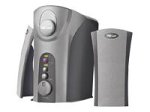
Image: The Trust Soundwave 1000P PC Speaker system, featuring a central subwoofer unit and two compact satellite speakers, designed for computer audio. The subwoofer is typically placed on the floor, while the satellite speakers are positioned on a desk.
Тохируулах заавар
Follow these steps to correctly set up your Trust Soundwave 1000P PC Speaker system.
- Савлах: Carefully remove all components from the packaging. Ensure you have the subwoofer, two satellite speakers, and all necessary cables.
- Илтгэгчийн байршил:
- Place the subwoofer on the floor, preferably near your computer desk, to optimize bass response. The vertical bass reflex design benefits from clear space around it.
- Position the two satellite speakers on your desk, equidistant from your listening position, for optimal stereo sound.
- Хиймэл дагуулын чанга яригчийг холбох: Connect the cables from the satellite speakers to the corresponding output ports on the subwoofer unit. Ensure a secure connection.
- Connecting to Audio Source (PC): Connect the 3.5mm audio jack cable from the subwoofer to the audio output port (usually green) on your computer's sound card.
- Эрчим хүчний холболт: Plug the power cable from the subwoofer into a standard electrical outlet.
- Анхны асаалт: Turn on the speaker system using the power control, typically located on the subwoofer or a wired remote.
Чанга яригчийг ажиллуулах
Once set up, you can begin using your Soundwave 1000P speakers.
- Асаах/унтраах: Use the main power switch or button to turn the system on or off. An indicator light may confirm the power status.
- Дууны хяналт: Adjust the overall volume using the dedicated volume knob or controls. Start with a low volume and gradually increase it.
- Басс тохируулга: The subwoofer features an adjustable bass control. Rotate the bass knob to achieve your desired level of deep bass.
- 3D Sound Switch: Activate or deactivate the 3D sound feature using the designated switch. Experiment with this setting to find your preferred audio experience for different content.
- Аудио оролт: The system primarily uses an AUX connection. Ensure your audio source is playing sound through its 3.5mm audio output.
Засвар үйлчилгээ, арчилгаа
Тохиромжтой засвар үйлчилгээ нь таны чанга яригч системийн урт наслалт, оновчтой ажиллагааг баталгаажуулдаг.
- Цэвэрлэгээ:
- Цэвэрлэхийн өмнө цахилгааныг салга.
- Use a soft, dry cloth to wipe down the speaker surfaces.
- Шингэн цэвэрлэгч, аэрозоль эсвэл зүлгүүрийн материалыг бүү хэрэглэ, учир нь эдгээр нь өнгөлгөө эсвэл дотор эд ангиудыг гэмтээж болзошгүй.
- Байршил: Avoid placing speakers in direct sunlight, near heat sources, or in areas with high humidity. Ensure adequate ventilation around the subwoofer.
- Кабелийн менежмент: Кабелийг эмх цэгцтэй байлгаж, гэмтэхээс сэргийлж, хурц гулзайлгах, нугалахаас зайлсхий.
- Хадгалах: If storing the speakers for an extended period, disconnect them from power, clean them, and store them in a dry, cool place, preferably in their original packaging.
Алдааг олж засварлах гарын авлага
If you encounter issues with your Trust Soundwave 1000P speakers, refer to the following common problems and solutions.
| Асуудал | Боломжит шалтгаан | Шийдэл |
|---|---|---|
| Чанга яригчаас дуу гарахгүй. |
|
|
| Гажуудсан эсвэл тодорхой бус дуу чимээ. |
|
|
| Сабвуфер басс гаргахгүй байна. |
|
|
Бүтээгдэхүүний техникийн үзүүлэлтүүд
Key technical details for the Trust Soundwave 1000P PC Speaker system.
- Загварын дугаар: 12616
- Брэнд: Итгэл
- Чанга яригчийн төрөл: Subwoofer (2.1 system)
- Хамгийн их гаралтын хүч: 1000 ватт
- RMS Ватtage: 7 Watt (5 + 2 x 1 Watt RMS)
- Холболтын технологи: AUX (3.5 мм залгуур)
- Аудио гаралтын горим: Стерео
- Эрчим хүчний эх үүсвэр: Утастай цахилгаан
- Барааны жин: 10 гр
- Суурилуулах төрөл: Tabletop Mount (for satellites), Floor (for subwoofer)
- Хяналтын арга: Хүрэх
Баталгаат хугацааны мэдээлэл
Энэ бүтээгдэхүүн нь хамт ирдэг Хязгаарлагдмал баталгаат хугацаа. For specific terms and conditions, including warranty duration and claim procedures, please refer to the warranty card included with your purchase or visit the official Trust webсайт. Баталгаат нэхэмжлэл гаргахын тулд худалдан авалтаа нотлох баримтаа хадгалаарай.
Хэрэглэгчийн дэмжлэг
For further assistance, technical support, or inquiries not covered in this manual, please visit the official Trust support webсайтад бүртгүүлэх эсвэл тэдний хэрэглэгчийн үйлчилгээний хэлтэстэй холбогдоно уу. Холбоо барих мэдээллийг ихэвчлэн үйлдвэрлэгчийн вэбсайтаас олж болно webсайт эсвэл бүтээгдэхүүний сав баглаа боодол.
Official Trust Webсайт: www.trust.com