1. Танилцуулга
This manual provides essential information for the proper setup, operation, and maintenance of your Coby DVD-527 5.1 Channel Progressive Scan DVD Player. Please read this manual thoroughly before using the device to ensure optimal performance and safety. The Coby DVD-527 features a super-slim design, 5.1 channel audio output, and progressive scan video output for enhanced picture quality on compatible televisions.
2. Аюулгүй байдлын мэдээлэл
- Эрчим хүчний эх үүсвэр: Цахилгаан хангамж нь ботьтой таарч байгаа эсэхийг шалгаарайtagтөхөөрөмж дээр заасан шаардлага.
- Агааржуулалт: Агааржуулалтын нүхийг хааж болохгүй. Хэт халалтаас урьдчилан сэргийлэхийн тулд төхөөрөмжийн эргэн тойронд зохих агаарын урсгалыг бий болгох хангалттай зай гарга.
- Чийг: Төхөөрөмжийг бороо, чийг эсвэл хэт их чийгшилд бүү оруул.
- Цэвэрлэгээ: Unplug the unit from the power outlet before cleaning. Use a soft, dry cloth.
- Үйлчилгээ: Энэ бүтээгдэхүүнд өөрөө үйлчлэх гэж бүү оролдоорой. Бүх засвар үйлчилгээг мэргэшсэн үйлчилгээний ажилтнуудад хандаарай.
3. Багцын агуулга
Бүх зүйл багцад байгаа эсэхийг шалгана уу:
- Coby DVD-527 DVD Player
- Бүрэн ажиллагаатай алсын удирдлага
- АВ кабель
- Хэрэглэгчийн гарын авлага (энэ баримт бичиг)
- Баталгаат хугацааны мэдээлэл
4. Бүтээгдэхүүн дууссанview
The Coby DVD-527 DVD Player and its accompanying remote control are designed for ease of use and integration into your home entertainment system.
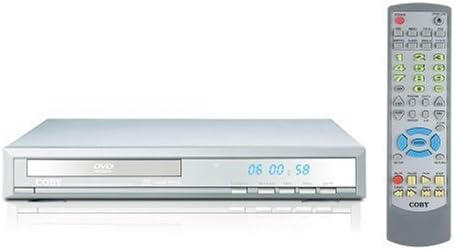
Зураг 1: Coby DVD-527 DVD Player (left) and its full-function remote control (right). The DVD player features a slim profile with a disc tray, display screen, and control buttons on the front panel. The remote control includes various buttons for playback, navigation, and special features.
Урд самбарын удирдлага
The front panel typically includes the disc tray, power button, play/pause, stop, and eject buttons, along with a digital display showing playback time or status.
Арын самбарын холболтууд
The rear panel houses various audio and video output ports for connecting to your television and audio system.
Алсын удирдлага
The included remote control provides full functionality for operating the DVD player from a distance, including power, playback controls, menu navigation, volume, and special features.
5. Тохиргоо
5.1 Телевизтэй холбогдох
Дараах видео холболтын аргуудын аль нэгийг сонгоно уу:
- Component Video Output (Progressive Scan): For the highest quality picture on HD-capable televisions, connect the Y, Pb, and Pr component video outputs from the DVD player to the corresponding inputs on your TV using component video cables.
- RCA Video Output: Connect the yellow RCA video output from the DVD player to the video input on your TV using an RCA video cable.
- S-Видео гаралт: Connect the S-Video output from the DVD player to the S-Video input on your TV using an S-Video cable.
5.2 Аудио системд холбогдох
Дараах аудио холболтын аргуудын аль нэгийг сонгоно уу:
- 5.1 Dolby Digital Output: For surround sound, connect the 5.1 channel audio outputs (Front Left, Front Right, Center, Surround Left, Surround Right, Subwoofer) from the DVD player to the corresponding inputs on your 5.1 channel receiver or ampнастан.
- Коаксиаль дижитал аудио гаралт: Connect the coaxial digital audio output from the DVD player to the coaxial digital audio input on your receiver or amplifier using a coaxial digital audio cable.
- Оптик дижитал аудио гаралт: Connect the optical digital audio output from the DVD player to the optical digital audio input on your receiver or amplifier using an optical digital audio cable.
- Аналог аудио гаралт: Connect the red and white RCA analog audio outputs from the DVD player to the corresponding audio inputs on your TV or stereo system using an RCA audio cable.
5.3 Эрчим хүчний холболт
After all audio and video connections are made, plug the DVD player's power cord into a standard AC power outlet.
6. Ашиглалтын заавар
6.1 Үндсэн диск тоглуулах
- Телевизээ асаагаад DVD тоглуулагчийн зөв оролтын эх үүсвэрийг сонго.
- Press the Power button on the DVD player or remote control to turn on the unit.
- Press the Eject button (▲) on the front panel or remote to open the disc tray.
- Place a compatible disc (DVD, CD, CD-R/RW, MP3) gently into the disc tray with the label side facing up.
- Press the Eject button (▲) again to close the disc tray. The player will begin reading the disc.
- Тоглуулах нь автоматаар эхлэх ёстой. Хэрэв дискний цэс гарч ирвэл алсын удирдлага дээрх навигацийн товчлууруудыг ашиглан хүссэн сонголтоо сонгоод Enter товчийг дарна уу.
- Use the Play (▶), Pause (▐▐), Stop (■), Fast Forward (►►), and Rewind (◄◄) buttons on the remote for playback control.
6.2 Онцлог шинж чанарууд
- Дэлгэц дээрх дэлгэц: Press the OSD button on the remote to view playback information on your screen.
- Томруулах үйлдэл: Use the Zoom button to magnify a portion of the picture.
- Олон Viewөнцөг: For discs that support it, press the Angle button to switch between different camera angles.
- Хадмал: Press the Subtitle button to select available subtitle languages.
- Parental Lock Control: Access the setup menu to configure parental control settings, restricting playback of certain content based on rating.
6.3 Системийн тохиргоо
Press the Setup button on the remote to access the system menu. Here you can adjust video settings (e.g., aspect ratio, progressive scan mode), audio settings, language preferences, and parental control options. Refer to the on-screen menu for detailed navigation.
7. Засвар үйлчилгээ
7.1 Төхөөрөмжийг цэвэрлэх
Wipe the exterior of the DVD player with a soft, dry cloth. Do not use liquid cleaners or aerosol sprays, as they may damage the finish or internal components.
7.2 Дискний арчилгаа
Handle discs by their edges. Keep discs clean and free of scratches. Store discs in their cases when not in use to prevent dust and damage.
8. Алдаа засах
Хэрэв та DVD тоглуулагчтайгаа холбоотой асуудалтай тулгарвал дараах нийтлэг асуудал болон шийдлүүдийг үзнэ үү.
- Эрчим хүчгүй:
• Ensure the power cord is securely plugged into both the DVD player and a working electrical outlet.
• Check if the power outlet is functional by plugging in another device. - Зураг байхгүй:
• Verify that the video cables are correctly connected between the DVD player and the TV.
• Ensure your TV is set to the correct input source (e.g., AV1, Component, HDMI).
• Check the TV's picture settings. - Дуугүй:
• Confirm that audio cables are properly connected to your TV or audio system.
• Check the volume level on both the DVD player and your TV/audio system.
• Ensure your TV/audio system is set to the correct audio input.
• If using digital audio, verify the audio settings in the DVD player's setup menu. - Disc Not Playing / Disc Error:
• Ensure the disc is clean and free of scratches or smudges.
• Make sure the disc is inserted correctly with the label side facing up.
• Verify that the disc format is compatible with the player (DVD, CD, CD-R/RW, MP3). - Алсын удирдлага ажиллахгүй байна:
• Check and replace the batteries in the remote control.
• Ensure there are no obstructions between the remote and the DVD player's sensor.
• Point the remote directly at the DVD player.
9. Техникийн үзүүлэлтүүд
| Загвар | DVD-527 |
| Брэнд | Коби |
| Хэмжээ (W x D x H) | 11 x 10 x 2 инч (ойролцоогоор) |
| Жин | 7 фунт (ойролцоогоор) |
| Медиа төрлийн нийцтэй байдал | DVD, CD, CD-R/RW, MP3 |
| Видео гаралт | Component Video (Y, Pb, Pr), RCA Video, S-Video |
| Аудио гаралт | 5.1 Channel Dolby Digital, Coaxial Digital, Optical Digital, Analog RCA (L/R) |
| Онцлог шинж чанарууд | Progressive Scan, Multiple Subtitles, Multiple Viewing Angles, On-Screen Display, Zoom Operation, Parental Lock Control |
| Видео нийцтэй байдал | NTSC/PAL систем |
10. Баталгаат хугацаа ба дэмжлэг
This product is covered by a limited manufacturer's warranty. Please refer to the warranty information card included in your package for specific terms and conditions, including the warranty period and coverage details. Keep your purchase receipt as proof of purchase.
For technical assistance or customer support, please refer to the contact information provided in your warranty documentation or visit the official Coby webхамгийн сүүлийн үеийн тусламжийн эх сурвалжуудын сайт.


