1. Танилцуулга
The Samson S-com 4 is a versatile single-rack space audio device designed for dynamics processing. It features four independent channels, each equipped with an Expander/Gate and a Compressor/Limiter. This unit is engineered to provide high-quality audio control for various applications, from studio recording to live sound reinforcement. The channels can operate independently or be linked in stereo pairs, offering flexibility for different audio setups.
Key features include multi-segment LED metering for input/output levels and gain reduction, continuously variable Threshold controls for both expander/gate and compressor/limiter sections, and an Enhancer switch to restore high frequencies that may be reduced during heavy compression. The S-com 4 also incorporates a Smart Knee Detector circuit, which automatically adjusts compression characteristics based on the input signal level.
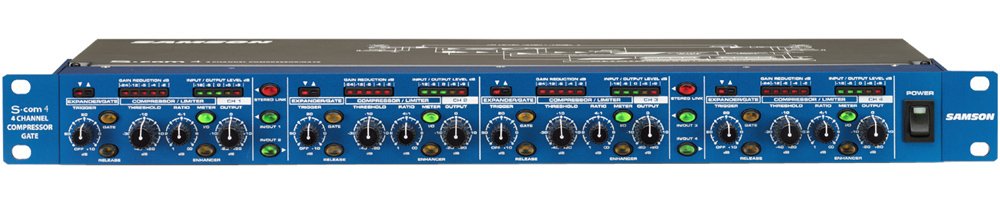
Image: Front panel view of the Samson S-com 4 Four Channel Compressor/Gate, showing controls and metering for all four channels.
2. Аюулгүй байдлын мэдээлэл
Please read and adhere to the following safety guidelines to ensure safe operation and prevent damage to the unit or injury to yourself.
- Эрчим хүчний эх үүсвэр: Connect the unit only to the specified power supply (9V DC, 500mA). Ensure the power outlet matches the required voltage.
- Агааржуулалт: Do not block any ventilation openings. Ensure adequate airflow around the unit, especially if rack-mounted, to prevent overheating.
- Ус ба чийг: Do not expose this unit to rain, moisture, dripping, or splashing liquids. Never place objects filled with liquids on the unit.
- Дулааны эх үүсвэрүүд: Төхөөрөмжийг радиатор, халаалтын төхөөрөмж, зуух эсвэл бусад төхөөрөмж (үүнд орно) гэх мэт дулааны эх үүсвэрээс хол байлга. ampөргөгч) дулаан үүсгэдэг.
- Цэвэрлэгээ: Цэвэрлэхийн өмнө төхөөрөмжийг цахилгааны залгуураас салга. Зөвхөн хуурай даавуу ашиглана уу.
- Үйлчилгээ: Do not attempt to service this unit yourself. Refer all servicing to qualified service personnel. Servicing is required when the apparatus has been damaged in any way, such as power-supply cord or plug is damaged, liquid has been spilled or objects have fallen into the apparatus, the apparatus has been exposed to rain or moisture, does not operate normally, or has been dropped.
3. Тохиргоо
3.1 Савлах, шалгах
Carefully unpack your S-com 4 and inspect it for any signs of damage that may have occurred during shipping. If damage is present, contact your dealer immediately. Retain the packing materials for future use if you need to transport the unit.
3.2 Rack суурилуулах
The S-com 4 is designed as a single-rack space unit. It can be mounted into any standard 19-inch equipment rack. Ensure there is sufficient ventilation around the unit, especially if other heat-generating equipment is mounted nearby.
3.3 Эрчим хүчний холболт
Connect the supplied 9V DC, 500mA power adapter to the power input jack on the rear panel of the S-com 4. Plug the adapter into a suitable AC power outlet. Always ensure the unit is powered off before making or breaking power connections.
3.4 Аудио холболт
The S-com 4 provides balanced XLR and 1/4" TRS input and output connectors for each of its four channels. These connections allow for flexible integration into various audio systems.
- Оролтын холболтууд: Connect the audio source (e.g., mixer insert send, microphone preamplifier output) to the desired channel's input. Use balanced XLR or 1/4" TRS cables for optimal signal integrity.
- Гаралтын холболтууд: Connect the output of the S-com 4 channel to the next device in your signal chain (e.g., mixer insert return, power ampөргөгчийн оролт).
- Стерео холболт: Channels can be linked in stereo pairs (1/2 and 3/4). When linked, the controls of the odd-numbered channel (1 or 3) will control both channels in the pair, and the processing will be applied equally to maintain the stereo image.
4. Ашиглалтын заавар
Each of the four channels on the S-com 4 features independent controls for its Expander/Gate and Compressor/Limiter sections.
4.1 Expander/Gate Section
- Босго: This control sets the level below which the gate will attenuate the signal. Adjust it to eliminate unwanted noise or bleed between signals. Signals above the threshold pass through unaffected.
- Release (Fast/Slow Switch): This switch determines how quickly the gate closes once the signal falls below the threshold. 'Fast' is suitable for percussive sounds, while 'Slow' can be used for smoother transitions or sustained instruments.
4.2 Compressor/Limiter Section
- Босго: This control sets the level above which compression begins. Signals exceeding this threshold will be compressed according to the Ratio setting.
- Харьцаа: This control determines the amount of compression applied. A ratio of 2:1 means that for every 2dB the input signal goes above the threshold, the output will only increase by 1dB. Higher ratios result in more aggressive compression.
- Гаралтын түвшин: This control adjusts the overall output level of the channel after compression. Use it to compensate for any gain reduction caused by compression.
- Enhancer Switch: Engaging this switch restores high frequencies that can sometimes be diminished during heavy compression, helping to maintain clarity and presence in the audio signal.
- Smart Knee Detector: The S-com 4 features an automatic Smart Knee Detector circuit. This circuit intelligently switches between soft-knee and hard-knee compression characteristics based on the input signal level, providing smooth and musical dynamics processing without requiring manual adjustment.
4.3 Тоолуур
Each channel is equipped with multi-segment LED meters that display both input/output signal levels and gain reduction. Monitor these meters to observe the effect of your dynamics processing and ensure optimal signal levels.
5. Засвар үйлчилгээ
The Samson S-com 4 is designed for reliable operation with minimal maintenance. Follow these guidelines to ensure its longevity:
- Цэвэрлэгээ: Regularly wipe the unit with a soft, dry cloth to remove dust and grime. Do not use liquid cleaners or solvents, as they may damage the finish or internal components.
- Агааржуулалт: Ensure that the ventilation slots are clear of obstructions to prevent overheating.
- Хадгалах: Удаан хугацаагаар ашиглаагүй үед төхөөрөмжийг хуурай, тоосгүй орчинд хадгална уу.
6. Алдаа засах
If you encounter issues with your S-com 4, refer to the following common problems and solutions:
- Дуугүй:
- Check that the unit is powered on and the power adapter is securely connected.
- Verify all audio cables are correctly connected to the inputs and outputs.
- Ensure input and output levels on the S-com 4 and connected devices are appropriately set.
- Check the Expander/Gate Threshold; if set too high, it may be gating out the entire signal.
- Bypass the S-com 4 (if your system allows) to determine if the issue lies with the unit or other equipment.
- Гажуудсан дуу:
- Reduce the input level to the S-com 4 to prevent clipping.
- Check the Compressor/Limiter Ratio; very high ratios can lead to noticeable distortion if not managed carefully.
- Ensure the output level is not too high, causing clipping in subsequent devices.
- Хэт их дуу чимээ:
- Adjust the Expander/Gate Threshold to effectively remove unwanted background noise.
- Verify proper gain staging throughout your audio chain.
- Бүх кабелиуд сайн нөхцөлд, зохих хамгаалалттай байгаа эсэхийг шалгаарай.
- Unit Feels Hot:
- It is normal for electronic equipment to generate some heat during operation. Ensure adequate ventilation around the unit, especially if rack-mounted. If the unit becomes excessively hot or exhibits unusual behavior, discontinue use and contact support.
If these steps do not resolve your issue, please contact Samson customer support for further assistance.
7. Техникийн үзүүлэлтүүд
| Онцлог | Тодорхойлолт |
|---|---|
| Загварын дугаар | SA-SCOM4 |
| Бүтээгдэхүүний хэмжээс | 23.5 x 11 x 4.25 инч |
| Дохионы формат | Аналог |
| Ботьtage | 9 вольт |
| Ampарилгах | 500 саяamps |
| Сувгууд | 4 (independent or stereo linkable) |
| Холбогч | Balanced XLR & 1/4" Inputs/Outputs |
8. Баталгаат хугацаа ба дэмжлэг
Samson Technologies provides a limited warranty for its products. For specific warranty terms and conditions, please refer to the warranty card included with your product or visit the official Samson webсайт. Баталгаат нэхэмжлэл гаргахын тулд худалдан авалтаа нотлох баримтаа хадгалаарай.
For technical support, service, or questions regarding your Samson S-com 4, please contact Samson customer support through their official website or the contact information provided in your product documentation. When contacting support, please have your model number (SA-SCOM4) and purchase date available.


