1. Танилцуулга
The Radial J48 MK2 is an active direct box designed to convert unbalanced instrument signals into balanced, low-impedance signals suitable for professional mixing consoles and recording equipment. It operates on 48V phantom power, providing a wide, distortion-free frequency response and dynamic range for various instruments. This manual provides essential information for the proper setup, operation, and maintenance of your J48 MK2.
2. Аюулгүй байдлын мэдээлэл
Энэ төхөөрөмжийг ажиллуулахаасаа өмнө бүх аюулгүй байдлын зааврыг уншиж, ойлгоно уу.
- Санал 65 Анхааруулга: Энэ бүтээгдэхүүн нь хорт хавдар, ургийн гажиг эсвэл нөхөн үржихүйн бусад хор уршгийг үүсгэдэг Калифорнийн муж улсад мэдэгддэг химийн бодис агуулсан байж болно.
- Төхөөрөмжийг бороо, чийгэнд бүү тавь.
- Do not open the chassis; there are no user-serviceable parts inside. Refer all servicing to qualified personnel.
- Ашиглалтын явцад төхөөрөмжийн эргэн тойронд агааржуулалт сайтай байх ёстой.
- Use only with 48V phantom power sources as intended.
3. Бүтээгдэхүүн дууссанview
The Radial J48 MK2 is engineered for optimal performance with modern instruments, offering robust construction and transparent audio conversion. Its features include a unique switch-mode power supply for high rail voltage, ensuring signal integrity even with dynamic sources.
Гол онцлогууд:
- Active 48-Volt phantom powered operation.
- High rail voltage to prevent clipping with powerful instruments.
- Low inter-modulation distortion for clear audio.
- Innovative merge function for stereo-to-mono summing.
- 80Hz high-pass roll-off filter to reduce low-frequency rumble.
- Rugged alloy steel construction for durability.
Удирдлага ба холбогч:

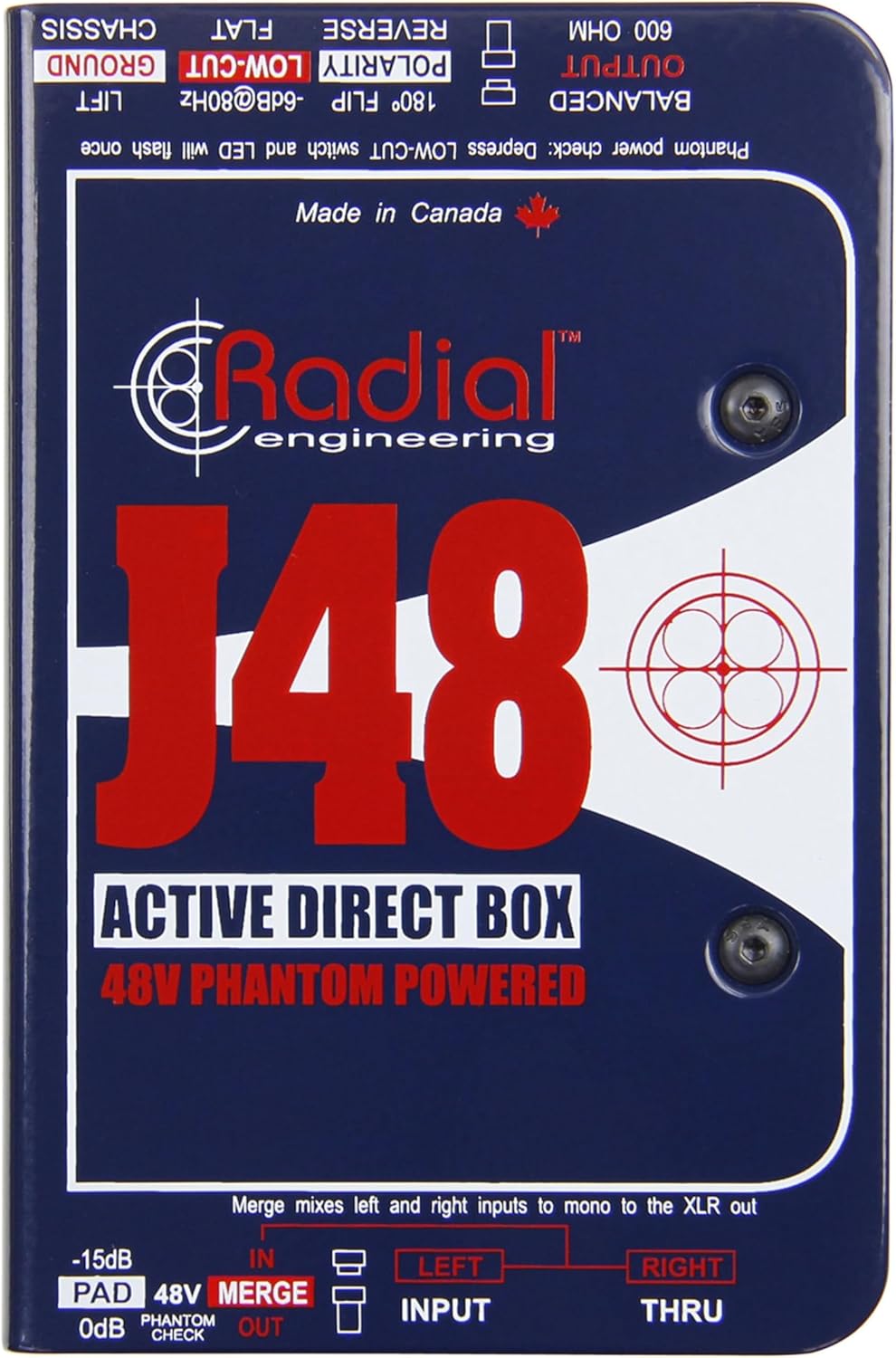
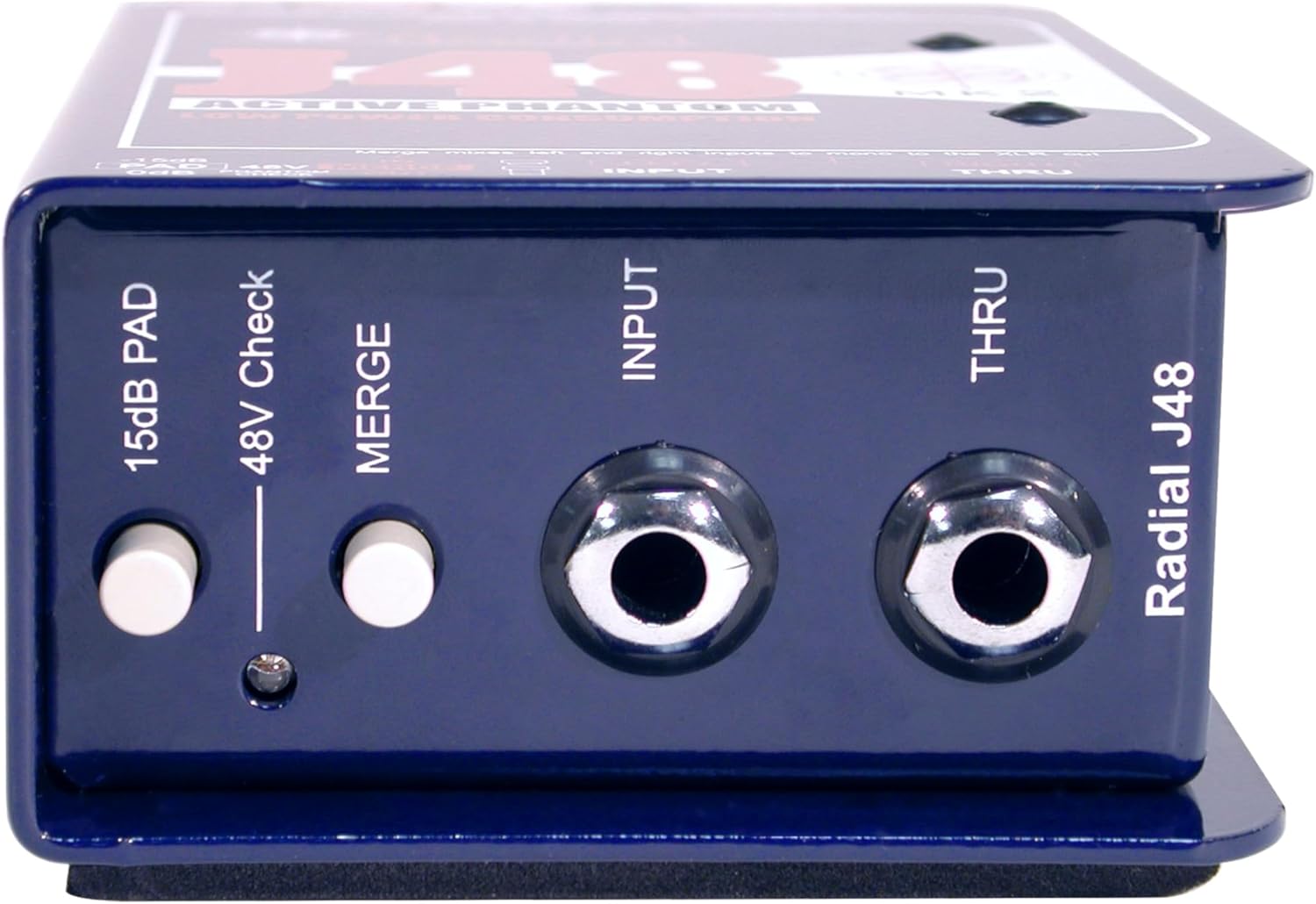
- INPUT (1/4" Jack): Connect your instrument or audio source here.
- THRU (1/4" Jack): Provides a direct, unprocessed signal to feed an instrument ampөргөгч эсвэл монитор.
- -15dB PAD Switch: Attenuates the input signal by 15dB for high-output sources, preventing overload.
- 48V Phantom Check LED: Illuminates momentarily when 48V phantom power is detected.
- MERGE Button: Combines the LEFT and RIGHT 1/4" inputs into a mono signal, sent to the XLR output.
- ТЭНЦВЭРТЭЙ ГАРАЛТ (XLR): Provides a balanced, low-impedance output signal to a mixing console or audio interface.
- 180° POLARITY FLIP Switch: Reverses the polarity of the XLR output signal, useful for phase correction.
- LOW-CUT (-6dB@80Hz) Switch: Activates an 80Hz high-pass filter to reduce unwanted low-frequency rumble or mud.
- GROUND LIFT унтраалга: Disconnects the audio ground from the chassis ground to eliminate hum and buzz caused by ground loops.
4. Тохиргоо
Follow these steps to connect your Radial J48 MK2:
- Холбох хэрэгсэл: Plug your instrument (e.g., guitar, bass, keyboard) into the ОРОЛТ 1/4" jack on the J48 MK2.
- -д холбогдох Ampөргөгч (заавал биш): If you wish to send your instrument's signal to an on-stage amplifier or monitor, connect a 1/4" cable from the THRU jack on the J48 MK2 to your ampөргөгчийн оролт.
- Connect to Mixer/PA: Connect a balanced XLR cable from the Тэнцвэртэй гаралт of the J48 MK2 to an XLR input on your mixing console or audio interface.
- Фантом хүчийг идэвхжүүлэх: Ensure that the connected mixing console or audio interface provides 48V phantom power to the XLR input. The 48V Phantom Check LED on the J48 MK2 will briefly illuminate to confirm power reception. The J48 MK2 requires 48V phantom power for operation.
5. Ашиглалтын заавар
Optimize your sound using the J48 MK2's controls:
- Using the -15dB PAD: If your instrument has a very high output (e.g., active pickups, high-output keyboards), engage the -15дБ PAD switch. This reduces the input signal level, preventing distortion and ensuring a clean signal to the mixer.
- MERGE Function: For instruments with stereo outputs (e.g., some keyboards or media players) that you want to sum to a single mono XLR output, press the НЭГДЭХ button. Connect the left output to the INPUT jack and the right output to the THRU jack. The J48 MK2 will then combine these into a mono signal at the XLR output.
- POLARITY FLIP (180°): In multi-microphone or multi-DI setups, phase cancellation can occur, leading to a thin or hollow sound. If you suspect phase issues, engage the 180° POLARITY FLIP switch to invert the phase of the XLR output. Listen for an improvement in low-end response or overall clarity.
- LOW-CUT Filter: To reduce unwanted low-frequency noise, stage rumble, or to clean up the low-end of an instrument's signal, engage the БАГА ЗАСАЛТ switch. This activates an 80Hz high-pass filter, removing frequencies below 80Hz.
- Газар өргөх: If you experience hum or buzz in your audio signal, it may be due to a ground loop. Engage the ГАЗРЫН Лифт switch to disconnect the audio ground from the chassis ground. If the hum persists, try disengaging it, as sometimes lifting the ground can introduce noise in certain setups.
6. Засвар үйлчилгээ
The Radial J48 MK2 is built for durability and requires minimal maintenance.
- Цэвэрлэгээ: Төхөөрөмжийн гадна талыг цэвэрлэхийн тулд зөөлөн, хуурай даавуу ашиглана уу. Зүлгүүрийн цэвэрлэгч эсвэл уусгагчаас зайлсхий.
- Хадгалах: Төхөөрөмжийг хуурай орчинд, хэт температур, нарны шууд тусгалаас хол байлга.
- Шалгалт: Periodically check cables and connectors for wear or damage.
There are no user-serviceable parts inside the J48 MK2. Any internal servicing should be performed by authorized Radial Engineering technicians.
7. Алдаа засах
If you encounter issues with your J48 MK2, refer to the following common problems and solutions:
- Дуугүй:
- Ensure 48V phantom power is active on the mixer's XLR input. The 48V Phantom Check LED should briefly flash upon connection.
- Check all cable connections (instrument to INPUT, J48 OUTPUT to mixer).
- Verify the instrument is working and its volume is up.
- Ensure the mixer channel is unmuted and its gain is appropriately set.
- Хум эсвэл Buzz:
- Холбох эсвэл салгах ГАЗРЫН Лифт switch to break potential ground loops.
- Бүх төхөөрөмжийг зөв газардуулсан эсэхийг шалгаарай.
- Кабелийн гэмтэл байгаа эсэхийг шалгана уу.
- Гажуудсан дуу:
- -ийг оролцуулах -15дБ PAD Хэрэв таны хэрэгсэл өндөр гаралтын түвшинтэй бол унтраа.
- Reduce the input gain on your mixing console.
- Check for damaged cables or faulty equipment.
- Thin or Hollow Sound:
- If using multiple microphones or DIs, try engaging the 180° POLARITY FLIP switch to correct phase issues.
If problems persist, contact Radial Engineering support for further assistance.
8. Техникийн үзүүлэлтүүд
| Загварын дугаар | R8003001 |
| Зүйлийн жин | 1.58 фунт (0.72 кг) |
| Бүтээгдэхүүний хэмжээс | 6.5 x 4.1 x 3.1 инч (16.5 x 10.4 x 7.9 см) |
| Эрчим хүчний шаардлага | 48 вольтын Phantom Power |
| Холбогч төрөл | 1/4" TS (Input/Thru), 3-Pin XLR (Output) |
| Материалын төрөл | Хайлш ган |
| Өнгөний нэр | Цэнхэр |
| Оролтын самбар | -15дБ |
| Бага зүсэлттэй шүүлтүүр | -6dB 80 Гц |
9. Баталгаат хугацаа ба дэмжлэг
For warranty information, technical support, or service inquiries, please contact Radial Engineering directly through their official webсайт эсвэл эрх бүхий дистрибьютерүүд. Худалдан авалтын баримтаа баталгаат нэхэмжлэлд зориулж худалдан авалтын баталгаа болгон хадгална уу.