1. Танилцуулга
The Extech SDL200 is a versatile four-channel thermometer and data logger designed for precise temperature measurement and recording. It supports six types of thermocouples (J, K, E, T, R, S) and two channels for RTD (Pt100Ohm) probes, allowing for a wide range of applications. This device can display individual channel readings (T1, T2, T3, T4) or differential readings (T1-T2). It features an offset adjustment for relative measurements and can store up to 99 readings manually, with an extensive capacity of 20 million readings via a 2GB SD memory card. All recorded data is time-stamped and saved in an Excel-compatible format for easy transfer and analysis on a PC. The SDL200 also includes user-programmable sampling rates, Min/Max recording, Data Hold, Auto Power Off, and a built-in PC interface.
2. Аюулгүй байдлын мэдээлэл
Please read and understand all safety instructions before operating the Extech SDL200. Failure to follow these instructions may result in injury or damage to the device.
- Хэрэв төхөөрөмж эвдэрсэн эсвэл тусгаарлагч нь эвдэрсэн мэт харагдаж байвал ажиллуулж болохгүй.
- Ensure proper probe connection before taking measurements.
- Төхөөрөмжийг хэт өндөр температур, чийгшил, нарны шууд тусгалд оруулахаас зайлсхий.
- Use only specified battery types and ensure correct polarity during installation.
- Keep the device clean and dry. Refer to the maintenance section for cleaning instructions.
- Төхөөрөмжийг засах, өөрчлөхийг бүү оролдоорой. Бүх үйлчилгээг мэргэшсэн боловсон хүчинд шилжүүлээрэй.
3. Багцын агуулга
Савлахдаа бүх зүйл байгаа эсэхийг шалгана уу:
- Extech SDL200 Four-Channel Thermometer SD Logger unit
- 6 АА батерей
- Four general purpose Type K bead wire temperature probes
- SD memory card (2GB)
- Хатуу зөөвөрлөгч

Зураг 3.1: Extech SDL200 unit with four Type K thermocouple probes inserted into the top ports. The display shows temperature readings for T1, T2, T3, and T4.

Зураг 3.2: The retail packaging box for the Extech SDL200, displaying the brand logo, model name, and UPC code (0793950432105).
4. Бүтээгдэхүүн дууссанview
The SDL200 features a clear digital display and intuitive button layout for easy operation. The top of the device includes four input ports for thermocouple probes. The side of the device houses connectivity ports for power and PC interface, along with RTD probe inputs.

Зураг 4.1: Хажуу тал view of the Extech SDL200, illustrating the DC 9V power input, RS232 serial port for PC connection, and two RTD (PT100Ohm) probe input ports labeled PT1 and PT2, protected by a rubber flap.

Зураг 4.2: A set of four yellow Type K bead wire temperature probes with standard mini-connectors, alongside a larger clamp-style temperature probe, demonstrating the variety of probes that can be used with the device.
5. Тохиргоо
5.1. Зай суурилуулах
- Төхөөрөмжийн арын хэсэгт байрлах зайны тасалгааны тагийг нээнэ үү.
- Insert six (6) AA batteries, ensuring correct polarity as indicated inside the compartment.
- Зайны тасалгааны тагийг сайтар хаа.
5.2. Зонд холболт
- For thermocouple probes (Type J, K, E, T, R, S), connect them to the four input jacks located at the top of the meter. Ensure the correct thermocouple type is selected in the device settings if applicable.
- For RTD (Pt100Ohm) probes, connect them to the PT1 and PT2 ports on the side of the device (refer to Figure 4.1).
5.3. SD карт оруулах
- Locate the SD card slot, typically on the side or bottom of the device.
- Insert the provided 2GB SD memory card into the slot until it clicks into place.
- Авахын тулд картыг гарч иртэл дотогшоо зөөлөн түлхэнэ үү.
6. Ашиглалтын заавар
6.1. Асаах/унтраах
дээр дарна уу ХҮЧ товчлуурыг дарж төхөөрөмжийг асаах, унтраах.
6.2. Basic Temperature Measurement
- Connect the desired temperature probes.
- Power on the device. The display will show real-time temperature readings for the connected channels (T1, T2, T3, T4).
- дээр дарна уу T1-T2 button to switch between individual channel display and differential temperature (T1-T2) display.
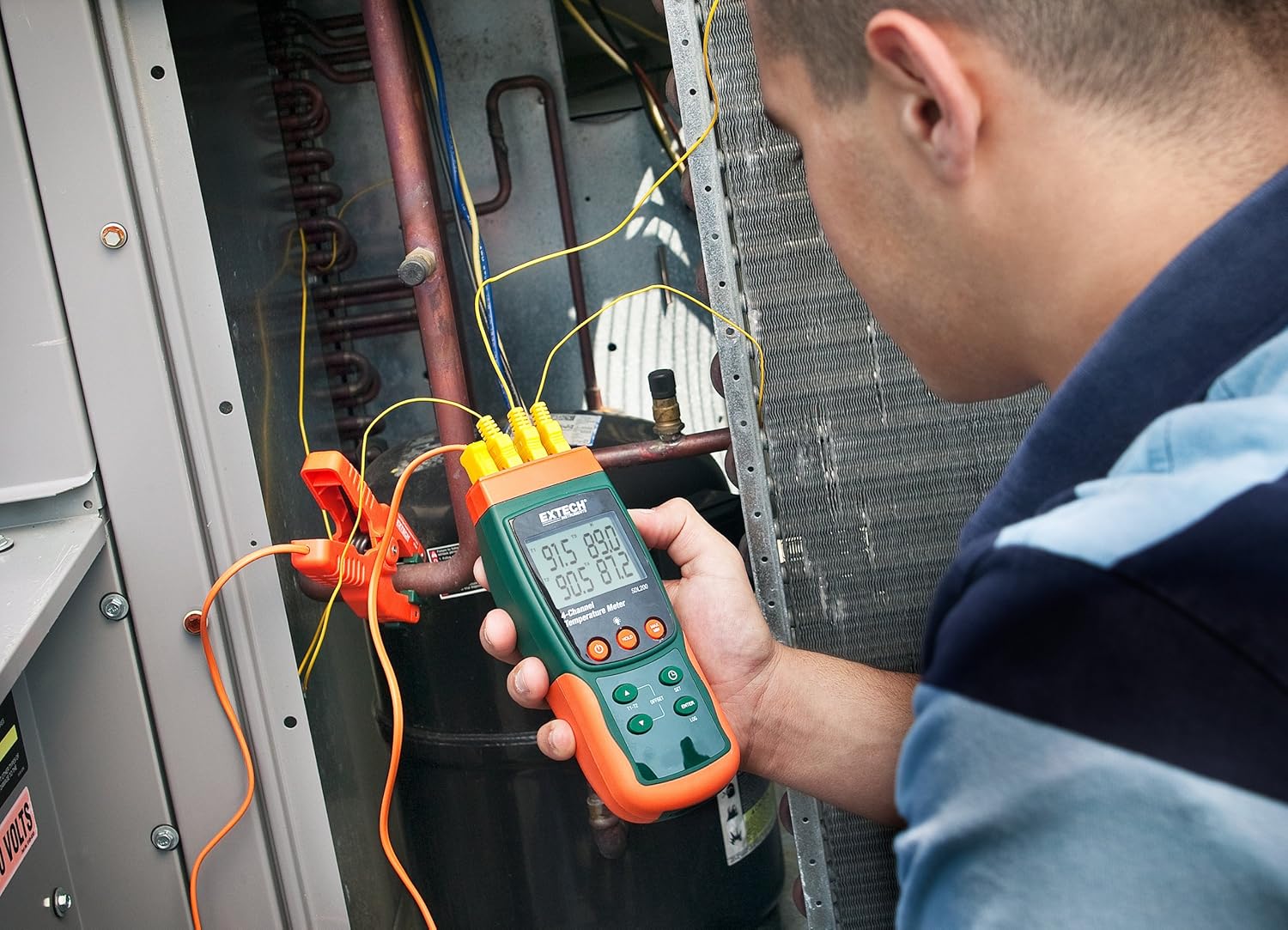
Зураг 6.1: A technician utilizing the Extech SDL200 to monitor multiple temperature points on an HVAC system, demonstrating its application in industrial and scientific settings.
6.3. Мэдээлэл бүртгэх
The SDL200 can record temperature data to the SD card with a real date and time stamp.
- Set Sampханш: -г ашиглана уу SET button to access settings and adjust the sampдууны хурд (1-ээс 3600 секунд).
- Бүртгэлийг эхлүүлэх: дээр дарна уу LOG button to begin recording data to the SD card. A logging indicator will appear on the display.
- Stop Logging: дээр дарна уу LOG Өгөгдөл бичихээ зогсоохын тулд товчийг дахин дарна уу.
- Өгөгдөл дамжуулах: Remove the SD card and insert it into a computer to access the data, which is saved in Excel (.xls) format.
6.4. Min/Max and Data Hold
- Мин/Макс: дээр дарна уу MAX/MIN button to display the maximum or minimum recorded temperature since the function was activated. Press again to cycle through Max, Min, and current readings.
- Өгөгдөл хадгалах: дээр дарна уу БАРЬ Дэлгэц дээрх одоогийн заалтыг царцаах товчийг дарна уу. Суллахын тулд дахин дарна уу.
6.5. Offset Adjustment
-г ашиглана уу ОФСЕТ button to perform a zero function for relative measurements. Consult the full manual for detailed calibration procedures.
6.6. Автоматаар унтраах
The device features an Auto Power Off function to conserve battery life. This can typically be disabled or adjusted in the settings menu if continuous operation is required.
6.7. PC Interface
The built-in RS232 PC interface allows for real-time data streaming and advanced control using compatible software (sold separately or available for download from Extech's website). Connect the device to your PC using an appropriate RS232 cable.
7. Засвар үйлчилгээ
7.1. Цэвэрлэгээ
Төхөөрөмжийг зөөлөн, d-ээр арчиж цэвэрлэнэ үүamp cloth. Do not use abrasive cleaners or solvents. Ensure the device is dry before storage or further use.
7.2. Зай солих
Дэлгэц дээр батерей бага байгааг харуулсан заалт гарч ирэхэд батерейг солино уу. Батерей суурилуулах зааврыг 5.1-р хэсгээс үзнэ үү.
7.3. Хадгалах
When not in use for extended periods, remove the batteries and store the device in its hard carrying case in a cool, dry place.
8. Алдаа засах
- Төхөөрөмж асахгүй байна: Зайны суурилуулалтыг шалгаж, батерей нь дуусаагүй эсэхийг шалгаарай. Шаардлагатай бол солино.
- Буруу температурын заалт: Verify probe connections are secure and that the correct probe type is selected (if applicable). Ensure probes are not damaged.
- Data logging not working: Check if the SD card is properly inserted and has sufficient free space. Ensure the logging function is activated.
- Компьютерийн холболтын асуудлууд: Verify the RS232 cable connection and ensure the correct drivers and software are installed on your PC.
9. Техникийн үзүүлэлтүүд
| Онцлог | Тодорхойлолт |
|---|---|
| Брэнд | Extech |
| Загварын нэр | SDL200 |
| Онцлог шинж чанар | 4-Channel Datalogging |
| Дэлгэцийн төрөл | Дижитал |
| Холболтын технологи | USB (via RS232 interface) |
| Эрчим хүчний эх үүсвэр | Батерейгаар ажилладаг (6 АА батерей багтсан) |
| Дээд температурын үнэлгээ | Фаренгейтийн 2732 градус |
| Хариу өгөх хугацаа | 1 секунд |
| Datalogging Capacity | 20M readings via 2G memory card |
| Sampling Rate | 1 to 3600 seconds (user programmable) |
| Термопарын төрлүүд | J, K, E, T, R, S (4-channel) |
| RTD датчик | Pt100Ohm (2-channel) |
| Оруулсан бүрэлдэхүүн хэсгүүд | Batteries, Bead wire temperature probes, memory card, case |
| Зүйлийн жин | 1.1 фунт |
| Зүйлийн урт | 7.2 инч |
| Гаднах материал | Поликарбонат (PC) |
| Үзүүлэлт | CE |
10. Баталгаат хугацаа ба дэмжлэг
Extech products are designed for reliability and performance. For warranty information, technical support, or service inquiries, please refer to the official Extech webсайт эсвэл харилцагчийн үйлчилгээний хэлтэстэй холбогдоно уу. Худалдан авалтын баримтаа баталгаат нэхэмжлэлд зориулж худалдан авалтын баталгаа болгон хадгална уу.
Нэмэлт эх сурвалжийг эндээс авна уу Extech Store on Amazon.