Танилцуулга
The Danco 88698 Faucet Index Buttons are designed to replace worn or missing hot and cold indicators on compatible Delta faucets. These buttons restore the aesthetic and functional clarity of your faucet handles, ensuring proper identification of hot and cold water lines. Crafted from durable clear acrylic plastic, they feature a snap-in design for straightforward installation.
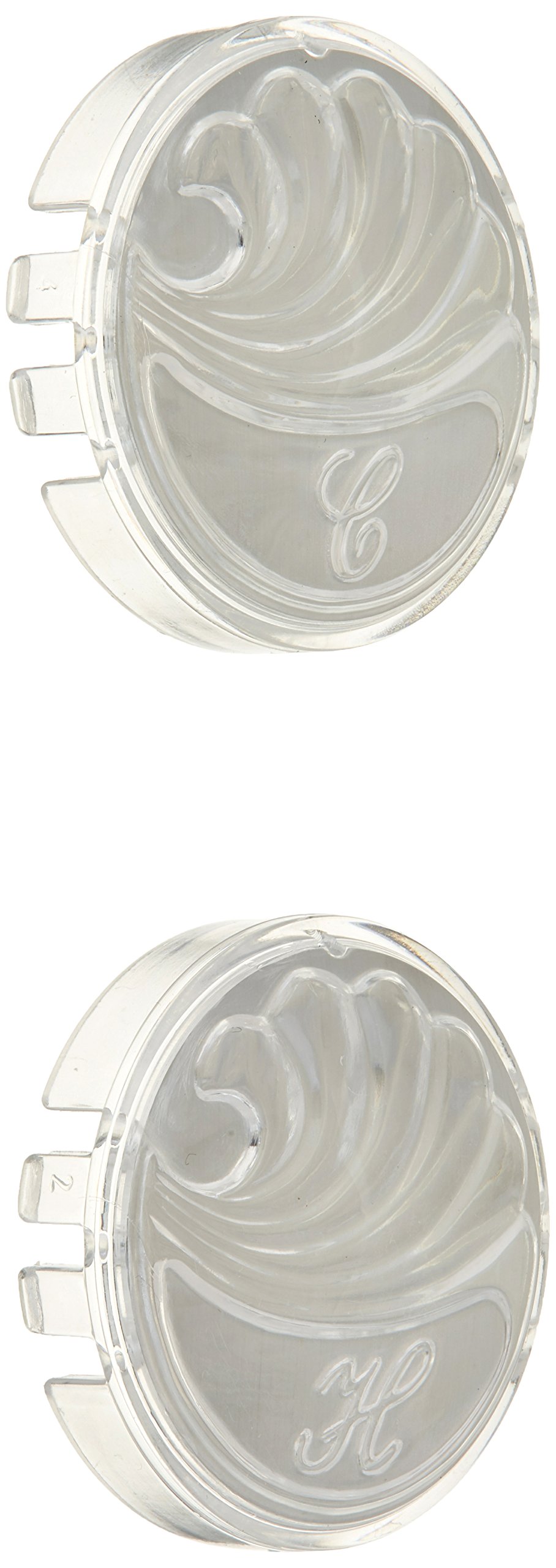
Image: Danco 88698 Faucet Index Buttons, featuring a clear acrylic design with 'H' and 'C' labels for hot and cold water.
Гол онцлогууд:
- Clear acrylic plastic construction for durability and a clean look.
- New-style wave design for enhanced aesthetics.
- Specifically designed for Delta faucets.
- Includes one hot-labeled button and one cold-labeled button.
- Snap-in style for easy and secure installation.
Тохиргоо ба суурилуулалт
Before beginning installation, ensure the water supply to the faucet is turned off to prevent accidental water flow. Gather any necessary tools, though typically none are required for snap-in buttons.
- Identify Replacement Location: Locate the handle on your Delta faucet where the index button is missing or needs replacement.
- Remove Old Button (if present): If an old button is present, gently pry it out using a small, flat-head screwdriver or a similar non-abrasive tool. Exercise caution to avoid scratching the faucet handle.
- Талбайг цэвэрлэх: Clean any debris or residue from the button recess on the faucet handle. This ensures a secure fit for the new button.
- Insert New Button: Take the appropriate Danco 88698 button (Hot 'H' or Cold 'C') and align it with the recess on the faucet handle.
- Байршуулах: Press the button firmly into the recess until it snaps securely into place. Ensure it sits flush with the handle surface.
- Тохирохыг баталгаажуулах: Gently test the button to ensure it is firmly seated and does not easily come loose.

Image: A pair of Danco faucet index buttons, clearly showing the 'H' and 'C' markings for hot and cold water identification.
Ашиглалтын заавар
The Danco 88698 Faucet Index Buttons serve as visual indicators for hot and cold water on your Delta faucet handles. Once installed, they require no specific operation. Simply use your faucet as normal, relying on the 'H' and 'C' labels to identify the water temperature.
Засвар үйлчилгээ
To maintain the appearance and longevity of your Danco Faucet Index Buttons, follow these simple cleaning guidelines:
- Тогтмол цэвэрлэгээ: Clean the buttons regularly with a soft cloth and mild soap and water.
- Химийн хорт бодисоос зайлсхий: Do not use abrasive cleaners, scouring pads, or harsh chemical detergents, as these can scratch or damage the acrylic surface.
- Хатаах: After cleaning, wipe the buttons dry with a soft, clean cloth to prevent water spots.
Алдааг олж засварлах
| Асуудал | Боломжит шалтгаан | Шийдэл |
|---|---|---|
| Button does not snap into place. | Debris in the recess; incorrect button orientation; incompatible faucet model. | Clean the recess thoroughly. Ensure the button is correctly aligned. Verify your faucet is a compatible Delta model. |
| Button falls out easily. | Improper installation; worn recess on faucet handle; incompatible faucet model. | Re-install, ensuring a firm snap. Inspect the faucet handle's recess for damage. Confirm faucet compatibility. |
| Button appears scratched or cloudy. | Use of abrasive cleaners; natural wear over time. | Use only mild soap and a soft cloth for cleaning. If severely damaged, replacement may be necessary. |
Үзүүлэлтүүд
- Загварын дугаар: 88698
- Брэнд: Данко
- Материал: Акрил
- Өнгө: Clear (with red 'H' and blue 'C' indicators, implied by hot/cold)
- Handle Attachment Mechanism: Нэвтрэх
- Тохиромжтой байдал: Designed for Delta faucets
- Барааны жин: Approximately 0.32 ounces (per set)
- UPC: 037155003570, 037155886982
Баталгаат хугацааны мэдээлэл
The Danco 88698 Faucet Index Buttons come with a Хязгаарлагдмал 1 жилийн баталгаат хугацаа. This warranty covers defects in material and workmanship under normal use and service. For specific terms, conditions, and to make a warranty claim, please retain your proof of purchase and contact Danco customer support.
Дэмжлэг
For further assistance, technical support, or to inquire about replacement parts, please contact Danco customer service. You can typically find contact information on the official Danco webсайт эсвэл бүтээгдэхүүнийг худалдан авсан жижиглэн худалдаалагчаар дамжуулан.
Онлайн нөөцүүд: Visit the official Danco website for product information, FAQs, and additional support resources.
Холбоо барих: Refer to your product packaging or the Danco website for current customer service contact details (phone, email, or contact form).


