1. Танилцуулга
The Extech EX330 is a compact, autoranging digital multimeter designed for a wide range of electrical and electronic measurements. Its robust design and comprehensive features make it an essential tool for professionals and hobbyists alike. This manual provides detailed instructions for the safe and effective use of your EX330 multimeter.
EX330-ийн гол онцлогууд нь:
- Баригдсан контактгүй АС ботьtage detector (NCV) for enhanced safety.
- Large 4000-count LCD display for clear readings.
- Automatic ranging for simplified operation.
- Арга хэмжээ AC/DC Voltage, AC/DC Current, Resistance, Capacitance, Frequency, Duty Cycle, and Temperature.
- Diode test and Continuity check functions.
- Data Hold and Max Hold features.
- Durable rubber holster for protection.
- UL listed Cat III 600V safety rating.

2. Эхлэл
2.1. Зай суурилуулах
The EX330 multimeter requires two AAA batteries for operation. To install or replace batteries:
- Мультиметр унтарсан эсэхийг шалгаарай.
- Төхөөрөмжийн арын хэсэгт зайны тасалгааг ол.
- Зайны тасалгааны тагийг нээхийн тулд халив ашиглана уу.
- Тасалгааны дотор талд заасан зөв туйлшралыг (+ ба -) ажиглан хоёр AAA батерейг оруулна уу.
- Зайны тасалгааны тагийг сольж, боолтоор бэхлээрэй.
2.2. Туршилтын утсыг холбох
The multimeter comes with a set of red and black test leads. Proper connection is crucial for accurate and safe measurements.
- Хар туршилтын утсыг үргэлж холбоно уу COM (Нийтлэг) оролтын залгуур.
- Ихэнх ботьtage, resistance, and continuity measurements, connect the red test lead to the V/Ω/µA/CAP/Hz/Temp оролтын үүр.
- For current measurements up to 400mA, connect the red test lead to the mA оролтын үүр.
- For high current measurements up to 10A, connect the red test lead to the 10 А оролтын үүр.

3. Ашиглалтын заавар
3.1. Асаах/унтраах
To turn the multimeter on, rotate the function switch from the OFF position to any desired measurement function. To turn the multimeter off, rotate the function switch back to the OFF байр суурь.
3.2. Function Selection (Rotary Dial)
The large rotary dial on the front of the multimeter allows you to select the desired measurement function. The EX330 features automatic ranging, which simplifies operation by automatically selecting the correct measurement range.
- VAC / ВDC: Measures AC or DC Voltage.
- mA / 10A: Measures AC or DC Current (milliampэрт эсвэл ampere).
- Ω: Measures Resistance.
- CAP: Measures Capacitance.
- Гц /%: Measures Frequency and Duty Cycle.
- ° F / ° C: Measures Temperature in Fahrenheit or Celsius.
- Диод / Тасралтгүй байдал: Tests diodes and checks for circuit continuity.
3.3. Холбоо барихгүй ботьtage (NCV) илрүүлэх
The NCV feature allows for quick detection of AC voltage without direct contact, enhancing safety when working with electrical systems. To use the NCV function, press and hold the NCV button. The top of the meter will illuminate and an audible tone will sound if AC voltage илэрсэн.

3.4. Ботьtage Хэмжилт (AC/DC)
Хэмжихийн тулд ботьtage:
- Эргэдэг товчлуурыг тохируулна уу VAC or VDC зохих ёсоор.
- Хар туршилтын холболтыг холбоно уу COM Жек болон улаан туршилтын хар тугалга V/Ω/µA/CAP/Hz/Temp Жак.
- Туршилтын датчикуудыг хэмжих хэлхээ эсвэл эд анги дээр зэрэгцээ холбоно.
- боть уншина ууtagLCD дэлгэц дээрх e утга.

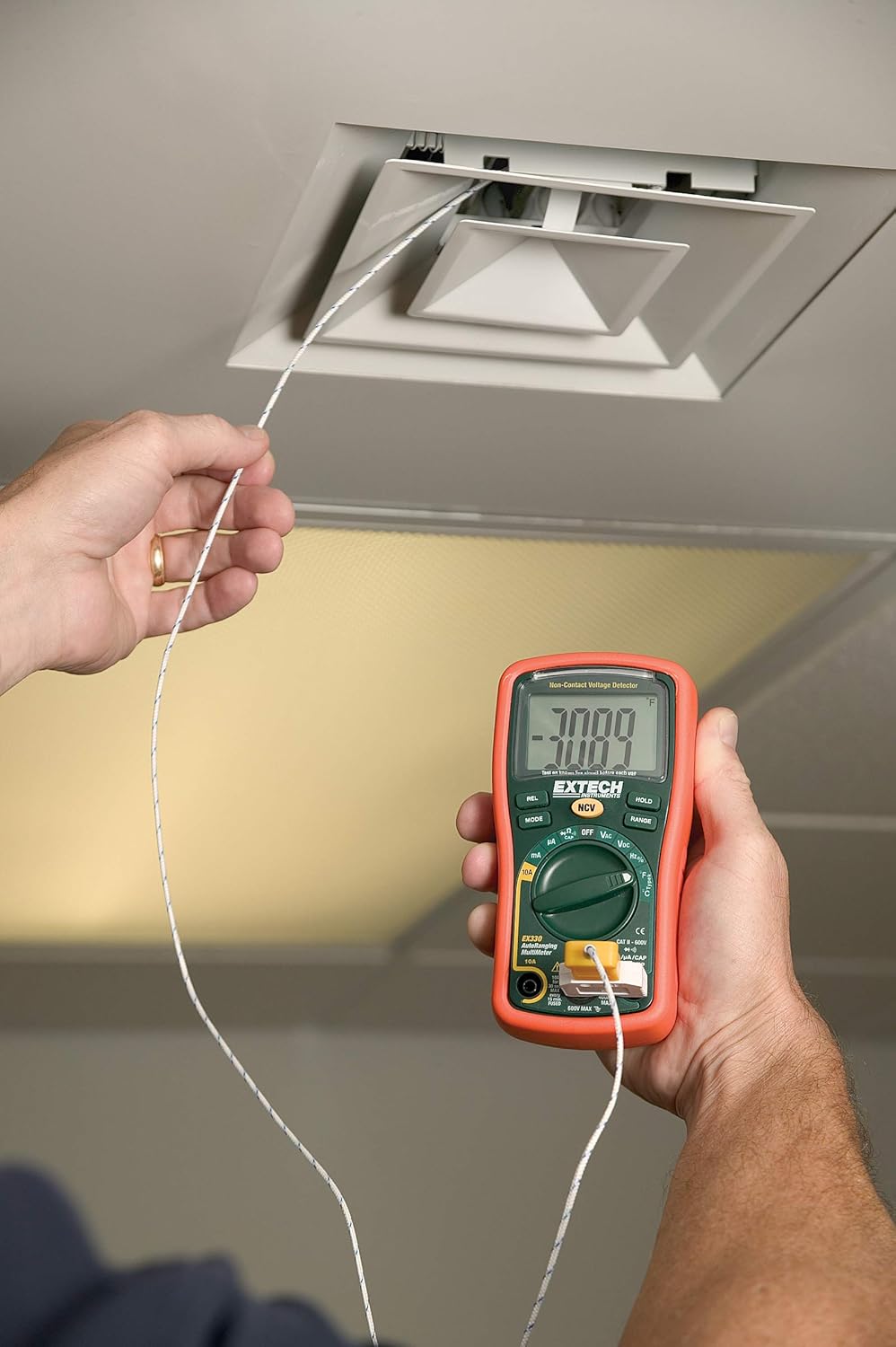
3.5. Temperature Measurement (Type K)
The EX330 includes a Type K temperature probe for accurate temperature readings.
- Эргэдэг товчлуурыг тохируулна уу °F or °C.
- Plug the Type K temperature probe into the V/Ω/µA/CAP/Hz/Temp болон COM оролтын залгуурууд, туйлшралыг ажиглах.
- Температур хэмжигчний үзүүрийг температурыг хэмжих объектын дээр эсвэл ойролцоо байрлуулна.
- Allow time for the reading to stabilize on the display.
3.6. Data Hold and Max Hold
- дээр дарна уу БАРЬ Дэлгэц дээрх одоогийн заалтыг царцаах товчийг дарна уу. Суллахын тулд дахин дарна уу.
- дээр дарна уу MODE button repeatedly while in certain functions to cycle through sub-functions or to activate ДАХЬ БАРИЛГА, which captures and displays the maximum measured value.
3.7. Бүтээгдэхүүний онцлогууд дууссанview
Хурдан дуусгахын тулд энэ видеог үзээрэйview of the Extech EX330's key features and applications.
Видео 3.1: Дууслааview of Extech EX330 Multimeter features, including AC/DC voltage measurement, 4000-count display, built-in non-contact voltage detector, and Type K temperature measurement.
3.8. Accuracy Demonstration
This video demonstrates the accuracy and reliability of Extech multimeters, showcasing two units providing consistent readings when measuring voltage from a power supply.
Video 3.2: Demonstration of two Extech multimeters measuring voltage from a power supply, highlighting their consistent and accurate readings over time.
4. Засвар үйлчилгээ, арчилгаа
4.1. Цэвэрлэгээ
Мультиметрийг цэвэрлэхийн тулд зөөлөн, d ашиглана ууamp cloth. Do not use abrasives or solvents. Ensure the unit is off and disconnected from any circuits before cleaning.
4.2. Зай солих
When the battery indicator appears on the display, replace the batteries as described in Section 2.1. Prompt battery replacement ensures continued accuracy and proper operation.
4.3. Гал хамгаалагч солих
If the multimeter fails to measure current, the fuse may need replacement. Refer to the specifications for the correct fuse type and rating. Fuse replacement should only be performed by qualified personnel.
5. Алдаа засах
This section addresses common issues you might encounter with your EX330 multimeter.
| Асуудал | Боломжит шалтгаан | Шийдэл |
|---|---|---|
| Дэлгэц байхгүй эсвэл бүдэг харагдаж байна | Дуусах эсвэл бага батарей | Батерейг солих (2.1-р хэсэг) |
| Буруу уншилтууд | Incorrect function selected, poor test lead connection, damaged test leads | Verify function, check connections, replace test leads if damaged |
| Гүйдлийн хэмжилт байхгүй | Гал хамгаалагч шатсан | Replace fuse (Section 4.3) |
| NCV нь эзэлхүүнийг илрүүлж чадахгүй байнаtage | Ботьtage too low, interference, or incorrect usage | Баталгаажуулах ботьtage is within detectable range, minimize interference, follow NCV instructions (Section 3.3) |
6. Техникийн үзүүлэлтүүд
| Тодорхойлолт | Үнэ цэнэ |
|---|---|
| Дэлгэц | 4000 Count LCD |
| AC/DC Voltage | 600 В хүртэл |
| AC / DC гүйдэл | 10А хүртэл |
| Эсэргүүцэл | 40MΩ хүртэл |
| Багтаамж | Up to 100µF |
| Давтамж | 10 МГц хүртэл |
| Температур (Төрөл K) | -4-1382°F (-20-750°C) |
| Холбоо барихгүй ботьtage (NCV) | 100-аас 600VAC хүртэл |
| Эрчим хүчний эх үүсвэр | 2 x AAA батерей (дагсан) |
| Хэмжээ (L x W x H) | 5.7 x 2.9 x 1.6 инч |
| Жин | 9.9 унц (0.28 кг) |
| Аюулгүй байдлын үнэлгээ | UL listed Cat III - 600V |
| Гарал үүслийн улс | Хятад |

7. Баталгаат хугацаа ба дэмжлэг
7.1. Баталгаат хугацааны мэдээлэл
The Extech EX330 Autoranging Mini Multimeter is covered by a 1 жилийн эд анги, хөдөлмөрийн баталгаа from the date of purchase. This warranty covers defects in materials and workmanship under normal use. It does not cover damage resulting from misuse, unauthorized modifications, accidents, or neglect.
7.2. Хэрэглэгчийн дэмжлэг
For technical assistance, troubleshooting, or warranty claims, please contact Extech customer support. Refer to the official Extech webхамгийн сүүлийн үеийн холбоо барих мэдээллийг сайт эсвэл таны бүтээгдэхүүний сав баглаа боодолоос авна уу.


