1. Танилцуулга
The Extech EX310 is a compact, manual-ranging digital multimeter designed for a variety of electrical measurements. It features an extra-large 2000-count LCD and a built-in Non-Contact AC Voltage Detector (NCV) for enhanced safety. This device is capable of measuring AC/DC Voltage, AC/DC Current, Resistance, Diode, and Continuity, and includes a battery test function for 1.5V and 9V batteries. Its robust design, including a protective rubber holster and tilt stand, makes it suitable for field use.
2. Аюулгүй байдлын мэдээлэл
Цахилгаан туршилтын төхөөрөмжийг ашиглахдаа аюулгүй байдлын урьдчилан сэргийлэх арга хэмжээг үргэлж дагаж мөрдөөрэй. Үүнийг дагаж мөрдөөгүй тохиолдолд гэмтэл бэртэл авах эсвэл туршилтын тоолуур эсвэл төхөөрөмжид эвдрэл учруулж болзошгүй.
- The Extech EX310 is UL listed with a CAT III – 600 Volt safety rating.
- Үнэлэгдсэн хэмжээнээс илүүг бүү хэрэглээрэйtage, as marked on the meter, between terminals or between any terminal and ground.
- Always inspect test leads for damage before use. Replace if insulation is compromised.
- Амьд хэлхээтэй ажиллахдаа маш болгоомжтой байх хэрэгтэй.
- Use the Non-Contact Voltage (NCV) detector as a preliminary check for live AC voltage, but always verify with direct contact measurements when possible.
- Ensure the function switch is set to the correct range before making measurements.
3. Бүтээгдэхүүний онцлог
- 9-Function Manual-Ranging DMM: AC/DC боть хэмждэгtage, AC/DC current (up to 10 A), resistance, diode, continuity, plus 1.5 V/9 V battery tests.
- Холбоо барихгүй ботьtage (NCV) илрүүлэгч: Built-in NCV with red LED and audible beeper alerts to the presence of live AC (100-600 VAC) without probes.
- Extra-Large 2000-Count Display: Clear, easy-to-read 1-inch digits on a high-count LCD ensure readability.
- Rugged, Portable Design: Compact meter (5.7 × 2.9 × 1.6 in, 9 oz) with protective rubber holster, tilt stand, and low-battery indicator.
- Reliable Safety & Accuracy: 0.5% basic accuracy. Designed to UL/CAT II-1000 V & CAT III-600 V safety standards.
4. Багцын агуулга
The Extech EX310 package includes the following items:
- Extech EX310 Mini Digital Multimeter
- Туршилтын удирдамж
- 9 вольтын батерей
- Хазайлгах
5. Бүтээгдэхүүн дууссанview (Controls and Display)
Familiarize yourself with the components of your EX310 multimeter:

Зураг: Урд view of the Extech EX310 Mini Digital Multimeter, showing the large LCD display, function dial, NCV button, and input jacks.
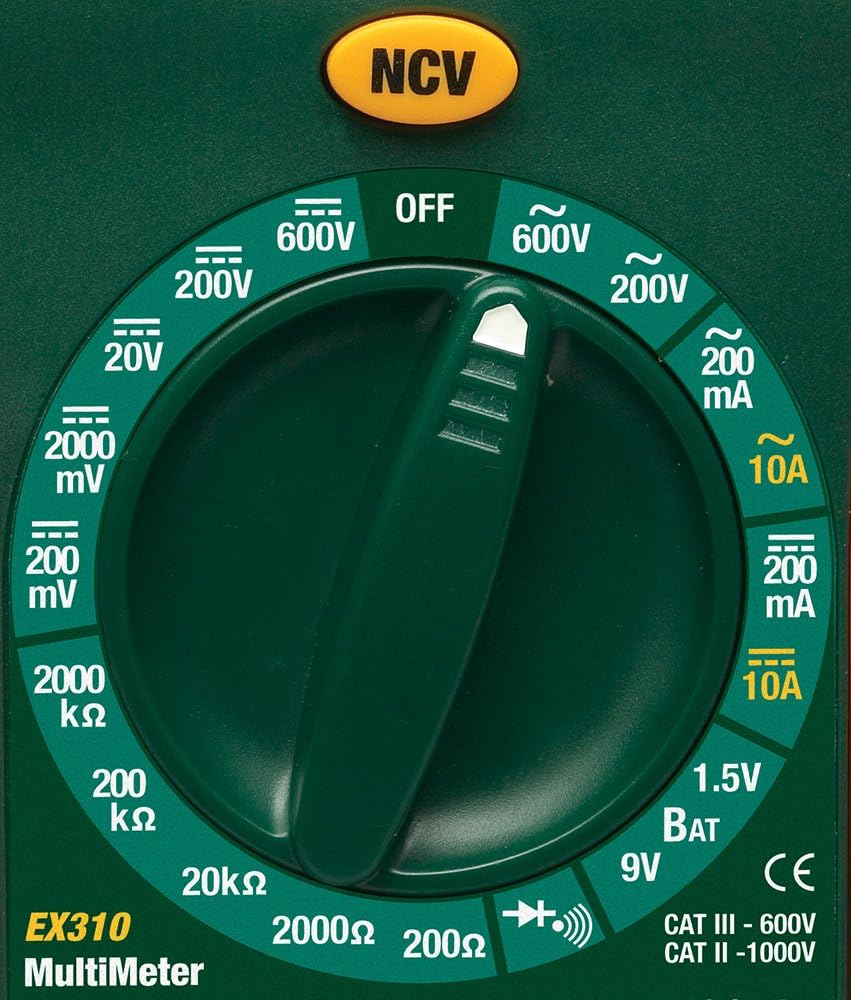
Image: Close-up of the Extech EX310's function dial, illustrating the various measurement ranges and functions such as voltage, current, resistance, diode, continuity, and battery test.
- LCD дэлгэц: Хэмжилтийн заалт, нэгж, функцийн үзүүлэлтүүдийг харуулна.
- Функц шилжүүлэгч: Rotary dial to select the desired measurement function and range.
- NCV товчлуур: Холбоо барихгүй эзэлхүүнийг идэвхжүүлнэtage илрүүлэх онцлог.
- Жак оролт: Terminals for connecting test leads (COM, VΩmA, 10A).
6. Тохиргоо
6.1. Зай суурилуулах
- Мультиметр унтарсан эсэхийг шалгаарай.
- Тоолуурын ар талд батерейны тасалгааны тагийг олоорой.
- Хадгалах эрэг(үүд)-ийг тайлж, тагийг ав.
- Insert a new 9V battery, observing correct polarity.
- Replace the cover and secure with the screw(s).
A low battery indicator will appear on the display when the battery needs replacement.
6.2. Туршилтын утсыг холбох
Connect the test leads to the appropriate input jacks:
- Хар туршилтын утсыг хоолойд оруулна COM (common) jack.
- Ихэнх хэмжилтийн хувьд (Ботьtage, Resistance, Diode, Continuity, mA Current), insert the red test lead into the VΩmA Жак.
- Өндөр гүйдлийн хэмжилтийн хувьд (10А хүртэл) улаан туршилтын утсыг оруулна уу 10 А Жак.
7. Ашиглалтын заавар
Before making any measurement, ensure the test leads are correctly connected and the function switch is set to the desired range.
7.1. AC/DC Voltage Хэмжилт
- Set the function switch to the desired ACV (~) or DCV (---) range (e.g., 200V, 600V).
- Connect the red test lead to the VΩmA jack and the black test lead to the COM jack.
- Туршилтын датчикуудыг хэлхээний цэгүүдэд хүрнэ үү, тэнд вольт байнаtage хэмжинэ.
- боть уншина ууtagLCD дээрх e утга.
7.2. Хувьсах гүйдлийн гүйдлийн хэмжилт
Анхааруулга: Never attempt to measure current on a circuit with voltage present across the current terminals. This can blow the fuse or damage the meter.
- Хэлхээний хүчийг унтраа.
- Set the function switch to the desired ACA (~) or DCA (---) range (e.g., 200mA, 10A).
- Connect the red test lead to the appropriate current jack (VΩmA for mA, 10A for 10A) and the black test lead to the COM jack.
- Гүйдлийн хүчийг хэмжих хэлхээг нээж, тоолуурыг цуваа холбоно уу.
- Apply power to the circuit and read the current value on the LCD.
7.3. Эсэргүүцлийг хэмжих
- Хэлхээ эсвэл эд анги нь хүчдэлгүй байгаа эсэхийг шалгаарай.
- Set the function switch to the desired Resistance (Ω) range (e.g., 200Ω, 20kΩ).
- Connect the red test lead to the VΩmA jack and the black test lead to the COM jack.
- Хэмжих гэж буй эд анги эсвэл хэлхээний дагуух туршилтын датчикуудад хүрнэ үү.
- LCD дэлгэц дээрх эсэргүүцлийн утгыг уншина уу.

Image: The Extech EX310 Multimeter displaying a reading while test leads are connected to a circuit board, demonstrating a typical measurement scenario.
7.4. Диодын туршилт
- Ensure the component is de-energized.
- Set the function switch to the Diode (→|) position.
- Connect the red test lead to the VΩmA jack and the black test lead to the COM jack.
- Улаан датчикийг анод руу, хар датчикийг диодын катод руу хүргэнэ.
- Урагш боть уншина ууtage drop on the LCD. Reverse the probes to check for an open circuit (OL).
7.5. Тасралтгүй байдлын тест
- Хэлхээ эсвэл эд анги нь хүчдэлгүй байгаа эсэхийг шалгаарай.
- Set the function switch to the Continuity (→))) position.
- Connect the red test lead to the VΩmA jack and the black test lead to the COM jack.
- Хэлхээ эсвэл эд анги дээрх туршилтын датчикуудад хүрнэ үү.
- An audible tone will sound if continuity exists (resistance below approximately 30Ω).

Зураг: Ойрын зураг view of the Extech EX310 Multimeter with its test leads connected to an internal electronic circuit, demonstrating precise measurement capabilities.
7.6. Холбоо барихгүй ботьtage (NCV) илрүүлэх
- Функцийн шилжүүлэгчийг дурын байрлалд тохируулна уу.
- Press and hold the NCV button.
- Move the top of the meter (where the NCV sensor is located) close to the suspected AC voltage source (e.g., wire, outlet).
- A red LED will illuminate and an audible beeper will sound, increasing in intensity as the meter gets closer to the live AC voltage.

Image: A hand holding the Extech EX310 Multimeter near an electrical wall outlet, demonstrating the use of the Non-Contact Voltage (NCV) detection feature to identify live circuits.
7.7. Battery Test (1.5V/9V)
- Set the function switch to the 1.5V BAT or 9V BAT position.
- Connect the red test lead to the VΩmA jack and the black test lead to the COM jack.
- Touch the red probe to the positive terminal and the black probe to the negative terminal of the battery.
- Зайны ботийг уншина ууtagLCD дээр e.
8. Засвар үйлчилгээ
8.1. Зай солих
Refer to Section 6.1 for detailed instructions on replacing the 9V battery when the low battery indicator appears.
8.2. Гал хамгаалагч солих
If the current measurement functions cease to operate, the internal fuse(s) may need replacement. The fuses are typically located beneath the battery compartment. Refer to the full product manual for specific fuse ratings and replacement procedures. Always replace with fuses of the identical type and rating.
8.3. Цэвэрлэгээ
Зар сурталчилгаа бүхий хэргийг үе үе арчиж байхamp даавуу болон зөөлөн угаалгын нунтаг. Зүлгүүрийн бодис эсвэл уусгагч хэрэглэж болохгүй. Хэрэглэхийн өмнө тоолуур бүрэн хуурай байгаа эсэхийг шалгаарай.
9. Алдаа засах
- Дэлгэц байхгүй: Check the 9V battery. Ensure it is correctly installed and has sufficient charge.
- Буруу уншилтууд: Verify that the function switch is set to the correct measurement type and range. Ensure test leads are properly connected and making good contact with the circuit.
- Одоогийн хэмжилт ажиллахгүй байна: Check the internal fuse(s). Refer to the Maintenance section for fuse replacement.
- NCV илрүүлэхгүй байна: Ensure the NCV button is pressed and held. Confirm the presence of AC voltage (100-600 VAC) in the area being tested.
10. Техникийн үзүүлэлтүүд
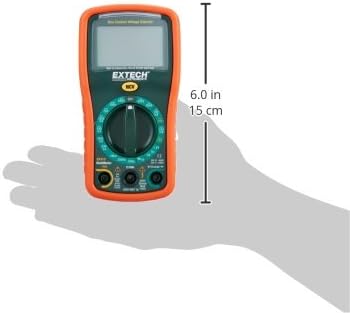
Image: Diagram illustrating the physical dimensions of the Extech EX310 Multimeter, showing a length of 6.0 inches (15 cm).
| Тодорхойлолт | Үнэ цэнэ |
|---|---|
| Брэнд | Extech |
| Загварын дугаар | EX310 |
| Хэмжилтийн төрөл | Мультиметр |
| Загвар | Гарын авлагын зай |
| Үндсэн нарийвчлал | +/-0.5% |
| Дэлгэц | 2000-Count LCD |
| Аюулгүй байдлын үнэлгээ | UL listed CAT III - 600V, CAT II - 1000V |
| Эрчим хүчний эх үүсвэр | 9V батерей |
| Хэмжээ (L x W x H) | 5.7 x 1.6 x 2.9 инч (14.5 x 4.1 x 7.4 см) |
| Зүйлийн жин | 0.704 унц (0.02 килограмм) |
| Оруулсан бүрэлдэхүүн хэсгүүд | Test leads, 9 Volt battery, tilt stand |
11. Баталгаат хугацааны мэдээлэл
The Extech EX310 Mini Digital Multimeter is covered by a 1 жилийн эд анги, хөдөлмөрийн баталгаа from the date of purchase. Please retain your proof of purchase for warranty claims. This warranty covers manufacturing defects and workmanship under normal use.
12. Хэрэглэгчийн дэмжлэг
For technical assistance, troubleshooting beyond this manual, or warranty service, please contact Extech customer support. Refer to the official Extech webхамгийн сүүлийн үеийн холбоо барих мэдээллийг сайт эсвэл бүтээгдэхүүний сав баглаа боодол.


