Танилцуулга
This manual provides detailed instructions for the installation, operation, and maintenance of the ECS P4M800-M7 motherboard. The P4M800-M7 is designed to support Socket LGA775 Intel Pentium 4 / Pentium D / Celeron D Processors with FSB 800/533 MHz and Hyper-Threading Technology.
Key features include 64-bit support, FSB 800MHz, RAID0, RAID1, and Serial ATA capabilities.
Бүтээгдэхүүн дууссанview

Figure 1: ECS P4M800-M7 Motherboard Layout. This image displays the main components of the motherboard, including the CPU socket (LGA 775), two DDR RAM slots, PCI and AGP expansion slots, and various I/O ports.
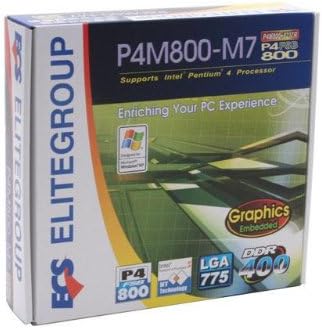
Figure 2: ECS P4M800-M7 Retail Box. The product packaging indicates support for Intel Pentium 4 processors, embedded graphics, and DDR400 memory, along with the LGA 775 socket type.
Тохиргоо ба суурилуулалт
Follow these steps for proper installation of the ECS P4M800-M7 motherboard into your computer system.
1. Системээ бэлтгэ
- Ensure your power supply is disconnected from the wall outlet.
- Газардуулгатай металл объектод хүрч статик цахилгааныг гадагшлуул.
2. CPU-г суулгана уу
- CPU залгуурын хөшүүргийг нээнэ үү.
- Carefully align the CPU (Intel Pentium 4 / Pentium D / Celeron D) with the socket, ensuring the notches match.
- CPU-г залгуурт зөөлөн буулга. Хүчээр бүү дар.
- CPU-г хамгаалахын тулд залгуурын хөшүүргийг хаа.
- Apply a thin layer of thermal paste to the CPU surface.
- CPU хөргөгчийг үйлдвэрлэгчийн зааврын дагуу суулгана уу.
3. Install Memory Modules
The motherboard supports DDR memory. Insert DDR modules into the available memory slots (2 slots).
- DIMM үүрний хоёр төгсгөлд байгаа хавчааруудыг нээнэ үү.
- Санах ойн модулийг үүртэй зэрэгцүүлж, модуль дээрх ховил нь үүрэнд байгаа түлхүүртэй тохирч байгаа эсэхийг шалгаарай.
- Модулийн хоёр үзүүрийг хавчаарууд нь бэхлэх хүртэл чанга дарна уу.
4. Эх хавтанг угсарна
- Install standoffs in your PC case that align with the motherboard's mounting holes.
- Carefully place the motherboard onto the standoffs, aligning the I/O shield with the case opening.
- Эх хавтанг боолтоор бэхлээрэй.
5. Цахилгаан болон дагалдах төхөөрөмжүүдийг холбоно
Connect the 20-pin ATX main power connector and the 4-pin ATX 12V power connector from your power supply to the motherboard. Connect SATA and IDE devices, front panel connectors, and expansion cards as needed.
Ашиглалтын заавар
Once the motherboard is installed and all components are connected, you can proceed with system operation.
1. Анхдагч ачаалах
After connecting the power supply and monitor, power on your system. The system should display the BIOS POST screen. Press the designated key (usually ДЭЛ or F2) to enter the BIOS setup utility.
2. BIOS-ийн тохиргоо
In the BIOS, you can configure various system settings, including boot order, date/time, and hardware parameters. Refer to the BIOS section of the full manual for detailed settings. Save changes and exit the BIOS to continue.
3. Үйлдлийн систем суурилуулах
Insert your operating system installation media (e.g., Windows CD/DVD) and follow the on-screen prompts to install the OS. Ensure all necessary drivers (chipset, audio, network, graphics) are installed after the OS installation for optimal performance. Drivers are typically provided on a CD with the motherboard or can be downloaded from the ECS Elitegroup webсайт.
Засвар үйлчилгээ
Тохиромжтой засвар үйлчилгээ нь эх хавтангийн урт наслалт, тогтвортой ажиллагааг хангана.
- Тоос арилгах: Regularly clean dust from inside your computer case, especially from heatsinks and fans, using compressed air. Ensure the system is powered off and unplugged before cleaning.
- Кабелийн менежмент: Ensure internal cables are neatly routed to allow for proper airflow.
- BIOS-ийн шинэчлэлтүүд: Periodically check the ECS Elitegroup website for BIOS updates. Only update the BIOS if necessary and follow the instructions precisely to avoid system instability.
- Драйверын шинэчлэлтүүд: Keep your device drivers updated to ensure compatibility and performance.
Алдааг олж засварлах
This section addresses common issues you might encounter with the ECS P4M800-M7 motherboard.
| Асуудал | Боломжит шалтгаан | Шийдэл |
|---|---|---|
| Систем асахгүй байна. | Power cables not connected, faulty power supply, or short circuit. | Check all power connections (20-pin ATX, 4-pin 12V). Test power supply. Ensure no metal objects are touching the motherboard. |
| Дэлгэц дээр дэлгэц байхгүй. | Monitor cable loose, faulty graphics card (if external), or RAM not seated correctly. | Verify monitor cable connection. Reseat RAM modules. If using an external graphics card, ensure it is properly seated and powered. |
| Систем хөлдөх эсвэл гацах. | Overheating, unstable drivers, or faulty RAM. | Check CPU and chipset temperatures. Update drivers. Test RAM modules individually. |
| Operating system not found. | Incorrect boot order in BIOS, or hard drive not detected. | Enter BIOS and set the correct boot order. Check SATA/IDE cable connections to the hard drive. |
Үзүүлэлтүүд
| Онцлог | Дэлгэрэнгүй |
|---|---|
| Үйлдвэрлэгч | ECS |
| Загварын дугаар | P4M800-M7 |
| CPU залгуур | LGA 775 |
| Тохиромжтой процессорууд | Intel Celeron D, Intel Pentium 4, Intel Pentium |
| Чипсетийн төрөл | Intel |
| Санах ойн үүрүүд боломжтой | 2 |
| Системийн автобусны стандартыг дэмжинэ | SATA 3 |
| FSB Support | 800/533 МГц |
| Hyper-Threading технологи | Дэмжигдсэн |
| RAID дэмжлэг | RAID0, RAID1 |
| UPC | 881038001678 |
| Эхний боломжтой огноо | 5 оны дөрөвдүгээр сарын 2006 |
Баталгаат болон дэмжлэг
For warranty information and technical support, please refer to the documentation included with your purchase or visit the official ECS Elitegroup webсайт. Баталгаат хугацаа, нөхцөл нь бүс нутаг болон жижиглэн худалдаалагчаас хамаарч өөр өөр байж болно.
Official ECS Elitegroup Webсайт: ECS Elitegroup Store on Amazon (Note: This link directs to the brand's store page on Amazon, where further support information might be available.)


