Танилцуулга
The Samson Rubicon R5a Active Ribbon Studio Monitors are designed to provide accurate and natural sound reproduction for professional audio environments. This manual provides essential information for the proper setup, operation, and maintenance of your R5a monitors.
Each R5a monitor features a bi-amplified design, delivering 50 watts to a 5-inch inverted cone low-frequency driver and 25 watts to a 2-inch Velocity Ribbon high-frequency transducer. The monitors are housed in a shelf-ported wood enclosure and offer balanced 1/4-inch and XLR input connections. A 4-segment high-frequency lift control allows for precise adjustment of the ribbon tweeter output.
Аюулгүй байдлын чухал заавар
Please read these instructions carefully before operating your Samson Rubicon R5a monitors. Keep this manual for future reference.
- Эрчим хүчний эх үүсвэр: Connect the unit only to a power supply of the type described in this operating instruction or marked on the unit.
- Агааржуулалт: Агааржуулалтын нүхийг хааж болохгүй. Үйлдвэрлэгчийн зааврын дагуу суурилуулна.
- Дулаан: Радиатор, халаалтын төхөөрөмж, зуух болон бусад төхөөрөмж (үүнд ampөргөгч) дулаан үүсгэдэг.
- Ус ба чийг: Энэ төхөөрөмжийг усны ойролцоо бүү ашигла.
- Цэвэрлэгээ: Зөвхөн хуурай даавуугаар цэвэрлэ.
- Үйлчилгээ: Бүх үйлчилгээг мэргэшсэн үйлчилгээний ажилтнуудад шилжүүлээрэй. Төхөөрөмж нь цахилгаан тэжээлийн утас, залгуур гэмтсэн, шингэн асгарсан, эд зүйл унасан, бороо, чийгэнд өртсөн, хэвийн ажиллахгүй байгаа тохиолдолд засвар үйлчилгээ хийх шаардлагатай. , эсвэл хасагдсан.
Багцын агуулга
Таны багц дараах зүйлсийг агуулж байгаа эсэхийг шалгана уу.
- Samson Rubicon R5a Active Ribbon Studio Monitors (Pair)
- Цахилгаан кабель (2)
- Хэрэглэгчийн гарын авлага (энэ баримт бичиг)
Тохиргоо
Байршил
Proper placement of your studio monitors is crucial for accurate sound reproduction. Position the monitors to form an equilateral triangle with your listening position. The tweeters should be at ear level. Avoid placing monitors directly against walls or in corners, as this can exaggerate bass frequencies.
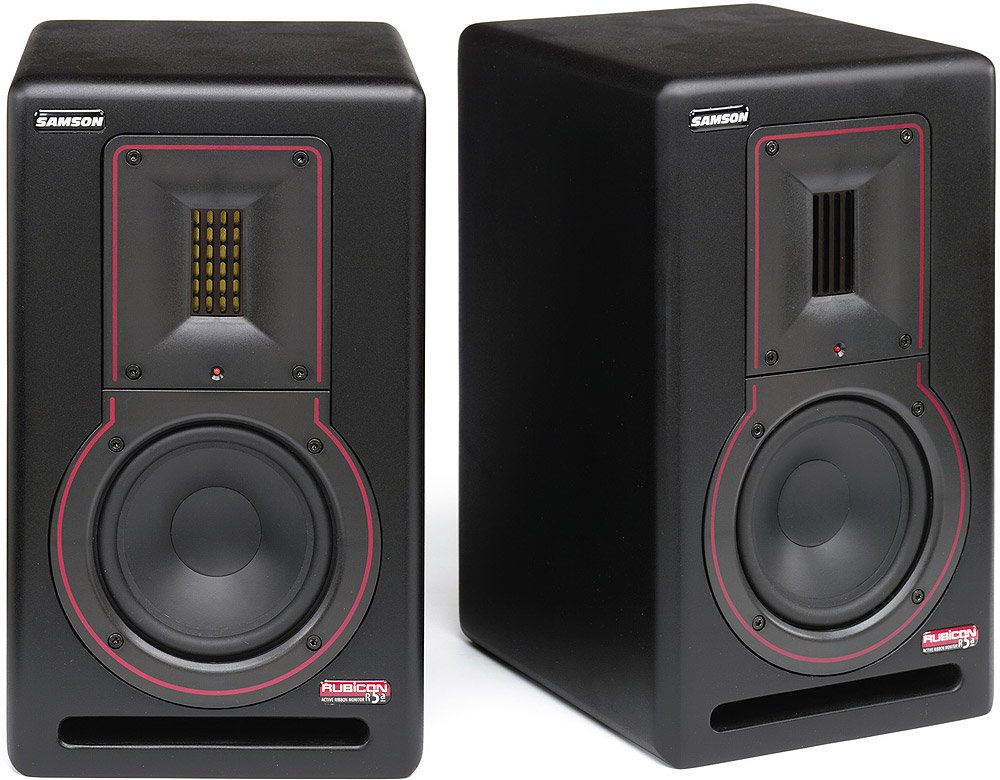
Зураг: Урд view of a Samson Rubicon R5a Active Ribbon Studio Monitor. It shows the 5-inch woofer, the 2-inch ribbon tweeter, and the Samson logo.
Холболтууд
The Rubicon R5a monitors offer balanced 1/4-inch and XLR input connections. Use high-quality shielded cables to connect your audio source (e.g., audio interface, mixer) to the monitors.
- Ensure both the monitors and your audio source are powered off before making any connections.
- Connect the audio output from your source to the XLR or 1/4-inch input on each R5a monitor.
- Connect the supplied power cables to the IEC power inlets on the rear of each monitor and then to a suitable AC power outlet.
- Once all connections are secure, you can proceed to power on your equipment. It is recommended to power on your audio source first, then the monitors. When powering off, turn off the monitors first, then the audio source.
Ашиглалтын заавар
Асаах/унтраах
Locate the power switch on the rear panel of each monitor. Flip the switch to the "ON" position to power on the monitor. An indicator light on the front panel will illuminate. To power off, flip the switch to the "OFF" position.
Дууны хяналт
Each R5a monitor has a volume control knob on the rear panel. Start with the volume set to a low level before playing audio. Gradually increase the volume to your desired listening level. It is generally recommended to control the overall system volume from your audio source (e.g., audio interface, mixer) and use the monitor's volume control for fine-tuning or balancing.
High-Frequency Lift Control
The R5a monitors feature a 4-segment high-frequency lift control. This allows you to adjust the output level of the ribbon tweeter to compensate for room acoustics or personal preference. Experiment with the different settings to find the optimal balance for your listening environment.
The settings typically include:
- 0 дБ: Хавтгай хариулт.
- +2 дБ: Slight boost in high frequencies.
- +4 дБ: Moderate boost in high frequencies.
- -2 дБ: Slight cut in high frequencies.
Засвар үйлчилгээ
To ensure the longevity and optimal performance of your Samson Rubicon R5a monitors, follow these maintenance guidelines:
- Цэвэрлэгээ: Dust the monitors regularly with a soft, dry cloth. Do not use liquid cleaners or solvents, as these can damage the finish or internal components.
- Агааржуулалт: Ensure that the ventilation openings on the rear of the monitors are not obstructed. Adequate airflow is essential to prevent overheating.
- Хадгалах: If storing the monitors for an extended period, keep them in a dry, temperature-controlled environment, ideally in their original packaging or a protective case.
- Хэт ачааллаас зайлсхийх: Do not operate the monitors at excessively high volumes for prolonged periods, as this can cause damage to the drivers.
Алдааг олж засварлах
| Асуудал | Боломжит шалтгаан | Шийдэл |
|---|---|---|
| No sound from monitor. |
|
|
| Гажуудсан дуу чимээ. |
|
|
| Hum or buzz. |
|
|
If the problem persists after trying these solutions, please contact Samson customer support or a qualified service technician.
Үзүүлэлтүүд
| Онцлог | Дэлгэрэнгүй |
|---|---|
| Загварын нэр | Rubicon R5a |
| Чанга яригчийн төрөл | Active Ribbon Studio Monitor |
| Бага давтамжийн жолооч | 5-inch inverted cone |
| Өндөр давтамжийн хувиргагч | 2-inch Velocity Ribbon |
| LF AmpАмьдралын хүч | 50 ватт |
| HF AmpАмьдралын хүч | 25 ватт |
| Нийт гаралтын чадал | 75 Ватт (Би-ampEd) |
| Холболтын технологи | XLR, 1/4-inch (balanced) |
| Эрчим хүчний эх үүсвэр | Утастай цахилгаан |
| Хаалтны төрөл | Shelf-ported wood enclosure |
| Өндөр давтамжийн хяналт | 4-segment lift control |
| UPC | 809164005148 |
Баталгаат хугацааны мэдээлэл
Samson Technologies warrants its products to be free from defects in materials and workmanship for a period of one (1) year from the date of original purchase. This warranty is non-transferable and applies only to the original purchaser.
This warranty does not cover damage resulting from accident, misuse, abuse, alteration, or unauthorized service. For full warranty terms and conditions, please refer to the official Samson webсайт эсвэл хэрэглэгчийн дэмжлэгтэй холбоо барина уу.
Хэрэглэгчийн дэмжлэг
For technical support, service, or warranty inquiries, please contact Samson Customer Service:
- Webсайт: www.samsontech.com/support
- Утас: Refer to the Samson webбүс нутгийн холбоо барих утасны сайт.
- Хаяг: Samson Technologies Corp., 278-B Duffy Ave, Hicksville, NY 11801, USA
When contacting support, please have your product model (Rubicon R5a) and serial number available.


