1. Танилцуулга
Худалдан авалт хийсэнд баярлалааasing the JVC KW-AVX810 Vehicle Multimedia Receiver. This unit is designed to provide advanced audio and video entertainment in your vehicle, featuring a 7-inch touch panel monitor, DVD playback, USB connectivity for iPod/iPhone, and Bluetooth readiness. This manual provides essential information for the proper installation, operation, and maintenance of your new multimedia receiver.
2. Аюулгүй байдлын мэдээлэл
- Мэргэжлийн суурилуулалтыг санал болгож байна: Due to the complexity of vehicle electrical systems, professional installation is highly recommended to prevent damage to the unit or your vehicle.
- Эрчим хүчний хангамж: This unit is designed for 12V DC negative ground electrical systems. Ensure correct wiring to avoid short circuits or damage.
- Жолооны аюулгүй байдал: Do not operate the unit's advanced features or watch videos while driving. Always prioritize safe driving practices.
- Салдаг нүүрний хавтан: Handle the detachable faceplate with care. Avoid exposing it to direct sunlight or high temperatures for extended periods.
- Агааржуулалт: Хэт халалтаас урьдчилан сэргийлэхийн тулд төхөөрөмжийн эргэн тойронд хангалттай агааржуулалтыг хангана. Агааржуулалтын нүхийг хааж болохгүй.
3. Багцын агуулга
Бүх зүйл багцад байгаа эсэхийг шалгана уу:
- JVC KW-AVX810 Multimedia Receiver
- Detachable Faceplate
- Утсан бэхэлгээ
- Суурилуулах тоног төхөөрөмж
- Алсын удирдлага (хэрэв байгаа бол)
- Хэрэглэгчийн гарын авлага (энэ баримт бичиг)
4. Тохиргоо & Суурилуулалт
4.1 утас холболт
Refer to the wiring diagram below for proper connection of the power, speaker, and auxiliary cables. Incorrect wiring can cause damage to the unit or vehicle electrical system.
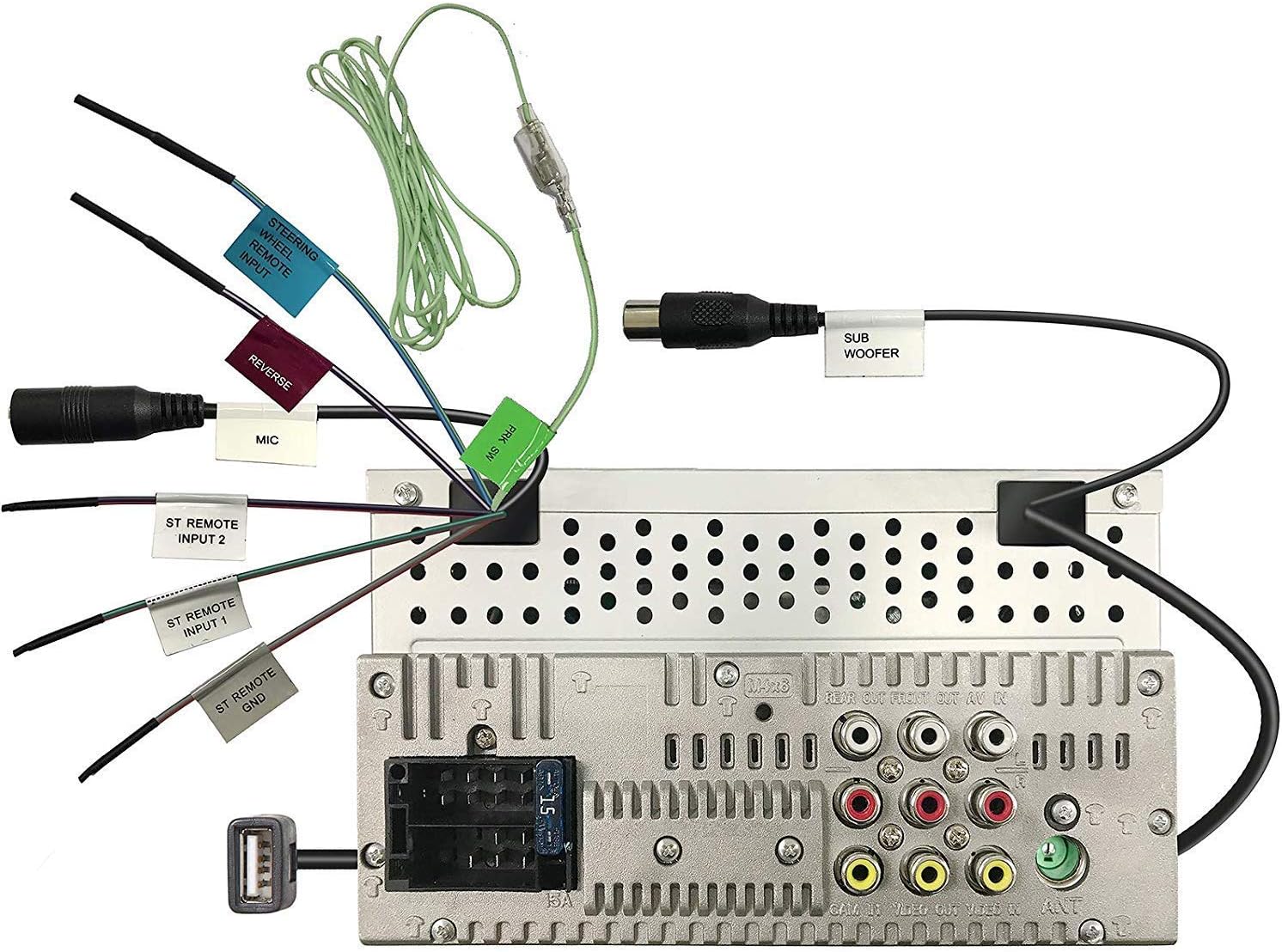
Figure 4.1: Rear panel wiring connections. This image displays the back of the JVC KW-AVX810 unit, illustrating various input and output ports. Key connections include the main power harness, speaker outputs, RCA pre-outs for front, rear, and subwoofer, video input/output, USB port, microphone input, and steering wheel remote input. Each connection is clearly labeled for identification.
- Эрчим хүчний холболтууд: Connect the yellow wire to the constant 12V supply, the red wire to the accessory 12V supply, and the black wire to a good chassis ground.
- Чанга яригчийн холболтууд: Connect the speaker wires to the corresponding vehicle speakers, ensuring correct polarity.
- USB оруулах: The USB port allows connection of compatible devices like iPods/iPhones for audio and video playback, and charging.
- RCA гаралт: Эдгээрийг гадаад холболтод ашиглана уу ampурд, хойд болон сабвуфер сувгуудын өргөгч.
- Видео оролт/гаралт: For connecting external video sources or monitors.
- Steering Wheel Remote Input: Connect to a compatible steering wheel control interface (sold separately) for integrated control.
4.2 Төхөөрөмжийг суурилуулах
The KW-AVX810 is a double-DIN unit. Ensure your vehicle's dashboard opening is compatible. Secure the unit using the provided mounting brackets and screws. After mounting, connect all wiring harnesses before reassembling the dashboard.
5. Ашиглалтын заавар
5.1 Үндсэн удирдлага ба дэлгэц
The unit features a 7-inch touch panel monitor for intuitive control. The main interface provides access to various functions.

Figure 5.1: Front panel and display. This image shows the JVC KW-AVX810's 7-inch touch panel display, featuring a graphical user interface with icons for various functions such as Tuner, Mirroring, AV-IN, Phone, BT Audio, and Settings. Volume controls and power button are visible on the left bezel. The current time is displayed prominently in the center.
- Асаах/унтраах: Press the power button (usually located on the left bezel) to turn the unit on or off.
- Дууны хяналт: Use the volume up/down buttons or the on-screen controls to adjust the audio level.
- Эх сурвалжийн сонголт: Tap the desired source icon (e.g., Tuner, DVD, USB, BT Audio, AV-IN) on the touch screen to switch between functions.
- Салдаг нүүрний хавтан: To detach the faceplate, press the release button (refer to the unit's specific mechanism). Always detach the faceplate when leaving the vehicle to deter theft.
5.2 Медиа тоглуулах
- DVD/CD тоглуулах: Insert a disc into the slot. The unit will automatically switch to DVD/CD mode. Use the touch screen for playback controls (play, pause, skip, menu).
- USB/iPod/iPhone: Connect your device to the USB port. The unit will detect the device and allow you to browse and play media files. The KS-U20 cable (sold separately) may be required for iPod video functionality.
- Bluetooth Аудио: Pair your Bluetooth-enabled device with the KW-AVX810. Once paired, you can stream audio wirelessly.
- Радио тааруулагч: Select the Tuner source. Use the touch screen to scan for stations, save presets, and switch between AM/FM bands.
5.3 Settings and Customization
Access the 'Settings' menu from the main screen to customize various aspects of the unit, including:
- Аудио тохиргоо: Adjust equalizer (7-Band iEQ), balance, fader, subwoofer levels, and sound effects (Dolby 5.1 headphone surround sound).
- Дэлгэцийн тохиргоо: Adjust brightness, contrast, and background.
- Системийн тохиргоо: Language, time, and other general preferences.
- Bluetooth тохиргоо: Manage paired devices and connection options.
6. Засвар үйлчилгээ
- Дэлгэц цэвэрлэх: Use a soft, dry cloth to wipe the touch screen. For stubborn smudges, lightly dampen the cloth with water or a screen cleaner designed for electronics. Do not use abrasive cleaners.
- Нүүрний хавтанг цэвэрлэх: Wipe the detachable faceplate with a soft, dry cloth. Avoid harsh chemicals.
- Дискний арчилгаа: Дискийг ирмэгээр нь барь. Тэдгээрийг цэвэрхэн, зураасгүй байлга. Дискийг ашиглаагүй тохиолдолд хайрцагт нь хадгал.
- Ерөнхий арчилгаа: Keep the unit free from dust and moisture. Avoid extreme temperatures.
7. Алдаа засах
If you encounter problems with your KW-AVX810, refer to the following common issues and solutions:
| Асуудал | Боломжит шалтгаан | Шийдэл |
|---|---|---|
| Хүч чадалгүй | Буруу утас; Гал хамгаалагч шатсан; Тээврийн хэрэгслийн батерейны асуудал. | Check power connections (yellow, red, black wires). Inspect the unit's fuse and vehicle's fuse box. Ensure vehicle battery is charged. |
| Дуу алга | Дууны түвшин хэт бага байна; Дуугүй болгох горим идэвхжсэн; Чанга яригчийн холболт буруу байна; Ampөргөгчийн асуудал. | Increase volume. Check if mute is on. Verify speaker connections. If using external amplifier, check its power and connections. |
| Дэлгэц ажиллахгүй байна | Faceplate not properly attached; Display settings. | Ensure faceplate is securely attached. Check display brightness/contrast settings. |
| USB/iPod not recognized | Incompatible format; Loose connection; Device issue. | Хэвлэл мэдээллийн хэрэгслээр хангах files are in a supported format. Reconnect the USB device. Try a different USB device. Update iPod/iPhone software if necessary. |
| Bluetooth холболтын асуудал | Device not in pairing mode; Interference; Already paired to another device. | Ensure Bluetooth is enabled on both devices and in pairing mode. Delete previous pairings and re-pair. Move closer to the unit. |
If the problem persists after trying these solutions, contact JVC customer support or a qualified service technician.
8. Техникийн үзүүлэлтүүд
- Бүтээгдэхүүний хэмжээ: 18.39 x 17.81 x 10.01 см; 2.6 кг
- Загварын дугаар: KWM150BT+XV95BK+MAGNET
- Брэнд: JVC
- Холболтын технологи: Bluetooth, USB
- Хянагчийн төрөл: Андройд (нийцтэй)
- Онцлог шинж чанарууд: Built-In Bluetooth, FM Tuner, Subwoofer Pre-out
- Тохиромжтой төхөөрөмжүүд: Ухаалаг утас
- Нийт HDMI портууд: 1 (Note: This may refer to an internal component or specific model variant, as the main description does not highlight HDMI)
- Холбогч төрөл: USB
- Аудио гаралтын горим: Хүрээлэн
- Хүрээлэн буй орчны дууны сувгийн тохиргоо: 4.1
- Үйлдвэрлэгч: JVC
9. Баталгаат хугацаа ба дэмжлэг
9.1 Баталгаат хугацааны мэдээлэл
The JVC KW-AVX810 Vehicle Multimedia Receiver comes with a warranty. For Mobile Products, the warranty covers 1 жилийн эд анги, хөдөлмөр from the date of purchase. Please retain your proof of purchase for warranty claims. The warranty does not cover damage caused by improper installation, accident, misuse, abuse, or unauthorized modification.
9.2 Хэрэглэгчийн дэмжлэг
For technical assistance, service, or warranty inquiries, please contact JVC customer support. Refer to the official JVC webхамгийн сүүлийн үеийн холбоо барих мэдээллийг сайт эсвэл таны бүтээгдэхүүний сав баглаа боодолоос авна уу.


