Танилцуулга
This manual provides instructions for the setup, operation, and maintenance of your Microsoft Wireless Comfort Desktop 5000. This product combines a wireless keyboard and a wireless mouse designed for comfortable and efficient computer interaction.
The Microsoft Wireless Comfort Desktop 5000 features an ergonomically designed Comfort Curve keyboard and a mouse utilizing BlueTrack Technology for versatile surface tracking. It operates on a 2.4 GHz wireless connection, offering a reliable connection with a range of up to 30 feet.
Тохируулах гарын авлага
Хайрцагт юу байна
- Microsoft Wireless Comfort Desktop 5000 Keyboard
- Microsoft Wireless Comfort Desktop 5000 Mouse
- USB Mini-Transceiver
- 2 AA Alkaline Batteries (for keyboard)
- 1 AA Alkaline Battery (for mouse)
Системийн шаардлага
- Үйлдлийн систем: Windows 8, Windows 7, Windows Vista, Windows XP (excluding Windows XP 64-bit)
- Хатуу диск: 100 MB free space
- Порт: USB порт
Батерей суурилуулах
The keyboard requires two AA alkaline batteries, and the mouse requires one AA alkaline battery. Batteries are included with the product.
- Гар болон хулганы доод талд батерейны тасалгааг олоорой.
- Зайны тасалгааны тагийг нээ.
- Зөв туйлшралыг (+/-) хангаж, AA батерейг оруулна уу.
- Зайны тасалгааны тагийг сайтар хаа.
Connecting the Wireless Transceiver
The wireless desktop set connects to your computer via a USB mini-transceiver.
- Locate the USB mini-transceiver. It may be stored in the mouse's battery compartment for transport.
- Insert the USB mini-transceiver into an available USB port on your computer.
- Таны компьютер шаардлагатай драйверуудыг автоматаар илрүүлж, суулгах ёстой. Энэ процесс хэдэн минут үргэлжилж магадгүй.
- Once drivers are installed, the keyboard and mouse should be ready for use.

Figure 1: The compact USB mini-transceiver for wireless connection.

Figure 2: The underside of the mouse showing the storage slot for the USB mini-transceiver.
Ашиглалтын заавар
Гарны онцлог

Зураг 3: Дээрээс доош view of the Comfort Curve keyboard layout.
- Comfort Curve Design: The keyboard features an ergonomist-approved Comfort Curve design that encourages a natural wrist posture, reducing strain during extended use.
- Quiet Touch Keys: Experience comfortable typing with low-profile, quiet-touch keys.
- далдуу модны тулгуур: A soft-touch palm rest is integrated to provide additional comfort and support for your wrists.
- Removable Feet: Adjustable feet on the underside allow you to set the keyboard at a preferred angle for a more comfortable wrist posture.
- Taskbar Favorites for Windows 7: Easily access programs pinned to the Windows Taskbar using dedicated shortcut keys. The keys automatically adapt if you rearrange icons in the Taskbar.
- Media Center Controls: Control media playback directly from your keyboard using dedicated media keys (e.g., play/pause, volume up/down, mute).

Зураг 4: Өнцөг view highlighting the integrated palm rest and Comfort Curve design.
Хулганы онцлог шинж чанарууд

Зураг 5: Өнцөг view of the wireless mouse.
- BlueTrack технологи: The mouse utilizes Microsoft's BlueTrack Technology, combining the power of optical with the precision of laser for remarkable tracking on virtually any surface, including granite, carpet, and wood.
- Дөрвөн талт гүйлгэх: The tilt wheel allows for four-way scrolling (up, down, left, and right), enhancing efficiency and comfort when navigating documents or web хуудаснууд.
- Тохируулах товчлуурууд: The mouse buttons can be customized for quick access to programs, files, media, and webpages you use most often. Refer to your operating system's mouse settings for customization options.
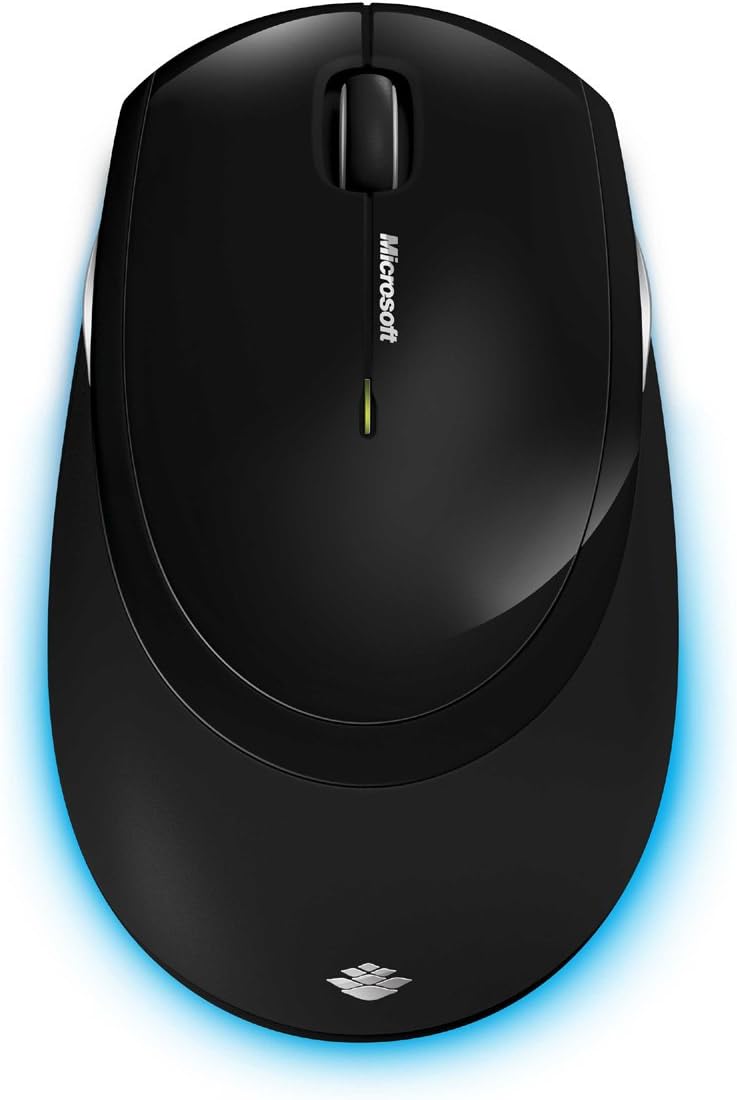
Зураг 6: Дээрээс доош view of the wireless mouse.
Засвар үйлчилгээ
Цэвэрлэгээ
To maintain the performance and appearance of your Microsoft Wireless Comfort Desktop 5000, follow these cleaning guidelines:
- Disconnect the USB transceiver from your computer before cleaning.
- Зөөлөн, хөвөнгүй даавууг бага зэрэг хэрэглээрэй dampусаар эсвэл зөөлөн цэвэрлэгээний уусмалаар дүүргэнэ.
- Гадаргууг гэмтээж болзошгүй тул түрэмгий химийн бодис, зүлгүүрийн цэвэрлэгч эсвэл уусгагч хэрэглэхээс зайлсхий.
- Гарны хувьд та товчлууруудын хоорондох тоос шороо, хог хаягдлыг арилгахын тулд шахсан агаар ашиглаж болно.
- For the mouse, gently wipe the optical sensor area on the bottom to ensure optimal tracking performance.
Зай солих
When the batteries are low, the indicator light on the keyboard or mouse may flash. Replace the batteries as described in the "Battery Installation" section under Setup Guide.
- Always use new, high-quality AA alkaline batteries.
- Ашигласан батерейг орон нутгийн дүрэм журмын дагуу устгана уу.
Алдааг олж засварлах
Холболтын асуудлууд
- No response from keyboard/mouse:
- Ensure the USB mini-transceiver is securely plugged into a working USB port on your computer.
- Check if the batteries in the keyboard and mouse are correctly installed and have sufficient charge. Replace if necessary.
- Дамжуулагчийг өөр USB порт руу залгаад үзээрэй.
- Компьютерээ дахин эхлүүлнэ үү.
- хөндлөнгийн оролцоо:
- The 2.4 GHz wireless technology can be affected by other wireless devices. Move the transceiver closer to the keyboard and mouse, or move other wireless devices away.
- Avoid placing the transceiver near large metal objects, which can block the wireless signal.
Хулганы мөрдөлтийн асуудлууд
- Erratic or no tracking:
- Ensure the BlueTrack sensor on the bottom of the mouse is clean and free of debris.
- Try using the mouse on a different surface. While BlueTrack is versatile, highly reflective or transparent surfaces (like clear glass) may still cause issues.
Үзүүлэлтүүд
| Онцлог | Дэлгэрэнгүй |
|---|---|
| Брэнд | Microsoft |
| Загварын дугаар | CSD-00001 |
| Холболтын технологи | Wireless (USB Transceiver) |
| Утасгүй төрөл | 2.4 GHz радио давтамж |
| Тохиромжтой төхөөрөмжүүд | Хувийн компьютер |
| Үйлдлийн системийн нийцтэй байдал | Windows 8, Windows 7, Windows Vista, Windows XP (excluding Windows XP 64-bit) |
| Өнгө | Хар |
| Зүйлийн жин | 2.9 фунт |
| Бүтээгдэхүүний хэмжээ (LxWxH) | 8.7 x 2.9 x 18.54 инч |
| Эрчим хүчний эх үүсвэр | Батерейгаар ажилладаг |
| Батерей шаардлагатай | 3 ширхэг AA батерей (2 ширхэг гар, 1 ширхэг хулганад) |
| Эхний боломжтой огноо | 29 оны долдугаар сарын 2009 |
Баталгаат хугацааны мэдээлэл
Specific warranty details for the Microsoft Wireless Comfort Desktop 5000 are not provided within this manual. For comprehensive warranty information, including terms, conditions, and duration, please refer to the official Microsoft website or the warranty card included with your product packaging.
Дэмжлэг
For further assistance, technical support, or to download the latest drivers and software for your Microsoft Wireless Comfort Desktop 5000, please visit the official Microsoft support webсайт:
You can also visit the Microsoft Store on Amazon for product information and related accessories:
Чухал мэдээлэл
Хууль эрх зүйн татгалзал
Please note that the "Legal Disclaimer" provided with the product pertains to sales terms and conditions, such as return policies and shipping details, and is separate from the operational instructions in this user manual. For specific product usage and safety guidelines, please refer to the relevant sections of this manual.


