1. Танилцуулга
Thank you for choosing the Taylor #1523 Indoor/Outdoor Thermometer & Humidity Guide. This device is designed to provide accurate indoor and outdoor temperature readings, along with indoor humidity levels. Please read this manual carefully to ensure proper setup, operation, and maintenance of your thermometer.
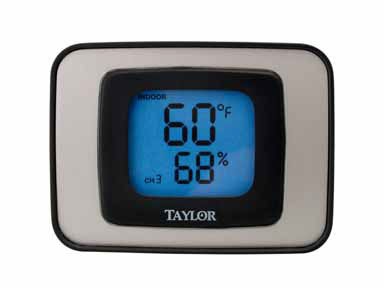
Image 1: Taylor #1523 Indoor/Outdoor Thermometer and Humidity Guide. This image shows the front view of the thermometer unit, displaying temperature and humidity readings.
2. Бүтээгдэхүүний онцлог
- Simultaneous display of indoor and outdoor temperature.
- Displays indoor humidity levels.
- Switchable temperature units (Celsius or Fahrenheit).
- Records and displays minimum and maximum temperature/humidity readings.
- Backlight for easy reading in low light conditions.
- Versatile placement: desktop stand or wall-mountable.
3. Багцын агуулга
- Taylor #1523 Thermometer Unit
- Outdoor Temperature Sensor (wired)
- Хэрэглэгчийн гарын авлага
Note: One AAA battery is required for operation and is not typically included.
4. Тохиргоо
4.1 Батерей суурилуулах
- Төхөөрөмжийн арын хэсэгт зайны тасалгааг ол.
- Зайны тасалгааны тагийг ав.
- Insert one (1) AAA battery, ensuring correct polarity (+ and -).
- Зайны тасалгааны тагийг солих.
4.2 Мэдрэгчийн байршил
- Дотор хэсэг: Place the main thermometer unit indoors in a location away from direct sunlight, heat sources, or drafts that could affect temperature and humidity readings. It can be placed on a desktop using its integrated stand or mounted on a wall using the keyhole slot on the back.
- Гадна мэдрэгч: Route the wired outdoor temperature sensor outside. For accurate readings, place the sensor in a shaded area, protected from direct sunlight and precipitation. Ensure the cable is not pinched or damaged.
5. Үйл ажиллагаа
The control buttons are located on the back of the unit, except for the backlight button which is on the top.
5.1 Уншлагыг харуулах
- The display will show the current indoor temperature, outdoor temperature, and indoor humidity.
5.2 Changing Temperature Units (C/F)
- дээр дарна уу C / F байна button on the back of the unit to toggle between Celsius and Fahrenheit temperature displays.
5.3 Viewing Minimum/Maximum Readings (MIN/MAX)
- дээр дарна уу MIN / MAX button on the back of the unit to cycle through current, minimum, and maximum recorded values for temperature and humidity.
5.4 Clearing Minimum/Maximum Readings (CLEAR)
- байхад viewing the MIN/MAX readings, press the ЦЭВЭРЛЭХ button on the back of the unit to reset the recorded minimum and maximum values.
5.5 Арын гэрэлтүүлэг
- Press the button located on the top of the unit to activate the backlight for a few seconds, improving visibility in dark environments.
6. Засвар үйлчилгээ
- Цэвэрлэгээ: To clean the unit, wipe it with a soft, damp даавуу. Зүлгүүрийн цэвэрлэгч эсвэл уусгагч хэрэглэж болохгүй, учир нь эдгээр нь хуванцар эдлэлийг гэмтээж болзошгүй.asing эсвэл дэлгэц.
- Зай солих: Replace the AAA battery when the display becomes dim or stops functioning. Ensure proper polarity during installation.
- Хадгалах: If storing the unit for an extended period, remove the battery to prevent leakage.
7. Алдаа засах
| Асуудал | Боломжит шалтгаан | Шийдэл |
|---|---|---|
| Дэлгэц байхгүй эсвэл бүдэг харагдаж байна | Батерей бага эсвэл цэнэггүй; зайны буруу суурилуулалт. | Зөв туйлшралыг хангаж, AAA батерейг солино уу. |
| Температур/чийгшлийн заалт буруу байна | Unit or sensor placed in direct sunlight, near heat/cold sources, or in drafts. | Relocate the unit and/or outdoor sensor to a more appropriate, stable environment. Ensure the outdoor sensor is in shade. |
| Гаднах температурыг харуулахгүй | Outdoor sensor cable is disconnected or damaged. | Check the connection of the outdoor sensor cable to the main unit. Inspect the cable for any visible damage. |
8. Техникийн үзүүлэлтүүд
- Загвар: #1523
- Хэмжээ: 6.5 x 5.9 x 1.8 инч (Барааны багц)
- Жин: 4 унц (Сав баглаа боодлын жин)
- Материал: Хуванцар
- Эрчим хүчний эх үүсвэр: 1 x AAA батерей (оруулаагүй)
- UPC: 077784015230
- Арчилгааны заавар: Цэвэрхэн арчина
9. Баталгаат хугацаа ба дэмжлэг
Taylor provides a limited warranty for its products. For specific warranty details, technical support, or service inquiries, please refer to the warranty card included with your product or visit the official Taylor website. You may also contact Taylor customer service directly for assistance.
Taylor Customer Service: www.taylorusa.com/support


