Танилцуулга
The Brookstone Cool It Personal Fan is a portable, battery-powered device designed to provide personal cooling. Its compact size and flexible blades make it suitable for various environments, offering an adjustable airflow for comfort.
Гол онцлогууд нь:
- Portable design for personal use anywhere.
- Adjustable fan speed for customized airflow.
- Flexible, finger-safe blades for enhanced safety.
- Includes a lanyard for hands-free carrying.
- 4 АА батерейгаар ажилладаг (оруулаагүй).
Тохиргоо
1. Зай суурилуулах
The Brookstone Cool It Personal Fan requires 4 AA batteries for operation. Batteries are not included with the product.
- Locate the battery compartment cover on the back of the fan handle.
- Тасалгааг нээхийн тулд тагийг нь зөөлөн гулсуулж эсвэл тайл.
- Тасалгааны дотор заасны дагуу зөв туйлшралыг (+ ба -) баталгаажуулж, 4 АА батерейг оруулна уу.
- Батерейны тасалгааны тагийг буцааж, найдвартай хаасан эсэхийг шалгана уу.

Зураг: хажуу тал view of the fan, illustrating the general area for battery access.
2. оосортой хавсралт
A lanyard is included for convenient, hands-free carrying.
- Locate the small loop or attachment point at the top of the fan handle.
- Thread the lanyard through this loop and secure it according to the lanyard's design.
Ашиглалтын заавар
Асаах/унтраах болон хурдны тохируулга
The fan features a variable speed control for customized airflow.
- To turn the fan on, rotate the control dial, typically located on the handle, clockwise.
- Continue rotating the dial clockwise to increase the fan speed.
- To decrease the fan speed, rotate the dial counter-clockwise.
- To turn the fan off, rotate the dial fully counter-clockwise until it clicks into the 'off' position.

Зураг: Урд view of the fan, highlighting the fan blades and the control dial on the handle.
Using the Integrated Stand
The fan includes a small integrated stand for tabletop use.
- Locate the stand mechanism on the bottom or side of the fan handle.
- Extend or unfold the stand until it locks into position, allowing the fan to sit upright on a flat surface.
- Ensure the fan is stable before use.
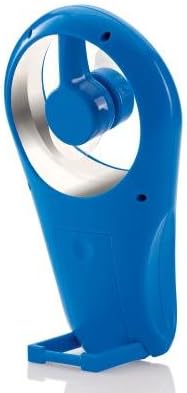
Зураг: хажуу тал view of the fan with its integrated stand extended for tabletop use.
Засвар үйлчилгээ
Цэвэрлэгээ
To maintain optimal performance and appearance, clean the fan periodically.
- Ensure the fan is turned off and batteries are removed before cleaning.
- Гадна талын гадаргууг зөөлөн арчиж, damp даавуу. Зүлгүүрийн цэвэрлэгч, уусгагчийг бүү ашигла.
- The flexible blades can be gently wiped if dust accumulates. Avoid bending them excessively.
- Сэнсийг ус болон бусад шингэнд дүрж болохгүй.
Зай солих
Replace batteries when the fan's performance diminishes or it stops working.
- Follow the battery installation steps outlined in the Setup section.
- Always replace all 4 AA batteries at the same time with new ones.
- Хуучин болон шинэ батерей, өөр төрлийн батерейг бүү холь.
- Ашигласан батерейг орон нутгийн дүрэм журмын дагуу хариуцлагатайгаар устгана уу.
Алдааг олж засварлах
| Асуудал | Боломжит шалтгаан | Шийдэл |
|---|---|---|
| Сэнс асахгүй байна. | Батерей дууссан эсвэл буруу суурилуулсан. | Батерейны туйлшралыг шалгана уу. Шинэхэн АА батерейгаар солино уу. |
| Low airflow or weak fan speed. | Batteries are low. Speed dial is set too low. | Replace batteries. Rotate the control dial clockwise to increase speed. |
| Сэнс ер бусын чимээ гаргадаг. | Obstruction near blades. Loose battery cover. | Ensure no foreign objects are near the blades. Check if battery cover is secure. |
Үзүүлэлтүүд
- Брэнд: Брукстоун
- Загварын нэр: Cool It
- Загварын дугаар: 883594041181
- Эрчим хүчний эх үүсвэр: Батерейгаар ажилладаг
- Батерей: 4 x AA (оруулаагүй)
- Хяналтын арга: Variable Dial Control
- Онцлог шинж чанарууд: Portable, Flexible Blades, Integrated Stand
- Оруулсан бүрэлдэхүүн хэсгүүд: оосор
- Бүтээгдэхүүний хэмжээ: 4 x 2 x 7 инч (L x W x H)
- Барааны жин: 8 унц (батерейгүй)
- Дотор/гадаа ашиглах: Гадаа
Баталгаат болон дэмжлэг
Warranty information for the Brookstone Cool It Personal Fan is not provided within this manual. For details regarding warranty coverage, product support, or service inquiries, please refer to the official Brookstone webсайт эсвэл харилцагчийн үйлчилгээтэй шууд холбогдоно уу.
You may find additional information and contact options on the Brookstone Store on Amazon.


