1. Танилцуулга
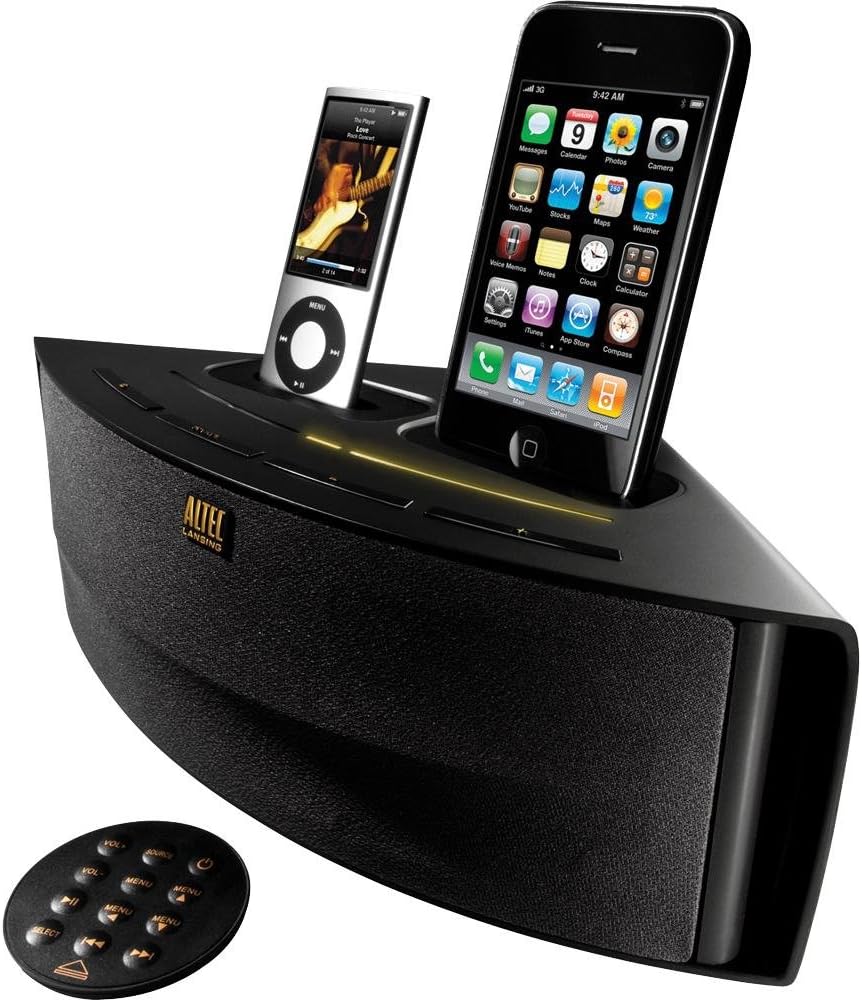
The Altec Lansing M202 Octiv Duo is a dual-docking speaker system designed to charge and play two Apple iPhone or iPod devices simultaneously. It features a compact, wedge-shaped design and includes a built-in USB port for charging a third device. This manual provides instructions for the setup, operation, and maintenance of your M202 system.
Гол онцлогууд:
- Dual docking and charging for two iPhone/iPod devices (30-pin connector).
- Integrated USB port for charging an additional device.
- Auxiliary input for connecting other audio sources.
- Авсаархан, орон зай хэмнэсэн загвар.
- Full-featured remote control.
- Audio Alignment technology for clear sound.
- Shielded design to prevent mobile phone interference.
2. Багцын агуулга
Бүх зүйл багцад байгаа эсэхийг шалгана уу:
- Altec Lansing Octiv Duo speaker system
- Цахилгаан адаптер
- Алсын удирдлага
3. Бүтээгдэхүүн дууссанview
Familiarize yourself with the components of your Altec Lansing M202 Octiv Duo.
Алсын удирдлага:
The included remote control allows for convenient operation of the M202 system from a distance. It features buttons for power, volume adjustment, source selection, and menu navigation for docked devices. The remote can be magnetically attached to the back of the speaker for storage.
4. Тохиргоо
4.1 Эрчим хүчний холболт
- Connect the power adapter cable to the DC IN port located on the back of the M202 unit.
- Plug the other end of the power adapter into a standard electrical wall outlet.
4.2 Docking Devices
- Gently place your iPhone or iPod onto one of the 30-pin connectors in the docking bays.
- Ensure the device is seated properly and securely in the connector. The device should begin charging automatically.
4.3 Charging a Third Device (USB)
- Connect a USB charging cable (not included) to the USB port located on the M202 unit.
- Connect the other end of the USB cable to your third device (e.g., smartphone, Bluetooth headset). The device will begin charging.
4.4 Auxiliary Input Connection
- Connect an audio cable (3.5mm, not included) from your external audio source (e.g., MP3 player, computer) to the AUX IN jack on the M202 unit.
- Select the auxiliary input as the source for audio playback (refer to Section 5.2).
5. Үйл ажиллагаа
5.1 Асаах/унтраах
дээр дарна уу Хүч button on the M202 unit or the remote control to turn the system on or off.
5.2 Аудио тоглуулах
- Ensure your iPhone or iPod is properly docked or your external device is connected via AUX IN.
- дээр дарна уу Эх сурвалж button on the M202 unit or the remote control to cycle through the available audio sources (Dock 1, Dock 2, AUX IN).
- Холбогдсон төхөөрөмж дээрээ тоглуулж эхлээрэй.
5.3 Дууны хяналт
ашиглан аудио гаралтын түвшинг тохируулна уу Боть+ болон Хэмжээ buttons on the remote control or the corresponding controls on the M202 unit.
5.4 Алсын удирдлагын функцууд
Алсын удирдлага нь дараахь функцуудыг гүйцэтгэдэг.
- Эрчим хүч: Төхөөрөмжийг асаах эсвэл унтраана.
- Эзлэхүүн (+/-): Increases or decreases the audio volume.
- Эх сурвалж: Switches between docked devices and auxiliary input.
- Цэсийн навигаци: Buttons for navigating menus and controlling playback (play/pause, skip track) on docked iPod/iPhone devices.
5.5 Music Mix App (Optional)
The optional Music Mix app, available for iPhone and iPod Touch (iOS 3.1 or later), allows users to shuffle music from both docked devices. It also displays battery levels and activates the stereo widening feature of the Octiv Duo. This app is not required for basic functionality but enhances the dual-docking experience.
6. Засвар үйлчилгээ
6.1 Цэвэрлэгээ
- Use a soft, dry cloth to clean the exterior surfaces of the M202 unit.
- Do not use liquid cleaners, abrasive cloths, or chemical solvents, as these may damage the finish.
6.2 Хадгалалт
When not in use, store the unit in a cool, dry place. The remote control can be magnetically attached to the back of the speaker to prevent loss.
7. Алдаа засах
If you encounter issues with your M202 system, refer to the following common problems and solutions:
7.1 Эрчим хүчгүй
- Ensure the power adapter is securely connected to both the DC IN port on the M202 and a working electrical wall outlet.
- Өөр төхөөрөмжийг залгах замаар цахилгаан залгуур ажиллаж байгаа эсэхийг шалгана уу.
7.2 Дуугүй
- Check that the M202 unit is powered on.
- Verify that the correct audio source (Dock 1, Dock 2, or AUX IN) is selected.
- Ensure the volume is not set to minimum or muted on both the M202 and the connected device.
- Confirm that the docked device is actively playing audio.
- For auxiliary input, check the connection cable for damage and ensure the external device's volume is adequate.
7.3 Төхөөрөмж цэнэглэхгүй байна
- Ensure the iPhone or iPod is properly seated in the 30-pin dock connector. Remove any bulky cases that might prevent a proper connection.
- For USB charging, verify the USB cable connection and ensure the M202 is powered on.
7.4 Алсын удирдлага хариу өгөхгүй байна
- Алсын удирдлага дахь зайг шалгаж, шаардлагатай бол солино уу.
- Ensure there are no obstructions between the remote control and the M202 unit.
7.5 High-Pitched Noise
- If a high-pitched noise is heard when the unit is plugged in but not playing audio, try unplugging the unit from the wall outlet when not in use. This characteristic may vary between individual units.
8. Техникийн үзүүлэлтүүд
| Бүтээгдэхүүний хэмжээс | 12.9 x 5.3 x 7.1 инч |
| Зүйлийн жин | 2.5 фунт |
| Эрчим хүчний гаралт | 7.5 ватт |
| Тоног төхөөрөмжийн интерфейс | USB, 30-pin dock connector |
| Тохиромжтой төхөөрөмжүүд | iPhone 4, iPhone 4S, iPod Touch, and other 30-pin iPod models |
| Нийт USB портууд | 1 |
| Number of Docking Ports | 2 |
9. Баталгаат хугацаа ба дэмжлэг
9.1 Баталгаат хугацааны мэдээлэл
The Altec Lansing M202 Octiv Duo is backed by a one-year limited warranty. Please refer to the warranty documentation included with your purchase for specific terms and conditions regarding coverage and claims.
9.2 Хэрэглэгчийн дэмжлэг
For technical assistance, troubleshooting beyond this manual, or further inquiries, please visit the official Altec Lansing website or contact their customer support department. Contact information can typically be found on the product packaging or the manufacturer's webсайт.


