Танилцуулга
The Casio SA-76 44-Key Mini Personal Keyboard is designed for beginners, offering an intuitive and engaging musical experience. Its compact size and user-friendly interface make it suitable for young musicians and those new to keyboard playing. This manual provides essential information for setting up, operating, and maintaining your SA-76 keyboard.
The keyboard features an easy-to-read LCD display that shows important data such as tone, rhythm, song number, metronome, tempo, and the note being played. With dedicated buttons for Piano and Organ sounds, switching between instrument voices is quick and simple. The 44 mini keys and 5 percussion pads are designed for comfortable play, especially for smaller hands, making it an excellent introduction to the world of keyboard music.
Гол онцлогууд
- 44 mini-sized keys for comfortable play.
- 5 percussion pads for rhythmic exploration.
- 100 built-in tones to explore various instrument sounds.
- 50 rhythm patterns to accompany your playing.
- Simple tone selection with dedicated PIANO and ORGAN buttons.
- Melody on/off lesson function for practice.
- Easy-to-read LCD display for clear information.
- Built-in speakers with 1.6 Watts output.
- Headphones jack (3.5mm) for private practice.
- Portable design, can be powered by batteries (6 AA, not included) or an optional AC adapter.
Тохиргоо
1. Төхөөрөмжийг тэжээх
The Casio SA-76 can be powered by either an optional AC adapter or batteries.
- AC адаптер (заавал биш): Connect a compatible 9V DC AC adapter (not included) to the DC 9V jack on the rear panel of the keyboard. Plug the adapter into a standard wall outlet.
- Батерей: The keyboard requires 6 AA-size batteries (not included).
2. Зай суурилуулах
- Ensure the keyboard is turned off.
- Locate the battery compartment cover on the bottom of the keyboard.
- Тагийг нь гулсуулж онгойлгоно уу.
- Insert 6 AA-size batteries, ensuring correct polarity (+/-) as indicated inside the compartment.
- Зайны тасалгааны тагийг найдвартай солино.
3. Attaching the Music Stand
The included music stand can be inserted into the slots on the top panel of the keyboard to hold sheet music or a tablet.
Ашиглалтын заавар
1. Асаах/унтраах
- To turn on the keyboard, press and hold the ХҮЧ button until the LCD display lights up.
- To turn off the keyboard, press and hold the ХҮЧ дэлгэц унтрах хүртэл дахин дарна уу.
2. Дууны хэмжээг тохируулах
-г ашиглана уу БОТЬ + болон ЭЗлэхүүн - buttons located next to the power button to increase or decrease the overall sound volume.
3. Ая сонгох
The SA-76 offers 100 different tones. You can select them using the dedicated buttons or the rotary dial.
- дээр дарна уу Төгөлдөр хуур or ORGAN button for quick access to these common sounds.
- To select other tones, rotate the Ая dial to browse through the available options displayed on the LCD.
4. Playing Rhythms
The keyboard includes 50 rhythm patterns.
- -г эргүүл ХЭМНЭЛ dial to select a desired rhythm pattern.
- дээр дарна уу START/STOP Хэмнэлийг тоглуулахыг эхлүүлэх эсвэл дуусгах товчийг дарна уу.
- ашиглан хурдыг тохируулна уу TEMPO + болон ТЕМПО - товчлуурууд.
5. Playing Built-in Songs
The SA-76 features 10 built-in songs for listening or practicing with the melody on/off function.
- -г эргүүл SONG BANK dial to select a song.
- дээр дарна уу ТОГЛОХ/ЗОГСООХ button to start or pause the song.
- -г ашиглана уу АЯ АСААХ/УНТРААХ button to mute or unmute the melody part of the song, allowing you to play along.
6. Sustain Function
-г идэвхжүүлнэ Тогтвортой байдал function to make notes linger longer after the key is released, similar to a piano's sustain pedal.
- дээр дарна уу Тогтвортой байдал button to toggle the effect on or off.
7. Percussion Pads
The 5 percussion pads allow you to add drum sounds to your performance. Simply press a pad to trigger a percussion sound.
8. Чихэвч ашиглах
For private practice, connect 3.5mm stereo headphones to the УТАС / ГАРАЛТ jack on the rear panel. This will mute the built-in speakers.
Бүтээгдэхүүн дууссанview
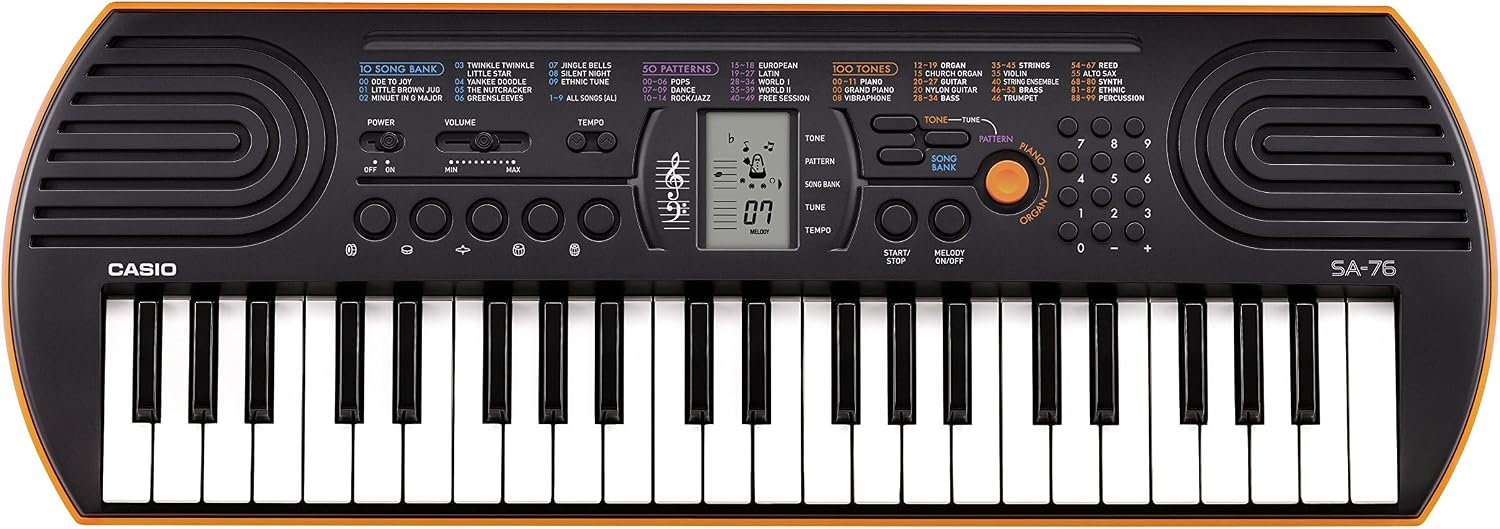
Figure 1: Casio SA-76 44-Key Mini Personal Keyboard. This image shows the overall design of the orange Casio SA-76 keyboard with its 44 mini keys and control panel.

Figure 2: Close-up of the control panel. This image provides a detailed view of the LCD display, tone/rhythm/song dials, volume buttons, and other function buttons on the Casio SA-76.

Figure 3: Diagram highlighting key features. This image illustrates various components of the Casio SA-76, including the 44 mini keys, drum pads, built-in speakers, and easy-to-use controls.

Figure 4: Casio SA-76 product dimensions. This image shows the physical measurements of the keyboard: 23.8 inches (W) x 8.3 inches (D) x 2.24 inches (H).
Засвар үйлчилгээ
- Цэвэрлэгээ: Wipe the keyboard with a soft, dry cloth. Avoid using abrasive cleaners, waxes, or solvents, as these can damage the finish.
- Хадгалах: Store the keyboard in a cool, dry place away from direct sunlight, extreme temperatures, and high humidity. If storing for an extended period, remove the batteries to prevent leakage.
- Харьцуулах: Гарыг унагаах эсвэл хүчтэй цохилтод өртөхөөс зайлсхий. Дээр нь хүнд зүйл тавьж болохгүй.
Алдааг олж засварлах
| Асуудал | Боломжит шалтгаан | Шийдэл |
|---|---|---|
| Хүч чадалгүй | Batteries are dead or incorrectly installed; AC adapter not connected or faulty. | Replace batteries or check polarity. Ensure AC adapter is securely connected and functional. |
| Дуу алга | Volume is too low; headphones are connected; speakers are muted. | Increase volume. Disconnect headphones. Check if any mute function is active. |
| Түлхүүрүүд хариу өгөхгүй байна | Keyboard may be in a specific mode (e.g., lesson mode with melody off) or requires a reset. | Check current mode settings. Turn the keyboard off and on again to reset. |
Үзүүлэлтүүд
| Онцлог | Дэлгэрэнгүй |
|---|---|
| Түлхүүрүүдийн тоо | 44 mini-sized keys |
| Ая | 100 |
| Хэмнэл | 50 |
| Дуунууд | 10 |
| Цохилтот дэвсгэр | 5 |
| Илтгэгчид | 2 x 1.2 W (Amp Output: 1.6 Watts) |
| Чихэвчний залгуур | 3.5 мм стерео мини үүр |
| Эрчим хүчний эх үүсвэр | 6 AA batteries or optional AC adapter (DC 9V) |
| Хэмжээ (W x D x H) | 23.8" x 8.3" x 2.24" (60.45 см x 21.08 см x 5.69 см) |
| Зүйлийн жин | 3.08 фунт (1.4 кг) |
Баталгаат болон дэмжлэг
Баталгаат хугацаа эсвэл техникийн дэмжлэг авахыг хүсвэл бүтээгдэхүүнтэйгээ хамт ирсэн баримт бичгийг үзэх эсвэл албан ёсны Casio дэлгүүрт зочилно уу webсайт. Худалдан авалтын баримтаа аливаа баталгаат нэхэмжлэлийг худалдан авсан баримт болгон хадгална уу.