Танилцуулга
This manual provides comprehensive instructions for the Verbatim 2.4G Wireless Mini Travel Optical Mouse, Model 97471. It covers setup, operation, maintenance, and troubleshooting to ensure optimal performance and longevity of your device. This ultra-compact wireless mouse is designed for portability and ease of use with notebooks and netbooks.

Image: The Verbatim 2.4G Wireless Mini Travel Optical Mouse in blue, shown with its compact Nano receiver.
Багцын агуулга
Бүх зүйл багцад байгаа эсэхийг шалгана уу:
- Verbatim 2.4G Wireless Mini Travel Optical Mouse
- Nano USB хүлээн авагч
- 1x AAA батерей
- Түргэн эхлүүлэх гарын авлага
Системийн шаардлага
The Verbatim 2.4G Wireless Mini Travel Optical Mouse is compatible with the following operating systems:
- Windows XP, Vista, Windows 7, and higher
- Mac OS X 10.1 ба түүнээс дээш
- Linux kernel 2.6 and higher
A free USB 1.1 or 2.0 port is required for the Nano USB Receiver.
Тохируулах заавар
1. Зайг суулгана уу
- Хулганы доод талд зайны тасалгааны тагийг олоорой.
- Тасалгааг нээхийн тулд тагийг нь зөөлөн гулсуулж эсвэл өргөж ав.
- Insert the included AAA battery, ensuring the positive (+) and negative (-) terminals align correctly with the markings inside the compartment.
- Батерейны тасалгааны тагийг байрандаа найдвартай тогших хүртэл нь буцааж тавь.

Image: The underside of the mouse with the battery compartment open, showing the AAA battery and the Nano receiver stored inside.
2. Connect the Nano USB Receiver
- Remove the Nano USB receiver from its storage slot within the mouse's battery compartment (if stored there).
- Nano USB хүлээн авагчийг компьютер дээрх боломжтой USB порт руу залгаарай.
- Таны компьютер шаардлагатай драйверуудыг автоматаар илрүүлж, суулгах ёстой. Энэ процесс хэдэн минут үргэлжилж магадгүй.
Ашиглалтын заавар
Асаах/унтраах
The mouse typically powers on automatically when the receiver is connected and the mouse is moved. To conserve battery life, ensure the mouse is turned off when not in use. A power switch is usually located on the underside of the mouse.
Үндсэн хэрэглээ
- Зүүн товчлуур: Primary click function, used for selecting items, opening links, etc.
- Баруун товчлуур: Хоёрдогч товшилтын функц нь ихэвчлэн контекст цэсийг нээдэг.
- Гүйлгэх дугуй: Баримт бичгүүдийг үзэхийн тулд дээш эсвэл доош гүйлгэж харна уу web pages. The scroll wheel may also function as a middle button when pressed.
Засвар үйлчилгээ
Зай солих
When the mouse performance degrades or stops responding, it is likely time to replace the AAA battery. Follow the battery installation steps outlined in the Setup section.
Цэвэрлэгээ
To clean your mouse, use a soft, dry, lint-free cloth. For stubborn dirt, slightly dampen the cloth with water. Avoid using harsh chemicals, solvents, or abrasive cleaners, as these can damage the mouse's surface or internal components.
Алдааг олж засварлах
| Асуудал | Шийдэл |
|---|---|
| Хулгана хариу өгөхгүй байна |
|
| Курсорын хөдөлгөөн тогтворгүй эсвэл үсэрч байна |
|
| Receiver not detected by computer |
|
Үзүүлэлтүүд
| Онцлог | Дэлгэрэнгүй |
|---|---|
| Загварын дугаар | 97471 |
| Бүтээгдэхүүний хэмжээс | 3 x 2 x 1.25 инч (L x W x H) |
| Зүйлийн жин | 2.4 унц |
| Холболтын технологи | 2.4GHz утасгүй |
| Хөдөлгөөнийг илрүүлэх технологи | Оптик |
| Зайны төрөл | 1x AAA (included) |
| Интерфэйс | USB 2.0 (USB 1.1-тэй нийцтэй) |

Зураг: дээрээс доош view of the Verbatim Mini Travel Mouse showing its approximate dimensions of 3 inches length and 2 inches width.
Баталгаат хугацааны мэдээлэл
This Verbatim product is covered by a 1 жилийн хязгаарлагдмал баталгаат хугацаа from the date of purchase. This warranty covers defects in materials and workmanship under normal use. For full terms and conditions, please refer to the official Verbatim warranty documentation or contact customer support.
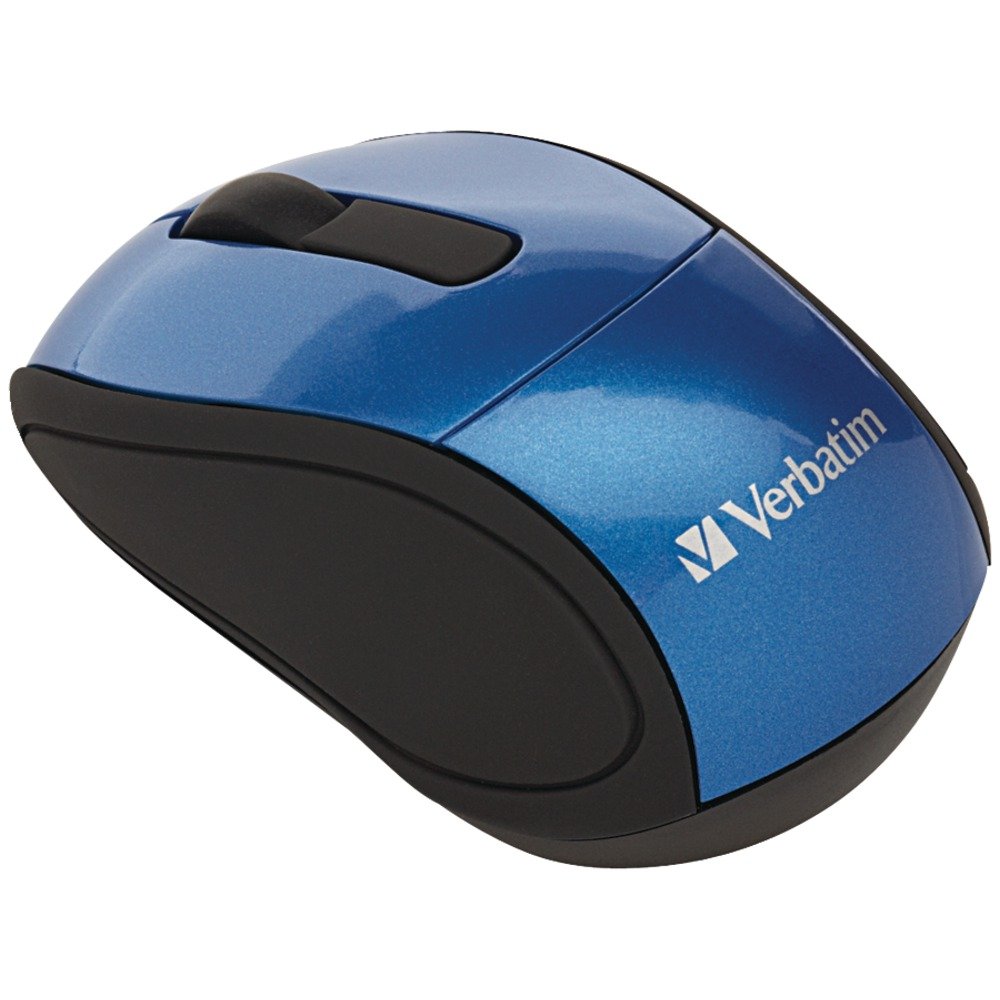
Image: A blue circular badge indicating a "1-Year Limited Warranty".
Дэмжлэг
For further assistance, technical support, or warranty claims, please visit the official Verbatim webсайтад бүртгүүлэх эсвэл тэдний харилцагчийн үйлчилгээний хэлтэстэй холбогдоно уу. Холбоо барих мэдээллийг ихэвчлэн Verbatim дээрээс олж болно webсайт эсвэл таны бүтээгдэхүүнд багтсан хурдан эхлүүлэх гарын авлагад.


