Танилцуулга
This manual provides comprehensive instructions for the setup, operation, and maintenance of your Sonic Alert SBJ525SS Digital Alarm Clock. Please read this manual thoroughly before using the device to ensure proper function and longevity. This alarm clock is designed to provide reliable timekeeping and alarm functions, including a powerful vibrating bed shaker, loud audible alarm, and visual alert features.
Аюулгүй байдлын мэдээлэл
- Ensure the power adapter is connected to a standard electrical outlet.
- Төхөөрөмжийг ус эсвэл хэт их чийгэнд бүү оруул.
- Төхөөрөмжийг дулааны эх үүсвэрийн ойролцоо эсвэл нарны шууд тусгалд байрлуулахаас зайлсхий.
- Хүүхдийн гар хүрэхгүй газар хадгална.
- Use only the provided power adapter and bed shaker.
Багцын агуулга
Таны багцад бүх зүйл байгаа эсэхийг шалгана уу:
- Sonic Alert SBJ525SS Digital Alarm Clock Unit
- 12-Volt Vibrating Bed Shaker
- Эрчим хүчний адаптер
- Зааварчилгааны гарын авлага
Бүтээгдэхүүн дууссанview
Сэрүүлэгтэй цагныхаа янз бүрийн эд анги, удирдлагатай танилцаарай.
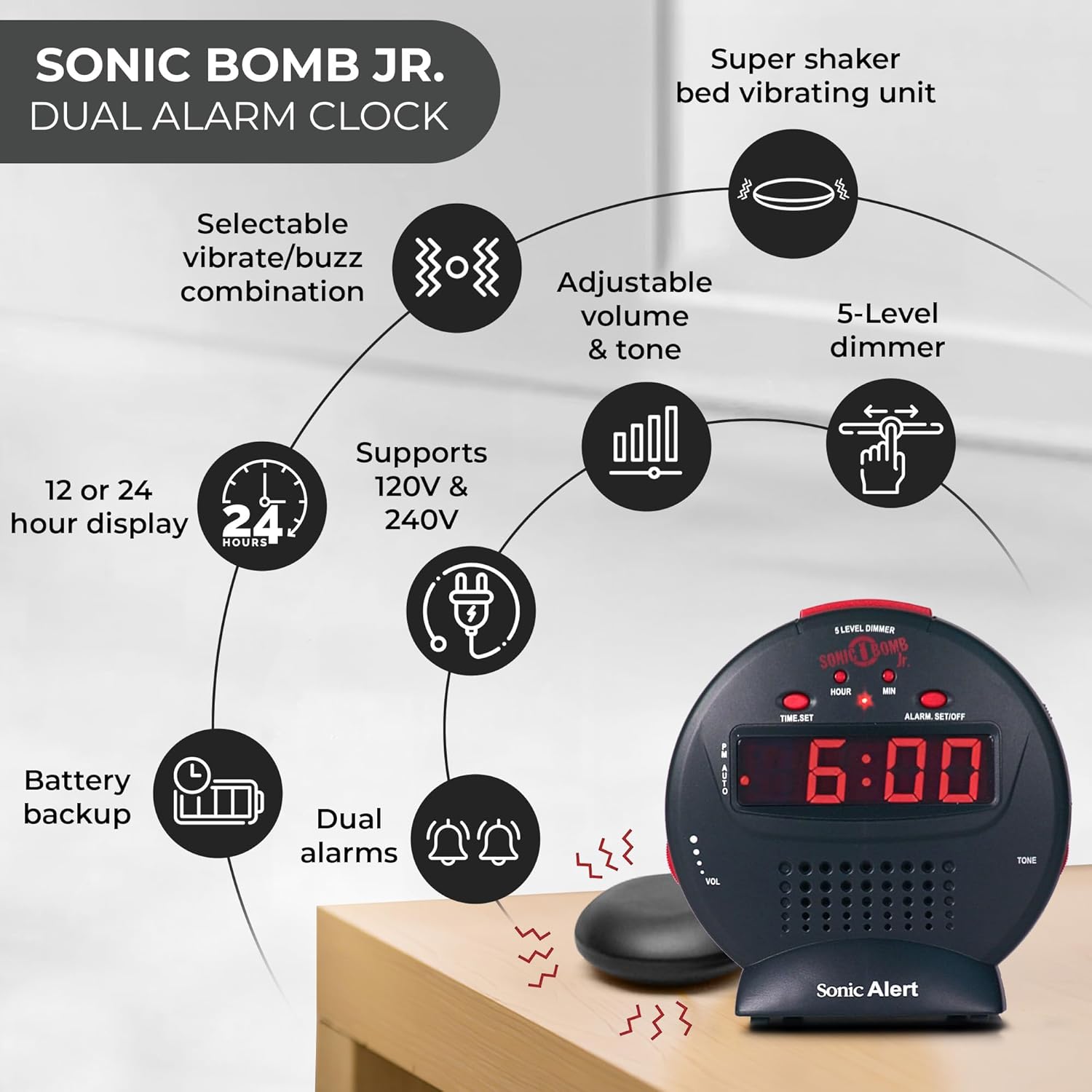
Зургийн тайлбар: A diagram illustrating the Sonic Alert SBJ525SS Digital Alarm Clock. Key features highlighted include the 12 or 24-hour display, battery backup, dual alarms, selectable vibrate/buzz combination, adjustable volume and tone, 5-level dimmer, and the super shaker bed vibrating unit. The clock supports 120V & 240V power.
The clock features a large digital display, control buttons for time and alarm settings, and adjustment knobs for volume and tone. A dedicated port is available for the bed shaker connection.
Тохиргоо
1. Эрчим хүчний холболт
- Connect the power adapter to the DC IN jack on the back of the alarm clock.
- Plug the power adapter into a standard electrical wall outlet. The display will illuminate.
2. Зайны нөөц суурилуулах
The alarm clock requires 2 AA batteries (not included) for battery backup functionality. This ensures your time and alarm settings are retained during a power outage.
- Төхөөрөмжийн доод хэсэгт зайны тасалгааг ол.
- Зайны тасалгааны тагийг нээ.
- Зөв туйлшралыг (+/-) ажиглаж, 2 АА батерейг оруулна уу.
- Зайны тасалгааны тагийг солих.

Зургийн тайлбар: A graphic illustrating the battery backup feature of the alarm clock. It shows the clock on a nightstand with a small circular battery icon (CR2032, 3V) next to it, indicating the type of battery used for backup. The text emphasizes that batteries are not included and are for retaining settings during power outages.
3. Цаг тохируулах
- -г удаан дар ЦАГ ТОНОГЛОХ товч. Цагийн цифрүүд анивчиж эхэлнэ.
- дээр дарна уу ЦАГ button repeatedly to adjust the hour. Observe the PM indicator for correct AM/PM setting.
- дээр дарна уу MIN минутыг тохируулахын тулд дахин дахин дарна уу.
- дарна уу ЦАГ ТОНОГЛОХ цагийг баталгаажуулахын тулд дахин.
- 12 цагийн болон 24 цагийн форматын хооронд шилжихийн тулд товчийг дарна уу 12/24 цаг button (if available, otherwise it might be part of time set cycle).
4. Bed Shaker Connection
The vibrating bed shaker is an integral part of the Sonic Alert system, designed for heavy sleepers or individuals with hearing impairments.
- Locate the jack labeled Босоо on the back of the alarm clock.
- Insert the plug of the bed shaker into this jack.
- Place the bed shaker under your pillow, between your mattress and box spring, or under a fitted sheet for optimal vibration.

Зургийн тайлбар: A composite image showing three different methods for placing the super bed shaker: under a pillow, under a fitted sheet, and under a mattress. The image also highlights the 6ft long cable of the shaker.
Ашиглалтын заавар
1. Setting Alarms (Dual Alarms)
The SBJ525SS features dual alarms, allowing you to set two independent wake-up times.
- -г удаан дар СЭРГҮҮЛГИЙГ ТОХИРУУЛАХ/УНТРААХ button once for Alarm 1. The hour digits for Alarm 1 will flash.
- -г ашиглана уу ЦАГ болон MIN хүссэн сэрүүлгийн цагийг тохируулах товчлуурууд.
- дарна уу СЭРГҮҮЛГИЙГ ТОХИРУУЛАХ/УНТРААХ again to confirm Alarm 1 and proceed to Alarm 2. The hour digits for Alarm 2 will flash.
- -г ашиглана уу ЦАГ болон MIN buttons to set the desired time for Alarm 2.
- дарна уу СЭРГҮҮЛГИЙГ ТОХИРУУЛАХ/УНТРААХ a third time to confirm Alarm 2 and exit alarm setting mode.
- Сэрүүлгийг идэвхжүүлэх эсвэл идэвхгүй болгохын тулд товчийг дарна уу СЭРГҮҮЛГИЙГ ТОХИРУУЛАХ/УНТРААХ button briefly (not held). Each press cycles through Alarm 1 ON, Alarm 2 ON, Both Alarms ON, Both Alarms OFF. An indicator light on the display will show which alarm(s) are active.

Зургийн тайлбар: A bedroom scene with a couple sleeping, and the Sonic Alert alarm clock prominently displayed on a nightstand. The text overlay emphasizes the "Dual Alarm Clock" feature, allowing two different alarms to be set for reliable wake-up times.
2. Alarm Modes (Vibrate, Sound, Both)
The alarm clock offers various alert modes:
- Vibrate Only: The bed shaker will activate without an audible alarm.
- Зөвхөн дуу чимээ: The audible alarm will sound without bed shaker activation.
- Хоёулаа: Both the bed shaker and audible alarm will activate simultaneously.
To select the alarm mode, use the Сэрүүлэг горим switch located on the side or back of the unit. Cycle through the options until your desired mode is selected.

Зургийн тайлбар: A woman sleeping in bed with the Sonic Alert alarm clock and its bed shaker visible on the adjacent nightstand. The image highlights the clock's features: a powerful 6-volt bed shaker, 102dB loud alarm with adjustable tone and volume, alarm and bed shaker test mode, and built-in red flashing lights.
3. Түр хойшлуулах функц
Сэрүүлэг дуугарах үед том товчлуурыг дар УНТАХ button on top of the unit to temporarily silence the alarm. The alarm will sound again after the set snooze duration.
- The snooze duration is adjustable from 1 to 30 minutes. Refer to the full instruction manual for specific steps on adjusting the snooze time.
Зургийн тайлбар: A man sleeping in bed with the Sonic Alert alarm clock on his bedside table. An overlay graphic shows a slider indicating the adjustable snooze duration from 1 to 30 minutes.
4. Brightness Dimmer
Adjust the display brightness to your preference using the 5-level dimmer function.
- -ийг олох ДИММЕР control (often a slider or button) on the unit.
- Adjust the control to cycle through the 5 brightness levels, from brightest (5) to dimmest (1).

Зургийн тайлбар: A woman sleeping in a bedroom with the Sonic Alert alarm clock on her nightstand. Below, a series of five clock images illustrate the different brightness levels of the display, from level 5 (brightest) to level 1 (dimmest), demonstrating the five-level dimmer feature.
5. Volume and Tone Adjustment
Customize the audible alarm sound to your preference.
- -г ашиглана уу БОТЬ (Volume) knob/slider to increase or decrease the alarm's loudness.
- -г ашиглана уу Ая knob/slider to adjust the pitch of the alarm sound.

Зургийн тайлбар: Ойрын зураг view of the Sonic Alert alarm clock, specifically highlighting the volume control slider on its side. The accompanying text explains how to adjust the sound with ease using the knobs for volume and tone.

Зургийн тайлбар: The Sonic Alert alarm clock on a white surface, with a graphic overlay demonstrating the adjustable tone feature. Sound waves emanate from the clock, and a slider indicates the range of tone adjustments available.
6. USB Charging Port Usage
The alarm clock includes a built-in USB port for charging compatible handheld devices.
- Locate the USB charging port on the side or back of the unit.
- Connect your device's USB charging cable to the port.
- Ensure your device begins charging. Note that charging speed may vary depending on the device and cable.

Зургийн тайлбар: A woman reaching for her smartphone, which is connected and charging via the built-in USB port on the Sonic Alert alarm clock, placed on a nightstand next to her bed.
Засвар үйлчилгээ
- Цэвэрлэгээ: Төхөөрөмжийг зөөлөн, хуурай даавуугаар арчина. Шингэн цэвэрлэгч болон зүлгүүрийн материалыг бүү ашигла.
- Зай солих: Replace backup batteries annually or when the battery low indicator appears to ensure continuous backup functionality.
- Хадгалах: Хэрэв төхөөрөмжийг удаан хугацаагаар хадгалах бол гоожихоос сэргийлж нөөц батерейг нь салгаж авна уу.
Алдааг олж засварлах
| Асуудал | Боломжит шалтгаан | Шийдэл |
|---|---|---|
| Цагийн дэлгэц унтарсан эсвэл анивчих. | Цахилгаан адаптер холбогдоогүй эсвэл эвдэрсэн; цахилгаан унтраалттайtage. | Ensure power adapter is securely plugged in. Check wall outlet. If power outage, battery backup should maintain time (display will be off). |
| Сэрүүлэг дуугарахгүй/чичирдэггүй. | Alarm not activated; incorrect alarm mode selected; volume too low; bed shaker not connected. | Verify alarm is ON (indicator light). Check alarm mode switch. Increase volume. Ensure bed shaker is securely plugged in. |
| Time/Alarm settings are lost after power outage. | Нөөц батерейнууд нь дууссан эсвэл суулгаагүй байна. | Install fresh AA batteries in the battery compartment. |
| USB цэнэглэлт удаан эсвэл ажиллахгүй байна. | Device incompatibility; faulty USB cable; device requires higher power output. | Try a different USB cable. Ensure your device is compatible with standard USB charging. The clock's USB port provides standard charging output. |
Үзүүлэлтүүд
| Брэнд | Дууны дохио |
| Загварын дугаар | SBJ525SS |
| Дэлгэцийн төрөл | Дижитал |
| Онцлог шинж чанарууд | Alarm, Auto Dimmable, Snooze, Vibrating Bed Shaker, USB Charging Port, Red Flashing Alert Lights |
| Эрчим хүчний эх үүсвэр | Corded Electric with Battery Backup (2 AA batteries required, not included) |
| Бүтээгдэхүүний хэмжээс | 5"W x 5"H |
| Материал | Хуванцар |
| Сэрүүлгийн чанга | Up to 102dB (with bed shaker) |
Баталгаат болон дэмжлэг
The Sonic Alert SBJ525SS Digital Alarm Clock comes with a Limited Warranty. For specific warranty terms and conditions, please refer to the warranty card included with your product or visit the official Sonic Alert webсайт.
For technical support, troubleshooting assistance, or to inquire about replacement parts, please contact Sonic Alert customer service:
- Webсайт: www.sonicalert.com
- Холбоо барих мэдээлэл: Албан тушаалтанд хандана уу webхамгийн сүүлийн үеийн холбоо барих мэдээллийг сайт эсвэл бүтээгдэхүүний сав баглаа боодол.
Зургийн тайлбар: An open instruction manual for the Sonic Bomb Jr. alarm clock, showing detailed operational instructions and diagrams. This image signifies that a manual is included with the product for user guidance.


