Бүтээгдэхүүн дууссанview
The Philips PD9016/37 Portable Dual 9-inch DVD Player is designed to provide entertainment on the go, allowing passengers to enjoy movies, music, and photos. This system features two 9-inch LCD screens, offering versatile viewing options for individual or shared entertainment.
Гол онцлогууд:
- Vibrant LCD Display: Enjoy treasured photos, favorite movies, and music with rich detail and vibrant colors on the color LCD screens.
- Broad Disc Compatibility: Compatible with most DVD and CD discs, including DVD, DVD+/-R, DVD+/-RW, (S)VCD, and CD formats.
- Simplified Connection: A single cable connects the two portable DVD players, ensuring quick and easy installation without cable clutter.
- Dual 9-inch Screens: Features two 9-inch DVD players for enhanced viewая тухтай байдал.
- Independent or Shared Viewing: The in-car dual player design allows for watching movies individually on each portable DVD player or sharing the same content across both screens.
Багцын агуулга
Your Philips PD9016/37 Portable Dual 9-inch DVD Player package includes:
- Two (2) Philips PD9016/37 9-inch Portable DVD Players
- Mounting kits for in-car installation
- Power adapter for home use
- Car adapter for in-car use
- Interconnection cable for dual screen synchronization
- Алсын удирдлага
- Хэрэглэгчийн гарын авлага (энэ баримт бичиг)
Тохиргоо ба суурилуулалт
Follow these steps to set up your Philips PD9016/37 Portable Dual 9-inch DVD Player in your vehicle:
- Mounting the Players:
- Attach the provided mounting kits to the back of each DVD player.
- Securely fasten the mounting kits to the headrest posts of your vehicle's front seats. Ensure the players are stable and do not obstruct the driver's view.
- Эрчим хүчний холболт:
- For in-car use, connect the car adapter to the DC IN 12V port on the main DVD player and plug the other end into your vehicle's cigarette lighter socket.
- For home use, connect the power adapter to the DC IN 12V port and a standard wall outlet.
- Connecting Dual Screens:
- To synchronize both screens to display the same content, connect the supplied interconnection cable between the AV OUT port of the main player and the AV IN port of the secondary player.
- Төхөөрөмжийг асаахаас өмнө бүх холболт найдвартай эсэхийг шалгаарай.
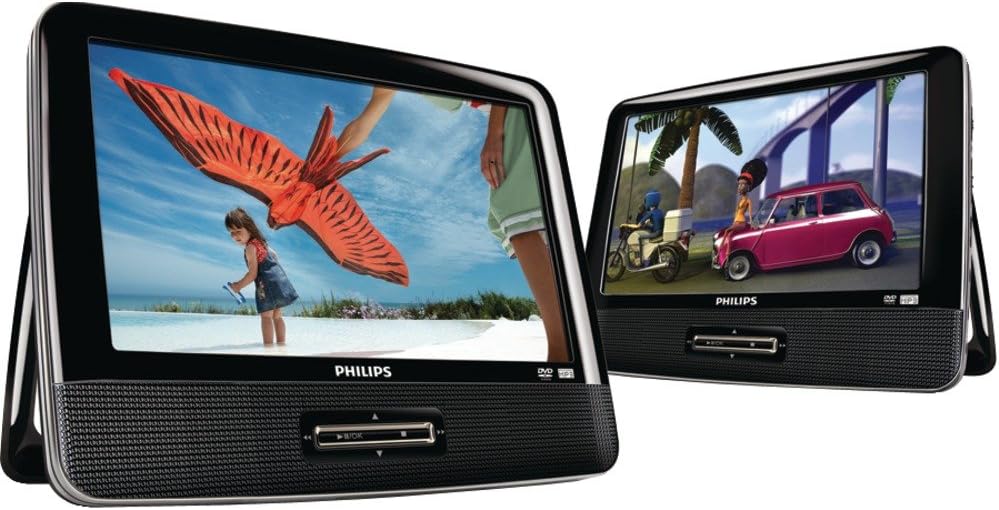
Image: Two Philips PD9016/37 portable DVD players, showcasing their dual screen capability. One screen displays a child flying a kite, while the other shows animated characters in a car.

Зураг: Ойрхон view of two Philips PD9016/37 portable DVD players, positioned side-by-side. The left screen shows a child with a kite, and the right screen displays animated characters in a vehicle, highlighting the vibrant LCD display.
Ашиглалтын заавар
- Асаах/унтраах: Locate the power switch on the device and slide it to the 'ON' position to power on. Slide to 'OFF' to power off.
- Диск оруулах: Gently open the disc compartment cover. Place your DVD or CD disc onto the spindle with the label side facing up. Close the cover securely.
- Тоглуулах удирдлага: Use the control buttons on the front panel of the main player or the remote control to manage playback:
- Тоглуулах/түр зогсоох: Тоглуулахыг эхлүүлэх эсвэл түр зогсоохын тулд дарна уу.
- Зогс: Тоглуулахыг зогсоохын тулд дарна уу.
- Skip/Search: Use the arrow buttons to skip tracks/chapters or fast forward/rewind.
- Эзлэхүүн: Adjust the volume using the dedicated volume buttons. Each player may have independent volume control.
- Эх сурвалжийн сонголт: If multiple input sources are connected (e.g., DVD, USB, SD card), use the 'Source' button to switch between them.
- Media Card and USB Playback: Insert a compatible SD/MMC card into the SD/MMC CARD slot or a USB flash drive into the USB port to play supported media files. Select the appropriate source.
- Чихэвчний хэрэглээ: For private listening, plug standard 3.5mm headphones into the headphone jack on each player.
Засвар үйлчилгээ, арчилгаа
To ensure the longevity and optimal performance of your Philips PD9016/37 DVD Player, follow these maintenance guidelines:
- Цэвэрлэгээ: Use a soft, dry cloth to clean the screens and exterior of the players. Avoid abrasive cleaners or solvents. For disc cleaning, use a specialized disc cleaning cloth, wiping from the center outwards.
- Дисктэй харьцах: Always handle discs by their edges to prevent fingerprints and scratches. Store discs in their cases when not in use.
- Хадгалах: When not in use, especially during long periods or extreme temperatures, remove the players from the vehicle and store them in a cool, dry place.
- Кабелийн менежмент: Ensure all cables are neatly organized and not pinched or tangled to prevent damage.
Алдааг олж засварлах
If you encounter issues with your Philips PD9016/37 DVD Player, refer to the following common troubleshooting tips:
- Эрчим хүчгүй:
- Check if the power adapter or car adapter is securely connected to both the player and the power source.
- Ensure the vehicle's power outlet (cigarette lighter) is functioning.
- Verify the power switch on the player is in the 'ON' position.
- Зураг/дуу чимээ байхгүй:
- Ensure the disc is clean and correctly inserted.
- Check the volume level on both players and any connected headphones.
- If using dual screens, verify the interconnection cable is properly connected between the main and secondary players.
- Confirm the correct input source is selected (DVD, USB, SD/MMC).
- Диск уншихгүй байна:
- Дискийг сайтар цэвэрлээрэй.
- Ensure the disc type is compatible with the player (DVD, CD, etc.).
- Диск эвдэрсэн эсэхийг шалгахын тулд өөр диск туршиж үзээрэй.
Үзүүлэлтүүд
| Онцлог | Дэлгэрэнгүй |
|---|---|
| Брэнд | Philips |
| Загварын дугаар | PD9016/37 |
| Зүйлийн жин | 3.47 фунт |
| Бүтээгдэхүүний хэмжээс | 2.76 x 16.54 x 9 инч |
| Өнгө | Хар |
| Дэлгэцийн хэмжээ | 9 инч (тус бүр) |
| Дэлгэцийн төрөл | LCD |
| Хэвлэл мэдээллийн төрөл | CD, DVD, VCD |
| Онцлог шинж чанарууд | Portable, Dual Player Design |
Баталгаат болон дэмжлэг
Please note that this product is currently listed as discontinued by the manufacturer. As such, no warranty will be provided since the original manufacturer's warranty period has concluded. For any operational questions or technical assistance, please refer to the troubleshooting section of this manual or consult online resources for general portable DVD player support.


