Танилцуулга
The Lark 10001 Silent Alarm Clock is designed to provide a gentle and personal wake-up experience. This device utilizes dynamic vibration to awaken the user without disturbing others. It also incorporates a sleep monitoring system to track sleep patterns and provide insights into sleep quality.
Waking to vibration may contribute to reduced heart rate variability, stress levels, and blood pressure spikes, promoting a more natural transition from sleep. The integrated sleep monitor uses actigraphy to track movements during the night, providing data on sleep duration and quality, which can be reviewed upon alarm deactivation.
The accompanying mobile application allows users to log mood, sleep triggers, and notes, and to compare sleep patterns against personal averages and expert benchmarks. All collected data is accessible online or through the mobile app.
A 7-day assessment is included with the purchase, offering insights into sleep patterns, body clock categorization, advanced data visualizations, expert explanations, actionable tips for improvement, and personalized recommendations.
Юу багтсан бэ
The Lark 10001 package typically includes the following components:
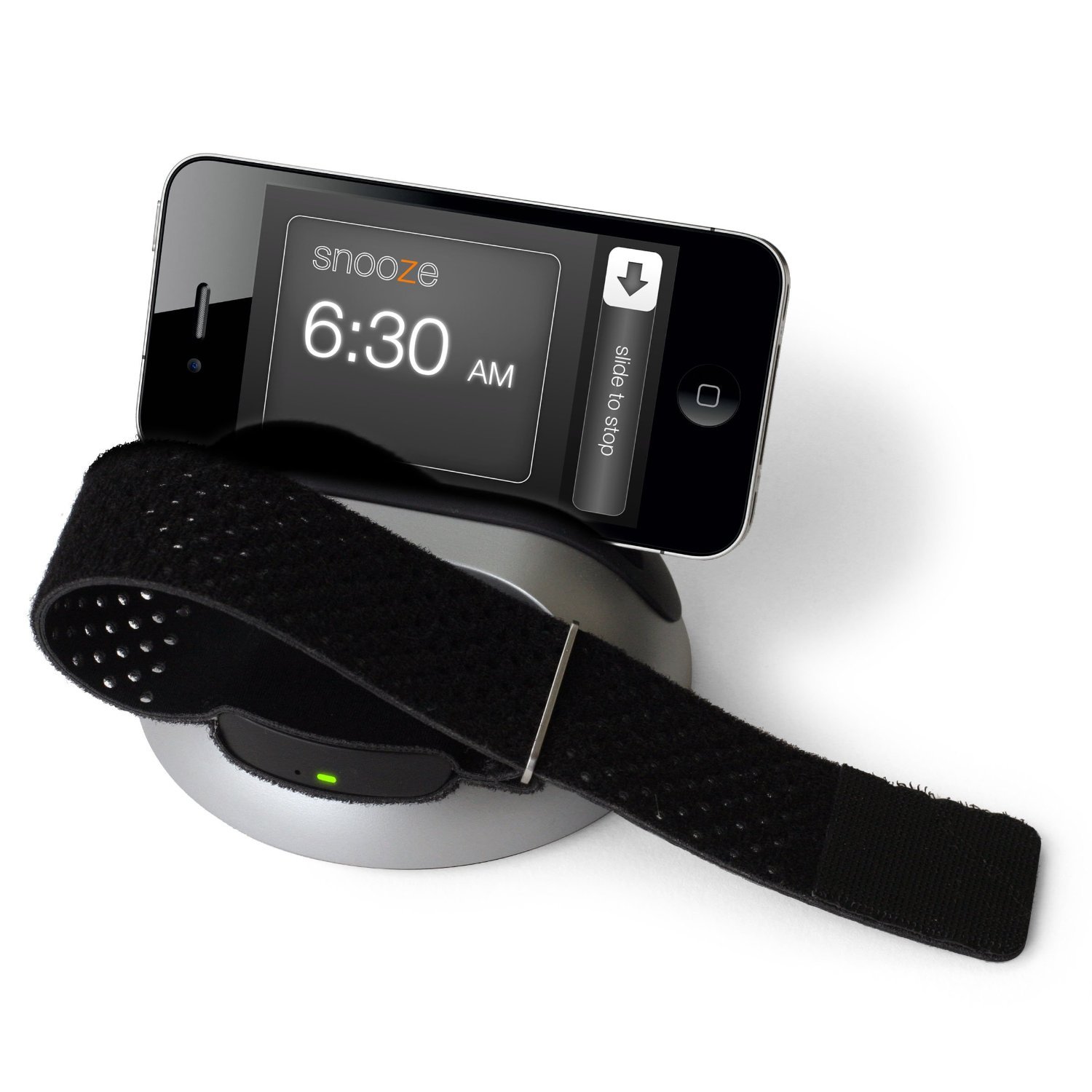
Image showing the Lark 10001 components: a soft wristband, a sleep sensor, the Lark Up app icon, a wristband and iPhone charging dock, and a power cord.
- Soft Wristband: An adjustable band designed for comfortable wear during sleep.
- Sleep Sensor: The core device that tracks sleep movements and provides the silent alarm function.
- Lark Up App: A mobile application (represented by its icon) for managing settings, viewing sleep data, and accessing coaching features.
- Wristband and iPhone Charging Dock: A dock for charging the sleep sensor and potentially an iPhone.
- Цахилгааны утас: For connecting the charging dock to a power source.
Тохиргоо
- Төхөөрөмжийг цэнэглэх: Connect the charging dock to a power source using the provided power cord. Place the sleep sensor into the charging dock. Ensure the device is fully charged before first use.
- Download the Lark Up App: хайх the "Lark Up" application in the Apple App Store on your iOS device. Download and install the app.
- Bluetooth-ээр хослуулах: Open the Lark Up app and follow the on-screen instructions to pair your sleep sensor with your iOS device via Bluetooth. Ensure Bluetooth is enabled on your phone.
- Wear the Wristband: Insert the sleep sensor into the soft wristband. Adjust the wristband for a comfortable fit on your wrist, ensuring it is secure but not too tight.
- Set Your Alarm: Use the Lark Up app to set your desired wake-up time. You can configure vibration intensity and enable the audio backup alarm if desired.
Ашиглалтын заавар
Setting and Disabling the Alarm
- Сэрүүлэг тохируулах: All alarm settings are managed through the Lark Up mobile application. Open the app, navigate to the alarm section, and set your desired wake-up time.
- Silent Wake-Up: At the set time, the wristband will begin to vibrate gently.
- Түр хойшлуулах: To snooze the alarm, tap the sleep sensor. The vibration will pause and resume after a set interval (configurable in the app).
- Disable Alarm: To fully disable the alarm, remove the wristband or interact with the app.
- Аудио нөөцлөлт: If enabled in the app, an audio alarm will sound from your paired iOS device if the wristband battery is depleted or if the wristband is removed during sleep.
Унтлагын хяналт
- Автомат хяналт: The sleep sensor automatically tracks your sleep patterns while worn.
- View Sleep Data: Upon waking and disabling the alarm, open the Lark Up app to view a summary of your sleep data, including duration and quality.
- Sleep Journal: Use the in-app sleep journal to record your mood, identify potential sleep triggers, and add notes about your sleep experience.
- Өгөгдлийн шинжилгээ: The app provides visualizations and comparisons of your sleep patterns against your personal average and expert benchmarks.
Онцлогууд
- Silent Vibration Alarm: Wakes you gently with wristband vibration, ensuring others are not disturbed.
- Audio Backup Alarm: An optional audio alarm from your paired phone activates if the wristband battery is low or if the wristband is removed.
- Тохируулж болох бугуйвч: Soft, breathable, and adjustable for optimal comfort during sleep.
- Actigraphy-Based Sleep Monitor: Accurately tracks sleep movements to assess sleep duration and quality.
- Sleep Pattern Visualization: Шууд view your sleep patterns and data summaries upon waking via the mobile app.
- Sleep Journal: Simple in-app tool to track mood, sleep triggers, and notes.
- Data Comparison: Compare your sleep data against personal averages and expert benchmarks.
- iOS Connectivity: Wireless Bluetooth connectivity for iOS devices running version 5.0 and higher.
- 7-Day Sleep Assessment: Includes one free advanced 7-day assessment with detailed data visualizations, expert analysis, and personalized tips for improving sleep.
Засвар үйлчилгээ
- Цэвэрлэгээ: Regularly clean the wristband and sleep sensor with a soft, damp cloth. Avoid using harsh chemicals or abrasive materials. Ensure the sensor is dry before placing it back in the charging dock or wearing it.
- Цэнэглэж байна: Charge the sleep sensor regularly to ensure continuous operation. The app will indicate battery status.
- Програм хангамжийн шинэчлэлтүүд: Keep the Lark Up mobile application updated to the latest version to ensure optimal performance and access to new features. Check your device's app store for updates.
- Хадгалах: When not in use, store the device and its components in a cool, dry place away from direct sunlight.
Алдааг олж засварлах
- Device Not Vibrating:
- Төхөөрөмж цэнэглэгдсэн эсэхийг шалгаарай.
- Verify the alarm is set correctly in the Lark Up app.
- Check Bluetooth connection between the sensor and your iOS device.
- Bluetooth холболтын асуудал:
- Таны iOS төхөөрөмж дээр Bluetooth идэвхжсэн эсэхийг шалгаарай.
- Restart both the Lark Up app and your iOS device.
- Try re-pairing the device through the app's settings.
- Sleep Data Not Syncing:
- Confirm the device is connected via Bluetooth.
- Ensure you have an active internet connection for data upload.
- Check for any pending app updates.
- Inaccurate Sleep Tracking:
- Ensure the wristband is worn securely and comfortably.
- Verify the sleep sensor is correctly inserted into the wristband.
Үзүүлэлтүүд
| Атрибут | Дэлгэрэнгүй |
|---|---|
| Брэнд | болжмор |
| Загварын дугаар | 8083374 |
| Тохиромжтой төхөөрөмжүүд | iOS_compatible |
| Онцлог шинж чанарууд | Silent alarm clock |
| Дэлгэцийн төрөл | Дижитал |
| Эрчим хүчний эх үүсвэр | Батерейгаар тэжээгддэг |
| Утасгүй холболт | Bluetooth |
| Материал | Хуванцар |
| Суурилуулах төрөл | Ширээний тавцан |
| Хэмжээ | 4.83 x 11.18 x 17.78 см; 360 гр |
Дэмжлэг
For further assistance, technical support, or inquiries regarding your Lark 10001 Silent Alarm Clock, please refer to the official Lark website or contact their customer service department. Ensure you have your model number (8083374) available when seeking support.
For the most up-to-date information, FAQs, and troubleshooting guides, visit the official Lark support portal.